1. Introduction
This manual provides detailed instructions for the safe operation, installation, and maintenance of your Westinghouse WPAC8000s Portable Air Conditioner. This unit offers three primary functions: cooling, fan-only operation, and dehumidification. Please read this manual thoroughly before using the appliance and retain it for future reference.
2. Safety Information
Always follow basic safety precautions when using electrical appliances to reduce the risk of fire, electric shock, or injury. This unit uses R-32 refrigerant, which is flammable. Ensure proper ventilation and avoid ignition sources during installation and maintenance.
- Do not operate the unit with a damaged power cord or plug.
- Ensure the unit is placed on a flat, stable surface to prevent tipping.
- Keep the air intake and exhaust vents clear of obstructions.
- Do not insert objects into the air vents.
- Unplug the unit before cleaning or performing any maintenance.
- Do not use the unit in wet or damp environments.
3. Product Overview
3.1 Control Panel
The control panel on top of the unit allows for direct operation and setting adjustments. It features indicators for fan speed, temperature display, and active mode.

Figure 1: Control Panel Layout
3.2 Remote Control
A remote control is included for convenient operation from a distance. It allows adjustment of temperature, fan speed, mode, and other functions.

Figure 2: Remote Control
3.3 Included Accessories
The unit comes with all necessary accessories for installation and operation.
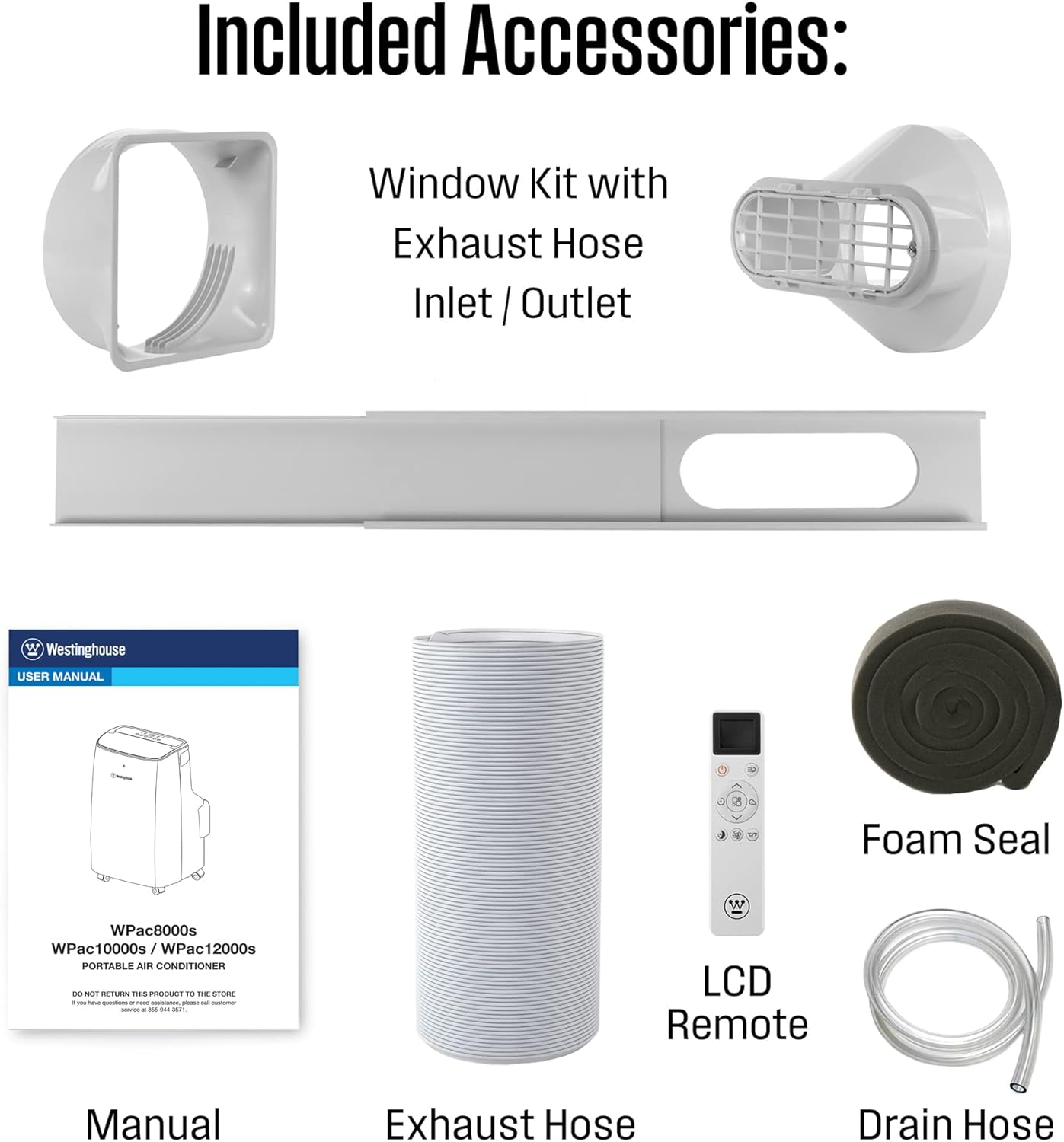
Figure 3: Included Accessories
4. Setup
Follow these steps to set up your portable air conditioner.
4.1 Window Kit Installation
The window kit is designed for easy installation in most standard vertical or horizontal sliding windows.
- Attach the exhaust hose to the unit's exhaust port.
- Connect the other end of the exhaust hose to the window panel adapter.
- Adjust the window panel to fit your window opening and secure it.
- Ensure all gaps are sealed using the provided foam seal to prevent air leakage.
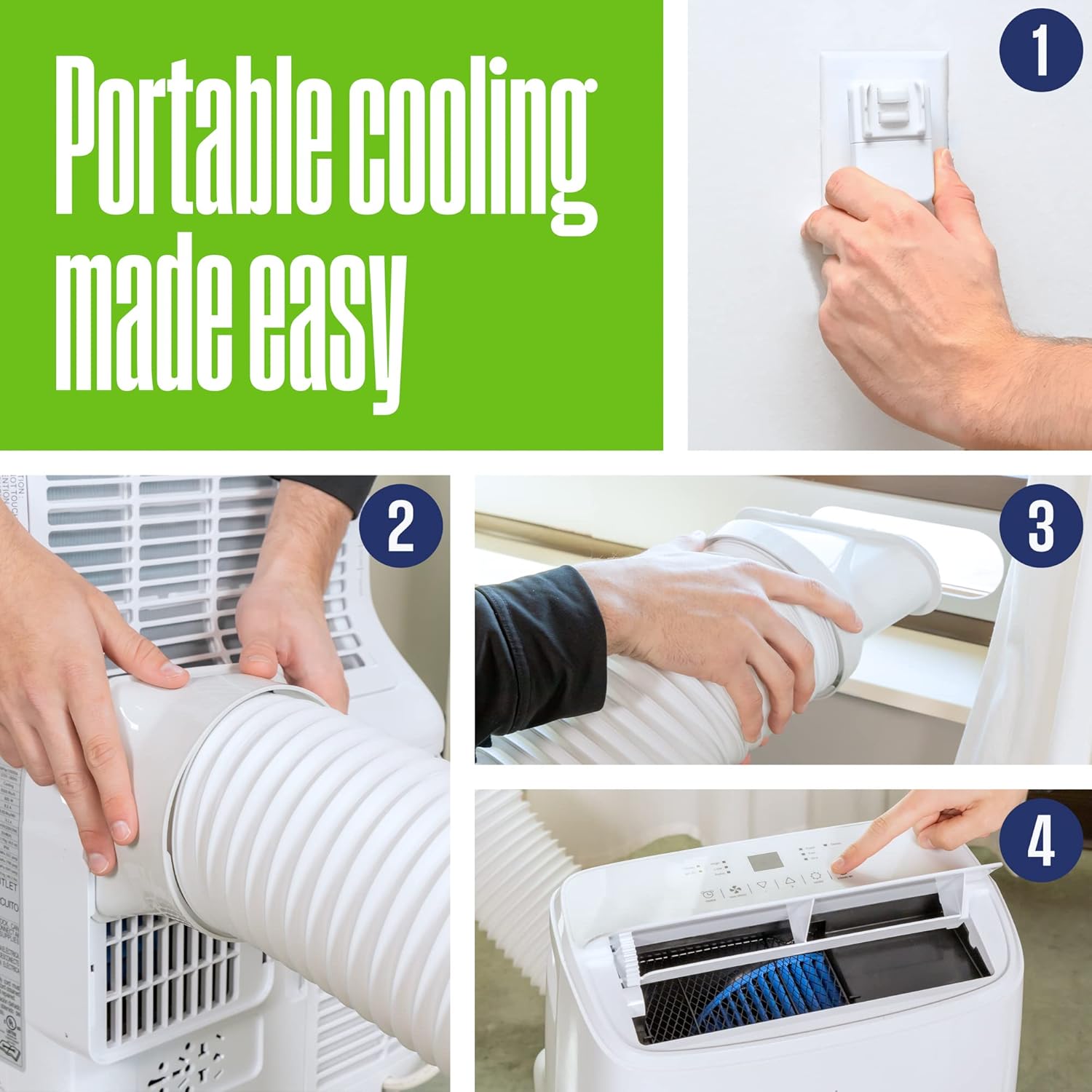
Figure 4: Installation Steps
4.2 Drainage Options
The unit collects condensation during operation. You have two drainage options:
- Manual Drainage: When the internal water tank is full, the unit will stop operating and display an "FL" error code. Carefully move the unit to a suitable drainage location, remove the bottom drain plug, and allow the water to empty.
- Continuous Drainage: For continuous operation without manual emptying, attach the provided drain hose to the continuous drain port (located higher on the back of the unit) and direct it to a floor drain or a bucket. Ensure the hose is sloped downwards for gravity drainage.

Figure 5: Rear View with Drain Port
Video 1: Demonstrates how to set up the continuous drainage for the Westinghouse portable air conditioner, showing the hose connected to the unit and draining into a bucket.
5. Operating Instructions
Familiarize yourself with the unit's functions for optimal comfort.
5.1 Power On/Off
Press the Power button on the control panel or remote to turn the unit on or off.
5.2 Mode Selection
Press the Mode button to cycle through the available operating modes:
- Cool Mode: Provides cooling and dehumidification.
- Fan Mode: Circulates air without cooling.
- Dry Mode (Dehumidifier): Removes moisture from the air.
5.3 Temperature Adjustment
In Cool mode, use the Up and Down arrow buttons on the control panel or remote to set your desired temperature.
5.4 Fan Speed
Press the Fan Speed button to select between High, Low, or Auto fan speeds.
5.5 Timer Function
The timer allows you to program the unit to turn on or off automatically after a set period (up to 24 hours).
5.6 Sleep Mode
Activate Sleep Mode for quieter operation and energy saving during nighttime hours.
5.7 Wi-Fi / Smart App Control
Control your unit remotely using the Westinghouse Smart App on your smartphone. Download the app from your device's app store and follow the in-app instructions for pairing.

Figure 6: Mobile App Interface
6. Maintenance
Regular maintenance ensures efficient operation and extends the lifespan of your unit.
6.1 Cleaning the Air Filter
The air filter should be cleaned every two weeks or more frequently depending on usage and air quality. A dirty filter can reduce cooling efficiency.
- Turn off and unplug the unit.
- Remove the filter from the back of the unit.
- Wash the filter with warm, soapy water. Rinse thoroughly.
- Allow the filter to air dry completely before reinstalling.

Figure 7: Cleaning the Reusable Filter
6.2 Water Drainage
Refer to Section 4.2 for detailed instructions on manual and continuous water drainage.
6.3 Storage
Before storing the unit for an extended period, ensure the internal water tank is completely drained. Clean the air filter and store the unit in a dry, upright position.
7. Troubleshooting
If you encounter issues with your unit, consult the following table before contacting customer support.
| Problem | Possible Cause | Solution |
|---|---|---|
| Unit does not turn on | No power; Power cord not plugged in; Circuit breaker tripped. | Check power connection; Reset circuit breaker. |
| Unit does not cool effectively | Dirty air filter; Room too large; Doors/windows open; Exhaust hose obstructed. | Clean air filter; Ensure room size is within specifications; Close doors/windows; Clear exhaust hose. |
| "FL" error code displayed | Internal water tank is full. | Drain the internal water tank (refer to Section 4.2). |
| Unit is noisy | Unit not on a level surface; Fan speed too high. | Ensure unit is level; Reduce fan speed. |
8. Specifications
| Feature | Detail |
|---|---|
| Model Number | WPAC8000s |
| Cooling Power | 8,000 British Thermal Units (BTU) ASHRAE / 5,300 BTU DOE |
| Recommended Room Size | Up to 350 sq. ft. |
| Dehumidification Capacity | 30 Pints/day (50 Pints 2012 DOE standard) |
| Noise Level | 51 Decibels |
| Product Dimensions | 15.3"D x 14"W x 24.8"H (Unit) / 17.3"D x 17.8"W x 26.2"H (Shipping) |
| Item Weight | 51.9 pounds |
| Voltage | 115 Volts |
| Refrigerant | R-32 |
| Special Features | Adjustable Humidistat, Dehumidifier, Remote Controlled, WiFi Enabled |
9. Warranty & Support
9.1 Warranty Information
This Westinghouse Portable Air Conditioner comes with a 1 Year Limited Warranty. Please retain your proof of purchase for warranty claims.
9.2 Customer Support
For technical assistance, troubleshooting not covered in this manual, or warranty inquiries, please contact Westinghouse Customer Support. Refer to the contact information provided in your product packaging or visit the official Westinghouse website.


