Introduction
The Chicco Billy Quattro is a versatile 4-in-1 ride-on toy designed to adapt to your child's growth from 9 to 36 months. This robust and safe toy offers four distinct modes: Rocker, Push-and-Go, Walk-Behind, and Ride-On, along with an interactive electronic activity panel featuring lights and sounds.
Important Safety Information: Before using the product, please read all instructions and warnings carefully, both in this manual and on the product packaging. Keep this manual for future reference.
Setup and Assembly
The Chicco Billy Quattro requires some assembly before first use. Please follow the steps below.
Package Contents:
- Main ride-on body
- Electronic steering wheel
- Push handle (for Push-and-Go mode)
- Rocking base (for Rocker mode)
- Anti-tip system components
- Instruction manual
Assembly Instructions:
- Unpack Components: Carefully remove all parts from the packaging. Ensure all components listed above are present.
- Attach Steering Wheel: Secure the electronic steering wheel to the main body of the toy. Ensure it clicks firmly into place.
- Install Batteries: The electronic steering wheel requires 2 AA 1.5V batteries (not included).
- Locate the battery compartment on the underside of the steering wheel.
- Using a screwdriver, open the battery compartment cover.
- Insert 2 AA 1.5V batteries, observing the correct polarity (+/-).
- Close the battery compartment cover and secure it with the screw.
- Attach Push Handle (Optional): For Push-and-Go mode, insert the push handle into the designated slot at the rear of the toy until it locks securely.
- Attach Rocking Base (Optional): For Rocker mode, attach the rocking base to the underside of the main body, ensuring it is securely fastened under the wheels.
- Safety Check: Before allowing a child to use the toy, verify that all assembled parts are securely attached and that there are no loose components.
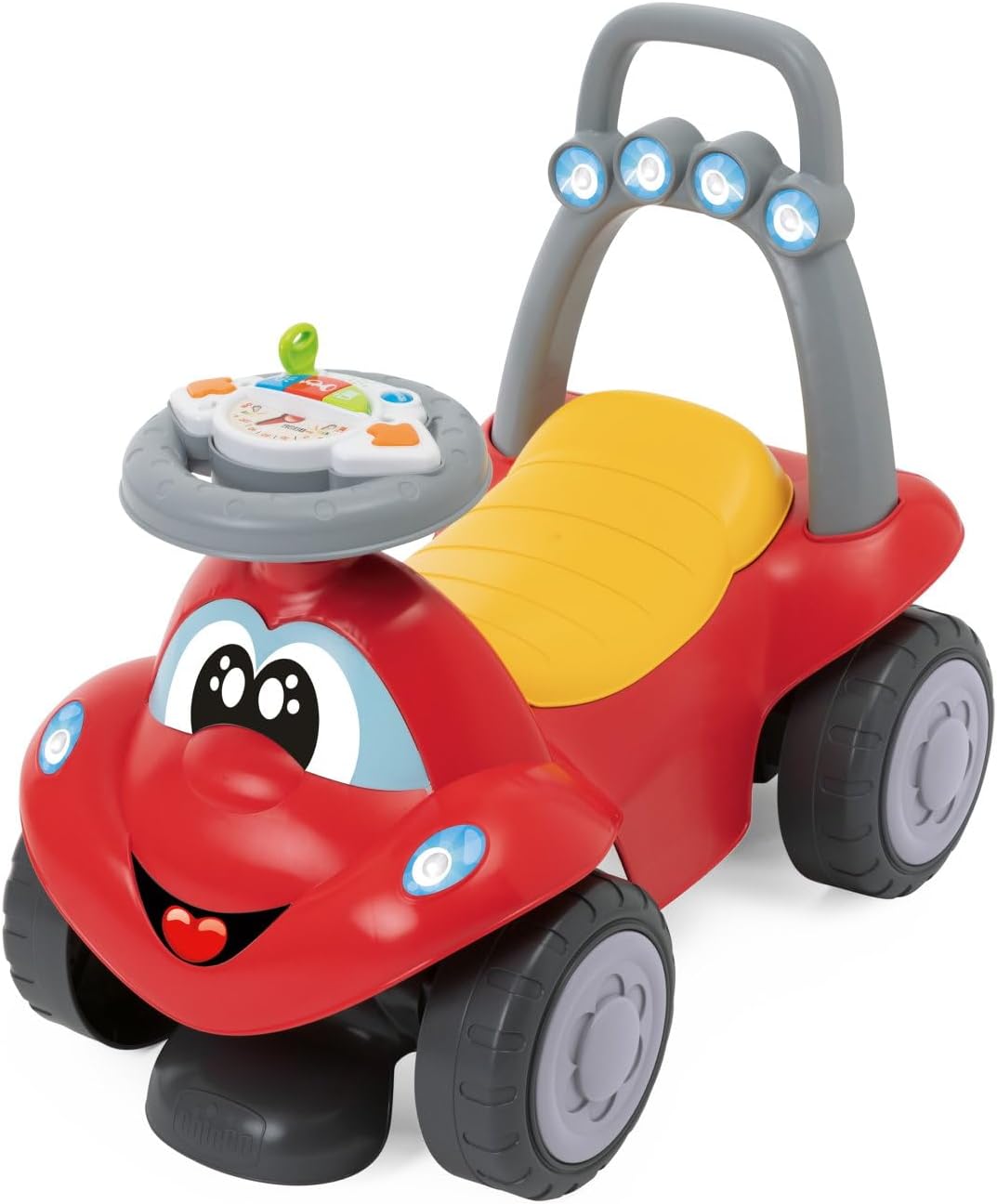
Image: The Chicco Billy Quattro toy in its primary ride-on configuration, featuring a friendly face and electronic steering wheel.
Operating Instructions
The Chicco Billy Quattro offers four distinct modes of play, adapting to your child's developmental stage.
1. Rocker Mode (Approx. 9+ Months)
In this mode, the toy functions as a stable rocker.
- Ensure the rocking base is securely attached to the underside of the toy.
- Place your child safely on the seat.
- Supervise your child at all times while they are using the rocker.

Image: The Chicco Billy Quattro configured as a rocker, with the green rocking base attached.

Image: A child happily seated on the Chicco Billy Quattro in rocker mode, engaging with the steering wheel.
2. Walk-Behind Mode (Approx. 9+ Months)
This mode assists your child in taking their first steps, providing stable support.
- Remove the rocking base if previously attached.
- Ensure the rear handle is in the upright position, providing a wide and secure grip for your child.
- Encourage your child to hold onto the handle and push the toy forward as they learn to walk.

Image: A young child standing behind the Chicco Billy Quattro, holding the rear handle to use it as a walk-behind toy.
3. Push-and-Go Mode (Approx. 12+ Months)
For when your child is seated but still needs assistance with movement.
- Attach the long push handle to the rear of the toy.
- Ensure your child is seated comfortably and securely.
- The parent can then push the toy using the handle, guiding the child.
- The compartment under the seat can be used to store small toys.

Image: A parent pushing a child seated in the Chicco Billy Quattro using the extended push handle.
4. Ride-On Mode (Approx. 18+ Months)
When your child is ready for independent movement.
- Remove the push handle and rocking base.
- Ensure the four large wheels are free to move.
- Your child can sit on the seat and propel themselves forward using their legs.
- The wide legroom allows for comfortable and free movement.

Image: A child happily riding the Chicco Billy Quattro independently, propelling themselves with their feet.
Electronic Steering Wheel Operation:
The electronic steering wheel provides interactive play with lights and sounds.
- Engine Sound: Turn the key on the steering wheel to activate realistic engine sounds.
- Lights & Effects: Press the colorful buttons on the panel to trigger various lights and fun sound effects.
- Ensure batteries are correctly installed for electronic functions to work.

Image: A close-up view of the electronic steering wheel, showing the key, colorful buttons, and activity panel.
Maintenance
Cleaning:
- Wipe all surfaces with a damp cloth and mild soap.
- Do not use abrasive cleaners or solvents.
- Ensure the electronic steering wheel is dry before use. Do not immerse in water.
Storage:
- Store the toy in a clean, dry place away from direct sunlight and extreme temperatures.
- If storing for an extended period, remove batteries from the electronic steering wheel to prevent leakage.
Troubleshooting
Electronic Steering Wheel Not Working:
- Check Batteries: Ensure 2 AA 1.5V batteries are correctly installed with the proper polarity.
- Replace Batteries: If the batteries are old or depleted, replace them with new ones.
- Battery Compartment: Verify that the battery compartment cover is securely closed.
- Contact Support: If the issue persists after checking batteries, please contact Chicco customer support.
Toy Does Not Move Smoothly:
- Check Wheels: Ensure no debris is caught in the wheels.
- Surface: The toy is designed for smooth, flat surfaces. Uneven terrain may hinder movement.
Specifications
| Model Number | 00011505000000 |
| Dimensions (L x W x H) | 58.5 x 36.5 x 32.5 cm |
| Weight | 2.9 kg |
| Recommended Age | 9 - 36 months |
| Batteries Required | 2 x AA 1.5V (not included) |
| Material | Polypropylene (PP), 80% recycled plastic for certain components |
| Educational Objectives | Development of motor skills and cognitive stimulation through play |
| Origin | Made in Italy |
Warranty Information
Chicco products are manufactured to high-quality standards. For specific warranty details, please refer to the warranty card included with your product or visit the official Chicco website for your region. Keep your proof of purchase for any warranty claims.
Customer Support
If you have any questions, concerns, or require assistance with your Chicco Billy Quattro, please contact Chicco customer service. Contact information can typically be found on the product packaging or on the official Chicco website.
Online Resources: For additional information and support, please visit the official Chicco website.


