
1. Introduction
This user manual provides comprehensive instructions for the VINABTY LR03 XL-6046 Replacement Remote Control. This remote is specifically designed to be compatible with various Onn DVD Player models, including 100008761, 100093892, ONA18DP001, ONA19DP005, and 100008761OA. It offers a direct replacement solution, requiring no programming for immediate use.
2. Product Features
- Direct replacement remote control for specified Onn DVD Player models.
- No programming or pairing required; ready to use out of the box after battery installation.
- Full functionality for controlling your Onn DVD Player.
- Infrared (IR) connectivity technology.
3. Product Overview and Components
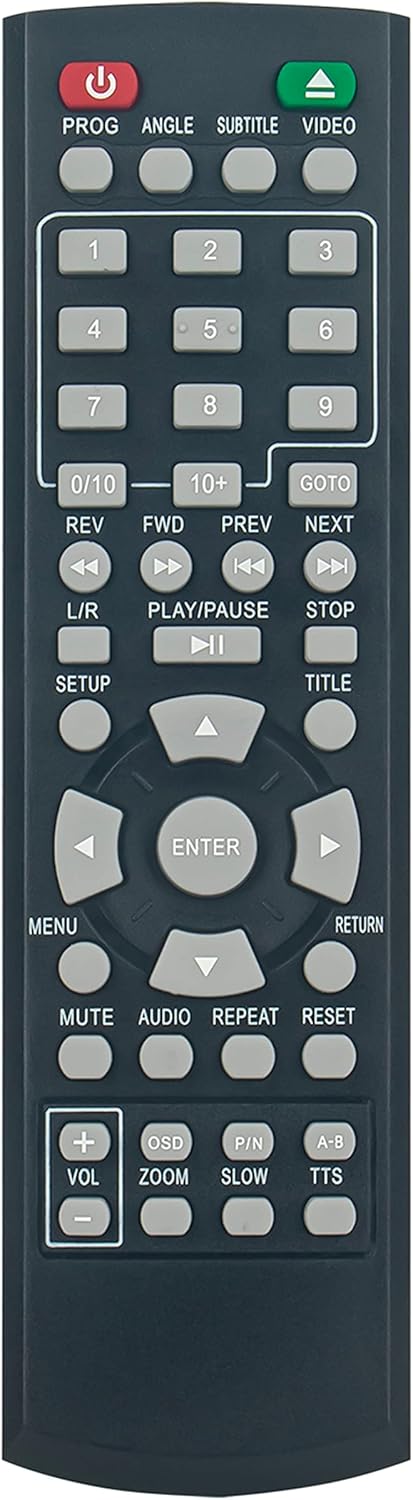
Figure 3.1: Front view of the VINABTY LR03 XL-6046 Replacement Remote Control, showing all buttons and layout.

Figure 3.2: Angled view of the remote control, highlighting its ergonomic design.

Figure 3.3: Back view of the remote control, illustrating the battery compartment cover.
4. Setup
4.1 Battery Installation
The remote control requires two (2) AAA batteries (not included) for operation.
- Locate the battery compartment on the back of the remote control (refer to Figure 3.3).
- Slide the battery compartment cover downwards to open it.
- Insert two AAA batteries, ensuring the positive (+) and negative (-) terminals align correctly with the markings inside the compartment.
- Slide the battery compartment cover back into place until it clicks securely.
Important Note: This replacement remote control requires no programming. Once batteries are installed, it is ready for immediate use with your compatible Onn DVD Player.
5. Operating Instructions
Point the remote control directly at the infrared sensor on your Onn DVD Player. Ensure there are no obstructions between the remote and the player.
5.1 Basic Functions
- POWER (Red Button): Turns the DVD player on or off.
- PROG: Accesses program settings.
- ANGLE: Changes the camera angle during DVD playback (if supported by the disc).
- SUBTITLE: Toggles subtitle display on/off or cycles through available subtitle languages.
- VIDEO: Selects video output modes.
- Number Buttons (0-9, 0/10, 10+): Used for direct track selection or inputting numbers.
- REV / FWD: Fast reverse / Fast forward.
- PREV / NEXT: Skips to the previous / next track or chapter.
- PLAY/PAUSE: Starts or pauses playback.
- STOP: Stops playback.
- L/R: Selects left/right audio channels.
- SETUP: Enters the system setup menu of the DVD player.
- TITLE: Returns to the DVD title menu.
- MENU: Accesses the DVD disc menu.
- Navigation Buttons (Up, Down, Left, Right): Navigates through menus and options.
- ENTER: Confirms selections.
- RETURN: Goes back to the previous menu or screen.
- MUTE: Mutes or unmutes the audio.
- AUDIO: Cycles through available audio tracks or languages.
- REPEAT: Repeats current track, chapter, or disc.
- RESET: Resets the DVD player (functionality may vary by player model).
- VOL+ / VOL-: Increases / Decreases volume.
- OSD: On-Screen Display, shows playback information.
- ZOOM: Zooms in/out on the video.
- P/N: Switches between PAL/NTSC video formats.
- SLOW: Activates slow-motion playback.
- A-B: Repeats a specific section between point A and point B.
- TTS: Text-to-Speech (functionality may vary by player model).
6. Maintenance
6.1 Cleaning
To clean the remote control, gently wipe it with a soft, dry cloth. Do not use liquid cleaners, sprays, or abrasive materials, as these may damage the remote's surface or internal components.
6.2 Battery Replacement
Replace batteries when the remote control's response becomes sluggish or stops functioning. Always replace both batteries at the same time with new AAA batteries. Do not mix old and new batteries, or different types of batteries.
Dispose of used batteries according to local regulations. Do not dispose of batteries in fire.
7. Troubleshooting
| Problem | Possible Cause | Solution |
|---|---|---|
| Remote control is not working. | Batteries are dead or inserted incorrectly. | Replace batteries with new AAA batteries, ensuring correct polarity (+/-). |
| Remote control has limited range or intermittent response. | Low batteries; Obstruction between remote and DVD player; Remote not pointed directly at player. | Replace batteries; Remove any obstructions; Ensure remote is pointed directly at the DVD player's IR sensor. |
| Certain buttons do not function. | Button malfunction; Feature not supported by your specific DVD player model or disc. | Ensure the button is relevant to the current function (e.g., Angle button only works if disc supports multiple angles). If issue persists, contact support. |
8. Specifications
| Feature | Detail |
|---|---|
| Model Number | LR03 XL-6046 |
| Compatible Devices | Onn DVD Players (100008761, 100093892, ONA18DP001, ONA19DP005, 100008761OA) |
| Connectivity Technology | Infrared (IR) |
| Power Source | 2 x AAA Batteries (not included) |
| Special Feature | No Programming Required |
| Product Dimensions | 6.7 x 2 x 0.7 inches (approx.) |
| Item Weight | 3 ounces (approx.) |
9. Warranty and Support
For any questions, issues, or support regarding your VINABTY LR03 XL-6046 Replacement Remote Control, please contact the seller or manufacturer through the platform where the purchase was made. Please retain your proof of purchase for warranty claims, if applicable.


