
MULS PA5278U-1BRS
MULS PA5278U-1BRS Laptop Battery User Manual
Model: PA5278U-1BRS | Brand: MULS
1. Introduction
This user manual provides essential information for the safe and effective use of your MULS PA5278U-1BRS laptop battery. Please read this manual thoroughly before installation and use to ensure optimal performance and longevity of the battery.

Image: The MULS PA5278U-1BRS laptop battery, shown with two small screwdrivers, indicating tools that may be needed for installation.
2. Product Specifications
| Specification | Value |
|---|---|
| Model Number | PA5278U-1BRS |
| Battery Type | Lithium Ion |
| Voltage | 11.4V |
| Capacity | 4080mAh |
| Watt-Hours (Wh) | 48Wh |
| Item Weight | 13.6 ounces (approx. 385.6g) |
| Package Dimensions | 13.5 x 5.75 x 1 inches |

Image: A visual representation of the battery's key electrical specifications: Voltage (11.1V), Capacity (4080mAh), Wattage (48Wh), and Battery Type (Li-ion).
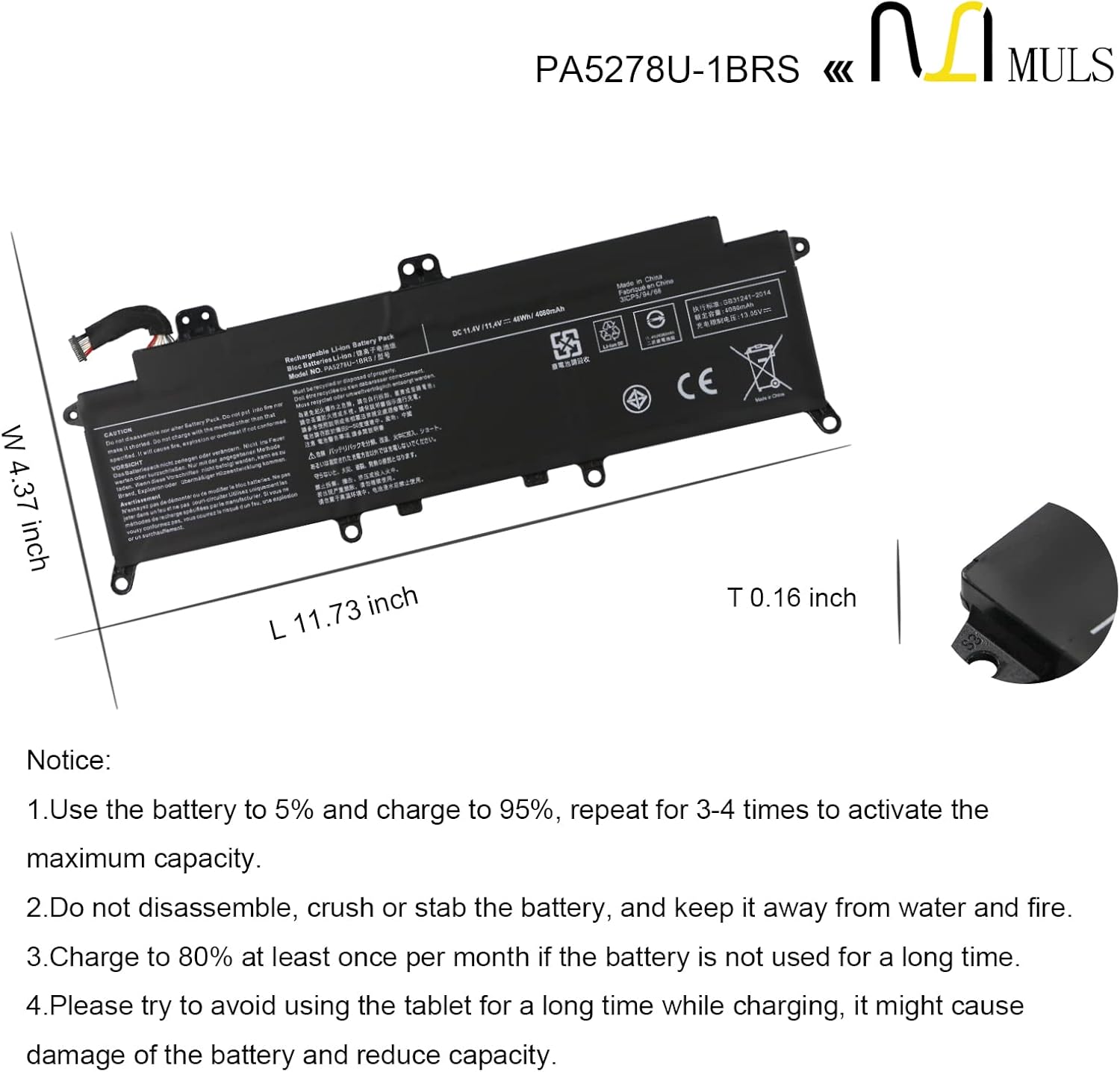
Image: A technical drawing illustrating the physical dimensions of the battery, including its length, width, and thickness.
3. Compatibility
The MULS PA5278U-1BRS battery is designed as a replacement for specific laptop models. Please verify your laptop's model number against the list below to ensure compatibility.
Compatible Part Numbers:
- PA5278U-1BRS
- PT28U-0LN03X
Compatible Laptop Models:
- For TOSHIBA Portege X30 Series:
- Portege X30-D, X30-D-10L, X30-D-10M, X30-D-10V, X30-D-119, X30-D-11U, X30-D-121, X30-D-123, X30-D-13Z, X30-D-143, X30-D-162, X30-D-16P, X30-D-19E
- Portege X30-E, X30-E-10G, X30-E-10U, X30-E-11D, X30-E-11T, X30-E-11U, X30-E-12H, X30-E-19Z, X30-E-BTO
- Portege X30-F-15U, X30-F1352
- For TOSHIBA Tecra X40 Series:
- Tecra X40-D, X40-D-10E, X40-D-10F, X40-D-10G, X40-D-10H, X40-D-10J, X40-D-10M, X40-D-10Q, X40-D-10R, X40-D-10T, X40-D-10U, X40-D-10V, X40-D-10W, X40-D-10Z, X40-D-110, X40-D-11F
- Tecra X40-E-013, X40-E-108
- Tecra X40-F, X40-F-10D
- For DYNABOOK Portege X30-F Series:
- Portege X30-F-10L, X30-F-10N

Image: A laptop from the compatible series, demonstrating the intended use environment for the battery.
4. Safety Information and Precautions
Your safety is paramount. This battery is manufactured with multiple protection features. Adhere to the following guidelines to prevent potential hazards and ensure safe operation.
Built-in Safety Features:
- Short-Circuit Protection: Prevents damage from electrical shorts.
- Over-heat Protection: Monitors and regulates battery temperature.
- Overload Protection: Safeguards against excessive current draw.
- Overcharge Protection: Prevents battery from being charged beyond its capacity.
- Overcurrent Protection: Protects against current surges.

Image: The battery displaying its CE, FCC, and RoHS compliance marks, alongside visual indicators for short-circuit, over-heat, and overload protection.

Image: An illustration highlighting the comprehensive protection mechanisms integrated into the battery design, including safeguards against overcharge, overcurrent, overheat, and short circuits.
General Safety Warnings:
- Do not disassemble, crush, or stab the battery.
- Keep the battery away from water and fire.
- Avoid exposing the battery to extreme temperatures.
- Dispose of used batteries according to local regulations. Do not dispose of in household waste.
5. Installation
Replacing a laptop battery typically involves opening the laptop casing. If you are not comfortable performing this procedure, it is recommended to seek assistance from a qualified technician.
General Installation Steps (May vary by laptop model):
- Power Off and Disconnect: Ensure your laptop is completely powered off and unplugged from any power source.
- Remove External Battery (if applicable): If your laptop has an external, removable battery, remove it first.
- Access Internal Battery: Carefully open the laptop's back panel or keyboard area to access the internal battery compartment. Refer to your laptop's specific service manual for precise instructions.
- Disconnect Old Battery: Gently disconnect the old battery's cable from the motherboard.
- Remove Old Battery: Unscrew any retaining screws and carefully remove the old battery.
- Install New Battery: Place the new MULS battery into the compartment, ensuring it aligns correctly. Secure it with screws if necessary.
- Connect New Battery: Connect the new battery's cable to the motherboard, ensuring a firm connection.
- Reassemble Laptop: Carefully reassemble the laptop, ensuring all screws and panels are properly secured.
Caution: Static electricity can damage electronic components. Take appropriate anti-static precautions during installation.
6. First Use and Charging
To activate the battery's maximum capacity and ensure optimal performance, follow these initial charging instructions:
- Initial Activation: Use the battery until its charge level drops to approximately 5%, then fully charge it to 95%. Repeat this charge and discharge cycle 3-4 times. This process helps calibrate the battery and activate its full capacity.
- First Charge: For the very first use, it is recommended to fully charge the battery before using the laptop on battery power.
7. Maintenance and Storage
Proper maintenance and storage can significantly extend the lifespan of your laptop battery.
- Regular Use: For best results, use your laptop on battery power regularly rather than keeping it constantly plugged in.
- Long-Term Storage: If the battery will not be used for an extended period (e.g., more than one month), charge it to approximately 80% before storing. Store it in a cool, dry place away from direct sunlight.
- Avoid Constant Charging: While charging, avoid using the laptop for prolonged periods, as this might cause damage to the battery and reduce its capacity over time.
- Temperature: Operate and store the battery within recommended temperature ranges (typically 0°C to 35°C or 32°F to 95°F).
8. Troubleshooting
If you encounter issues with your MULS PA5278U-1BRS battery, consider the following common troubleshooting steps:
- Battery Not Detected:
- Ensure the battery is correctly installed and its connector is firmly seated.
- Restart your laptop.
- Update your laptop's BIOS and battery drivers.
- Battery Not Charging:
- Verify that the AC adapter is functioning correctly and is the original or a compatible replacement.
- Check the charging port for any debris or damage.
- Try a different power outlet.
- Short Battery Life:
- Ensure background applications are not excessively draining power.
- Adjust power settings in your operating system to optimize battery usage.
- Perform the initial activation cycle (5% to 95% charge) a few times to recalibrate the battery.
If problems persist after attempting these steps, please contact MULS customer support for further assistance.
9. Warranty and Support
MULS is committed to providing high-quality products and excellent customer service.
Warranty Information:
- 30-Day Money-Back Guarantee: Enjoy a 30-day no-questions-asked full money-back period from the date of receipt.
- 12-Month Exchange Warranty: The battery is covered by a 12-month exchange warranty for manufacturing defects.
Note: The return window may close a month after product receipt. Please contact us directly for warranty claims beyond this period.
Customer Support:
For any questions, concerns, or support needs, MULS provides 24/7 email service. Please refer to your purchase documentation for specific contact details or visit the official MULS website.