Introduction
This manual provides detailed instructions for the installation, operation, and maintenance of your Generic Outdoor Photocell Sensor. This photoelectric sensor is designed to automatically control outdoor and indoor lighting, such as street lighting, passage lighting, and doorway lighting, based on ambient light levels. It features electronic circuitry for quick response and a 3-10 second time delay to prevent false triggers. The product is UL listed and complies with UL773A standards for non-industrial photoelectric switches.
Product Features
- Automatic On/Off: Automatically turns lights on at dusk and off at dawn. Includes a delay feature to prevent false triggers from temporary light sources.
- Wide Voltage Input: AC 120-277V, 50/60Hz.
- Adjustable Design: 180° adjustable swivel mount for optimal positioning.
- Durable Construction: Heavy-duty build with surge protection.
- Waterproof Rating: IP65 rated, suitable for various outdoor and indoor applications.
- Easy Installation: Designed for simple installation with a threaded diameter of 1.06 inches.
- UL Certified: Ensures quality and safety standards are met.
Specifications
| Specification | Value |
|---|---|
| Model Number | 0732141053347 |
| Operating Voltage | AC 120-277V |
| Frequency | 50/60Hz |
| Operation Mode | Automatic (Dusk to Dawn) |
| On/Off Levels | 5-20Lx (on) / 20-60Lx (off) |
| Time Delay | 3-10 seconds |
| Threaded Diameter | 1.06 inches |
| Rotation | 180° Swivel |
| International Protection Rating | IP65 |
| Contact Type | Normally Open |
| Connector Type | Screws |
| Material | Zinc (Contact Material) |
| Manufacturer | FEFN |
Installation Instructions
Safety First: Before beginning installation, ensure the power supply to the lighting fixture is turned OFF at the circuit breaker to prevent electrical shock.
Wiring Diagram
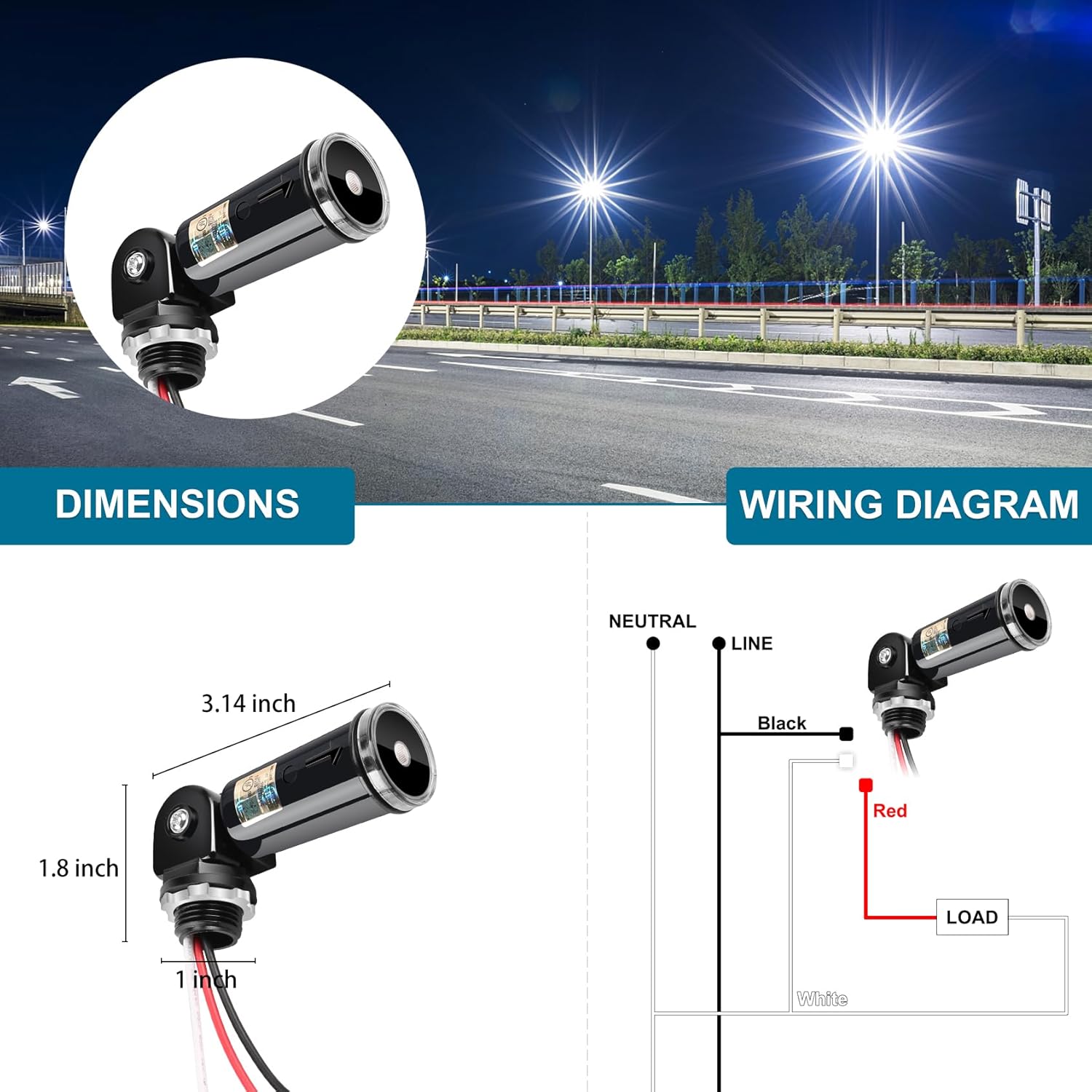
Image: Wiring diagram for the photocell sensor. The black wire connects to the Line, the red wire to the Load, and the white wire to Neutral.
- Prepare the Knockout Hole: Locate a suitable knockout hole on your lighting fixture or junction box. The sensor requires a 1.06-inch threaded diameter opening.
- Thread the Sensor: Insert the threaded portion of the photocell sensor into the knockout hole.
- Secure the Sensor: Place the rubber gasket over the threaded portion from the inside of the fixture/box, followed by the zinc alloy lock-nut. Tighten the lock-nut securely to ensure a watertight seal.
- Connect Wiring:
- Connect the Black wire from the sensor to the Line (hot) wire of your power supply.
- Connect the Red wire from the sensor to the Load wire of your lighting fixture.
- Connect the White wire from the sensor to the Neutral wire of your power supply and lighting fixture.
- Adjust Sensor Direction: Utilize the 180° swivel mount to position the sensor eye. Point the sensor away from any direct artificial light sources (e.g., the light it controls) and away from areas where direct sunlight might cause premature turn-off. Optimal placement ensures accurate dusk-to-dawn operation.
- Restore Power: Once all connections are secure and the sensor is positioned, restore power at the circuit breaker.

Image: The 180° swivel feature allows for easy adjustment of the photocell eye direction to avoid interference and optimize light detection.

Image: The IP65 rated photocell sensor is designed for outdoor use, capable of withstanding rain and other environmental elements.
Operating Instructions
The Generic Outdoor Photocell Sensor operates automatically based on ambient light levels. No manual intervention is required after proper installation.
- Dusk Activation: When the ambient light level falls below the "on" threshold (5-20 Lux), the sensor will activate the connected lighting fixture. A built-in time delay of 3-10 seconds prevents false activation from transient light changes like car headlights or lightning.
- Dawn Deactivation: When the ambient light level rises above the "off" threshold (20-60 Lux), the sensor will deactivate the connected lighting fixture. The same time delay applies to prevent premature deactivation.
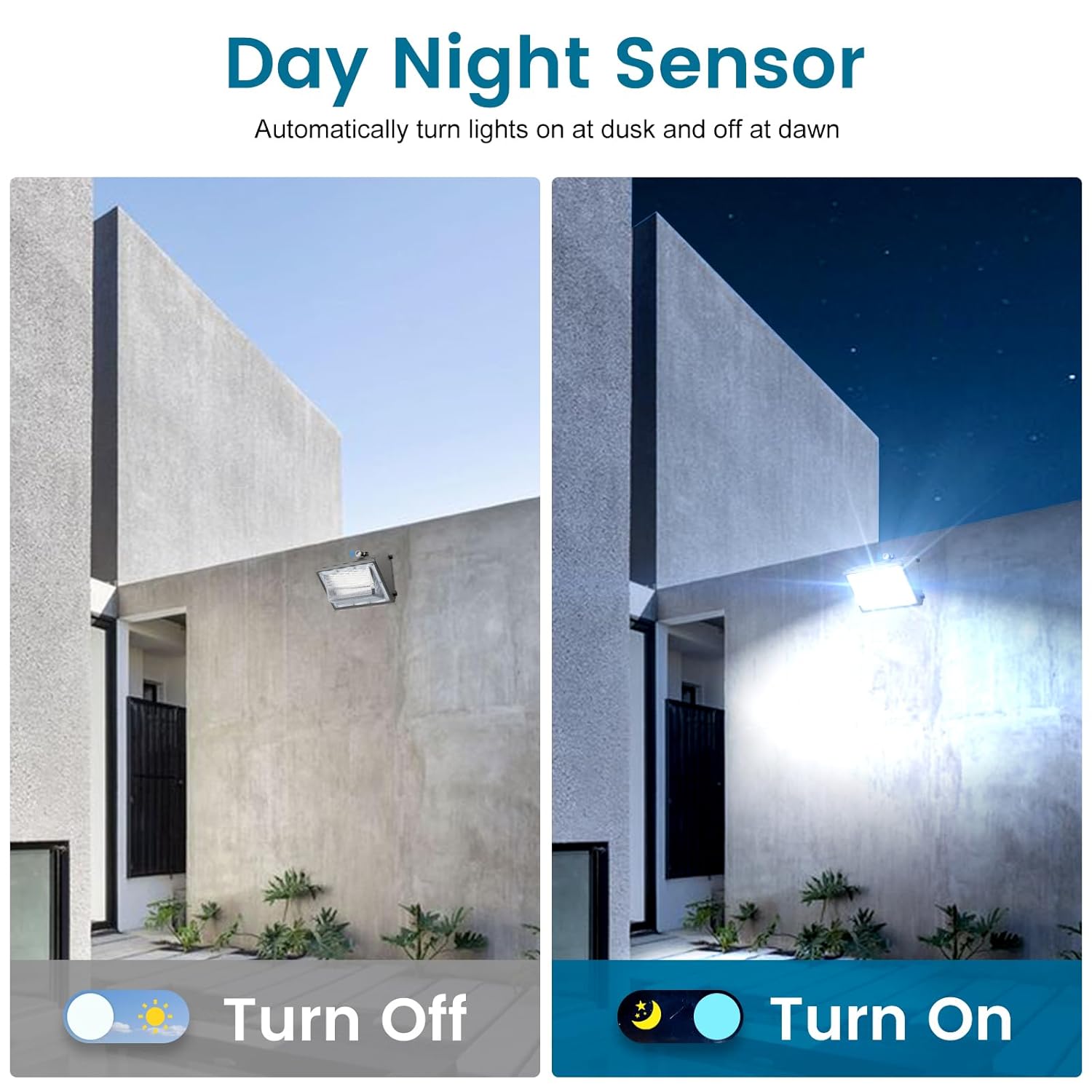
Image: Illustration of the sensor's day-night functionality, automatically turning lights off at dawn and on at dusk.
Maintenance
The Generic Outdoor Photocell Sensor is designed for minimal maintenance. Follow these guidelines to ensure optimal performance:
- Regular Cleaning: Periodically inspect the sensor's eye for any accumulation of dirt, dust, spiderwebs, or debris. Gently clean the sensor lens with a soft, damp cloth to ensure accurate light detection.
- Obstruction Check: Ensure no new obstructions (e.g., growing foliage, new structures) are blocking the sensor's view of ambient light.
- Connection Check: Annually, or if issues arise, verify that all electrical connections remain secure and free from corrosion. Ensure the lock-nut is still tight.
- Avoid Harsh Chemicals: Do not use abrasive cleaners or solvents on the sensor, as these can damage the housing or lens.
Troubleshooting
| Problem | Possible Cause | Solution |
|---|---|---|
| Lights stay on during the day. |
|
|
| Lights do not turn on at night. |
|
|
| Lights flicker or cycle rapidly. |
|
|
Warranty and Support
This Generic Outdoor Photocell Sensor comes with a 3-year service warranty. If you encounter any issues or have concerns regarding the photocell sensor, please contact the seller for assistance. They are committed to providing support within 24 hours for refunds or replacements.
For further support or inquiries, please refer to the contact information provided with your purchase or visit the seller's support page.