
1. Introduction
This manual provides instructions for the Generic replacement infrared remote control, model Easytry18359. This remote is designed to function as a direct replacement for the original remote controls of various Pioneer Car Stereo AV Receiver models, including CXB6797, CXB3455, CXB3456, FH-P404, KEH-P780, KEH-P7850, DEH-P400, DEH-P4000, DEH-P600, and DEH-P7000R. Please ensure your original remote matches the appearance of this replacement for full compatibility.
2. Setup: Battery Installation
The remote control requires two (2) CR2 batteries for operation. Follow these steps to install the batteries:
- Locate the battery compartment cover on the back of the remote control.
- Slide or gently pry open the battery compartment cover.
- Insert two CR2 batteries, ensuring the positive (+) and negative (-) terminals align correctly with the markings inside the compartment.
- Replace the battery compartment cover until it clicks securely into place.

Image 2.1: Back of the remote control, illustrating the battery compartment location.
Note: Always use fresh batteries and dispose of old batteries responsibly.
3. Operating Instructions
This infrared replacement remote control operates your compatible Pioneer Car Stereo AV Receiver without any additional setup or coding. Point the remote directly at the receiver's infrared sensor. The maximum effective range is approximately 10 meters (33 feet).
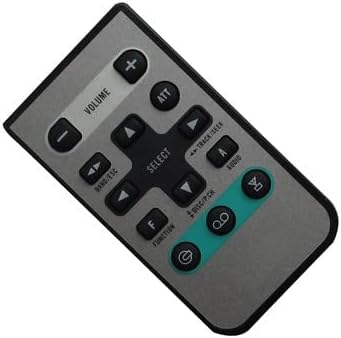
Image 3.1: Front view of the remote control, displaying all functional buttons.
Button Functions:
- POWER (⏻): Turns the receiver on or off.
- VOLUME (+/-): Increases or decreases the audio volume.
- ATT (Attenuate): Mutes or significantly reduces the audio volume.
- BAND/ESC: Changes radio bands (e.g., FM1, FM2, AM) or exits a menu/function.
- SELECT: Confirms a selection or enters a menu.
- TRACK/SEEK (◀◀ / ▶▶): Skips tracks forward/backward or seeks radio stations.
- AUDIO: Accesses audio settings or sound modes.
- F (Function): Activates special functions or menu options.
- DISC/P.CH: Selects disc playback or changes preset channels.
- Directional Arrows (▲ ▼ ◀ ▶): Navigates through menus or adjusts settings.
4. Maintenance
- Cleaning: Wipe the remote control with a soft, dry cloth. Do not use liquid cleaners or abrasive materials.
- Battery Replacement: Replace batteries when the remote's performance degrades or it stops responding. Refer to Section 2 for battery installation.
- Storage: Store the remote in a cool, dry place away from direct sunlight and extreme temperatures. If storing for extended periods, remove the batteries to prevent leakage.
5. Troubleshooting
| Problem | Possible Cause | Solution |
|---|---|---|
| Remote is not responding. |
|
|
| Some functions do not work. |
|
|
| Remote works intermittently. |
|
|
If issues persist after attempting these solutions, please contact customer support.
6. Specifications
- Model Number: Easytry18359
- Brand: Generic
- Connectivity Technology: Infrared (IR)
- Controller Type: Button Control
- Maximum Number of Supported Devices: 1
- Maximum Range: 10 meters (approximately 33 feet)
- Batteries Required: 2 x CR2 (not included)
7. Warranty Information
This Generic replacement remote control comes with a 90-day warranty from the date of purchase. This warranty covers manufacturing defects and malfunctions under normal use. It does not cover damage caused by misuse, accidents, unauthorized modifications, or battery leakage. Please retain your proof of purchase for warranty claims.
8. Customer Support
For any questions, concerns, or troubleshooting assistance not covered in this manual, please contact the seller directly through the platform where the product was purchased. Provide your order number and a detailed description of the issue for prompt support.