
1. Product Overview
The Timiyou AMQ8546 Silent Muscle Massage Gun is a multifunctional electric massage device designed for deep tissue percussion massage. It features a powerful 9800 RPM motor, 99 adjustable intensity levels, and comes with 6 professional massage heads to target various muscle groups. This device is engineered to help relieve muscle pain, reduce lactic acid buildup, promote blood circulation, and improve joint mobility, making it suitable for athletes, fitness enthusiasts, and individuals seeking muscle recovery and relaxation.
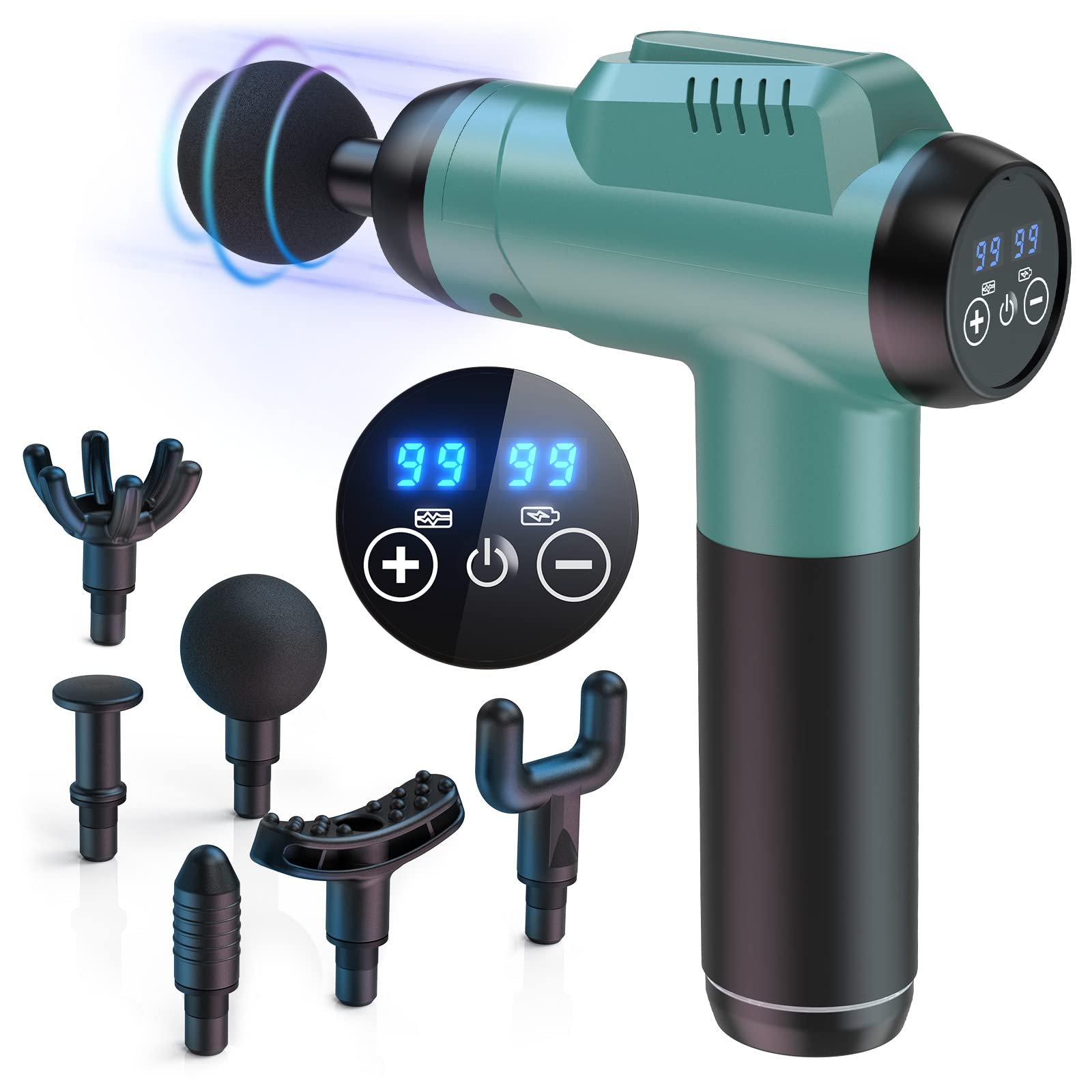
Image 1.1: The Timiyou AMQ8546 Silent Muscle Massage Gun, showcasing its ergonomic design and peacock blue color.
2. Important Safety Information
Please read all safety instructions carefully before using the Timiyou AMQ8546 Muscle Massage Gun. Failure to follow these instructions may result in injury or damage to the device.
- Do not use the device on open wounds, irritated skin, or areas with skin conditions.
- Consult a physician before use if you have any medical conditions, are pregnant, or have a pacemaker.
- Keep the device away from water and high temperatures.
- Do not disassemble or attempt to repair the device yourself. Contact customer support for assistance.
- Keep out of reach of children and pets.
- Use only the provided USB charging cable.
- Avoid using the device for prolonged periods on a single area to prevent bruising or discomfort.
3. Package Contents
Verify that all items are present in the package:
- Timiyou AMQ8546 Muscle Massage Gun
- 6 Professional Massage Heads
- USB Charging Cable
- User Manual
4. Product Features
- Powerful Motor: Integrated 9800 RPM brushless motor for effective deep tissue massage.
- 99 Intensity Levels: Offers a wide range of speed adjustments to suit individual needs and preferences.
- 6 Interchangeable Massage Heads: Designed to target various muscle groups and provide different massage experiences.
- AI Smart Chip: Intelligently adjusts massage intensity based on feedback, optimizing each session.
- Low Noise Operation: Operates at a noise level below 45 dB, ensuring a quiet and relaxing experience.
- LED Touch Screen: Sensitive display shows speed level and battery indicator for easy monitoring.
- Portable Design: Lightweight and features an ergonomic handle for comfortable, one-handed operation.
- Long-Lasting Battery: Equipped with an 1800 mAh battery for extended use.

Image 4.1: LED display showing speed levels and battery status, with controls for intensity adjustment.

Image 4.2: Illustration of 16mm deep tissue penetration for effective muscle relief.

Image 4.3: Diagram illustrating the low noise technology, maintaining operation below 45dB.

Image 4.4: Visual representation of the 1800mAh battery providing 8-10 hours of working time.
5. Setup Guide
5.1 Initial Charging
Before first use, fully charge the massage gun.
- Connect the provided USB charging cable to the charging port on the massage gun.
- Plug the other end of the USB cable into a compatible USB power adapter (not included) or a computer USB port.
- The LED display will indicate the charging status. Charge until the battery indicator shows full.
5.2 Attaching Massage Heads
The massage gun comes with 6 interchangeable heads. Select the appropriate head for your desired massage area.
- Ensure the massage gun is turned off before attaching or detaching any heads.
- Gently push the desired massage head into the opening at the front of the gun until it is securely in place.
- To remove, gently pull the massage head straight out. Do not twist.
6. Operating Instructions
6.1 Power On/Off
- To turn on the device, press and hold the power button on the LED touch screen for a few seconds. The screen will light up.
- To turn off the device, press and hold the power button again until the screen turns off.
6.2 Adjusting Intensity Levels
The massage gun offers 99 speed levels.
- Once the device is on, use the '+' and '-' buttons on the LED touch screen to increase or decrease the massage intensity.
- The current speed level will be displayed on the screen.
6.3 Usage Guidelines
- Select the appropriate massage head for the target body area.
- Turn on the massage gun and select a low intensity level to start.
- Gently apply the massage gun to the desired muscle area. Move it slowly and smoothly over the muscles, applying light pressure.
- Avoid pressing too hard or staying on one spot for too long (no more than 60 seconds per area).
- Do not use on bony areas, joints, or directly on the spine.
- Increase the intensity gradually as needed, ensuring comfort.
- Typical session duration is 10-15 minutes per body part.

Image 6.1: Examples of individuals using the massage gun for post-workout recovery, office relief, and general relaxation.
7. Massage Head Guide
The Timiyou AMQ8546 includes 6 specialized massage heads for comprehensive body treatment:
| Head Type | Description | Recommended Use |
|---|---|---|
| Round Head | General purpose head for large muscle groups. | Arms, back, hips, thighs, calves. |
| Multi-Claw Head | Designed for broader coverage and scraping massage. | Back and shoulders. |
| U-shaped Head | Contoured for areas around the spine and neck. | Spine, neck, shoulders. |
| Spiral Head | Small, pointed head for deep tissue and trigger points. | Joints, deep tissue, palms, soles. |
| Small Flat Head | Flat surface for general relaxation and all body parts. | Full body relaxation. |
| Crescent-shaped Head | Unique shape for specific muscle contours. | Shoulders and legs. |

Image 7.1: Visual guide to the 6 included massage heads and their recommended applications.
8. Care and Maintenance
8.1 Cleaning
- Ensure the device is turned off and unplugged before cleaning.
- Wipe the main body of the massage gun with a soft, slightly damp cloth. Do not use abrasive cleaners or immerse in water.
- Remove massage heads and clean them separately with mild soap and water. Rinse thoroughly and allow them to air dry completely before reattaching or storing.
8.2 Storage
- Store the massage gun and its accessories in a cool, dry place, away from direct sunlight and extreme temperatures.
- Keep the device in its original packaging or a protective case to prevent damage.
9. Troubleshooting
If you encounter any issues with your Timiyou AMQ8546 Muscle Massage Gun, please refer to the following common problems and solutions:
| Problem | Possible Cause | Solution |
|---|---|---|
| Device does not turn on. | Low battery or not charged. | Charge the device fully using the provided USB cable. |
| Device stops working during use. | Battery depleted or overheating protection activated. | Recharge the device. If it's hot, allow it to cool down for 30 minutes before resuming use. |
| Weak massage intensity. | Low battery or intensity set too low. | Charge the device. Increase the intensity level using the '+' button. |
| Massage head falls off. | Head not securely attached. | Ensure the massage head is pushed firmly into the opening until it clicks into place. |
| Unusual noise or vibration. | Foreign object or internal malfunction. | Turn off the device immediately. Check for any obstructions. If the problem persists, contact customer support. |
10. Product Specifications
| Feature | Detail |
|---|---|
| Model Number | AMQ8546 |
| Brand | Timiyou |
| Dimensions (L x W x H) | 14 x 11 x 4 cm |
| Weight | 100 grams |
| Material | Plastic |
| Motor Speed | Up to 9800 RPM |
| Intensity Levels | 99 |
| Massage Heads | 6 (Interchangeable) |
| Battery Capacity | 1800 mAh Lithium Metal |
| Power Source | Battery Powered |
| Noise Level | Below 45 dB |
| Massage Technique | Percussion |
| Water Resistance | Not Waterproof |
| UPC | 730635253839 |
11. Warranty and Support
Timiyou products are manufactured with quality and care. For specific warranty information, please refer to the documentation included with your purchase or contact Timiyou customer support.
Customer Support:
If you have any questions, concerns, or require technical assistance, please contact our customer support team. Contact details can typically be found on the product packaging or the official Timiyou website.