
Introduction
This manual provides essential instructions for the installation, operation, maintenance, and troubleshooting of the Generic SIMATIC ET 200SP BaseUnit BU15-P16+A0+2B/T, model 6es7193-6bp00-0ba0. Please read this manual thoroughly before using the device to ensure safe and efficient operation.
The SIMATIC ET 200SP BaseUnit is a critical component in distributed I/O systems, designed for industrial automation applications. It serves as the interface for connecting various I/O modules to the backplane bus, facilitating communication and power distribution within the ET 200SP system.
Safety Instructions
Always observe the following safety guidelines to prevent personal injury and damage to equipment:
- Ensure power is disconnected before installation, wiring, or maintenance.
- Installation and wiring should only be performed by qualified personnel.
- Adhere to all local and national electrical codes and regulations.
- Protect the device from moisture, dust, and extreme temperatures.
- Do not operate the device if it shows signs of damage.
Setup and Installation
The BaseUnit is designed for easy integration into an existing SIMATIC ET 200SP system. Follow these steps for proper installation:
- Mounting:
The BaseUnit is typically mounted on a standard DIN rail. Ensure the DIN rail is securely fastened within the control cabinet. Align the BaseUnit with the DIN rail and press firmly until it clicks into place.
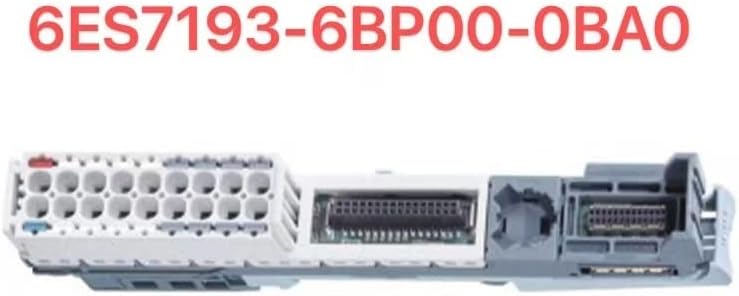
Image: The SIMATIC ET 200SP BaseUnit module, showing its various connection points and form factor for DIN rail mounting.
- Module Insertion:
Insert the desired I/O modules into the BaseUnit slots. Ensure each module is correctly aligned and fully seated. The BaseUnit provides the necessary electrical and mechanical connection for the I/O modules.
- Wiring:
Connect the power supply to the BaseUnit as per the system requirements. Wire the input/output signals to the respective I/O modules. Refer to the specific I/O module documentation for detailed wiring diagrams. Ensure all connections are secure and correctly terminated.
- Grounding:
Proper grounding is crucial for system stability and safety. Connect the BaseUnit to the protective earth (PE) conductor of the control cabinet.
Operating Principles
Once installed and powered, the BaseUnit facilitates communication between the I/O modules and the central controller (e.g., a PLC). It distributes power to the connected modules and provides the backplane bus for data exchange.
- Power-Up: After connecting the power supply, the BaseUnit and connected modules will initialize. Observe any status LEDs on the modules for proper operation.
- Configuration: The configuration of the ET 200SP system, including the BaseUnit and its modules, is typically performed using engineering software (e.g., Siemens TIA Portal). This software allows you to define module parameters, addresses, and diagnostic settings.
- Data Exchange: The BaseUnit ensures reliable data exchange between the I/O modules and the higher-level controller via the backplane bus.
Maintenance
The SIMATIC ET 200SP BaseUnit is designed for minimal maintenance. However, periodic checks can help ensure long-term reliability:
- Visual Inspection: Regularly inspect the BaseUnit and connected modules for any signs of physical damage, loose connections, or corrosion.
- Cleaning: If necessary, gently clean the exterior of the device with a soft, dry, lint-free cloth. Do not use abrasive cleaners or solvents. Ensure no dust or debris accumulates in ventilation openings.
- Environmental Conditions: Verify that the operating environment remains within the specified temperature and humidity ranges to prevent premature wear.
Troubleshooting
If you encounter issues with your BaseUnit, consider the following common problems and solutions:
| Problem | Possible Cause | Solution |
|---|---|---|
| No power to modules | Incorrect power supply connection, faulty power supply, or damaged BaseUnit. | Check power supply wiring and voltage. Verify power supply functionality. Inspect BaseUnit for damage. |
| Module not recognized | Module not fully seated, incorrect module type for slot, or configuration error. | Ensure module is securely inserted. Verify module compatibility. Check configuration in engineering software. |
| Communication errors | Loose backplane connection, electromagnetic interference (EMI), or faulty BaseUnit/module. | Check all module connections. Ensure proper grounding. Shield cables if necessary. Consult system diagnostics. |
For more complex issues, refer to the detailed diagnostic information provided by the SIMATIC ET 200SP system or contact technical support.
Specifications
Key specifications for the SIMATIC ET 200SP BaseUnit BU15-P16+A0+2B/T (Model: 6es7193-6bp00-0ba0):
- Model Number: 6es7193-6bp00-0ba0
- Power Supply: AC
- Motor Type: AC Motor (Note: This specification might refer to the broader system compatibility rather than the BaseUnit itself, which is a passive component.)
- Origin: DE (Germany)
- Certification: CE
- Condition: New
- Package: Carton or wooden box
- Material: Wood (Note: This specification appears inconsistent with an industrial electronic component. It might be an error in the source data or refer to packaging material. The actual BaseUnit is typically made of industrial-grade plastics and metals.)
For detailed technical data, please refer to the official Siemens documentation for the SIMATIC ET 200SP system.
Warranty Information
This product comes with a warranty to cover manufacturing defects. Please retain your proof of purchase for warranty claims.
- New Products: A 1-year warranty is provided for new units.
- Used Products: A 3-month guarantee is provided for used units.
- General Warranty: Some listings indicate a 2-year warranty. Please verify the specific warranty terms with your supplier at the time of purchase.
The warranty covers defects in materials and workmanship under normal use. It does not cover damage caused by improper installation, misuse, accidents, unauthorized modifications, or natural disasters.
Support and Contact
For technical assistance, product inquiries, or warranty claims, please contact your supplier or the manufacturer's official support channels.
- Manufacturer Support: For official documentation and support related to SIMATIC ET 200SP products, visit the Siemens Industry Online Support website.
- Supplier Contact: Refer to your purchase documentation for specific supplier contact information.
When contacting support, please have your product model number (6es7193-6bp00-0ba0) and purchase details readily available.


