1. Introduction
This manual provides comprehensive instructions for the installation, operation, and maintenance of the Xinje XC3-48RT-E PLC CPU. This Programmable Logic Controller is designed for industrial automation applications, offering robust control capabilities with its 28 digital inputs and 20 digital outputs.
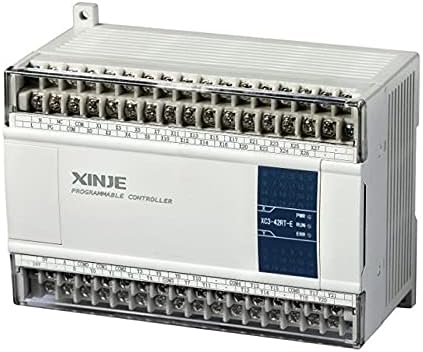
Figure 1: Front view of the Xinje XC3-48RT-E PLC CPU, showing input/output terminals and indicator lights.
2. Features
- I/O Configuration: 28 Digital Inputs (DI) and 20 Digital Outputs (DO).
- Power Supply: Supports AC220V or DC24V power input.
- Expandability: Can be expanded with additional expansion modules, BD boards, and a real-time clock.
- Data Retention: Features power-off retentive memory.
- Control Capabilities: Supports basic logic control and advanced data operations.
- Advanced Functions: Includes high-speed counting, pulse output, external interruption, C language function blocks, free switching for I/O points, free protocol communication, and MODBUS communication.
3. Specifications
3.1. General Specifications
| Item | Specification |
|---|---|
| Insulation Voltage | Above DC 500V 2Mohm |
| Noise Resistance | 1000V 1uS pulse for 1 minute |
| Environment Temperature | 0°C ~ 60°C |
| Ambient Humidity | 5% ~ 95% (non-condensing) |
| COM 1 Port | RS-232, for connection to host machine or HMI for programming/debugging |
| COM 2 Port | RS-485/RS-232, for networking or connecting to intelligent instruments, inverters, etc. |
| COM 3 Port | BD extensional communication port RS-485/RS232 |
| Installation | M3 screw fixed or DIN46277 (35mm width) guide rail installation |
| Grounding | Third type grounding (Never perform common grounding with strong power system) |
3.2. Performance Specifications
| Item | Specification |
|---|---|
| Program Operation Mode | Circulation scanning mode, timing scanning mode |
| Program Mode | Instructions and ladder chart |
| Processing Speed | 0.5µs |
| Power Failure Holding | FlashROM |
| User Program Capacity | 8000 steps |
| I/O Points | 28 input points, 20 output points |
| Output Format | Relay & Transistors |
| Power Supply | AC220V / DC24V |
| Interior Coil Points (M) | 8512 points |
| Timer (T) Points | 620 points |
| Timer Specifications | 100mS timer: set time 0.1~3276.7 seconds 10mS timer: set time 0.01~327.67 seconds 1mS timer: set time 0.001~32.767 seconds |
| Counter (C) Points | 635 Points |
| Counter Specifications | 16 bits counter: Set value K0~32767 32 bits counter: Set value K0~2147483647 |
| Data Register (D) | 8512 characters |
4. Setup and Installation
Proper installation is crucial for the reliable operation of the PLC. Follow these steps carefully:
- Mounting: The PLC can be mounted using M3 screws or by utilizing a DIN46277 (35mm width) guide rail. Ensure the mounting location is stable, free from excessive vibration, and within the specified environmental temperature and humidity ranges.
- Power Connection: Connect the appropriate power supply (AC220V or DC24V) to the designated power terminals. Verify the voltage matches the PLC's requirements. Ensure power is off during connection.
- Grounding: Implement proper third-type grounding for the PLC. Important: Never perform common grounding with a strong power system to avoid interference and potential damage.
- Input/Output Wiring: Connect your digital input devices (e.g., sensors, switches) to the DI terminals and your digital output devices (e.g., relays, indicators) to the DO terminals. Refer to the terminal markings on the unit for correct connections.
- Communication Connections:
- COM 1 (RS-232): Connect to a host machine or Human-Machine Interface (HMI) for programming, debugging, or monitoring.
- COM 2 (RS-485/RS-232): Use for networking with other PLCs or connecting to intelligent instruments, frequency inverters, and other compatible devices.
- COM 3 (BD Extensional RS-485/RS-232): For additional communication expansion.
- Initial Power-Up: After all connections are secure, apply power to the PLC. Observe the power indicator light to ensure proper power-up.
5. Operating Instructions
The Xinje XC3-48RT-E PLC operates based on programmed logic. Follow these guidelines for operation:
- Programming:
Programs are developed using instructions and ladder chart logic. Utilize compatible programming software on a host machine connected via the COM 1 (RS-232) port. Refer to the programming software's manual for detailed instructions on creating and downloading programs.
- Operation Modes:
The PLC supports two primary program operation modes:
- Circulation Scanning Mode: The PLC continuously scans and executes the program from start to finish.
- Timing Scanning Mode: Program execution is synchronized with specific time intervals.
- Basic Logic and Data Operations:
The PLC is capable of executing a wide range of basic logic (AND, OR, NOT, etc.) and data manipulation operations. These are defined within your ladder logic program.
- High-Speed Functions:
For applications requiring precise timing, utilize the high-speed count and pulse output functions. Configure these within your program according to the specific requirements of your application.
- Communication Protocols:
Leverage the free protocol communication and MODBUS communication capabilities for integrating the PLC into larger control systems or for data exchange with other devices.
6. Maintenance
Regular maintenance ensures the longevity and reliable performance of your PLC. While the XC3-48RT-E is designed for durability, consider the following:
- Environmental Control: Ensure the operating environment remains within the specified temperature (0°C ~ 60°C) and humidity (5% ~ 95% non-condensing) ranges. Avoid exposure to direct sunlight, excessive dust, corrosive gases, or strong electromagnetic interference.
- Cleaning: Periodically clean the exterior of the PLC with a soft, dry cloth. Do not use abrasive cleaners or solvents. Ensure ventilation slots are clear of obstructions.
- Connection Checks: Regularly inspect all wiring connections (power, I/O, communication) to ensure they are secure and free from corrosion or damage. Loose connections can lead to intermittent operation or system failures.
- Firmware Updates: Check the manufacturer's website periodically for any available firmware updates that may improve performance or address known issues. Follow the manufacturer's instructions carefully when performing updates.
- Backup Programs: Regularly back up your PLC programs to an external storage device. This protects against data loss in case of unforeseen issues.
7. Troubleshooting
This section provides general guidance for common issues. For complex problems, consult the manufacturer's technical support.
- PLC Not Powering On:
- Verify the power supply voltage matches the PLC's requirements (AC220V or DC24V).
- Check all power connections for proper seating and continuity.
- Ensure the power source is active.
- I/O Not Responding:
- Check wiring for inputs and outputs. Ensure correct polarity for DC inputs/outputs.
- Verify the program logic for the specific I/O points.
- Test the external sensors/actuators independently to confirm they are functioning.
- Communication Issues:
- Confirm correct cable connections (RS-232, RS-485).
- Verify communication parameters (baud rate, data bits, parity, stop bits) match between the PLC and the connected device.
- Check for proper grounding and shielding of communication cables to prevent noise interference.
- Program Errors:
- Review the programming software's error messages for specific guidance.
- Debug the program step-by-step to identify logic errors.
- Ensure the program capacity (8000 steps) is not exceeded.
8. Warranty and Support
For specific warranty terms and conditions, please refer to the documentation provided at the time of purchase or contact the seller directly. The manufacturer, Xinje, typically provides technical support for their products.
For technical assistance, product inquiries, or service requests, please contact your authorized distributor or the manufacturer's official support channels. Keep your product model number (XC3-48RT-E) and serial number (if applicable) ready when contacting support.