
1. Introduction
The ZM-7205A is a high-performance DC brushless motor driver designed for medium power motor drive applications. This unit incorporates advanced integrated circuit technology, providing enhanced anti-jamming capabilities and rapid response times. It is suitable for driving three-phase brushless DC motors without Hall sensors, with an input current below 5A and a power supply voltage range of AC 70V to 230V (nominal AC 80V to 220V).
The driver is engineered for low-temperature operation even under high current loads, making it ideal for various industrial applications including knitting equipment, food packaging machinery, and electric tools.
2. Product Features
- Integrated Handheld Setting Unit: Includes an external speed display board for real-time speed monitoring and parameter configuration.
- Dual Closed-Loop Control: Features current and speed closed-loop design for high torque at low speeds and stable operation.
- High Speed Output: Capable of high torque and speed output, with a maximum speed of 20,000 RPM (motor dependent).
- Flexible Speed Control: Supports external PWM speed control or external potentiometer speed adjustment.
- Control Signals: Equipped with EN (enable), DIR (direction), and X1 (brake) signal control terminals.
- Output Signals: Provides speed pulse (FG) output and alarm signal (ALM) output for user detection, both with photoelectric isolation.
- Comprehensive Protection: Includes overcurrent, overvoltage, undervoltage, fan control, Hall sensor phase error, and motor stall protection functions.
- Wide Power Input: Operates with 70-220VAC input, supporting up to 5A current for brushless DC motors below 1100W.
- Operating Modes: Supports Square Wave Hall open-loop, Square Wave Hall closed-loop, and Square Wave sensorless open-loop operations.
3. Specifications
| Parameter | Value |
|---|---|
| Model Number | ZM-7205A |
| Input Voltage | AC 70V ~ 230V (Nominal AC 80V ~ 220V) |
| Maximum Current | 5A |
| Maximum Power | 1100W |
| Maximum Speed | 20,000 RPM (motor dependent) |
| Control Type | DC Brushless Motor Driver (Sensorless BLDC) |
| Material | Copper (Internal Components) |
| Included Components | Display Unit, Connection Cable |
4. Setup and Installation
Proper installation is crucial for the safe and efficient operation of the ZM-7205A motor driver. Ensure all power is disconnected before making any connections.
4.1. Component Identification
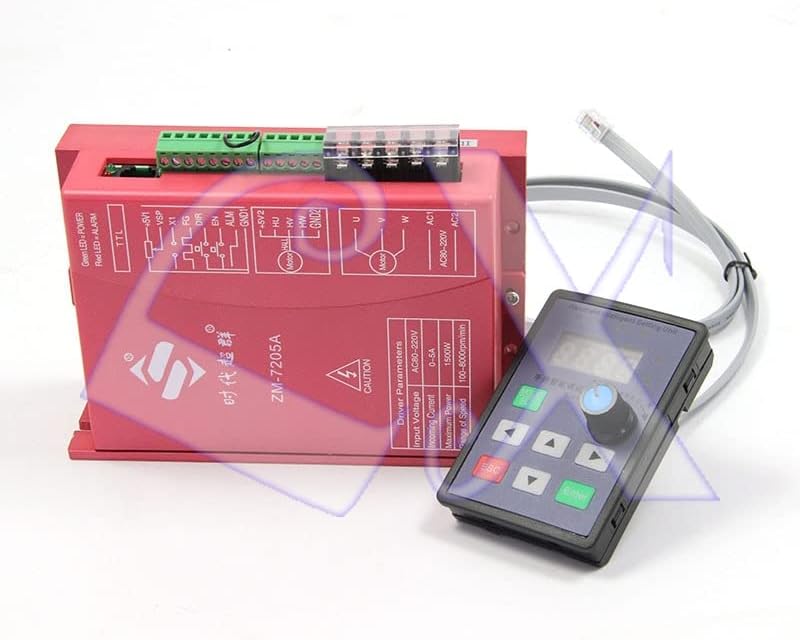
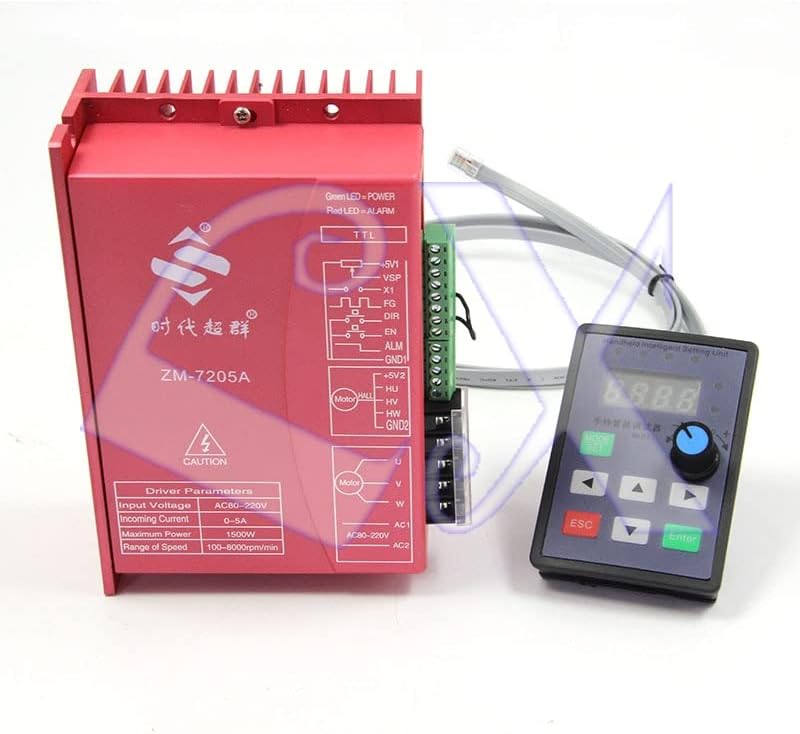
4.2. Wiring Instructions
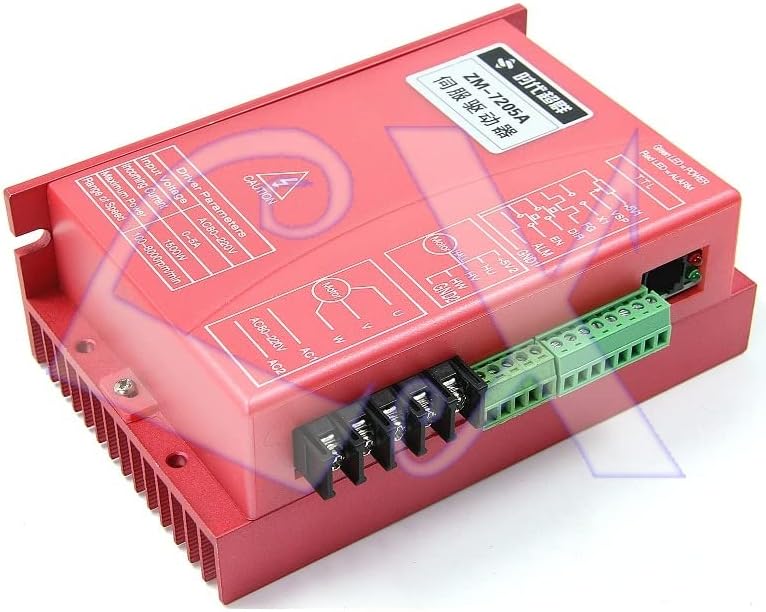
- Power Connection: Connect the AC 70V-230V power supply to the AC1 and AC2 terminals on the driver. Ensure the power source matches the driver's specifications.
- Motor Connection: Connect the three-phase brushless DC motor to the U, V, and W terminals. This driver is designed for sensorless BLDC motors.
- Handheld Unit Connection: Connect the provided cable from the handheld intelligent setting unit to the corresponding port on the driver.
- Control Signal Connections (Optional):
- Speed Control: Connect an external potentiometer or PWM signal source to the VSP (speed voltage input) or PWM input terminals for speed adjustment.
- Direction Control: Connect a control signal to the DIR terminal to change motor rotation direction.
- Enable/Disable: Use the EN terminal to enable or disable motor operation.
- Brake Function: Connect a signal to the X1 terminal for motor braking.
- Output Signal Connections (Optional):
- Speed Pulse (FG): Connect to an external device for speed feedback.
- Alarm (ALM): Connect to an external monitoring system for fault indication.
Caution: Always double-check wiring before applying power to prevent damage to the driver or motor. Refer to the wiring diagram printed on the driver unit for detailed terminal identification.
5. Operating Instructions
The ZM-7205A driver can be operated and configured using the handheld intelligent setting unit.
5.1. Handheld Setting Unit Overview

5.2. Basic Operation
- Power On: After ensuring all connections are secure, apply AC power to the driver. The handheld unit display should illuminate.
- Speed Adjustment: Use the rotary encoder or the Up/Down buttons on the handheld unit to adjust the motor speed. The current speed will be displayed.
- Direction Control: If configured, use the DIR input signal to change the motor's rotation direction.
- Parameter Setting: Press the "MODE/SET" button to enter the parameter setting menu. Use the navigation buttons and rotary encoder to select and modify parameters such as acceleration/deceleration rates, protection thresholds, and operating modes. Press "Enter" to confirm changes and "ESC" to exit.
- Monitoring: The display unit shows real-time speed. The Green LED on the driver indicates power, and the Red LED indicates an alarm condition.
5.3. Operating Modes
The ZM-7205A supports various operating modes, configurable via the handheld unit or PC software (if available):
- Square Wave Hall Speed Open Loop Operation
- Square Wave Hall Speed Closed Loop Operation
- Square Wave Sensorless Speed Open Loop Operation (Standard factory default)
Consult the detailed parameter list in the full technical documentation for advanced configuration options.
6. Maintenance
The ZM-7205A motor driver is designed for reliable operation with minimal maintenance. Adhere to the following guidelines:
- Cleaning: Keep the driver unit clean and free from dust and debris. Use a soft, dry cloth for cleaning. Do not use liquid cleaners.
- Ventilation: Ensure adequate airflow around the driver, especially around the heat sink fins, to prevent overheating. Do not obstruct ventilation openings.
- Environmental Conditions: Operate the driver within its specified temperature and humidity ranges. Avoid exposure to moisture, corrosive gases, or excessive vibrations.
- Connection Integrity: Periodically check all wiring connections for tightness and signs of wear or corrosion.
Warning: Disconnect all power before performing any maintenance or inspection. Only qualified personnel should perform internal inspections or repairs.
7. Troubleshooting
This section provides solutions to common issues encountered with the ZM-7205A motor driver.
| Problem | Possible Cause | Solution |
|---|---|---|
| Motor does not start. | No power, incorrect wiring, EN signal not active, motor stall. | Check power supply. Verify motor and control signal wiring. Ensure EN terminal is active. Check for motor obstruction. |
| Motor runs erratically or vibrates. | Incorrect motor parameters, poor motor connection, motor damage. | Verify motor parameters in settings. Check motor wiring for loose connections. Inspect motor for damage. |
| Red ALM LED is lit. | Overcurrent, overvoltage, undervoltage, Hall sensor error (if applicable), motor stall. | Identify the specific alarm code (if displayed). Check power supply voltage. Reduce motor load. Inspect motor and connections. |
| Handheld unit display is blank. | No power to driver, loose connection to handheld unit, faulty handheld unit. | Ensure driver has power. Check cable connection between driver and handheld unit. |
If the problem persists after attempting these solutions, contact technical support.
8. Warranty and Support
This product is covered by a standard manufacturer's warranty. For specific warranty terms and conditions, please refer to the documentation provided at the time of purchase or contact your vendor.
For technical assistance, troubleshooting beyond this manual, or inquiries regarding parts and service, please contact the seller or manufacturer directly. When contacting support, please provide your product model (ZM-7205A) and a detailed description of the issue.
Manufacturer: DAVITU