
1. Introduction
This manual provides detailed instructions for the installation, operation, and maintenance of the ChongXiao Universal BLDC Brushless Controller. This controller is designed for electric bikes and e-scooters, supporting various voltage ranges (24V, 36V, 48V, 60V) and power outputs (250W, 350W) with current ratings from 10A to 20A. It features a brushless design for smooth, stable, and long-lasting performance.

Image 1.1: The ChongXiao Universal BLDC Brushless Controller. This image shows the golden aluminum casing of the controller with its product label indicating nominal voltage, maximum current, and motor phase angle.
2. Setup and Installation
Proper installation is crucial for the safe and efficient operation of your electric bike or e-scooter. Please follow these steps carefully.
2.1 Controller Functions
The controller supports the following functions:
- Low-level brake
- Cruise control
- Brake light power output
- PAS (Pedal Assist System)
- Reverse gear
- High-level brake
- Speed controller handle (throttle) input
- Phase meter connection
- Three-speed gear selection
- Hall meter connection
- Hall sensor (5 wires) connection
- Intelligent recognition (self-learning lines)
- Head/tail light power output
- Electric door lock input
- Phase line connection
- Battery power input
2.2 Connection Steps
Refer to the wiring diagrams below for visual guidance. Ensure all connections are secure and correct before applying power.
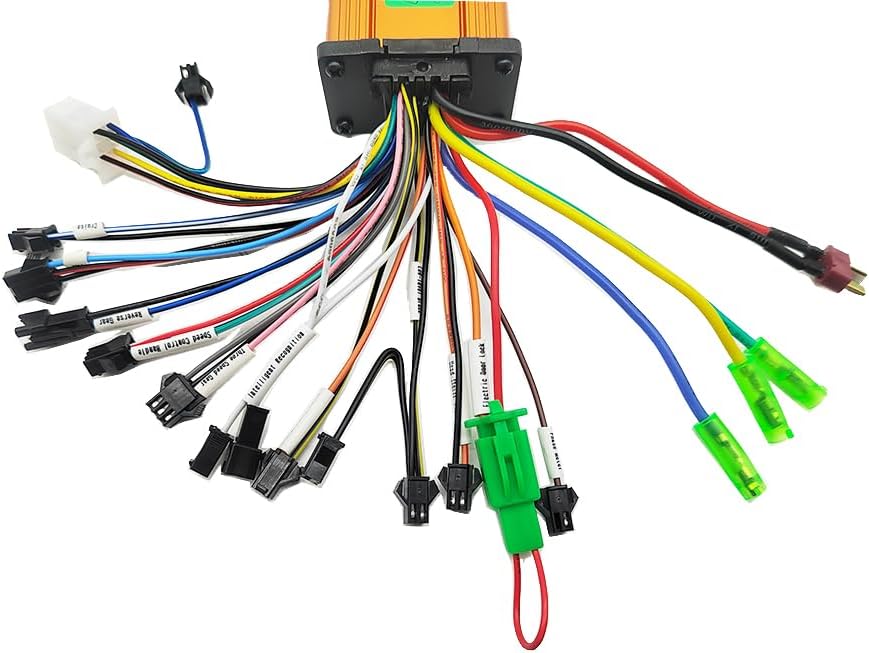
Image 2.1: The ChongXiao controller showing its multiple wire harnesses for various connections. Each harness is color-coded for identification.

Image 2.2: Detailed wiring diagram with numbered labels corresponding to the controller's functions. This diagram is essential for correct installation.
- Connect the Motor Line: Connect the motor phase lines (usually three thick wires) from the controller to the motor, ensuring color-to-color matching.
- Connect the Battery Line: Connect the battery power lines. The red wire is for battery positive (+), and the black wire is for battery negative (-).
- Connect the Throttle Line: Connect the speed controller handle (throttle) line. If your throttle does not have an electric lock, the controller's two electric lock wires can be shorted together.
- Connect the Hall Line: Connect the Hall sensor lines from the controller to the motor's Hall sensors, ensuring color-to-color matching.
- Intelligent Recognition (Self-Learning):
- Turn off the power.
- Connect the two intelligent recognition lines together.
- Turn on the power. The wheel will either rotate forward or reverse.
- If the wheel rotates forward, separate the intelligent recognition lines.
- If the wheel rotates in reverse, separate the intelligent recognition lines, then connect them together again. The wheel should now rotate forward. Once it rotates forward, separate the two intelligent recognition lines.
This process adjusts the controller's phase ratio and adapts it to the battery voltage. Note: When using throttle control for speed, the two intelligent recognition lines must be separated.
- Connect Other Functions: Connect other functions such as low-level brake, cruise, brake light power, PAS, reverse gear, high-level brake, phase meter, three-speed gear, hall meter, head/tail light, and electric door lock as needed, referring to Image 2.2 for wire identification.
3. Operating Instructions
Once the controller is correctly installed and configured, you can operate your electric bike or e-scooter using the connected accessories.
3.1 Basic Operation
- Power On/Off: Use the electric door lock (if connected) or the main power switch of your vehicle to turn the system on or off.
- Speed Control: Use the speed controller handle (throttle) to adjust the motor's speed.
- Braking: Apply the brakes. The controller supports both low-level and high-level brake inputs, which will cut off motor power when activated.
3.2 Advanced Functions
- Cruise Control: If connected, activate the cruise function to maintain a constant speed without continuously holding the throttle.
- Three-Speed Gear: Select between different speed modes (e.g., low, medium, high) using the connected three-speed gear switch.
- Pedal Assist System (PAS): If your vehicle has a PAS sensor and it's connected, the motor will provide assistance when you pedal.
- Reverse Gear: Activate the reverse function (if connected) for backward movement, typically at a reduced speed.
- Lights: If head/tail lights are connected to the controller's output, they can be controlled via the vehicle's light switch.
4. Maintenance
To ensure the longevity and optimal performance of your ChongXiao BLDC Brushless Controller, follow these general maintenance guidelines:
- Keep Dry: Protect the controller from water and excessive moisture. While the aluminum casing offers some protection, it is not fully waterproof.
- Clean Regularly: Periodically clean the exterior of the controller with a dry, soft cloth to remove dust and dirt. Do not use harsh chemicals or abrasive materials.
- Inspect Connections: Regularly check all wire connections to ensure they are secure and free from corrosion or damage. Loose connections can lead to intermittent operation or component failure.
- Avoid Overheating: Ensure the controller is mounted in a location with adequate airflow to prevent overheating, especially during prolonged use or high power demands.
- Handle with Care: Avoid dropping or subjecting the controller to strong impacts, which can damage internal components.
5. Troubleshooting
This section provides solutions to common issues you might encounter with your controller.
5.1 Common Issues and Solutions
- Motor Not Running:
- Check battery connection: Ensure the battery is charged and correctly connected to the controller.
- Check motor phase lines: Verify that the three thick motor wires are securely connected and matched by color.
- Check Hall sensor lines: Ensure the Hall sensor wires (5 wires) are correctly connected.
- Check throttle connection: Confirm the throttle is properly connected and functioning.
- Perform intelligent recognition: If not done or if connections were changed, repeat the intelligent recognition process (Section 2.2, Step 5).
- Motor Runs in Reverse:
- This indicates an incorrect phase match. Repeat the intelligent recognition process (Section 2.2, Step 5) to correct the motor's rotation direction.
- Intermittent Power/Operation:
- Inspect all wire connections for looseness or corrosion. Secure any loose connections.
- Check for damaged wires or connectors. Replace if necessary.
- No Brake Function:
- Verify the brake lever wires are correctly connected to the controller's low-level or high-level brake inputs.
- Ensure the brake levers themselves are functioning correctly.
If you encounter issues not listed here or if the suggested solutions do not resolve the problem, please contact customer support.
6. Specifications
Below are the technical specifications for the ChongXiao BLDC Brushless Controller:

Image 6.1: Dimensions of the ChongXiao BLDC Brushless Controller, showing measurements of 95mm length, 56mm width, and 32mm height.
| Feature | Detail |
|---|---|
| Brand Name | ChongXiao |
| Model Name | brushless controller |
| Nominal Voltage | 24V / 36V / 48V / 60V (Universal) |
| Power Output | 250W - 350W |
| Maximum Current | 10A - 20A |
| Material | Aluminum |
| Color | Gold |
| Item Package Dimensions (L x W x H) | 6.1 x 4.25 x 1.57 inches |
| Package Weight | 0.27 Kilograms |
| ASIN | B0C2TFD5YW |
| Date First Available | April 24, 2023 |
7. Warranty and Support
7.1 Warranty Information
The manufacturer's specifications indicate that there is no explicit warranty provided for this product. Please review the product listing at the time of purchase for any updated warranty details from the seller.
7.2 Customer Support
For technical assistance, installation queries, or troubleshooting beyond the scope of this manual, please contact the seller or manufacturer directly through the platform where the product was purchased. Provide your order details and a clear description of the issue to receive prompt support.