
Introduction
This manual provides detailed instructions for the installation, maintenance, and troubleshooting of the HYPER GO 14260 Rear Hubs. These spare parts are designed for 1/14 scale RC vehicles, specifically compatible with models H14MK, 14301, and 14302. Please read this manual thoroughly before attempting any installation or maintenance to ensure proper function and longevity of your RC vehicle.
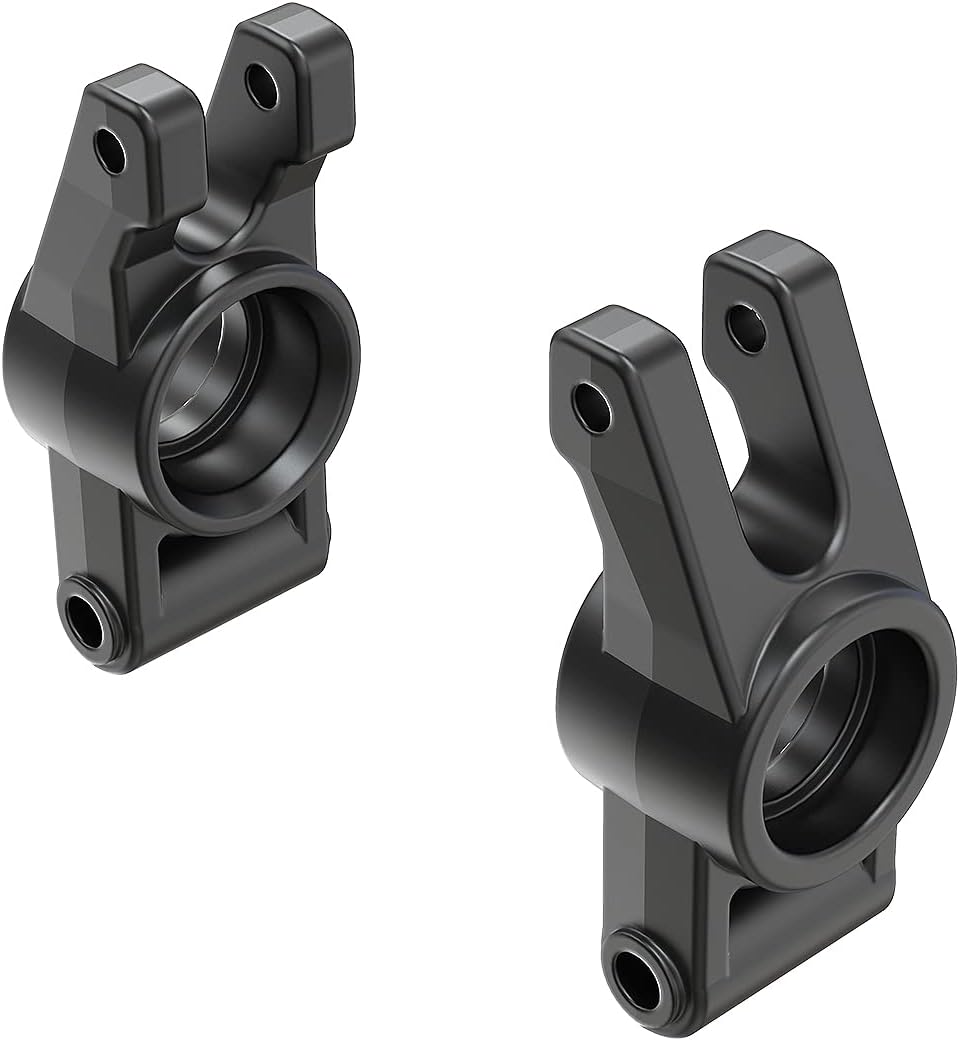
Image: A pair of black HYPER GO 14260 RC Car Rear Hubs, shown from a slightly angled perspective, highlighting their design and mounting points.
What's Included
The package for the HYPER GO 14260 Rear Hubs includes the following components:
- One (1) Pair of HYPER GO 14260 Rear Hubs
Note: Additional tools or parts required for installation (e.g., screws, wrenches, RC vehicle) are sold separately and are not included with this product.
Setup and Installation
Before beginning the installation, ensure your RC vehicle is powered off and the battery is disconnected. It is recommended to work on a clean, well-lit surface to prevent loss of small parts.
- Prepare the Vehicle: Carefully remove the wheels and any components obstructing access to the existing rear hubs. Refer to your vehicle's specific manual for detailed disassembly instructions.
- Remove Old Hubs: Locate the screws or pins securing the old rear hubs. Using appropriate tools, carefully remove these fasteners and detach the old hubs from the suspension arms and axle.
- Install New Hubs: Align the new HYPER GO 14260 Rear Hubs with the suspension arms and axle. Ensure the orientation is correct (left hub for left side, right hub for right side). Secure the new hubs using the original screws or pins. Do not overtighten fasteners.
- Reassemble: Reattach any components that were removed during disassembly, including the wheels. Ensure all connections are secure and there is no excessive play in the newly installed hubs.
- Check Functionality: Gently rotate the wheels to ensure smooth movement and proper alignment. Verify that the suspension components move freely without binding.

Image: A remote-controlled car mid-air, performing a jump over a concrete ramp in a skate park setting, demonstrating the vehicle's dynamic capabilities.
Operating Considerations
The HYPER GO 14260 Rear Hubs are designed to integrate seamlessly with compatible HYPER GO 1/14 scale RC vehicles. Once installed, they function as direct replacements for the original parts, maintaining the vehicle's intended performance characteristics.
- Compatibility: These hubs are specifically designed for HYPER GO models H14MK, 14301, and 14302. Using them with incompatible models may result in improper fit or reduced performance.
- Performance: Proper installation of these hubs ensures the rear wheels maintain correct alignment and support, which is crucial for stable handling and efficient power transfer.
- Battery Compatibility (General RC Car Information): While the hubs themselves do not use power, the performance of your RC car is dependent on its power source. Compatible batteries for HYPER GO RC cars typically include LiPo batteries.

Image: A 3S 2000 mAh LiPo battery pack, commonly used in RC vehicles, with its connectors visible.
Image: A 2S 3000 mAh LiPo battery pack, another common power source for RC vehicles, showing its compact design and wiring.
Maintenance
Regular inspection and maintenance of your HYPER GO 14260 Rear Hubs will extend their lifespan and ensure optimal performance of your RC vehicle.
- Cleaning: After each use, especially in dusty or dirty conditions, clean the hubs and surrounding areas with a soft brush or compressed air to remove debris. Avoid using harsh chemicals that could damage the plastic.
- Inspection: Periodically check the hubs for any signs of wear, cracks, or damage. Ensure all screws and fasteners are tight. Loose fasteners can lead to excessive play and premature wear.
- Bearing Check: If your vehicle's design includes bearings within the hubs, ensure they spin freely and are not gritty. Replace worn bearings as necessary.
- Lubrication: Apply a small amount of appropriate lubricant to moving parts if recommended by your RC vehicle's manufacturer. Avoid over-lubrication, which can attract dirt.
Troubleshooting
This section addresses common issues related to the HYPER GO 14260 Rear Hubs.
| Problem | Possible Cause | Solution |
|---|---|---|
| Excessive play in rear wheels | Loose fasteners; Worn bearings; Damaged hub | Tighten all screws securing the hub. Inspect and replace bearings if necessary. Replace the rear hub if it is cracked or severely damaged. |
| Wheel not spinning freely | Debris caught in hub/axle; Overtightened fasteners; Damaged bearing | Clean out any debris. Loosen fasteners slightly, then re-tighten to proper torque. Inspect and replace bearings if they are seized or gritty. |
| Hub appears cracked or broken | Impact damage; Material fatigue | The hub is a non-repairable part in this scenario. Replace the damaged rear hub with a new one. |
Specifications
| Attribute | Detail |
|---|---|
| Product Name | HYPER GO 14260 RC Car Accessories Rear Hubs (Pair) |
| Model Number | 14260 |
| Compatibility | HYPER GO 1/14 Scale RC Vehicles (H14MK, 14301, 14302) |
| Material | Durable Composite Plastic |
| Product Dimensions | 0.1 x 0.1 x 0.1 inches (per hub, approximate) |
| Item Weight | 0.317 ounces (total for pair, approximate) |
| Manufacturer | HYPER GO |
| Recommended Age | 14 years and up |
Support and Contact Information
For further assistance, technical support, or inquiries regarding replacement parts, please contact HYPER GO customer service. Refer to the official HYPER GO website or your product packaging for the most current contact details.
You can also visit the official HYPER GO store on Amazon for more products and information: HYPER GO Store