
Bifanuo TM004
Bifanuo Walking Pad Under Desk Treadmill with 5° Incline - Model TM004 User Manual
Brand: Bifanuo | Model: TM004
1. Introduction
Thank you for choosing the Bifanuo Walking Pad Under Desk Treadmill, Model TM004. This manual provides essential information for the safe and efficient operation, setup, and maintenance of your new fitness equipment. Please read this manual thoroughly before initial use and retain it for future reference.
2. Safety Information
WARNING: To reduce the risk of serious injury, read all important precautions and instructions in this manual before using the treadmill. Bifanuo assumes no responsibility for personal injury or property damage sustained by or through the use of this product.
- Always place the treadmill on a level, stable surface.
- Ensure there is at least 2 meters (6.5 feet) of clear space behind the treadmill and 0.6 meters (2 feet) on each side.
- Keep children and pets away from the treadmill during operation.
- The maximum user weight capacity is 265 pounds (120 kg). Do not exceed this limit.
- Wear appropriate athletic footwear. Do not use the treadmill barefoot or in socks.
- If you experience pain, dizziness, or shortness of breath, stop exercising immediately.
- Do not attempt to service the treadmill yourself. Contact customer support for assistance.
- Always unplug the treadmill from the power outlet when not in use, before cleaning, and before performing maintenance.
- This treadmill is designed for walking. Do not run on this device.
- The treadmill has a fixed 5% incline. Be aware of this incline when starting your workout.
3. Package Contents
Verify that all components are present in the package:
- Bifanuo Walking Pad Treadmill (Model TM004)
- Power Cord
- Remote Control
- User Manual (this document)

Image: Bifanuo Walking Pad Treadmill with its power cord and remote control.
4. Setup
The Bifanuo Walking Pad Treadmill requires no assembly. Follow these steps for initial setup:
- Unpack: Carefully remove the treadmill and all components from the packaging.
- Placement: Place the treadmill on a firm, level surface. Ensure adequate clearance around the unit as described in the Safety Information section.
- Power Connection: Connect the power cord to the treadmill's power input port, then plug the other end into a grounded electrical outlet.
- Remote Control: Ensure the remote control has batteries installed (if not pre-installed). The remote is used to operate the treadmill.

Image: The Bifanuo Walking Pad Treadmill positioned on a rug, ready for use.
5. Operating Instructions
The treadmill is operated using the included remote control.
5.1. Getting Started
- Step onto the treadmill belt carefully.
- Press the "Start" button on the remote control. The treadmill will typically start at a low speed.
- Use the speed adjustment buttons (+/-) on the remote to increase or decrease your walking speed. The speed range is 0.5 to 4.0 miles per hour (MPH).
- The LED display on the treadmill will show metrics such as Calories Burned, Distance, Speed, and Time.
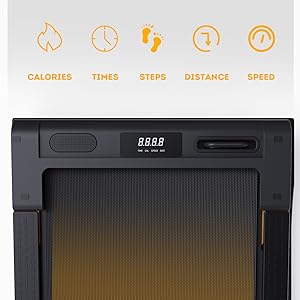
Image: The LED display panel indicating various workout data.
5.2. Incline Feature
This Bifanuo Walking Pad features a fixed 5% incline. This design is intended to increase calorie expenditure and engage leg and glute muscles more effectively compared to a flat walking surface. There is no adjustment for the incline.

Image: Visual representation of the treadmill's 5% incline design.
5.3. Ending Your Workout
To stop the treadmill, press the "Stop" button on the remote control. The belt will gradually slow down and come to a complete stop. Step off the treadmill once the belt has stopped moving.
6. Maintenance
Regular maintenance ensures the longevity and optimal performance of your treadmill. Always unplug the treadmill before performing any maintenance.
6.1. Cleaning
- Wipe down the treadmill's surfaces with a damp cloth after each use to remove sweat and dust.
- Do not use abrasive cleaners or solvents, as these can damage the finish.
- Keep the area around the treadmill clean and free of debris.
6.2. Belt Lubrication
The walking belt requires periodic lubrication to ensure smooth operation and prevent wear.
- Unplug the treadmill from the power outlet.
- Carefully lift the edge of the walking belt.
- Apply a small amount of silicone-based treadmill lubricant (not included, but often provided with treadmills or available separately) evenly under the center of the belt.
- Plug in the treadmill and run it at a slow speed (e.g., 1 MPH) for 2-3 minutes to distribute the lubricant.
- Lubricate the belt every 3-6 months, or after approximately 50 hours of use, depending on usage frequency.
6.3. Belt Adjustment
If the walking belt starts to drift to one side or feels loose, it may need adjustment. Refer to the specific instructions in the full user manual (if provided separately) or contact customer support for guidance. Incorrect adjustment can damage the belt or motor.
7. Troubleshooting
If you encounter issues with your Bifanuo Walking Pad, refer to the following common problems and solutions.
| Problem | Possible Cause | Solution |
|---|---|---|
| Treadmill does not start. | Power cord not properly connected; power switch off; remote control battery low. | Ensure power cord is securely plugged in. Check if the main power switch (if present) is ON. Replace remote control batteries. |
| Belt stops or moves erratically. | Belt requires lubrication; belt is too loose or too tight; motor overload. | Lubricate the walking belt (see Section 6.2). If the issue persists, contact customer support for belt adjustment. Ensure user weight is within limits. |
| Unusual noise during operation. | Loose components; belt friction; motor issue. | Check for any loose screws or parts. Lubricate the belt. If noise persists, discontinue use and contact customer support. |
| Remote control not responding. | Low or dead batteries; remote not paired. | Replace batteries in the remote control. If the remote needs re-pairing, refer to specific instructions or contact customer support. |
8. Specifications
| Feature | Detail |
|---|---|
| Brand | Bifanuo |
| Model Number | TM004 |
| Product Dimensions (L x W x H) | 43.7"D x 21.3"W x 7.2"H (111cm x 54cm x 18.3cm) |
| Item Weight | 55 Pounds (24.9 kg) |
| Maximum Weight Recommendation | 265 Pounds (120 kg) |
| Motor Horsepower | 2.25 HP |
| Speed Range | 0.5 - 4.0 MPH |
| Maximum Incline Percentage | 5% (Fixed) |
| Running Belt Dimensions (L x W) | 41.3"L x 16.3"W (105cm x 41.4cm) |
| Display Type | LED |
| Metrics Measured | Calories Burned, Distance, Speed, Time |
| Power Source | Corded Electric |
| Material | Wood (Frame) |
| Special Feature | Portable (with built-in wheels) |

Image: Built-in wheels for easy portability of the treadmill.
9. Warranty and Customer Support
9.1. Warranty Information
The Bifanuo Walking Pad Under Desk Treadmill (Model TM004) comes with a 1-year warranty from the date of purchase. This warranty covers manufacturing defects and workmanship. Please retain your proof of purchase for warranty claims. The warranty does not cover damage caused by misuse, accident, unauthorized modification, or normal wear and tear.
9.2. Customer Support
For any questions, concerns, or assistance with your product, please contact Bifanuo customer service. Our team is available to provide support and resolve any issues you may encounter.
You can typically reach customer service through the platform where you purchased the product (e.g., Amazon's messaging system).

Image: Guide on contacting Bifanuo customer service via the Amazon platform.
Ask a question about this manual
Ask about setup, troubleshooting, compatibility, parts, safety, or missing instructions. Manuals+ will review the question and use this page’s manual context to help answer it.