
1. Introduction
Thank you for choosing the ITOTIN Wireless Lavalier Microphone system. This compact and versatile microphone system (Model ITT-S16I) is designed for high-quality audio recording, live streaming, interviews, vlogging, and other content creation. It features intelligent noise reduction, a long working time, and a simple plug-and-play setup for seamless integration with compatible devices.
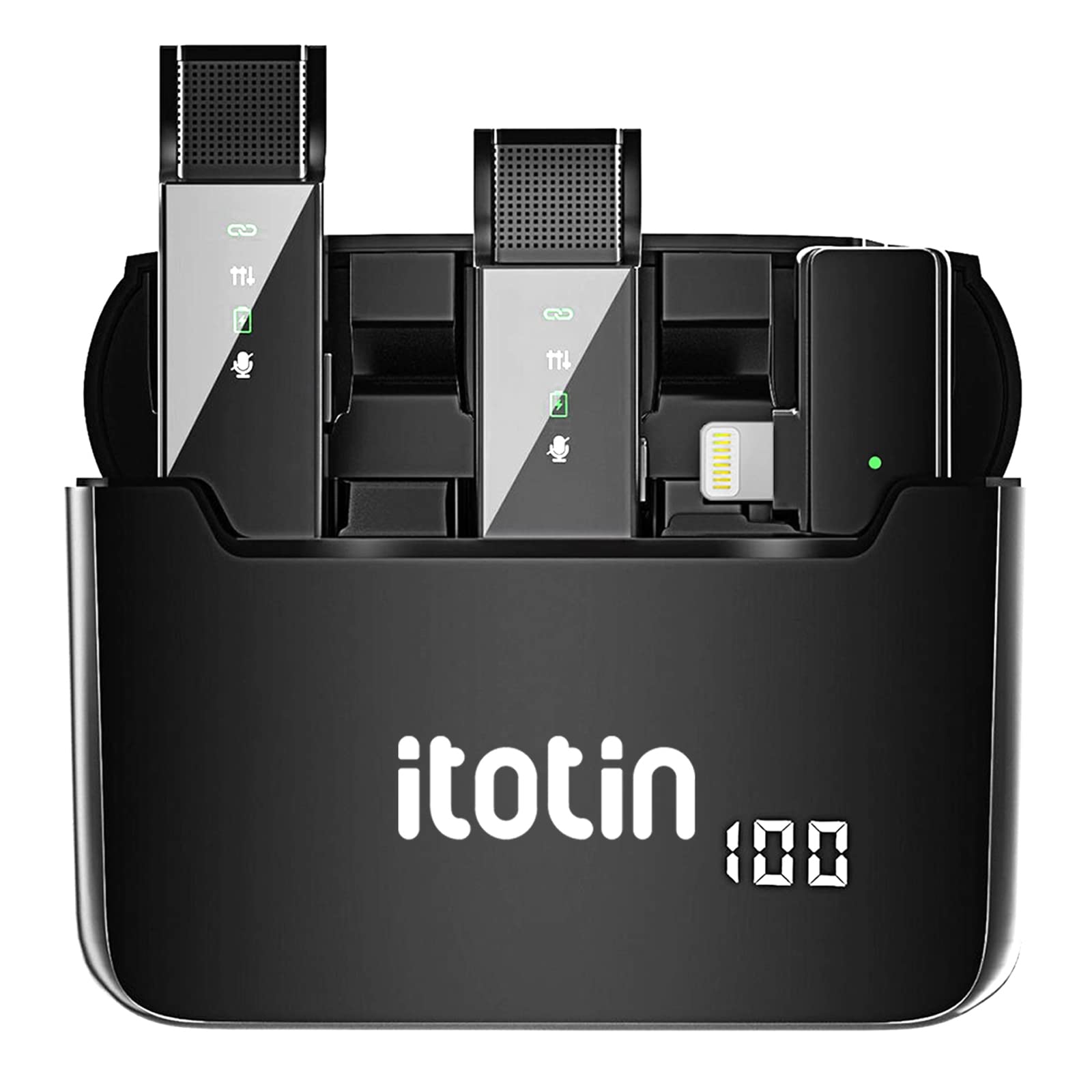
Figure 1: ITOTIN Wireless Lavalier Microphone System (ITT-S16I)
2. Package Contents
Please check the package contents upon unboxing to ensure all components are present:
- 2 x Wireless Lavalier Microphone Transmitters (TX)
- 1 x Wireless Receiver (RX)
- 1 x Portable Charging Case
- 1 x User Manual
- 1 x Charging Cable (USB)

Figure 2: Package Contents Overview
3. Product Features
The ITOTIN Wireless Lavalier Microphone system offers several key features to enhance your audio recording experience:
- Intelligent Noise Reduction: Built-in DSP noise reduction chip for clear and clean voice capture.
- Extended Battery Life: Up to 6 hours of continuous recording on a single charge.
- Plug & Play Operation: No pairing or additional apps required for quick setup.
- 360° Sound Reception: Omnidirectional pickup pattern for comprehensive audio capture.
- 2.4G Wireless Transmission: Stable and reliable wireless connectivity.
- Portable Charging Case: Provides convenient storage and multiple recharges for on-the-go use.

Figure 3: Key Product Features

Figure 4: Intelligent Noise Reduction in Action

Figure 5: 6 Hours Working Time
4. Setup Guide
The ITOTIN Wireless Lavalier Microphone system is designed for quick and easy setup. Follow these steps to begin recording:
- Charge the Devices: Ensure both the transmitters and the receiver are fully charged using the provided charging case and USB cable. The charging case itself should also be charged.
- Connect the Receiver: Plug the receiver into the charging port of your smartphone or compatible device. The receiver will automatically power on.
- Power On Transmitters: Take the microphone transmitters out of the charging case. They will automatically power on and attempt to pair with the receiver. A green indicator light on both the transmitter and receiver will confirm a successful connection.
- Attach Microphone: Clip the lavalier microphone transmitter to your clothing, ensuring it is positioned close to your mouth for optimal sound capture.

Figure 6: Plug & Play Setup Steps
5. Operating Instructions
Once set up, operating the ITOTIN Wireless Lavalier Microphone is straightforward:
5.1 Power On/Off
- Transmitters: Automatically power on when removed from the charging case. Press and hold the power button to manually turn off or on.
- Receiver: Automatically powers on when plugged into a device. Unplug to power off.
5.2 Recording
Open your preferred recording application (e.g., camera app, voice recorder, live streaming app) on your smartphone. The system will automatically be recognized as the audio input source. Begin recording as usual.
5.3 Noise Reduction
The intelligent noise reduction feature is active by default. For optimal performance, ensure the microphone is positioned correctly and avoid direct exposure to strong wind or excessive background noise.
5.4 Usage Scenarios
This microphone system is suitable for various applications:
- Video Recording
- Live Streaming
- Interviews
- Vlogging
- Online Courses
- Podcasts

Figure 7: Multi-scene Application Examples
Video 1: Overview and demonstration of the ITOTIN Wireless Lavalier Microphone system, showing its components, setup, and use in various recording environments.
6. Maintenance
To ensure the longevity and optimal performance of your ITOTIN Wireless Lavalier Microphone, follow these maintenance guidelines:
- Cleaning: Use a soft, dry cloth to clean the microphone transmitters, receiver, and charging case. Avoid using liquid cleaners or abrasive materials.
- Storage: Store the system in its charging case when not in use to protect it from dust and physical damage. Keep it in a cool, dry place away from direct sunlight and extreme temperatures.
- Charging: Regularly charge the devices, even if not in frequent use, to maintain battery health. Avoid overcharging or completely draining the battery for extended periods.
- Avoid Moisture: Do not expose the devices to water or high humidity, as this can damage internal components.
7. Troubleshooting
If you encounter any issues with your ITOTIN Wireless Lavalier Microphone, refer to the following troubleshooting tips:
| Problem | Possible Cause | Solution |
|---|---|---|
| No sound or low volume | Microphone not powered on; Receiver not properly connected; Device volume too low; Microphone too far from source. | Ensure transmitters are powered on (green light solid); Re-plug receiver firmly into device; Increase device volume; Position microphone closer to the sound source. |
| Intermittent connection or static | Interference from other wireless devices; Out of range; Low battery. | Move away from other 2.4GHz devices; Ensure transmitter and receiver are within effective range; Recharge transmitters and receiver. |
| Transmitter not charging | Improper placement in charging case; Charging case battery low; Faulty cable. | Ensure transmitters are correctly seated in the charging slots; Charge the charging case; Try a different USB charging cable. |
| Device not recognizing receiver | Receiver not fully inserted; Device compatibility issue. | Ensure receiver is fully inserted into the device's charging port; Verify your device is compatible with external USB audio input. |
8. Specifications
Technical specifications for the ITOTIN Wireless Lavalier Microphone (Model ITT-S16I):
- Model Number: ITT-S16I
- Brand: ITOTIN
- Connectivity Technology: 2.4G Wireless, USB
- Connector Type: USB (Lightning for iPhone/iPad models)
- Compatible Devices: Smartphone, Tablet
- Microphone Form Factor: Lavalier
- Polar Pattern: Omnidirectional
- Number of Channels: 2
- Power Source: Battery Powered
- Signal-to-Noise Ratio: 70 dB
- Item Weight: 4.6 ounces
- Package Dimensions: 5.79 x 3.15 x 1.26 inches
- UPC: 651810106859
9. Warranty and Support
ITOTIN products are manufactured to high-quality standards. For warranty information, please refer to the documentation included with your purchase or contact ITOTIN customer support.
If you require further assistance or have questions not covered in this manual, please contact our customer support team through the official ITOTIN website or your retailer's support channels. Please have your model number (ITT-S16I) and purchase details ready when contacting support.