
1. Introduction
The POFJOEQ Cash Register Playset (Model 668-125) offers children aged 3 and above an engaging and educational pretend play experience. This comprehensive 47-piece set simulates a real shopping environment, allowing children to explore roles as shoppers or cashiers. It includes a functional scanner, calculator, play money, credit cards, and a variety of play food items, fostering social skills, cognitive development, and hands-on ability through imaginative play.

Figure 1: POFJOEQ Cash Register Playset (Model 668-125)
2. Safety Information
- Age Recommendation: This playset is designed for children aged 3 years and older.
- Small Parts Warning: The set contains small parts (play money, coins, small food items) which may pose a choking hazard for children under 3 years. Adult supervision is recommended.
- Material Safety: Made from sturdy and shatterproof ABS plastic, certified to be 100% safe and free from harmful chemicals.
- Supervision: Always ensure children are supervised during play to prevent misuse and ensure safety.
- Cleaning: Clean the playset with a damp cloth. Do not immerse electronic components in water.
3. What's in the Box
The POFJOEQ Cash Register Playset includes a total of 47 accessories for a complete role-play experience:
- Cash Register Unit with integrated calculator and scanner holder
- Working Scanner (requires batteries, not included)
- Play Money (banknotes and coins)
- Credit Card
- Shopping Cart (as per product description, though "shopping car" might be a typo for cart)
- Play Food Set: beverages, cookies, cakes, sushi, pizza, milk, fruit drinks, candy, doughnuts, fruit snacks, yogurt, ice cream.
- Shopping Bag
- Change Purse

Figure 2: All included accessories in the playset.
4. Setup Instructions
Follow these steps to assemble and prepare your cash register playset for use:
- Unpack Components: Carefully remove all items from the packaging. Verify that all 47 pieces listed in Section 3 are present.
- Place Cash Register: Position the main cash register unit on a flat, stable surface.
- Attach Shelves: Securely attach the side shelves to the main unit. These shelves are designed to hold the various play food items.
- Insert Batteries (Scanner): Locate the battery compartment on the scanner. Insert the required batteries (not included) according to the polarity indicators. Close the compartment securely.
- Organize Accessories: Arrange the play money, coins, credit card, and play food items within the cash register's compartments, shelves, and the freezer section as desired.
- Apply Stickers (if applicable): Some items may require sticker application. Refer to the product box for guidance on sticker placement.

Figure 3: Playset configured in "Shopping Model" and "Sales Model".
5. Operating Instructions
5.1. Using the Scanner
The playset includes a realistic scanner to simulate scanning products:
- Hold the scanner in your hand.
- Point the scanner's light towards the barcode on a play food item.
- Press the button on the scanner to activate the light and sound, simulating a scan.
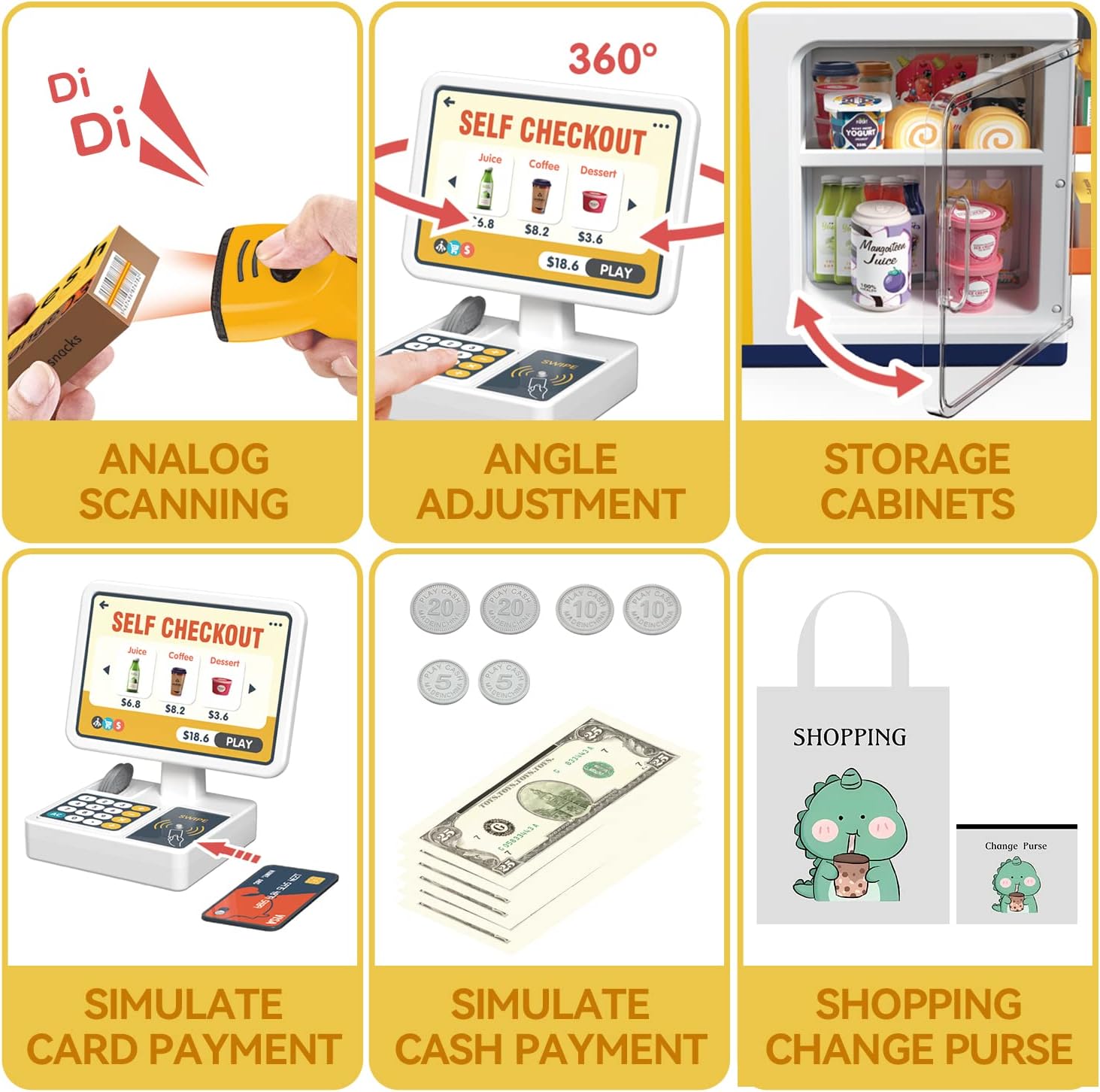
Figure 4: Demonstrating analog scanning with the toy scanner.
5.2. Making Payments
Children can practice different payment methods:
- Cash Payment: Use the included play banknotes and coins. The cash register has a designated area for handling cash.
- Card Payment: Use the provided play credit card. Swipe the card through the designated slot on the cash register to simulate a transaction.

Figure 5: Simulating cash and card payments.
5.3. Using the Calculator and Display
The cash register features a pretend calculator and a display screen:
- Press the buttons on the calculator keypad to simulate price entry and calculations.
- The display screen can be adjusted 360 degrees and shows various play items with their pretend prices, enhancing the shopping experience.

Figure 6: Adjustable self-checkout screen and calculator.
5.4. Freezer and Coffee Dispenser
The playset includes interactive elements for a more immersive experience:
- Freezer Section: Open the transparent door to store and retrieve play items like yogurt, ice cream, and juice.
- Coffee Dispenser: Place the play coffee cups under the dispensers and press the buttons to simulate serving coffee.

Figure 7: Interactive freezer and coffee dispenser.
5.5. Official Product Videos
For a visual guide on operating the playset, please refer to the official product videos below:
Video 1: Overview of the POFJOEQ Cash Register Playset features and functionality.
Video 2: Detailed product overview demonstrating various play scenarios.
6. Maintenance
- Cleaning: Wipe down all plastic surfaces with a soft, damp cloth. Avoid using harsh chemicals or abrasive cleaners.
- Storage: When not in use, store the playset and all accessories in a clean, dry place away from direct sunlight to prevent fading and damage.
- Battery Replacement: If the scanner's sounds or lights become dim, replace the batteries with new ones of the correct type and size.
7. Troubleshooting
| Problem | Possible Cause | Solution |
|---|---|---|
| Scanner not making sound/light. | Batteries are low or incorrectly installed. | Replace batteries, ensuring correct polarity. |
| Play food items do not fit on shelves. | Incorrect placement or orientation. | Ensure items are placed correctly and not forced. Some items are designed for specific slots. |
| Cash register buttons unresponsive. | Not an electronic feature; buttons are for pretend play. | The calculator is a pretend feature and does not have electronic functionality. |
8. Specifications
| Feature | Detail |
|---|---|
| Brand | POFJOEQ |
| Model Number | 668-125 |
| Age Range | 3 to 12 years |
| Included Components | 47pcs Cash Register Toy Playset |
| Material Type | ABS Plastic |
| Item Dimensions (L x W x H) | 16.1 x 14.5 x 8.1 inches |
| Item Weight | 1.28 Kilograms |
| Color | Yellow |
| Educational Objective | Role Play, Social Skill |
9. Warranty and Support
For any questions regarding product warranty, replacement parts, or technical support, please contact POFJOEQ customer service through the retailer's platform where the product was purchased. Please retain your proof of purchase for warranty claims.


