
AIRHOT AH-TM400-8-WH-US
AIRHOT 2-in-1 Under Desk Treadmill Instruction Manual
Model: AH-TM400-8-WH-US / TM401
Brand: AIRHOT
1. Introduction and Safety Information
Thank you for choosing the AIRHOT 2-in-1 Under Desk Treadmill. This manual provides essential information for the safe and efficient operation, maintenance, and troubleshooting of your new fitness equipment. Please read this manual thoroughly before initial use and retain it for future reference.
Important Safety Instructions
- Always place the treadmill on a flat, stable surface.
- Ensure adequate clear space around the treadmill (at least 2 feet on all sides).
- Keep children and pets away from the treadmill during operation.
- Do not use the treadmill if you weigh more than 120 kg (265 lbs).
- Wear appropriate athletic footwear and clothing.
- If you experience pain, dizziness, or shortness of breath, stop exercising immediately.
- Unplug the treadmill from the power outlet when not in use or before cleaning/maintenance.
- Do not operate the treadmill if the power cord or plug is damaged.
- This treadmill is designed for indoor use only.
2. Product Overview
The AIRHOT 2-in-1 Under Desk Treadmill is designed for both walking and light running, offering a convenient way to stay active. Its compact and quiet design makes it suitable for various environments.
Key Features
- Space-Saving Design: With a thickness of only 4.5 inches, it can be easily stored under a desk, bed, or sofa. Integrated wheels allow for effortless movement.
- Powerful & Quiet Motor: Equipped with a 2.5 HP motor, supporting users up to 265 lbs (120 kg). Operates at less than 45dB, ensuring a quiet workout.
- Advanced Shock Absorption: Features a dual-layer running belt system with 5 anti-slip layers, 10 shock absorbers, and 4 rubber pads to reduce joint impact and protect knees.
- Grass-Textured Running Belt: Provides enhanced grip and wear resistance for safety and durability.
- Accurate Fitness Tracking: LED display tracks calories burned, speed, time, and distance.
- Remote Control: Conveniently adjust speed and mode during your workout.
- Versatile Speed Range: Adjustable from 0.6 to 3.7 mph (1 to 10 km/h) to suit walking, jogging, or light running.
- Optional Incline: Features an adjustable incline up to 15 degrees for varied workout intensity.
Components Included
- AIRHOT 2-in-1 Under Desk Treadmill
- Remote Control
- User Manual (this document)
- Lubricating Oil
- Power Cord
- Safety Key

Figure 2.1: The treadmill features built-in wheels for easy transport and can be stored flat under furniture or upright against a wall to save space.

Figure 2.2: The extra-wide running area measures approximately 15.4 inches in width and 37.5 inches in length, providing ample space for comfortable movement.

Figure 2.3: The comfortable shock absorption system effectively reduces joint impact, featuring a 5-layer running belt, double-layer platform, 10 shock absorber points, and 4 bee nest shock pads.
3. Setup
The AIRHOT 2-in-1 Under Desk Treadmill requires no assembly. Follow these steps for initial setup:
- Unpack: Carefully remove the treadmill and all components from the packaging.
- Placement: Place the treadmill on a firm, level surface. Ensure there is at least 2 feet of clear space around the unit.
- Power Connection: Connect the power cord to the treadmill's power input and then plug it into a grounded electrical outlet.
- Safety Key: Attach the safety key to the designated slot on the treadmill console. The treadmill will not operate without the safety key in place. Clip the other end of the safety key to your clothing during use.
- Remote Control: Ensure the remote control has batteries installed (typically 2x AAA, not always included, check packaging).
Your treadmill is now ready for use.
4. Operating Instructions
Powering On/Off
- To power on, ensure the safety key is attached, then press the power button on the remote control or the treadmill console. The LED display will illuminate.
- To power off, press the power button again. Always unplug the treadmill from the wall outlet after use.
Using the Remote Control
The remote control allows you to conveniently adjust settings during your workout.

Figure 4.1: The LED display provides real-time fitness data, and the remote control allows for easy adjustment of speed and mode.
- Start/Stop: Press the Start/Stop button to begin or end your workout.
- Speed Adjustment: Use the + and - buttons to increase or decrease the speed. The speed range is 0.6 to 3.7 mph (1 to 10 km/h).
- Mode Selection: Some models may have a mode button to switch between different display metrics or pre-set programs. Refer to the display for current mode.
Understanding the LED Display
The integrated LED display shows your workout data:
- Time: Duration of your workout.
- Distance: Total distance covered.
- Speed: Current speed in mph or km/h.
- Calories: Estimated calories burned.
Workout Modes and Incline
The treadmill supports various activities:
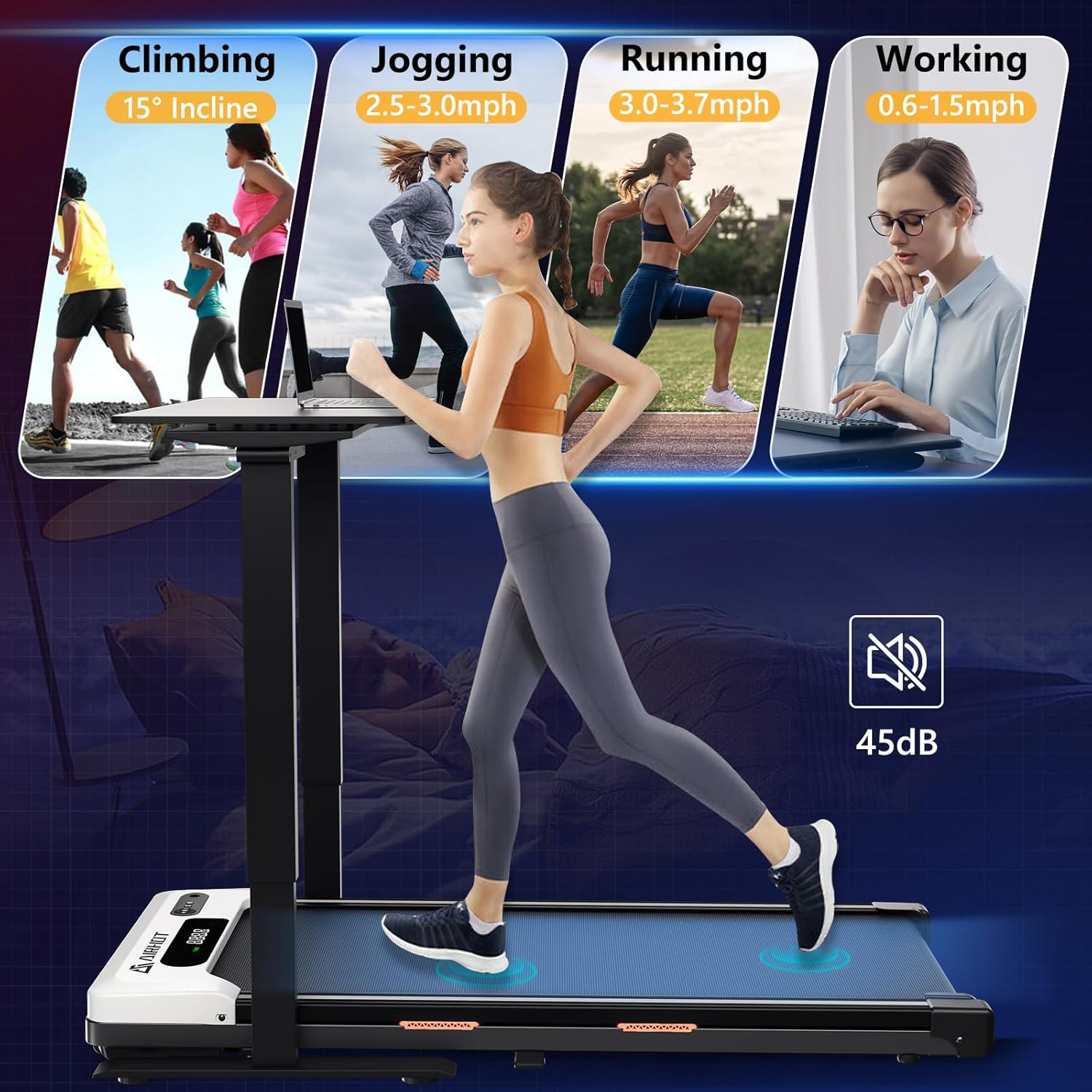
Figure 4.2: The treadmill supports various activities including climbing with 15° incline, jogging at 2.5-3.0 mph, running at 3.0-3.7 mph, and working at 0.6-1.5 mph, all while maintaining a low noise level of 45dB.
- Walking/Working (0.6-1.5 mph): Ideal for light activity while working or for warm-up.
- Jogging (2.5-3.0 mph): Suitable for a moderate cardio workout.
- Running (3.0-3.7 mph): For more intense cardio sessions.
- Climbing (15° Incline): Manually adjust the incline to simulate uphill walking for increased intensity.

Figure 4.3: The treadmill offers an adjustable incline feature, allowing users to switch between a flat surface (0% incline) and an elevated position (15° incline) to vary workout intensity.
5. Maintenance
Regular maintenance ensures the longevity and optimal performance of your treadmill.
Cleaning
- Always unplug the treadmill before cleaning.
- Wipe down the console and exterior surfaces with a soft, damp cloth. Avoid abrasive cleaners or solvents.
- Periodically vacuum under the treadmill to prevent dust and debris buildup.
Lubrication
The running belt requires periodic lubrication to reduce friction and wear. Use the provided lubricating oil.
- Unplug the treadmill.
- Loosen the belt tension by turning the rear roller bolts counter-clockwise (usually 2-3 turns).
- Lift the edge of the running belt and apply a small amount of silicone lubricant (provided) in a Z-pattern across the center of the deck.
- Tighten the rear roller bolts evenly until the belt is snug but not overly tight.
- Plug in the treadmill and run it at a low speed (e.g., 1 mph) for 5 minutes to distribute the lubricant.
- Lubricate every 3 months or after 50 hours of use, whichever comes first.
Belt Adjustment
If the running belt shifts to one side or slips, it may need adjustment.
- Centering the Belt: If the belt drifts to the left, turn the left rear roller bolt clockwise in quarter-turn increments. If it drifts to the right, turn the right rear roller bolt clockwise. Run the treadmill at a low speed after each adjustment to check alignment.
- Tightening the Belt: If the belt slips during use, it may be too loose. Turn both rear roller bolts clockwise in quarter-turn increments, ensuring they are turned evenly. Test for slipping. Do not overtighten.
6. Troubleshooting
Refer to this section for common issues and their solutions.
| Problem | Possible Cause | Solution |
|---|---|---|
| Treadmill does not power on. | Power cord unplugged, safety key not inserted, power switch off, circuit breaker tripped. | Check power cord connection. Ensure safety key is fully inserted. Check main power switch. Reset circuit breaker if necessary. |
| Running belt stops or slips. | Belt too loose, insufficient lubrication, motor overload. | Adjust belt tension (see Maintenance). Lubricate the running belt (see Maintenance). Reduce user weight or speed. |
| Running belt drifts to one side. | Belt misalignment. | Adjust belt alignment (see Maintenance). |
| Unusual noise during operation. | Loose parts, lack of lubrication, foreign object. | Check for and tighten any loose screws. Lubricate the belt. Inspect for any foreign objects under the belt. |
| Remote control not working. | Dead batteries, remote out of range, interference. | Replace batteries. Ensure remote is pointed at the treadmill's receiver. Remove any obstructions. |
If the problem persists after attempting these solutions, please contact customer support.
7. Specifications
| Feature | Detail |
|---|---|
| Brand | AIRHOT |
| Model Number | AH-TM400-8-WH-US / TM401 |
| Motor Power | 2.5 HP |
| Speed Range | 0.6 - 3.7 mph (1 - 10 km/h) |
| Maximum Weight Capacity | 120 kg (265 lbs) |
| Running Surface Dimensions (L x W) | 40 inches x 15.4 inches (approx. 101.6 cm x 39.1 cm) |
| Product Dimensions (L x W x H) | 121 cm x 50 cm x 10.5 cm (approx. 47.6 x 19.7 x 4.1 inches) |
| Folded Size (L x W x H) | 20 inches x 25 inches x 4 inches (approx. 50.8 cm x 63.5 cm x 10.16 cm) |
| Item Weight | 45 lbs (approx. 20.4 kg) |
| Noise Level | Below 45 dB |
| Display Type | LED |
| Material | Alloy Steel |
| Special Features | Foldable, Built-in Wheels, Remote Control |
| Assembly Required | No |
8. Warranty and Support
AIRHOT provides reliable after-sales support for your product.
- Product Warranty: Your AIRHOT treadmill comes with a one-year product warranty from the date of purchase. This warranty covers manufacturing defects and material flaws under normal use.
- Customer Service: For any questions, concerns, or warranty claims, please contact our professional after-sales service team. We offer 24-hour service support to ensure your satisfaction and peace of mind.
- Contact Information: Please refer to the contact details provided on the AIRHOT official website or your purchase documentation for the most up-to-date support channels.
Please retain your proof of purchase for warranty validation.
Related Documents - AH-TM400-8-WH-US
 |
AIRHOT Treadmill User Manual Comprehensive user manual for the AIRHOT Under Desk Treadmill, covering safety precautions, assembly, operation, maintenance, and troubleshooting. |
 |
AIRHOT TT-300 Treadmill User Manual and Instructions Comprehensive guide for the AIRHOT TT-300 treadmill, covering safety precautions, assembly, usage instructions, maintenance, and troubleshooting. Learn how to operate your treadmill for optimal health and fitness. |
 |
AIRHOT P2-C Walking Pad Treadmill User Manual User manual for the AIRHOT P2-C walking pad treadmill. Includes setup, operation, safety, maintenance, and troubleshooting for home fitness. |
 |
AIRHOT TT-300 Walking Pad Treadmill User Manual Comprehensive user manual for the AIRHOT TT-300 Walking Pad Treadmill, covering security cautions, assembly, operation, maintenance, and troubleshooting. Includes technical specifications and part configurations. |
 |
AIRHOT TT-300 Walking Pad Treadmill User Manual Comprehensive user manual for the AIRHOT TT-300 walking pad treadmill, covering safety precautions, assembly, operation, maintenance, and troubleshooting. Includes technical specifications and parts list. |
 |
Руководство по эксплуатации и техническому обслуживанию фаршемешалок AIRHOT MM, MME Полное руководство по эксплуатации и техническому обслуживанию для фаршемешалок AIRHOT моделей MM-11, MM-20, MM-20FH, MM-30FH, MME-11, MME-20. Включает технические характеристики, схемы, списки запасных частей, инструкции по установке, эксплуатации, чистке, обслуживанию, хранению и утилизации, а также раздел по устранению неисправностей. |
Ask a question about this manual
Ask about setup, troubleshooting, compatibility, parts, safety, or missing instructions. Manuals+ will review the question and use this page’s manual context to help answer it.