
Introduction
This instruction manual provides guidance for the installation and use of the ePartSolution replacement Type C USB charging port dock connector board, specifically designed for the ONN 100026191 tablet. This component is a brand new replacement part intended to restore charging and data transfer functionality to your device.
Important Safety Information
Please note that the installation of this replacement part can be difficult and requires specialized tools and technical knowledge. We strongly recommend that this procedure be performed by a qualified technician. Attempting installation without proper expertise may result in damage to your tablet or the replacement part, voiding any potential warranty.
Setup (Installation)
The replacement of the charging port involves disassembling your ONN 100026191 tablet. Due to the delicate nature of tablet components, professional installation is highly recommended.
- Power Off Device: Ensure your ONN tablet is completely powered off before beginning any work.
- Disassembly: Carefully open the tablet casing. This often requires heat to loosen adhesive and specialized prying tools.
- Disconnect Battery: Locate and disconnect the tablet's battery to prevent short circuits during the repair.
- Locate and Remove Old Port: Identify the existing charging port board. Carefully disconnect any flex cables and unscrew or unclip the old board from the tablet's frame.
- Install New Port: Position the new ePartSolution charging port board in place. Secure it with screws or clips as per the original design. Reconnect all necessary flex cables, ensuring they are properly seated.
- Reconnect Battery: Reconnect the tablet's battery.
- Test Functionality: Before fully reassembling, briefly power on the tablet and test the charging functionality with a compatible USB Type C cable and charger.
- Reassembly: If the test is successful, carefully reassemble the tablet casing, ensuring all clips and adhesives are properly secured.

This image displays the replacement Type C USB charging port board, showing the connector, flex cable, and mounting points. It is the component designed to replace the original charging port in your ONN 100026191 tablet.
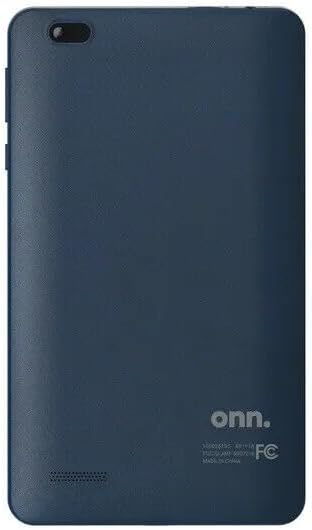
This image shows the back of an ONN tablet, illustrating the device into which the replacement charging port is installed. The tablet features a dark blue finish and the 'onn.' logo.
Operating
Once the replacement charging port is successfully installed, it will function identically to the original port.
- Charging: Connect a compatible USB Type C charging cable to the port and a power adapter. Ensure the connection is firm. The tablet should indicate that it is charging.
- Data Transfer: Connect a compatible USB Type C cable to the port and to a computer. Your tablet should be recognized by the computer for data transfer purposes.
Maintenance
Proper care of your tablet's charging port can extend its lifespan and ensure reliable performance.
- Keep Clean: Periodically inspect the charging port for dust, lint, or debris. Use a soft, dry brush or compressed air to gently clean the port. Avoid using sharp objects.
- Gentle Handling: Always insert and remove USB cables gently and directly. Avoid wiggling or applying excessive force, which can damage the internal pins of the port.
- Proper Storage: Store your tablet in a clean, dry environment to prevent foreign objects from entering the port.
Troubleshooting
If you encounter issues after installing the replacement charging port, consider the following troubleshooting steps:
- Tablet Not Charging:
- Verify that the USB Type C cable and power adapter are functional by testing them with another device.
- Ensure the charging port is clean and free of debris.
- Check that the charging port board is correctly installed and all flex cables are securely connected.
- Slow Charging:
- Use the original charger or a high-quality, compatible charger and cable.
- Ensure no background applications are consuming excessive power during charging.
- No Data Transfer:
- Ensure the USB cable is capable of data transfer (some cables are charge-only).
- Check your computer's drivers for the tablet.
- Verify the tablet's USB connection settings (e.g., 'File Transfer' mode).
- Loose Connection:
- If the cable feels loose in the port, re-check the installation to ensure the board is securely mounted.
- Inspect the port for any visible physical damage.
Specifications
- Brand: ePartSolution
- Manufacturer: JM International Inc
- Compatible Devices: ONN 100026191 Tablet
- Connector Type: USB Type C
- Connectivity Technology: USB
- Material: Plastic
- UPC: 618145032055
- ASIN: B0C2JBHPQR
- GTIN: 618145032055
Warranty and Support
This product comes with a 30-day warranty from the date of purchase. This warranty covers manufacturing defects but does not cover damage caused by improper installation, misuse, or accidental damage.
For warranty claims, technical assistance, or support, please contact the seller, eRepairSolution_Ships From Chicago, through your purchase platform. Please have your order details ready when contacting support.