
Introduction
This manual provides detailed instructions for the Bigmeda Kids Digital Sport Watch, Model BMJBSB. This watch is designed for children aged 5-12, featuring time display, alarm clock, stopwatch, and basic fitness tracking functionalities without requiring a smartphone app. Please read this manual thoroughly before using the watch to ensure proper operation and maintenance.
Product Overview
The Bigmeda Kids Digital Sport Watch is a versatile device with several key features:
- Digital Time Display: Shows current time, date, and day of the week.
- Fitness Tracker: Counts steps, calculates calories burned, and measures distance traveled. No app connection required.
- Alarm Clock: Two silent vibration alarms can be set.
- Stopwatch: For timing activities.
- EL-Backlight: For clear display in low light conditions.
- Waterproof: 5ATM rated, suitable for hand washing and rain. Not for swimming or bathing.
- USB Charging: Integrated USB port for convenient charging.

Image: An infographic illustrating the various features of the Bigmeda Kids Digital Sport Watch.

Image: Front view of the Bigmeda Kids Digital Sport Watch, highlighting the A and B buttons, and icons for steps, distance, calories, alarm, and battery.
Package Contents
- Bigmeda Kids Digital Sport Watch (Model BMJBSB)
- USB Charging Cable
- Instruction Manual
Setup
1. Charging the Watch
Before first use, fully charge the watch. A full charge takes approximately one hour and provides power for 15-20 days of use.
- Carefully remove the watch strap from one side to reveal the integrated USB charging port.
- Insert the USB port directly into any standard USB adapter (e.g., computer, power bank, wall charger).
- The watch display will indicate charging status.
- Once fully charged, disconnect the watch and reattach the strap securely.
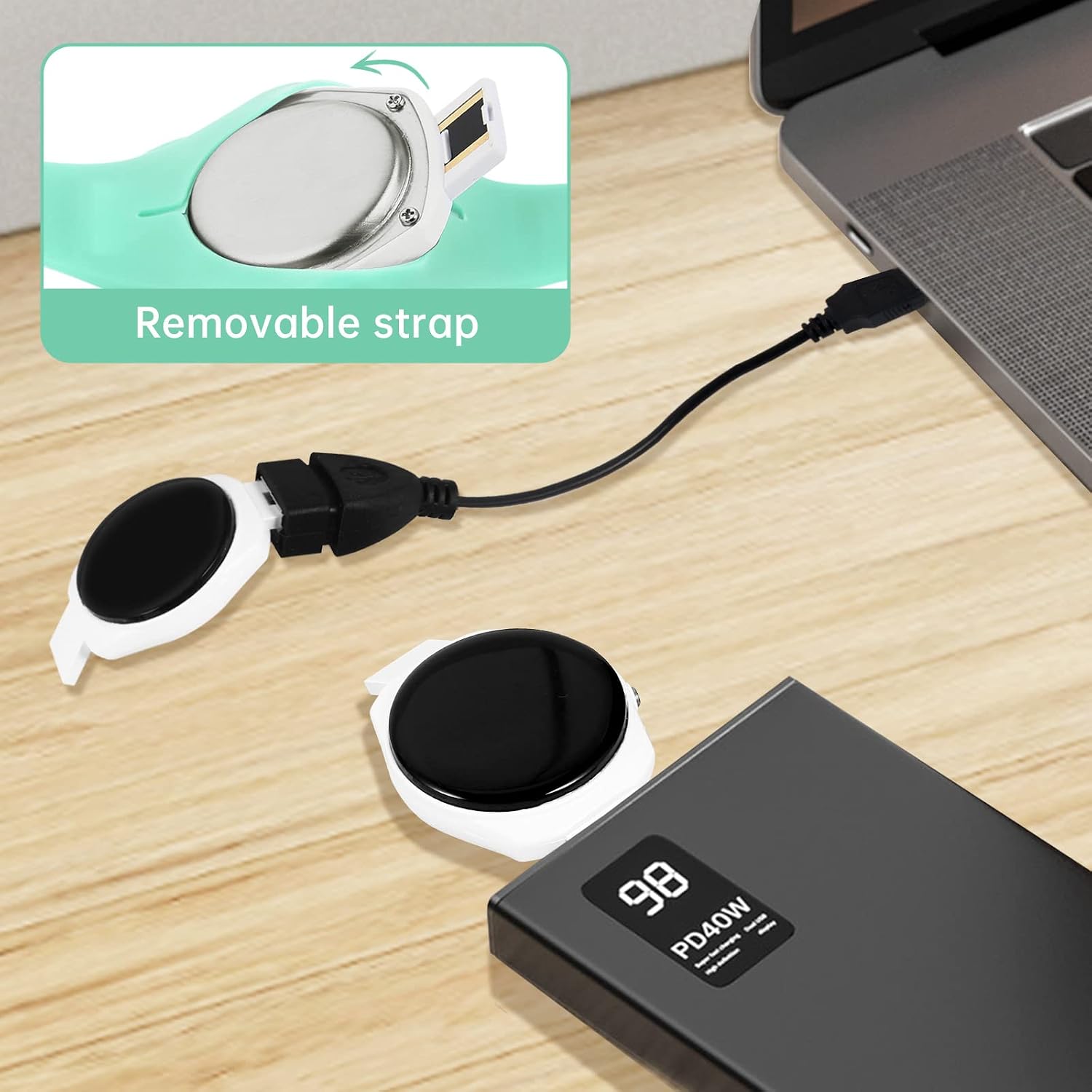
Image: The watch with one strap removed, revealing the USB charging connector, plugged into a power bank.

Image: Close-up showing how to detach the strap to access the USB charging port, and how to reattach it.
2. Initial Time and Date Setting
Upon first use or after the battery is completely depleted, you may need to set the time and date.
- Press and hold Button A (top button) to enter setting mode. The hour display will flash.
- Press Button B (bottom button) repeatedly to adjust the hour.
- Press Button A again to move to the minute setting. The minute display will flash.
- Press Button B repeatedly to adjust the minutes.
- Continue this process for setting the year, month, and day.
- Press Button A one last time to exit setting mode and save changes.
Operating Instructions
Navigating Modes
The watch has several modes: Time, Pedometer, Calories, Distance, Alarm, and Stopwatch. Press Button B to cycle through these modes.
1. Time Display
This is the default display mode, showing the current time, date, and day of the week.
- To activate the backlight, press Button A briefly. The backlight will illuminate for a few seconds.
2. Fitness Tracking (Pedometer, Calories, Distance)
The watch automatically tracks your child's activity throughout the day.
- From the Time display, press Button B once to view the Pedometer (steps count).
- Press Button B again to view Calories burned.
- Press Button B once more to view Distance traveled.
- The watch resets daily activity data automatically at midnight.

Image: Kids engaged in activity, illustrating the watch's fitness tracking capabilities for steps, distance, and calories.
3. Setting the Alarm Clock
The watch supports two silent vibration alarms.
- From the Time display, press Button B until you reach the Alarm mode (indicated by an alarm icon).
- Press and hold Button A to enter alarm setting mode. The hour will flash.
- Press Button B to adjust the hour.
- Press Button A to move to minutes, then use Button B to adjust.
- Press Button A again to toggle the alarm ON/OFF.
- Press Button A one last time to save and exit.
- Repeat for the second alarm if desired.
Note: This watch features a silent vibration alarm, designed not to disturb others.
4. Using the Stopwatch
- From the Time display, press Button B until you reach the Stopwatch mode (indicated by a stopwatch icon).
- Press Button A to start the stopwatch.
- Press Button A again to pause the stopwatch.
- While paused, press Button B to reset the stopwatch to zero.
- To exit stopwatch mode, press Button B to cycle to the next mode.
Maintenance
Cleaning
Wipe the watch regularly with a soft, damp cloth. Avoid using harsh chemicals or abrasive materials.
Water Resistance
The watch is 5ATM waterproof, meaning it is resistant to splashes, hand washing, and rain. It is not suitable for showering, bathing, swimming, or diving. Avoid pressing buttons underwater.

Image: The Bigmeda Kids Digital Sport Watch, emphasizing its 50m waterproof capability.
Battery Care
To prolong battery life, avoid fully depleting the battery frequently. Charge the watch when the low battery indicator appears.
Troubleshooting
| Problem | Possible Cause | Solution |
|---|---|---|
| Watch does not turn on or display is blank. | Low battery. | Charge the watch for at least one hour. |
| Time/Date is incorrect. | Not set correctly or battery was fully depleted. | Refer to "Initial Time and Date Setting" section to reset. |
| Fitness tracking (steps, calories, distance) is inaccurate. | Watch movement not consistent with walking/running, or worn too loosely. | Ensure the watch is worn snugly on the wrist. Accuracy may vary with activity type. |
| Alarm does not vibrate. | Alarm is not set to ON. | Check alarm settings to ensure it is activated. This watch uses silent vibration only. |
| Watch not charging. | USB port not fully inserted, or charger/cable issue. | Ensure the USB port is fully inserted. Try a different USB power source or cable. |
Specifications
- Model: BMJBSB
- Display Type: Digital
- Screen Size: 3 Centimeters
- Band Material: Food Grade Silicone
- Case Material: Plastic (with stainless steel components)
- Water Resistance: 5ATM (50 meters)
- Battery Type: Lithium Ion
- Charging Method: Integrated USB
- Charging Time: Approximately 1 hour
- Battery Life: 15-20 days (typical use)
- Weight: 64 Grams
- Band Length: 24 Centimeters
- Target Age: 5-12 years old
Warranty and Support
This product comes with an extended warranty. For warranty claims or technical support, please contact Bigmeda customer service through the retailer where the product was purchased or visit the official Bigmeda website.
Please retain your proof of purchase for warranty purposes.