
1. Introduction
This manual provides comprehensive instructions for the safe and effective use of the SUGON 8650DX Hot Air Rework Station. This device is designed for professional electronics repair, offering precise temperature and airflow control for soldering and desoldering surface-mount components (SMD).
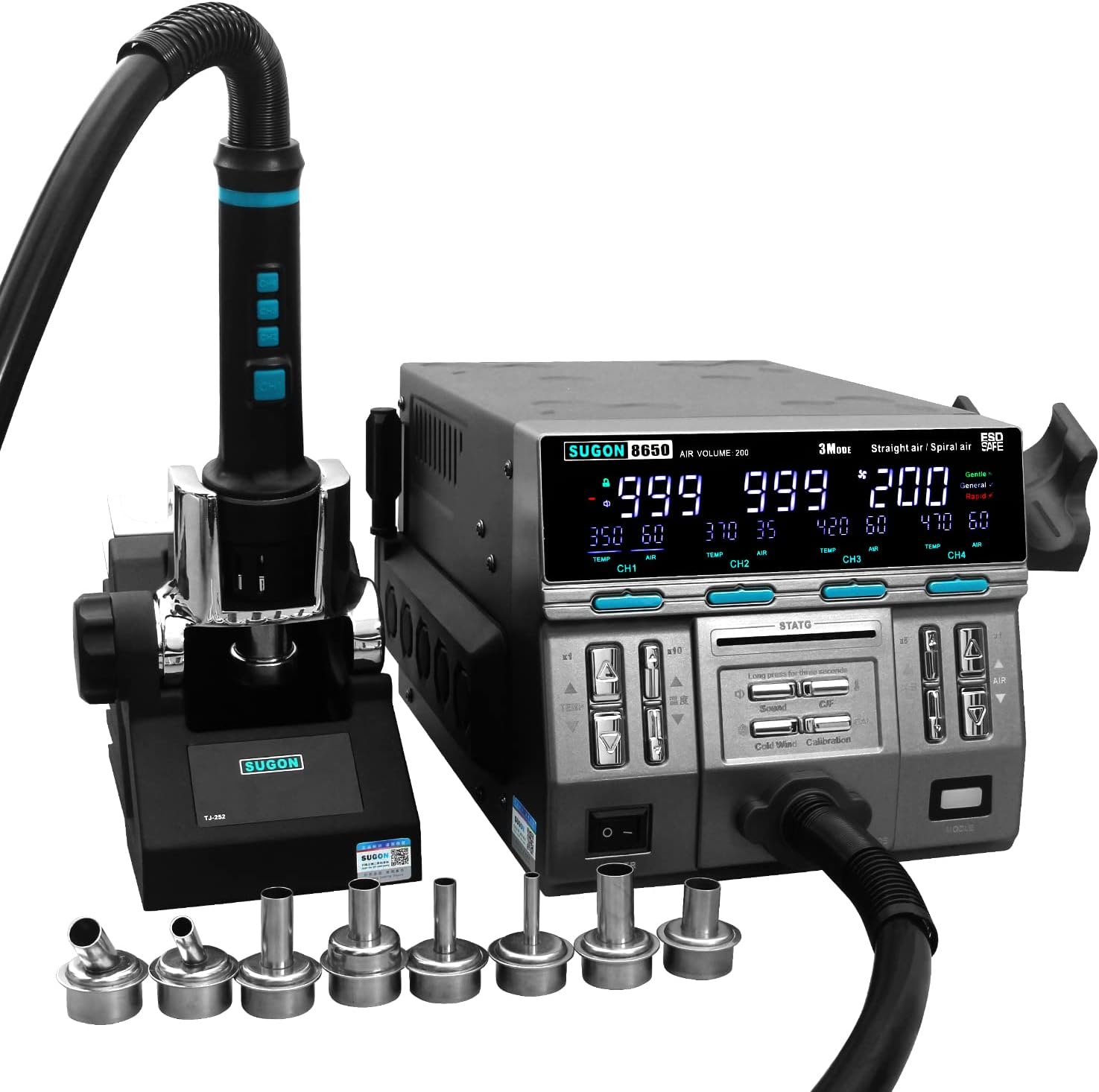
Figure 1: SUGON 8650DX Hot Air Rework Station with included accessories.
2. Safety Information
WARNING: Improper use can lead to electric shock, burns, or fire. Read all safety instructions carefully before operation.
- Always operate the rework station in a well-ventilated area to avoid inhaling fumes from soldering.
- Wear appropriate personal protective equipment, including safety glasses and heat-resistant gloves.
- Do not touch the hot air nozzle or heated components directly. Allow them to cool before handling.
- Ensure the power cord is properly grounded and inspect it for damage before each use.
- Keep flammable materials away from the work area.
- Place the hot air gun handle in its stand when not in use. The automatic sleep function will activate.
- Do not immerse the unit or its components in water or other liquids.
- Unplug the unit from the power outlet when not in use or before performing maintenance.
3. Product Overview
3.1 Included Components
- 1 × Hot Air Rework Station Main Unit
- 1 × Hot Air Gun Handle
- 8 × Air Nozzles (various sizes)
- 1 × Heating Element (spare)
- 1 × Multi-functional Storage Bracket
- 1 × Silicone Nozzle Storage Bracket
- 1 × Nozzle Replacement Bracket
- 1 × Power Cord
3.2 Key Features
- High Power Output: 1300W for rapid heating.
- Wide Temperature Range: Adjustable from 212°F (100°C) to 1022°F (550°C).
- Adjustable Air Volume: Control from 1 to 200.
- Three Air Outlet Modes: Gentle, General, and Rapid for varied applications.
- Four Temperature Memory Storage: Quickly recall preferred temperature and airflow settings.
- Cold Air Function: Instant cooling for components or handle protection.
- Automatic Sleep Function: Extends heater life and enhances safety when the handle is placed in its stand.
- Quick Nozzle Replacement: Tool-free nozzle changes with the included bracket.
- Temperature Calibration: Ensures accurate temperature readings.
- User-Friendly Display: LCD screen shows set and actual temperature, and air volume.
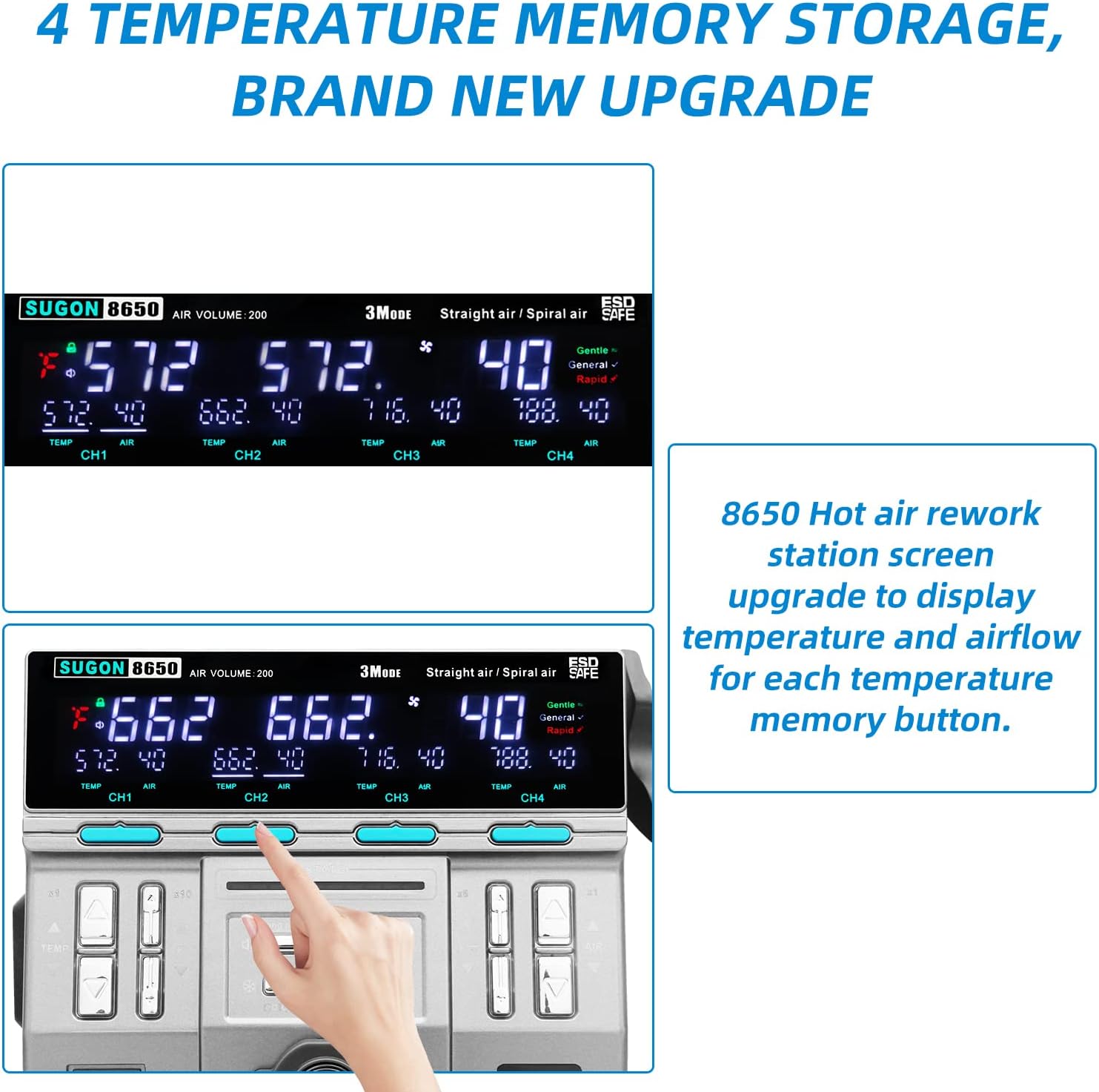
Figure 2: Labeled components and controls of the SUGON 8650DX.
4. Setup
- Unpacking: Carefully remove all components from the packaging. Inspect for any shipping damage.
- Placement: Position the main unit on a stable, heat-resistant, and level surface in a well-ventilated area. Ensure adequate space around the unit for airflow.
- Connect Handle: Connect the hot air gun handle cable to the designated port on the main unit.
- Install Handle Stand: Attach the multi-functional storage bracket and the nozzle replacement bracket to the side of the main unit as desired. Place the hot air gun handle into its stand.
- Power Connection: Connect the power cord to the main unit and then plug it into a grounded electrical outlet (230V).
- Initial Power On: Flip the main power switch located on the front panel to the 'ON' position. The display will illuminate.
5. Operation
5.1 Power On/Off
- To power on, press the main power switch.
- To power off, press the main power switch again. The unit will perform an automatic cooling cycle before fully shutting down.
5.2 Temperature and Air Volume Adjustment
Use the dedicated buttons on the main unit to adjust temperature and air volume. The display shows both the set and actual values.

Figure 3: Display showing set temperature, actual temperature, and air volume.
- Temperature Adjustment: Use the 'TEMP' up/down buttons. There are 1x and 10x adjustment buttons for fine or rapid changes.
- Air Volume Adjustment: Use the 'AIR' up/down buttons. There are 1x and 5x adjustment buttons for fine or rapid changes.


Figure 4: Temperature and Air Volume adjustment buttons.
5.3 Air Outlet Modes
The unit features three distinct air outlet modes: Gentle, General, and Rapid. Select the appropriate mode based on the application and user preference.
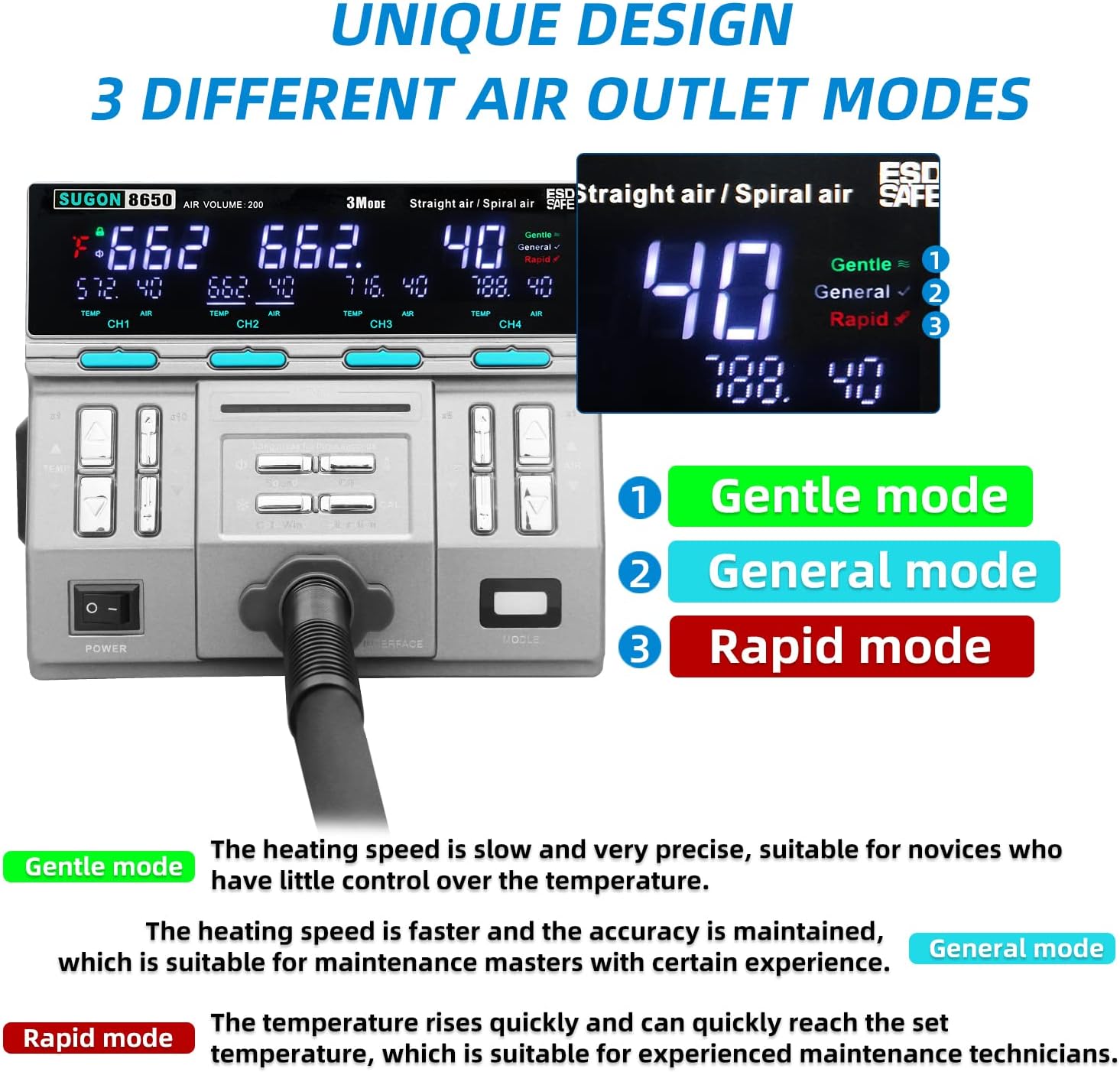
Figure 5: Air outlet mode selection on the display.
- Gentle Mode: Slow and precise heating, suitable for delicate components or beginners.
- General Mode: Faster heating with maintained accuracy, suitable for general maintenance.
- Rapid Mode: Quick temperature rise, suitable for experienced technicians requiring fast work.
5.4 Temperature Memory Storage
The unit allows storage of four temperature and air volume presets for quick recall.
- Saving Presets: Adjust the desired temperature and air volume. Long press one of the four memory buttons (CH1-CH4) on the main unit or the handle to save the current settings. The saved values will be displayed.
- Recalling Presets: Short press a memory button (CH1-CH4) to load the stored settings.
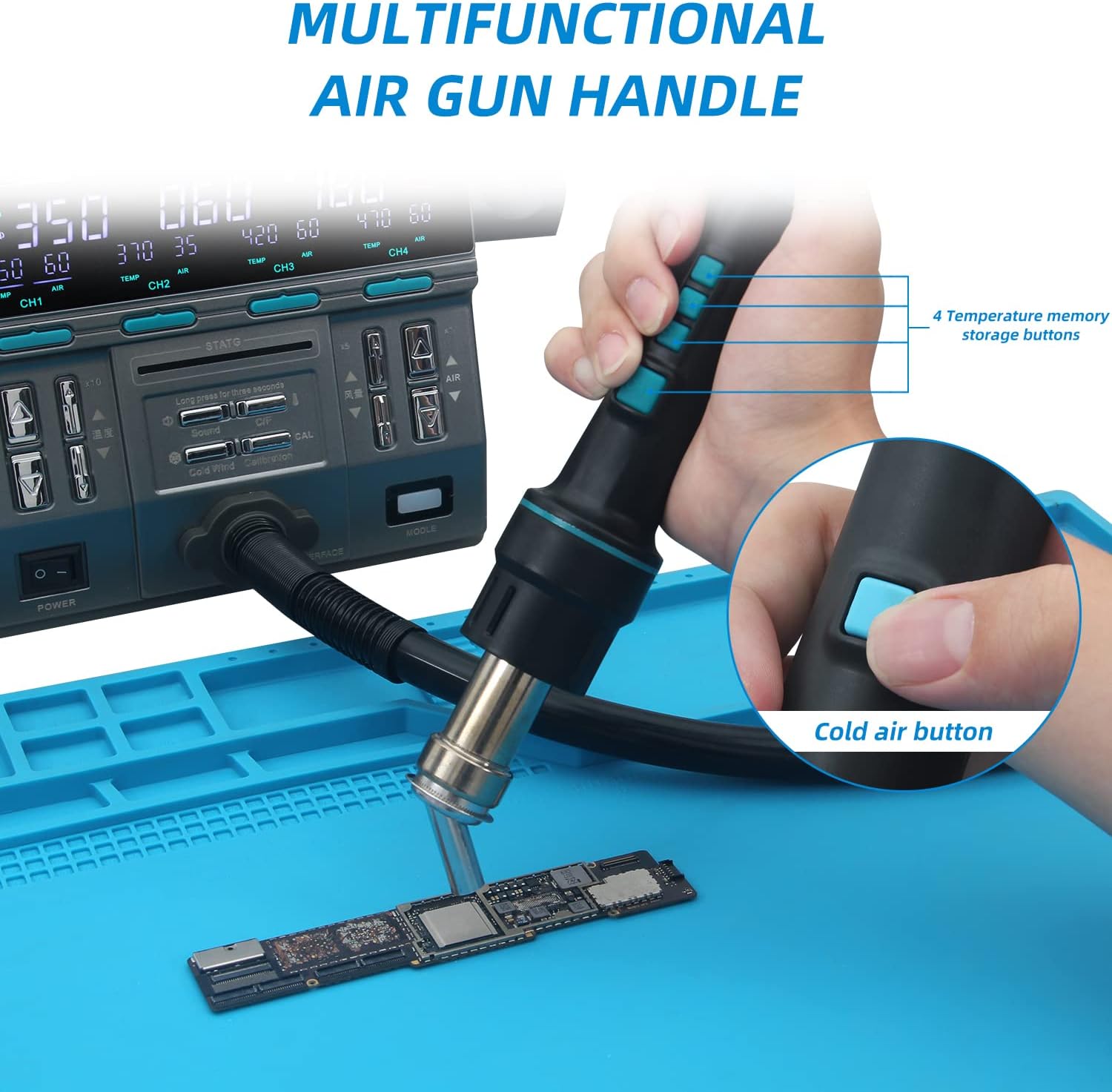
Figure 6: Hot air gun handle with memory and cold air buttons.
5.5 Cold Air Function
Press the 'Cold Air' button on the handle to activate cold airflow, useful for rapid cooling of components or the nozzle after use.
5.6 Nozzle Replacement
The rework station includes 8 different nozzles and a quick-change nozzle bracket for efficient replacement.
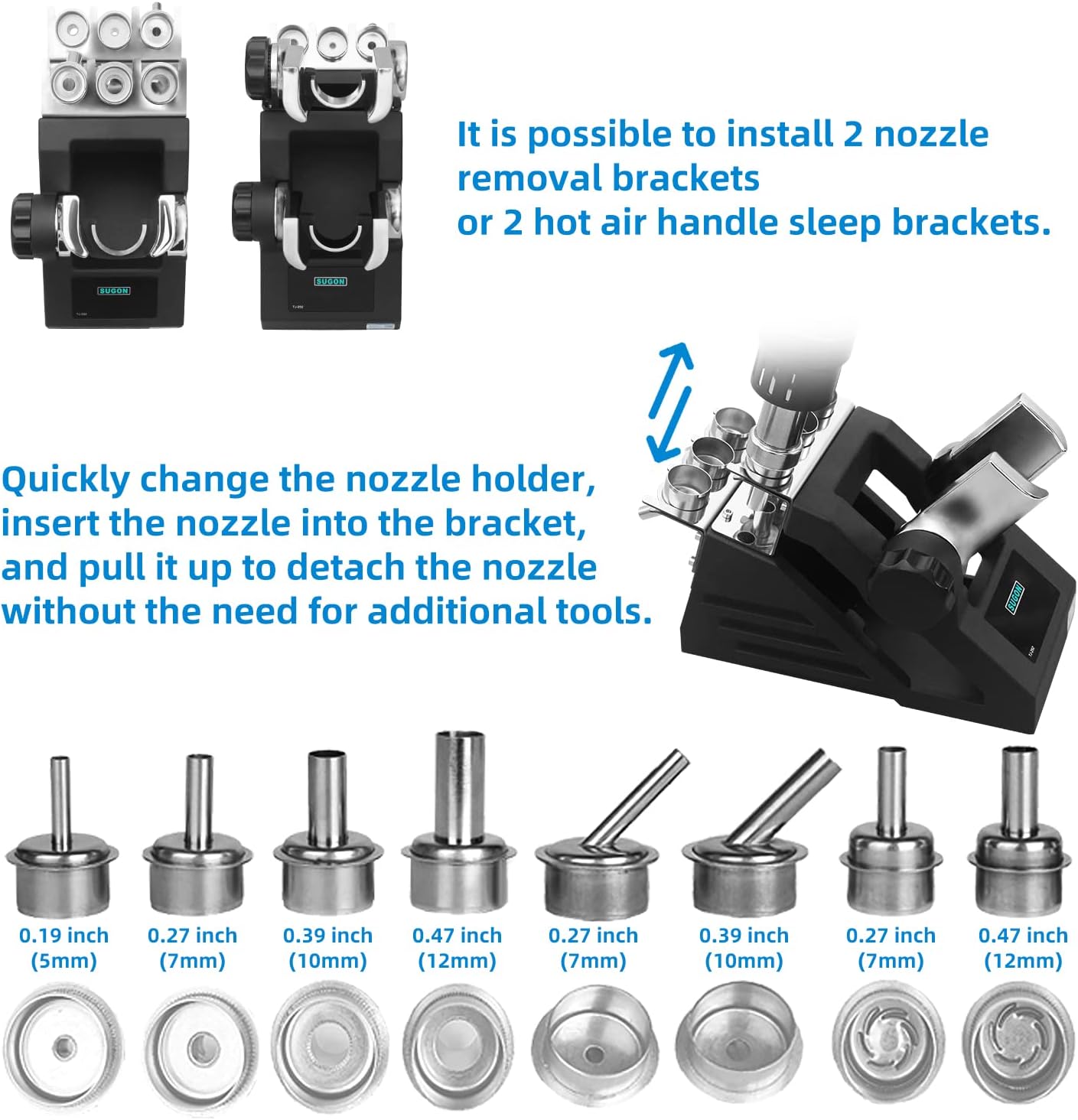
Figure 7: Assortment of nozzles and the quick replacement bracket.
- To replace a nozzle, insert the desired nozzle into the quick replacement bracket.
- Pull the handle up to detach the current nozzle and attach the new one without needing additional tools.
5.7 Automatic Sleep Function
When the hot air gun handle is placed in its stand, the unit automatically enters a sleep state, reducing power consumption and extending the life of the heating element. Picking up the handle will automatically wake the unit and resume operation.
5.8 Temperature Calibration
To ensure accurate temperature readings, the unit can be calibrated.
- Long press the 'Calibration' button for 3 seconds to enter the setting state.
- Adjust the base temperature using the up/down buttons to match a known external temperature sensor.
- Long press the 'Calibration' button for 1 second to save and exit.

Figure 8: Main unit control buttons for various functions.
5.9 Buzzer Control
The unit features an audible buzzer for key presses and alerts.
- To turn off the key sound, long press the 'Sound' button for 3 seconds.
- Repeat the process to turn the sound back on.
6. Maintenance
- Nozzle Cleaning: Regularly clean the nozzles to prevent blockages and ensure consistent airflow. Use a soft brush or specialized cleaning tools.
- Heating Element Replacement: The unit includes a spare heating element. If the hot air gun fails to heat properly, the heating element may need replacement. Refer to a qualified technician for this procedure.
- Automatic Cooling: The automatic high airflow cooling function helps extend the service life of the heater and protects the hot air handle. Allow this cycle to complete before powering off the unit.
- General Cleaning: Keep the main unit and handle clean and free of dust and debris. Use a dry cloth for cleaning. Do not use abrasive cleaners or solvents.
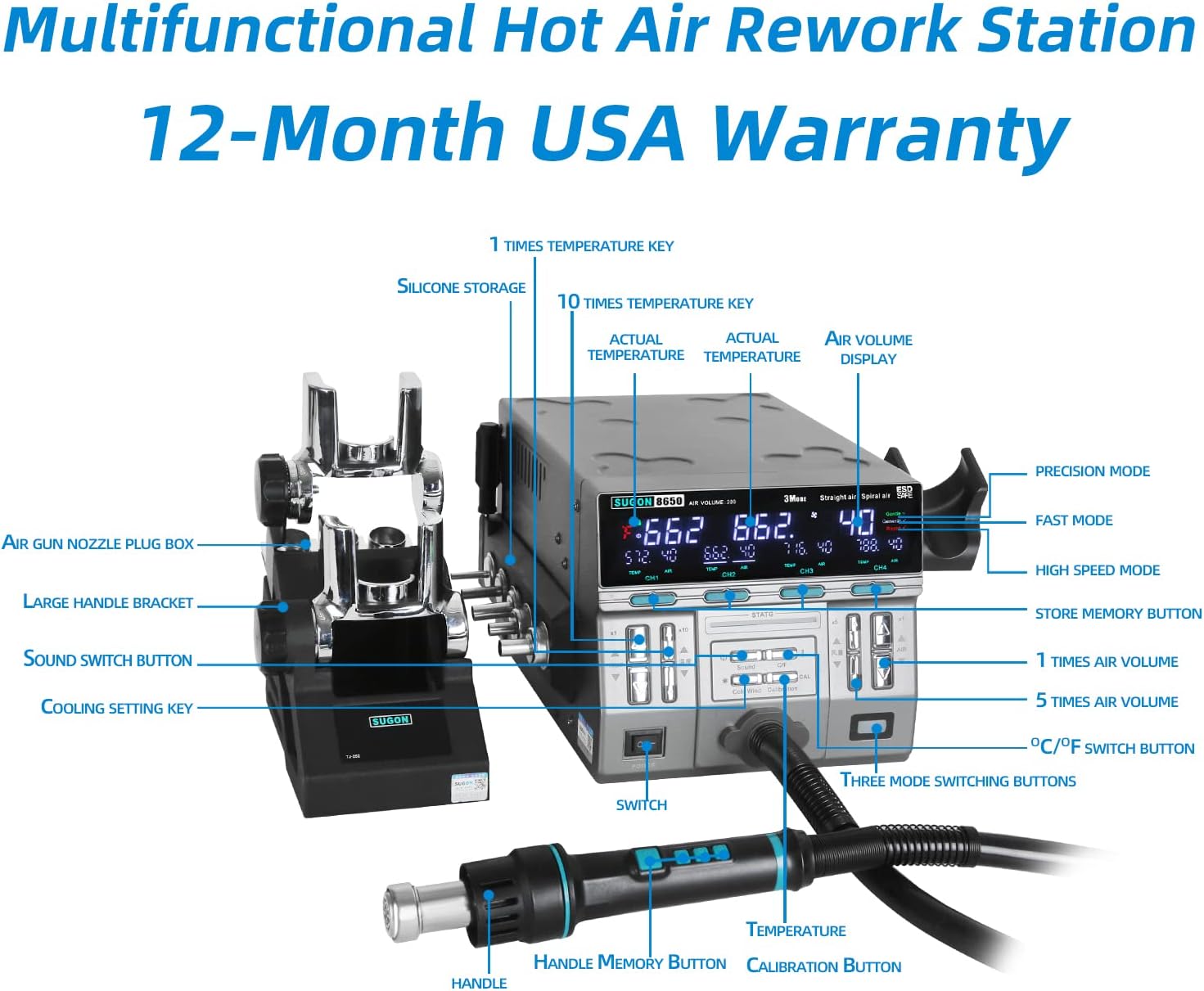
Figure 9: Silicone nozzle organizer for convenient storage.
7. Troubleshooting
This section addresses common issues you might encounter with your SUGON 8650DX Hot Air Rework Station.
| Problem | Possible Cause | Solution |
|---|---|---|
| Unit does not power on. | No power supply; power cord loose or damaged; main switch off. | Check power cord connection and outlet. Ensure main power switch is ON. |
| Hot air gun does not heat up or heats inconsistently. | Damaged heating element; incorrect temperature setting; handle not properly seated in stand (if sleep mode is active). | Verify temperature settings. Ensure handle is lifted from stand. If issue persists, the heating element may need replacement (refer to a qualified technician). |
| No airflow or weak airflow. | Air volume set too low; nozzle blocked; internal fan issue. | Increase air volume setting. Check and clean the nozzle. If issue persists, contact support. |
| Temperature display is inaccurate. | Unit requires calibration. | Perform temperature calibration as described in Section 5.8. |
| Automatic sleep function not working. | Handle not properly placed in the stand. | Ensure the handle is securely placed in its designated stand. |
8. Specifications
| Feature | Specification |
|---|---|
| Model | 8650DX |
| Power | 1300W |
| Voltage | 230V |
| Temperature Range | 212°F - 1022°F (100°C - 550°C) |
| Air Volume Range | 1 - 200 |
| Display Type | LCD |
| Product Dimensions (L x W x H) | 9.8 x 7.4 x 6.6 inches (24.9 x 18.8 x 16.8 cm) |
| Item Weight | 17.96 pounds (8.17 kg) |
| Material | Silicon (handle components) |
9. Warranty and Support
The SUGON 8650DX Hot Air Rework Station comes with a 12-month quality assurance service. For any questions, technical assistance, or warranty claims, please contact the seller or manufacturer directly. Please retain your proof of purchase for warranty validation.