
1. Introduction
This manual provides detailed instructions for the safe and effective use, assembly, operation, maintenance, and troubleshooting of your TiKenSo Electric Spin Scrubber TD-8136. Please read this manual thoroughly before using the product and retain it for future reference.
2. Safety Instructions
- Always ensure the product is fully charged before first use.
- Do not submerge the main unit in water. The main unit is IPX7 waterproof, meaning it can withstand splashes and brief immersion, but prolonged submersion is not recommended.
- Keep the product out of reach of children.
- Use only the provided charging cable and adapter.
- Do not attempt to disassemble or repair the unit yourself. Contact customer support for assistance.
- Avoid using the scrubber on delicate surfaces that may be scratched. Test on an inconspicuous area first.
- Ensure brush heads are securely attached before operation.
3. Package Contents
Verify that all items listed below are included in your package:
- Electric Spin Scrubber Main Unit
- Adjustable Telescopic Rod (2 sections)
- Large Flat Brush
- Sponge Brush
- Dome Brush
- Fiber Brush
- Small Flat Brush
- Cloth Brush
- Corner Brush
- Wool Brush
- Wire Ball Brush
- USB Type-C Charging Cable
- Mesh Storage Bag
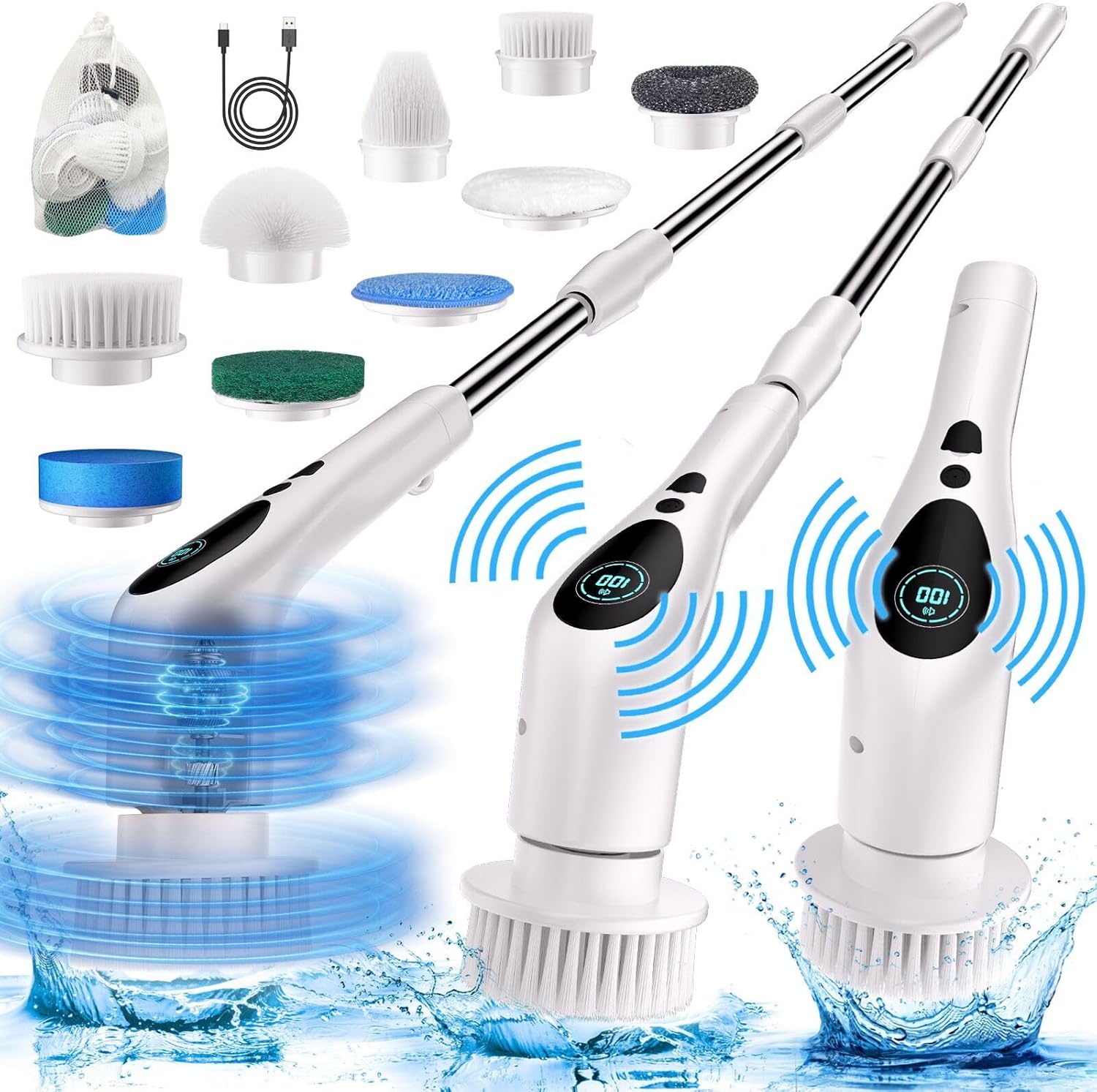
Image 1: The TiKenSo Electric Spin Scrubber main unit, two telescopic rods, USB-C charging cable, and nine various brush heads, including flat, dome, sponge, fiber, cloth, corner, wool, and wire ball brushes, along with a mesh storage bag.
4. Product Overview
The TiKenSo Electric Spin Scrubber is designed for efficient cleaning of various surfaces. It features a main unit with an LCD display, control buttons, and a voice announcement system. The device can be used handheld or with an extendable handle for reaching high or low areas.
Main Unit Features:
- LCD Display: Shows battery percentage and current speed setting.
- Control Button: Used for power on/off, unlocking, and adjusting speed.
- Voice Announcement: Provides audio feedback on speed changes and battery status.
- Charging Port: USB Type-C for convenient recharging.
Brush Head Types:
The scrubber comes with 9 interchangeable brush heads, each suited for different cleaning tasks:
- Large Flat Brush: Ideal for large flat surfaces like floors, walls, and bathtub interiors.
- Sponge Brush: Suitable for delicate surfaces, windows, and glass.
- Dome Brush: Effective for curved surfaces such as sinks and toilet bowls.
- Fiber Brush: For general scrubbing on various surfaces.
- Small Flat Brush: For smaller flat areas or detailed cleaning.
- Cloth Brush: Gentle cleaning for polished surfaces or car exteriors.
- Corner Brush: Designed to reach into corners and grout lines.
- Wool Brush: For polishing or very gentle cleaning.
- Wire Ball Brush: For heavy-duty scrubbing on tough stains, like burnt-on food on pans.

Image 2: A visual guide to the nine interchangeable brush heads, including large flat, sponge, dome, fiber, small flat, cloth, corner, wool, and wire ball brushes, each with an example of its intended use.
5. Assembly and Setup
5.1 Attaching Brush Heads
- Select the appropriate brush head for your cleaning task.
- Align the brush head with the rotating shaft on the main unit or the end of the telescopic rod.
- Push firmly and twist clockwise until it clicks into place.
5.2 Assembling the Extendable Handle
- To extend the reach, attach one or both telescopic rods between the main unit and the handle.
- Align the connectors and push firmly until they lock.
- The handle can be adjusted to lengths of 12.8 inches (32.5 cm), 42.5 inches (108 cm), or 53 inches (135 cm).

Image 3: The electric spin scrubber shown in three configurations: handheld (12.8 inches), with one extension rod (42.5 inches), and with two extension rods (53 inches), demonstrating its adjustable length for various cleaning needs.
5.3 Initial Charging
Before first use, fully charge the scrubber. Refer to the 'Charging' section for detailed instructions.
6. Operation
6.1 Power On/Off and Unlocking
- To power on and unlock the device, press and hold the control button for 2 seconds. The LCD display will illuminate, and the voice prompt will announce "Welcome for use, please press 2 seconds to unlock."
- To power off, press and hold the control button again for 2 seconds.

Image 4: A hand pressing the control button on the scrubber, with a lock icon visible on the LCD display, indicating the unlocking process.
6.2 Adjusting Speed
The scrubber offers three adjustable speeds:
- Speed 1 (280 RPM): For daily grime and light cleaning.
- Speed 2 (380 RPM): For stubborn spots and moderate cleaning.
- Speed 3 (430 RPM): For heavy-duty tasks and tough stains.
To switch speeds, press the control button briefly after the device is unlocked. The voice prompt will announce the current speed setting.

Image 5: An illustration detailing the three adjustable speeds (Low-Speed 280RPM, Mid-Speed 380RPM, High-Speed 430RPM) and information about fast charging (3 hours) and working time (100 minutes), with the LCD display showing battery percentage.
6.3 Using the Voice Announcement Feature
The scrubber is equipped with a voice prompt function that announces the current speed setting and other status updates (e.g., "Low Battery, please charge it."). This feature helps you identify the operational mode without needing to look at the display.

Image 6: A woman holding the electric spin scrubber, with a speech bubble listing voice broadcast messages such as "Welcome for use, please press 2 seconds to unlock," "Low speed," "Medium speed," "High speed," "Overloaded, product stopped, please restart," "Turn voice off," "Turn voice on," and "Low Battery, please charge it." The image highlights the speaker area on the device.
6.4 Cleaning Applications
Select the appropriate brush head and speed for the surface you are cleaning. The extendable handle allows you to clean various areas without excessive bending or reaching.
- Bathroom: Use dome or large flat brushes for tubs, showers, and sinks. Corner brush for grout.
- Kitchen: Use wire ball brush for tough stains on pots and pans. Flat brushes for countertops and stovetops.
- Floors and Walls: Large flat brush with the extendable handle.
- Windows and Glass: Sponge brush for gentle cleaning.
7. Charging
The scrubber is powered by a 2500mAh battery, providing up to 100 minutes of continuous cleaning. The battery's remaining capacity is displayed on the LCD screen.
- When the battery is low, the voice prompt will announce "Low Battery, please charge it."
- Connect the included USB Type-C cable to the charging port on the main unit.
- Plug the other end of the USB cable into a compatible USB power adapter (not included) or a USB port.
- A full charge takes approximately 3 hours. The LCD display will indicate charging status.
- Do not operate the scrubber while it is charging.

Image 7: The electric spin scrubber main unit is shown connected to a wall outlet via its USB Type-C charging cable, indicating the charging process.
8. Maintenance and Care
8.1 Cleaning the Scrubber
- After each use, remove the brush head.
- Rinse the brush head under running water to remove dirt and debris.
- Wipe the main unit and telescopic rods with a damp cloth. Do not use abrasive cleaners.
- Ensure all parts are dry before storing.
8.2 Waterproofing Guidelines
The main unit has an IPX7 waterproof rating, meaning it is protected against temporary immersion in water up to 1 meter for 30 minutes. However, it is not designed for continuous underwater use or submersion. Avoid prolonged exposure to water.

Image 8: A diagram illustrating the correct way to rinse the scrubber head under water (partially submerged) and an incorrect way (fully submerging the main unit), emphasizing its IPX7 rating for splashes and brief immersion, not full submersion.
8.3 Storage
Store the scrubber and its accessories in a cool, dry place, away from direct sunlight and extreme temperatures. Use the provided mesh storage bag for organizing brush heads.
9. Troubleshooting
| Problem | Possible Cause | Solution |
|---|---|---|
| Scrubber does not turn on. | Low battery. Device locked. | Charge the battery. Press and hold the power button for 2 seconds to unlock. |
| Brush head stops rotating or slows down significantly. | Low battery. Excessive pressure applied. Obstruction. | Recharge the battery. Reduce pressure during cleaning. Check for and remove any obstructions. |
| Voice announcement not working. | Voice feature turned off (if applicable). | Refer to the product's specific instructions for toggling voice announcements. |
| Extendable handle detaches during use. | Not securely attached. | Ensure the telescopic rods are firmly pushed and twisted until they click into place. |
10. Specifications
| Feature | Detail |
|---|---|
| Model Number | TD-8136 |
| Brand | TiKenSo |
| Battery Capacity | 2500mAh |
| Working Time | Up to 100 minutes (continuous) |
| Charging Time | Approximately 3 hours |
| Speeds | 3 (280rpm, 380rpm, 430rpm) |
| Waterproof Rating | IPX7 (main unit) |
| Handle Material | Plastic |
| Product Dimensions | 3"L x 3"W x 53"H (fully extended) |
| Material | Acrylonitrile Butadiene Styrene (ABS), Stainless Steel |
| Item Weight | 2.2 Pounds |
| UPC | 663992505238 |
11. Warranty and Customer Support
TiKenSo is committed to providing high-quality products and excellent after-sales support. Should you encounter any issues with your electric scrubber, such as damage during shipping or problems during use, please contact our customer service team for prompt assistance with repairs or replacements.
For support, please refer to the contact information provided with your purchase or visit the official TiKenSo website.


