
INTEMPO EE7508BLKSTKEU7
Intempo Bluetooth Boombox Speaker User Manual
Model: EE7508BLKSTKEU7
Brand: INTEMPO
Introduction
This manual provides essential information for the safe and efficient operation of your Intempo Bluetooth Boombox Speaker. Please read this manual thoroughly before using the device and retain it for future reference. The Intempo Bluetooth Boombox Speaker is designed to provide high-quality stereo sound with the convenience of wireless connectivity, hands-free calling, and dynamic LED lighting.
Safety Information
- Do not expose the speaker to extreme temperatures, direct sunlight, or high humidity.
- Avoid dropping or subjecting the speaker to strong impacts.
- Keep the speaker away from water or other liquids.
- Do not attempt to disassemble or repair the speaker yourself. Refer all servicing to qualified personnel.
- Use only the provided charging cable or a compatible Type-C cable for charging.
- Ensure proper ventilation when operating the speaker.
- Do not block any ventilation openings.
- Dispose of the product responsibly according to local regulations.
Package Contents
Please check the box for the following items:
- Intempo Bluetooth Boombox Speaker (Model: EE7508BLKSTKEU7)
- USB Type-C Charging Cable
- User Manual
Product Overview
Familiarize yourself with the components of your Intempo Bluetooth Boombox Speaker.

Figure 1: Front view of the Intempo Bluetooth Boombox Speaker, showcasing its dual speakers with vibrant color-changing LED lights and the integrated portable carry handle.
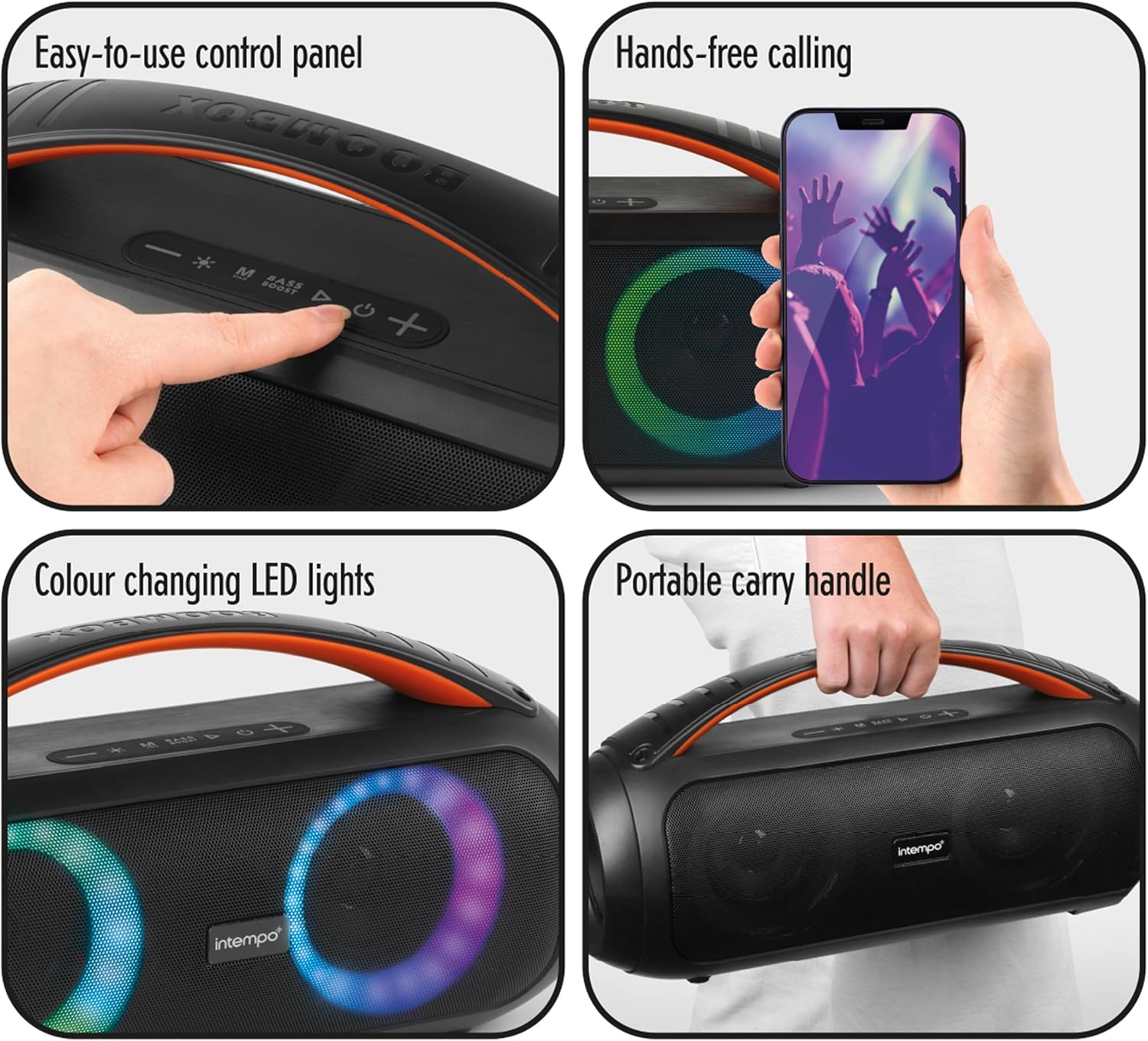
Figure 2: Detailed view highlighting key features: the easy-to-use control panel on top, a hand holding a smartphone demonstrating hands-free calling, the dynamic color-changing LED lights on the speaker grilles, and the robust portable carry handle.

Figure 3: Rear panel of the speaker, displaying the various input ports including AUX, USB, TF (MicroSD) card slot, and the DC5V charging port, protected by a rubber flap.
Control Panel Layout:

Figure 4: A hand interacting with the top-mounted control panel, showing buttons for power, mode, volume, play/pause, and LED light control.
- Power Button: Press and hold to turn the speaker ON/OFF.
- Mode Button (M): Short press to switch between Bluetooth, AUX, USB, and TF card modes.
- LED Light Button (*): Short press to cycle through LED light modes or turn them off.
- Volume Down (-): Short press to decrease volume. Long press for previous track.
- Play/Pause Button (▶): Short press to play or pause music. Press to answer/end calls.
- Volume Up (+): Short press to increase volume. Long press for next track.
- Bass Boost Button (BASS BOOST): Press to activate or deactivate bass boost.
Setup
Charging the Speaker:
- Locate the DC5V charging port on the rear of the speaker (refer to Figure 3).
- Connect the supplied USB Type-C charging cable to the speaker's DC5V port.
- Connect the other end of the USB cable to a compatible USB power adapter (not supplied) or a computer's USB port.
- The LED indicator will illuminate to show charging status. The speaker is fully charged when the indicator changes color or turns off (refer to specific product behavior for exact indication).
- A full charge provides up to 6 hours of playtime.
Powering On/Off:
- To power on the speaker, press and hold the Power button (refer to Figure 4) until you hear an audible prompt or the LED lights activate.
- To power off the speaker, press and hold the Power button again until the speaker shuts down.
Operating Instructions
Bluetooth Pairing:
- Ensure the speaker is powered on and in Bluetooth mode. If not, press the Mode button (M) to switch to Bluetooth mode. The speaker will emit a pairing tone, and the LED lights may flash to indicate it's ready for pairing.
- Enable Bluetooth on your smartphone, tablet, or other Bluetooth-enabled device.
- Search for available Bluetooth devices. The speaker will appear as "EE7508BLKSTKEU7" or "Intempo Boombox".
- Select the speaker from the list to initiate pairing.
- Once successfully paired, the speaker will emit a confirmation tone, and the LED lights will change their pattern.
- The speaker will automatically attempt to reconnect to the last paired device when powered on.
Playing Music:
- Bluetooth Mode: After pairing, play music directly from your connected device. Use the Play/Pause button on the speaker or your device to control playback. Use the Volume Up/Down buttons for volume control. Long press Volume Up/Down for next/previous track.
- AUX Mode: Insert a 3.5mm audio cable (not supplied) into the AUX port on the speaker and connect the other end to your audio source. Press the Mode button (M) until AUX mode is selected. Control playback and volume from your audio source.
- USB/TF Card Mode: Insert a USB flash drive or a TF (MicroSD) card into the respective ports on the speaker. The speaker will automatically switch to the corresponding mode and begin playing music from the storage device. Use the speaker's control buttons for playback and volume.
Hands-Free Calling:

Figure 5: A visual representation of the hands-free calling feature, showing a smartphone connected to the speaker.
- When a call comes in while connected via Bluetooth, the music will pause.
- Press the Play/Pause button (▶) once to answer the incoming call.
- Press the Play/Pause button (▶) again to end the call.
- To reject an incoming call, press and hold the Play/Pause button (▶).
LED Light Control:
- Press the LED Light button (*) to cycle through different color-changing light modes.
- Continue pressing the button to turn the LED lights off.
Bass Boost Function:
- Press the BASS BOOST button to enhance the bass output of the speaker.
- Press it again to deactivate the bass boost.
Maintenance
- Cleaning: Wipe the speaker with a soft, dry cloth. Do not use abrasive cleaners or solvents.
- Storage: When not in use for extended periods, store the speaker in a cool, dry place, away from direct sunlight and extreme temperatures.
- Battery Care: To prolong battery life, avoid fully discharging the battery frequently. Charge the speaker regularly, even if not in use.
Troubleshooting
| Problem | Possible Cause | Solution |
|---|---|---|
| Speaker does not turn on. | Battery is depleted. | Charge the speaker using the provided USB Type-C cable. |
| Cannot pair with Bluetooth device. | Speaker is not in pairing mode; Bluetooth is off on device; device is too far. | Ensure speaker is in Bluetooth mode. Turn on Bluetooth on your device. Move device closer to speaker (within 10 meters). Forget previous pairings on your device and try again. |
| No sound. | Volume is too low; incorrect mode selected; cable not connected properly. | Increase volume on both speaker and connected device. Ensure correct mode (Bluetooth, AUX, USB, TF) is selected. Check cable connections for AUX/USB/TF modes. |
| Sound distortion. | Volume too high; low battery; interference. | Lower the volume. Charge the speaker. Move away from other electronic devices that may cause interference. |
| LED lights not working. | Lights are turned off. | Press the LED Light button (*) to cycle through modes and turn them on. |
Specifications
| Feature | Detail |
|---|---|
| Model Number | EE7508BLKSTKEU7 |
| Brand | INTEMPO |
| Connectivity Technology | Wireless (Bluetooth) |
| Audio Output Mode | Stereo |
| Speaker Type | Stereo |
| Special Feature | LED Display, Hands-Free Calling, Portable Carry Handle, Bass Boost |
| Playtime | Up to 6 hours |
| Power Source | Rechargeable Battery (Type-C charging) |
| Compatible Devices | MP3 Player, Tablet, Smartphone |
| Material | Plastic |
Warranty and Support
For warranty information and technical support, please refer to the documentation included with your purchase or visit the official Intempo website. Keep your proof of purchase for any warranty claims.
Ask a question about this manual
Ask about setup, troubleshooting, compatibility, parts, safety, or missing instructions. Manuals+ will review the question and use this page’s manual context to help answer it.