
Introduction
Thank you for choosing the Philips S5887/10 Series 5000 Wet & Dry Razor. This manual provides essential information for the safe and effective use, maintenance, and care of your new shaver. Please read it thoroughly before first use and keep it for future reference.

Image: Philips S5887/10 Series 5000 Wet & Dry Razor in its retail packaging, highlighting key features.
Important Safety Information
Please read and understand all safety instructions before using the appliance. Failure to follow these instructions may result in electric shock, fire, or serious injury.
- Caution: To avoid the risk of cuts, ensure the blades are away from the skin when not shaving.
- Do not touch hot blades after prolonged use.
- Do not use the shaver when it is charging.
- For optimal hygiene, clean the shaver regularly and replace worn heads.
- Keep the appliance and its cord away from heated surfaces.
- Do not use attachments not recommended by Philips.
- This appliance is not intended for use by persons (including children) with reduced physical, sensory or mental capabilities, or lack of experience and knowledge, unless they have been given supervision or instruction concerning use of the appliance by a person responsible for their safety.
Product Features
The Philips S5887/10 Series 5000 Razor is designed for a powerful yet gentle shave, incorporating advanced technology for optimal performance and skin comfort.
- SteelPrecision Blades: Equipped with 45 high-performance blades that make up to 90,000 cuts per minute for an efficient shave.
- SkinIQ (Power Adapt Sensor): Technology that detects and adapts to your beard density, adjusting cutting power for improved skin comfort.
- 360° Flexible Heads: Heads that rotate 360 degrees to follow the contours of your face, ensuring close contact and an effective trimming position for hairs.
- Wet & Dry Use: Convenient for use on wet or dry skin, and even under the shower.
- Pop-up Trimmer: A built-in retractable precision trimmer for shaping sideburns and moustaches.
- Long Battery Life: Provides 60 minutes of cordless shaving after a 1-hour charge.
- Quick Charge: A 5-minute fast charge provides enough power for one full shave.
- LED Display: Intuitive display with icons for battery status and other operational indicators.

Image: Detail of the SteelPrecision blades, designed for efficient cutting.
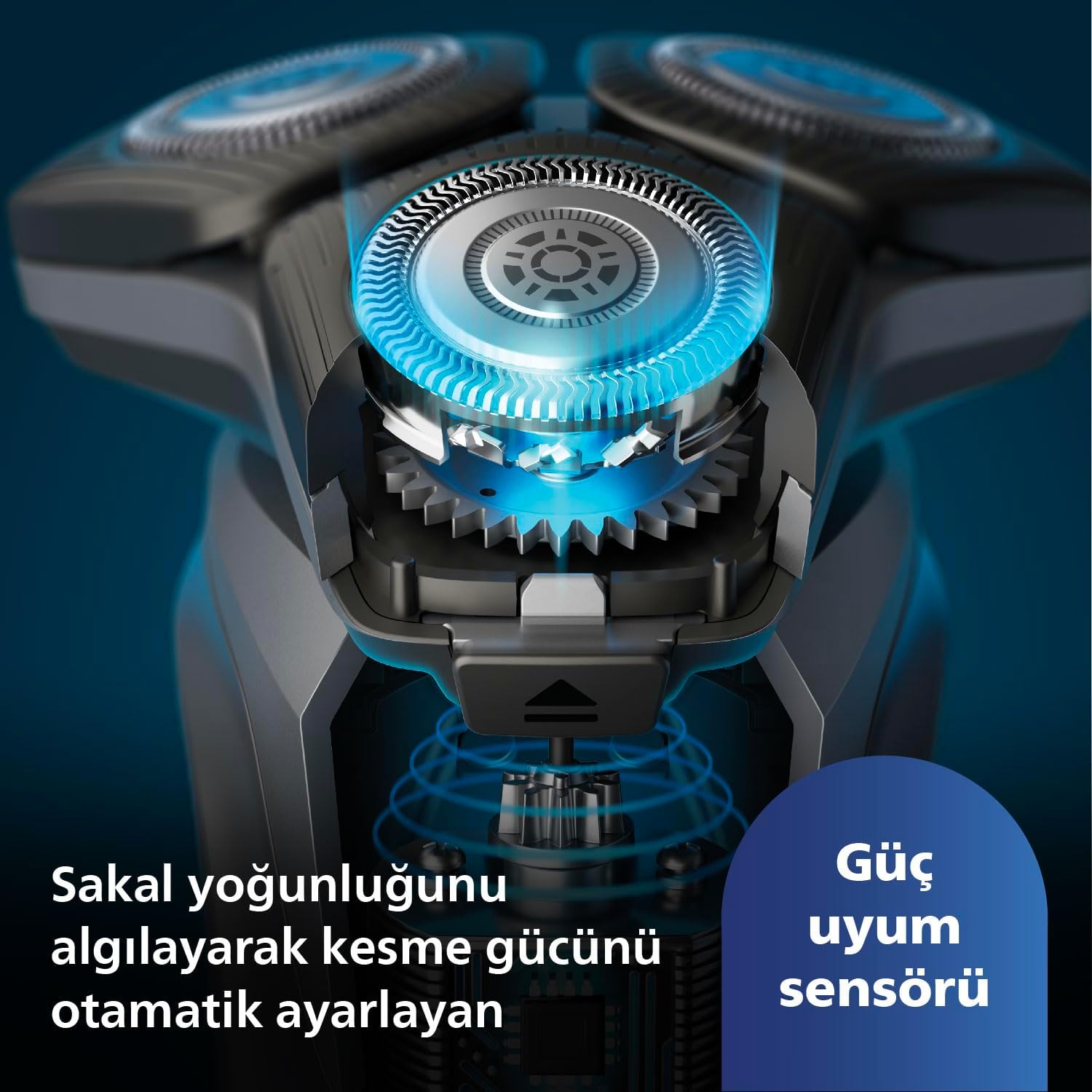
Image: Visual representation of the SkinIQ sensor adapting to beard density.

Image: The shaver's 360-degree flexible heads conforming to facial contours.

Image: A user demonstrating wet shaving with the Philips Series 5000 razor.
What's in the Box
Your Philips S5887/10 Series 5000 Wet & Dry Razor package includes the following components:
- Philips S5887/10 Series 5000 Wet & Dry Razor
- Travel bag
- Cleaning brush
- Power adapter

Image: The Philips S5887/10 shaver alongside its grey travel bag.
Setup
Before using your new Philips shaver for the first time, it is recommended to fully charge it.
- Connect the small plug of the power adapter to the shaver's charging port.
- Plug the power adapter into a wall outlet.
- The battery indicator on the shaver will show charging progress. A full charge takes approximately 1 hour.
- Once fully charged, unplug the shaver from the power outlet.
Operating Instructions
Shaving
The Philips S5887/10 can be used for both dry and wet shaving, including with foam or gel, or even in the shower.
- Ensure your shaver is charged.
- For Dry Shaving: Ensure your face is clean and dry.
- For Wet Shaving: Apply shaving foam or gel to your face, or use the shaver in the shower.
- Press the power button to turn on the shaver.
- Move the shaver in small, circular motions over your skin. Apply gentle pressure.
- The SkinIQ sensor will automatically adjust power based on your beard density.
- After shaving, turn off the shaver.

Image: A user demonstrating the proper technique for shaving with the Philips Series 5000 razor.
Using the Pop-up Trimmer
The integrated pop-up trimmer is ideal for precise trimming of sideburns, moustaches, and detailing.
- Locate the trimmer release button on the back of the shaver.
- Slide the button upwards to activate the pop-up trimmer.
- Use the trimmer to shape and define your facial hair.
- When finished, push the trimmer back down until it clicks into place.

Image: The retractable precision trimmer extended from the shaver body.
Charging
The shaver features a powerful Lithium-ion battery. An LED display indicates battery status.
- A full charge takes approximately 1 hour and provides up to 60 minutes of cordless shaving.
- If you need a quick shave, a 5-minute fast charge provides enough power for one full shave.
- Do not use the shaver while it is connected to the power outlet.

Image: A user connecting the charging cable to the shaver.
Maintenance
Cleaning
Regular cleaning ensures optimal performance and hygiene of your shaver.
- After each use, turn off the shaver.
- Press the release button to open the shaver head unit.
- Rinse the shaver head unit thoroughly under warm running water.
- You can also use the included cleaning brush to remove any stubborn hair particles.
- Shake off excess water and leave the shaver head unit open to air dry before closing.

Image: The shaver head being rinsed under a faucet for easy cleaning.
Blade Replacement
For best shaving results, it is recommended to replace the shaving heads every 12 months. The compatible replacement head for this model is SH71.
- Turn off and unplug the shaver.
- Open the shaver head unit.
- Remove the retaining ring by turning it counter-clockwise.
- Remove the old shaving heads.
- Insert the new SH71 replacement heads, ensuring they are correctly aligned.
- Place the retaining ring back and turn it clockwise to secure the heads.
Troubleshooting
If you encounter any issues with your Philips S5887/10 shaver, please refer to the following common troubleshooting tips:
- Shaver not turning on: Ensure the shaver is fully charged. If the battery is completely drained, it may take a few minutes of charging before the shaver responds.
- Poor shaving performance: Clean the shaving heads thoroughly. If performance does not improve, the shaving heads may be worn out and require replacement (SH71).
- Shaver stops during use: The battery may be low. Recharge the shaver.
- Skin irritation: Ensure you are using the correct shaving technique (small circular motions, gentle pressure). For wet shaving, ensure adequate foam or gel. Allow your skin to adapt to the new shaver for a few weeks.
If the problem persists, please contact Philips customer support for further assistance.
Specifications
Detailed technical specifications for the Philips S5887/10 Series 5000 Wet & Dry Razor:
| Feature | Specification |
|---|---|
| Model Name | S5887 |
| Item Model Number | S5887/10 |
| Brand | Philips |
| Power Source | Battery Powered |
| Battery Type | Lithium-ion |
| Battery Life | 60 minutes |
| Charging Time | 1 hour (full charge), 5 minutes (quick charge for 1 shave) |
| Special Feature | Waterproof (Wet & Dry use) |
| Blade Material | Stainless Steel |
| Colour | Grey |
| Item Weight | 0.48 Kilograms |
| Product Dimensions | 50 x 50 x 28 cm |
| Recommended Uses | Dry Shaving, Wet Shaving, Facial Hair Grooming, Different Skin Types |
| Included Components | Travel bag, Cleaning brush |
Warranty and Support
Your Philips S5887/10 Series 5000 Wet & Dry Razor comes with a 2-year warranty from the date of purchase, covering manufacturing defects under normal use.
For warranty claims, technical support, or to purchase replacement parts (such as SH71 shaving heads), please visit the official Philips support website or contact their customer service. Keep your proof of purchase for warranty validation.
Return Policy: This product typically has a 60-day return/replacement policy from the date of purchase, subject to the retailer's terms and conditions.