
1. Overview
The ILM Smart Adult Bike Helmet E3-12LS is designed for enhanced safety and convenience for e-bike and road cycling enthusiasts. It integrates advanced features such as automatic G-sensor turn signals, brake warning LED lights, and Bluetooth 5.0 connectivity for communication and entertainment.

Rear view of the ILM Smart Adult Bike Helmet E3-12LS, highlighting the integrated LED lighting system.
Key Features:
- Enhanced Safety: PC shell with impact-absorbing EPS material, certified to NTA-8776 CE CPSC Triple standards for higher impact speeds (up to 28mph).
- Built-in Bluetooth 5.0: Connects to mobile phones or other Bluetooth devices for music listening and answering calls via integrated microphone and speaker.
- Automatic Brake Lights & Turn Signals: Rear lights increase to 100% brightness during emergency braking. Tilt-activated turn signals (left/right tilt > 15 degrees for 10 seconds) for improved visibility.
- Light Control Function: Front and rear lights automatically adjust based on ambient light intensity, illuminating at night or in low-light conditions.
- Detachable Black Visor: Provides protection against UV, dust, and flying debris.
- Quick Release Buckle: Easy-to-use chin strap design.
- Integrated Shell: Ensures safety while reducing overall helmet weight.
2. Setup
2.1 Unboxing and Initial Inspection
Carefully remove the helmet and all accessories from the packaging. Inspect the helmet for any signs of damage. Ensure all components listed in the packing list are present.
2.2 Charging the Helmet
Before first use, fully charge the helmet's internal battery. Locate the charging port, typically covered by a rubber flap. Use the provided USB charging cable to connect the helmet to a suitable power source (e.g., computer USB port, USB wall adapter). The LED indicator will show charging status and turn off when fully charged.
2.3 Fitting the Helmet
Proper fit is crucial for safety. Place the helmet on your head. Adjust the rear dial (retention system) until the helmet feels snug and secure without being uncomfortably tight. The helmet should not move excessively when you shake your head. Adjust the chin strap so it is firm against your throat, and the quick-release buckle is centered under your chin.
2.4 Visor Attachment
The helmet comes with a detachable black visor. Align the visor's attachment points with the corresponding slots on the helmet and secure it firmly. Ensure it is properly seated to provide optimal protection.
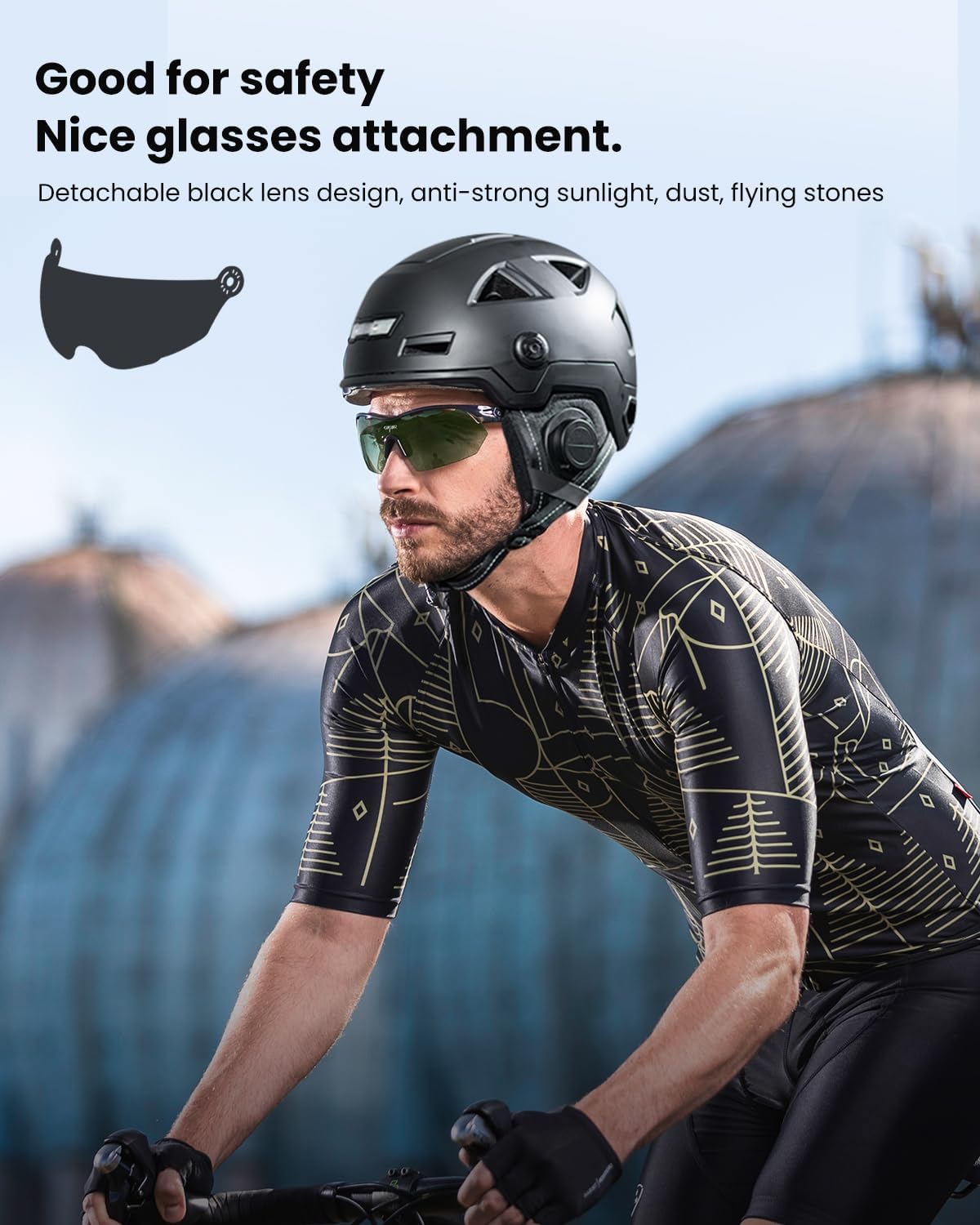
A cyclist wearing the ILM helmet with the detachable visor, demonstrating its compatibility with glasses.
2.5 Bluetooth Pairing
To use the Bluetooth features, pair the helmet with your mobile phone or other Bluetooth device:
- Ensure the helmet is powered on.
- Activate Bluetooth on your mobile device.
- Search for available devices. The helmet should appear as "E3-12SLBT" or similar.
- Select the helmet to pair. A confirmation sound or indicator will signify successful pairing.

A cyclist wearing the ILM helmet, demonstrating Bluetooth connectivity with a smartphone for music and calls.
3. Operating Instructions
3.1 Power On/Off
Press and hold the power button (usually located on the side of the helmet) for a few seconds to power the helmet on or off. An audible prompt or LED indicator will confirm the status change.
3.2 Light Control Function
The helmet features intelligent light control. After the main board is switched on, the lights will not illuminate during the daytime. They will automatically activate at night or in similar low-light situations, adjusting their mode based on ambient light intensity.

A cyclist wearing the ILM helmet, with the front light automatically activated in a low-light environment.
3.3 Automatic Brake Lights & Turn Signals
- Brake Warning: During emergency braking, the rear lights will automatically increase to 100% brightness to alert vehicles behind you.
- Turn Signals: When your head is tilted to the left by more than 15 degrees, the left turn signal will remain on for 10 seconds. Similarly, tilting your head to the right by more than 15 degrees will activate the right turn signal for 10 seconds. Note: These functions may not be effective in bright daytime conditions.

The ILM helmet displaying automatic turn signals (left and right) activated by head tilt, along with strobe headlight and steady taillight indicators.

The ILM helmet's smart braking warning function, with rear lights illuminating brightly to alert others.
3.4 Bluetooth Functions
- Music Playback: Once paired, you can stream music from your device to the helmet's built-in speakers. Use the helmet's controls (if available) or your device to manage playback.
- Phone Calls: The built-in microphone allows you to answer and make calls hands-free. Use the helmet's controls to answer/end calls.
- Voice Assistant: Access your device's voice assistant (e.g., Siri, Google Assistant) through the helmet for voice commands.
3.5 Helmet Locking (Tow Locks)
The helmet features integrated 'Tow Locks' which are both a vent and a locking hole. You can use a compatible cable lock to secure your helmet through these holes, preventing theft when you leave your bike unattended.

Close-up view of the ILM helmet demonstrating the 'Tow Locks' feature, allowing a cable lock to pass through for security.
4. Safety Information
The ILM Smart Adult Bike Helmet E3-12LS is designed with rider safety as a priority. It features a robust PC shell and impact-absorbing EPS material.
4.1 Certifications
This helmet is certified to NTA-8776 CE CPSC Triple standards. The NTA-8776 standard is a globally recognized safety standard specifically for e-bikes, testing at twice the speed of conventional bicycle helmet testing (e.g., common U.S. CPSC standard at 45 km/h for one hour). This certification ensures enhanced protection against higher impact speeds up to 28 mph and covers a larger part of the head compared to standard bicycle helmets.
4.2 Impact Testing
The helmet has undergone rigorous impact testing in the ILM Comprehensive Laboratory, one of the world's leading comprehensive laboratories capable of independently conducting NTA, CCC, ECE, and other tests. Tests include:
- Tilt Angle Impact: The helmet underwent an impact at a tilt angle of 30-45 degrees, followed by a direct fall. No visible damage to the exterior was observed. The G-force recorded was 80G, well below the maximum limit of 250G specified by NTA 8776.
- Vertex Impact: The helmet was subjected to a rise of approximately 2 meters from a standing position, followed by a direct fall. No visible cracks were observed on the exterior. The G-force recorded was 190G, meeting the standards set by NTA 8776.
- Right-Side Kerb Impact: Testing for right-side kerb impact resulted in a G-value of 90G, successfully concluding the test within safety parameters.
Official ILM video demonstrating the NTA 8776 safety standard testing for the E3-12LS helmet, including various impact tests and G-force measurements.
5. Maintenance
5.1 Cleaning
- Clean the helmet shell with a soft cloth, mild soap, and water. Avoid harsh chemicals or abrasive cleaners.
- The inner padding can be removed and hand-washed with mild soap and water, then air-dried.
- Clean the visor with a soft, damp cloth. Do not use abrasive materials that could scratch the surface.
5.2 Storage
Store the helmet in a cool, dry place away from direct sunlight and extreme temperatures. Do not store heavy objects on top of the helmet, as this can cause damage.
5.3 Battery Care
To prolong battery life, charge the helmet regularly, even if not in frequent use. Avoid fully discharging the battery for extended periods.
6. Troubleshooting
| Issue | Possible Cause | Solution |
|---|---|---|
| Helmet not powering on | Low battery, power button not pressed correctly | Charge the helmet fully. Press and hold the power button for 3-5 seconds. |
| Bluetooth not connecting | Helmet not in pairing mode, device Bluetooth off, interference | Ensure helmet is on and in pairing mode. Check device Bluetooth settings. Move closer to the helmet. |
| Lights not working | Low battery, ambient light too bright (for auto mode), malfunction | Charge the helmet. Test in low-light conditions. If issue persists, contact support. |
| Turn signals not activating | Insufficient head tilt, daytime use, sensor issue | Ensure head tilt is greater than 15 degrees. Note they may not work well in bright daylight. |
7. Specifications
| Feature | Detail |
|---|---|
| Model Number | E3-12LSBT |
| Brand | ILM |
| Outer Material | Polycarbonate (PC) |
| Inner Material | Expanded Polystyrene (EPS) |
| Certifications | NTA-8776, CE, CPSC |
| Bluetooth Version | 5.0 |
| Battery Type | Lithium Ion (included) |
| Item Weight | 998 g |
| Age Range | Adult |
| Special Features | Bluetooth, Automatic G-Sensor Turn Signal, Brake Warning LED Light, Light Control Function, Detachable Visor |
7.1 Size Chart
To ensure the correct fit, measure the circumference of your head. Place a measuring tape above your ears and slightly above your eyebrows, wrapping it around the crown on the back of your head.

ILM Smart Bike Helmet Size Chart, showing head circumference in CM and Inches, and corresponding hat sizes.
8. Warranty and Support
ILM products are manufactured to high-quality standards. For warranty information, product support, or service inquiries, please refer to the official ILM website or contact your retailer. Keep your purchase receipt as proof of purchase.
Manufacturer: ILM
Place of Business: ILM INC., 4654 Nebo Dr. La Mesa, CA, 91941, USA
Tel: 619-980-9572
