
NEKPOKKA 12V
Universal 12V Electric Air Conditioner User Manual
Brand: NEKPOKKA | Model: 12V
Introduction
This manual provides essential information for the proper installation, operation, and maintenance of your NEKPOKKA Universal 12V Electric Air Conditioner. Designed for versatility, this unit offers both cooling and heating functions, making it suitable for a wide range of vehicles including trucks, camping vehicles, excavators, vans, and RVs. Its independent operation from the vehicle's engine helps reduce fuel consumption and emissions, while the integrated low-voltage protection ensures your vehicle's battery remains safe.
Key Features
- Dual Functionality: Provides both cooling (1800W/9000btu) and heating (800W TPC electric heating) for year-round comfort.
- Energy Efficient: Operates independently from the vehicle's engine, reducing fuel consumption and emissions. A 480AH battery can power the unit for up to 8 hours.
- Low Voltage Protection: Automatically protects the vehicle's battery from excessive discharge, ensuring the vehicle can still start.
- Wide Application: Ideal for trucks, agricultural vehicles, excavators, camping vehicles, buses, vans, RVs, engineering vehicles, and ships.
- Intelligent Control: Features intelligent frequency conversion, fast cooling, and DC voltage operation.
- Quiet Operation: Designed for low noise output, contributing to a comfortable resting environment.
- Durable Construction: Utilizes a high-quality condenser made from thickened aluminum material for long service life.
- Adjustable Airflow: Equipped with 360-degree rotating air outlets for optimal air distribution.

Image: The unit provides both refrigeration (cooling) and heating functions, adaptable to various environmental needs.

Image: Designed for low noise, ensuring a comfortable and quiet environment for rest inside the vehicle.
Specifications
| Parameter | Value |
|---|---|
| Voltage | DC12V |
| System Power | 850W |
| Cooling Capacity | 1800W / 9000 BTU |
| Heating Power | 800W |
| Current | 30-60A |
| Refrigerant Type | R134a / 600g |
| Circulating Air Volume | 500m³ / Hr |
| Outdoor Unit Size | 20 x 7.6 x 14.3 inches (50.8 x 19.5 x 36.5 cm) |
| Indoor Unit Size | 19.2 x 6.2 x 11.8 inches (49 x 16 x 30 cm) |
| Total Weight | 24kg (55 pounds) |
| Noise Level | 35 dB |
| Installation Type | Split Air Conditioner |
| Included Components | Complete air conditioner unit |

Image: A visual representation of the key electrical and performance specifications for the 12V unit.

Image: Detailed dimensions of both the indoor and outdoor units, along with a visual list of included accessories for installation.
Setup and Installation
Due to the specialized nature of this product, professional installation is highly recommended to ensure proper function, safety, and optimal performance. Incorrect installation can lead to damage to the unit or vehicle, and may void any applicable warranties.
Key Considerations for Installation:
- Wiring: A minimum of 4-gauge wiring is recommended for power connections to minimize line loss and ensure adequate power delivery.
- Mounting: Securely mount both the indoor and outdoor units using the provided fixing plate and fixed brackets. Ensure adequate clearance for airflow around both units.
- Refrigerant Lines: Connect the high-pressure and low-pressure hoses between the indoor and outdoor units. These connections must be sealed properly to prevent refrigerant leaks.
- Drainage: Install the drain pipe to allow condensation to exit the indoor unit properly.
- Insulation: Utilize rubber insulation cotton where appropriate to reduce vibration and noise.
- Refrigerant Charging: The unit requires R134a refrigerant (600g). This process should only be performed by a certified technician.
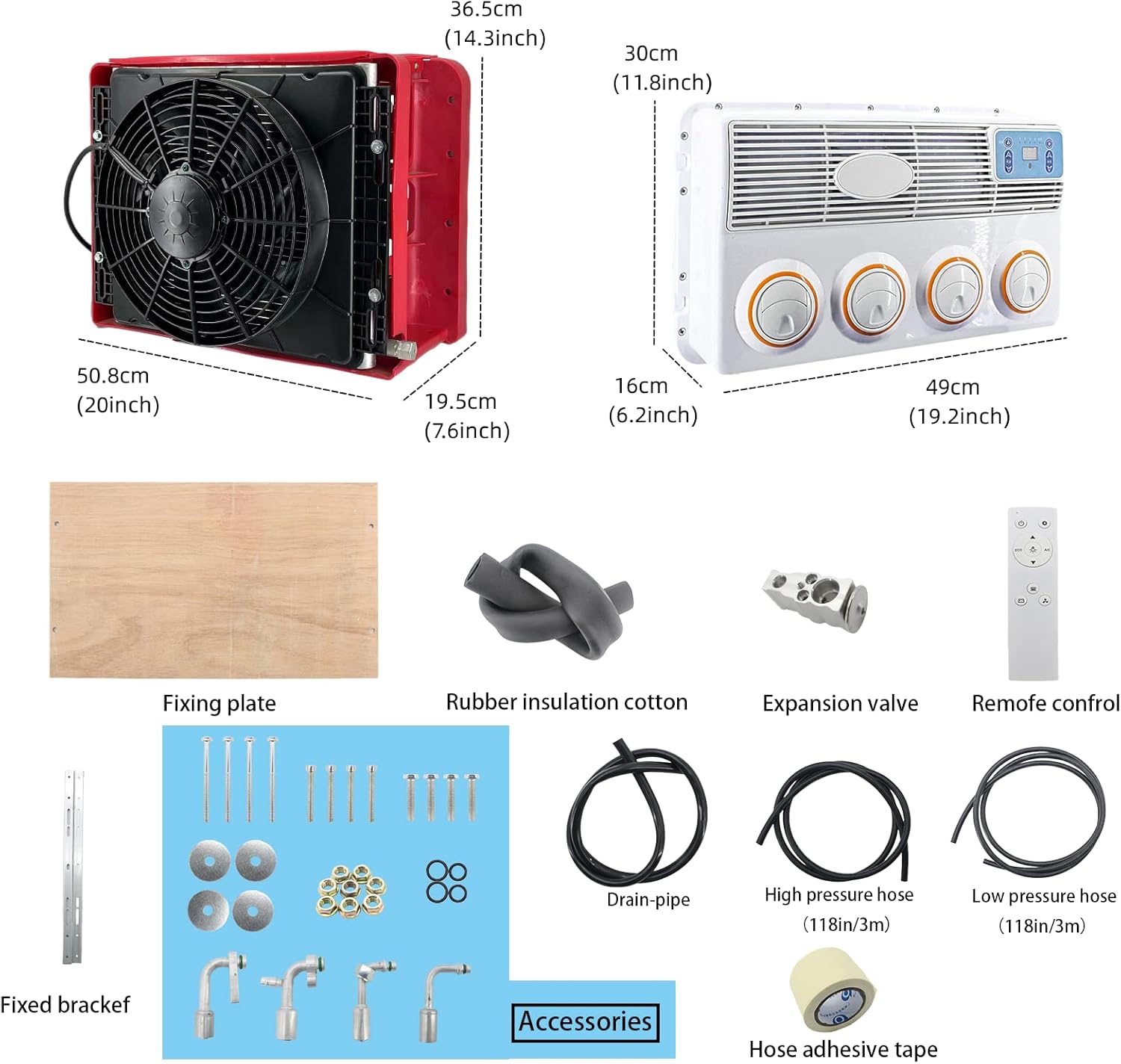
Image: Overview of the various accessories included for installation, such as fixing plates, hoses, and an expansion valve.

Image: The main components of the air conditioner system, including the indoor evaporator unit, outdoor condenser unit, and remote control.
Operation Guide
The NEKPOKKA 12V Electric Air Conditioner features an intelligent digital display and intuitive controls for ease of use. The control panel is located on the indoor unit.
Control Panel Functions:

Image: The intelligent digital display and control buttons on the indoor unit, showing power, wind speed, and temperature controls.
- Power Button (Leftmost button): Press to turn the unit ON or OFF.
- Mode/A/C Button: This button cycles through different operating modes and controls the cooling function.
- No.1 Light: Standby Mode
- No.2 Light: Heating Mode (TPC electric heating)
- No.3 Light: Energy-saving Mode
- No.4 Light: Intelligent Mode
- A/C Light: Cooling Mode
- Temperature Control Buttons (Up/Down arrows next to temperature display): Use these buttons to adjust the desired temperature setting.
- Fan Speed Control Buttons (Up/Down arrows next to wind speed display): Use these buttons to adjust the fan speed.
The unit also comes with a remote control for convenient operation from a distance.
Maintenance
Regular maintenance ensures the longevity and efficient operation of your air conditioner. Always turn off and disconnect power to the unit before performing any maintenance.
- Filter Cleaning: Periodically clean the air filters on the indoor unit to maintain optimal airflow and cooling/heating efficiency. Refer to the unit's design for filter access.
- Exterior Cleaning: Wipe down the exterior surfaces of both indoor and outdoor units with a soft, damp cloth. Do not use harsh chemicals or abrasive cleaners.
- Condenser Coil Cleaning: The outdoor unit's condenser coils can accumulate dirt and debris, reducing efficiency. Gently clean the coils with a soft brush or vacuum. For deep cleaning, professional service is recommended.
- Drainage Check: Ensure the drain pipe is free of blockages to allow proper condensation drainage.
- Refrigerant Level Check: If you notice a decrease in cooling performance, the refrigerant level may be low. This requires professional inspection and recharging.
- Electrical Connections: Periodically check all electrical connections for tightness and signs of corrosion.
Troubleshooting
This section addresses common issues you might encounter. For problems not listed here or if solutions do not resolve the issue, please contact customer support.
| Problem | Possible Cause | Solution |
|---|---|---|
| Unit does not turn on. | No power supply; loose wiring connection; low battery voltage. | Check power source and connections. Ensure vehicle battery is adequately charged. The unit has low voltage protection to prevent full discharge. |
| Insufficient cooling/heating. | Dirty air filters; blocked condenser coils; low refrigerant level; improper mode selection. | Clean air filters and condenser coils. Verify correct operating mode (A/C for cooling, No.2 light for heating). If refrigerant is suspected, contact a professional. |
| Unit is noisy. | Loose mounting; debris in fan; unit not level. | Ensure units are securely mounted and level. Check for any foreign objects in the fan blades of both indoor and outdoor units. |
| Water leakage from indoor unit. | Blocked drain pipe; improper installation angle. | Check and clear the drain pipe for blockages. Ensure the indoor unit is installed with a slight tilt for proper drainage. |
| Controls are confusing / Unit not responding to commands. | Incorrect button usage; remote control battery low. | Refer to the "Operation Guide" section for detailed control instructions. Replace remote control batteries if applicable. |
Warranty and Support
For any questions, technical assistance, or warranty claims, please contact the seller or manufacturer directly. It is recommended to keep your purchase receipt as proof of purchase.
- Return Policy: This product typically offers a 30-day return policy. Please refer to your purchase terms for specific details.
- Protection Plans: Extended protection plans may be available for purchase, including 3-Year, 4-Year, and Complete Protect options. These plans offer additional coverage beyond the standard warranty.
- Customer Support: For direct assistance, please reach out to the customer support provided by the seller.
Related Documents - 12V
 |
NEKPOKKA Air Conditioner User Manual and Troubleshooting Guide Comprehensive guide to operating and troubleshooting NEKPOKKA 12V/24V DC air conditioners. Covers control panel functions, remote control operations, fault codes, and technical specifications. |
 |
Eurolite TPC Coupler: Safety, Installation, and Technical Specifications Comprehensive guide to the Eurolite TPC Coupler, covering essential safety instructions, professional installation procedures, maintenance guidelines, and detailed technical specifications for various models. |
 |
NEKPOKKA Roof Air Conditioner User Manual Comprehensive user manual for the NEKPOKKA Roof Air Conditioner, covering installation, operation, features, troubleshooting, and safety guidelines for 12V and 24V models. |
 |
TPC-100W Series User Manual - Advantech Touch Panel Computer Comprehensive user manual for the Advantech TPC-100W Series touch panel computers, detailing specifications, setup, Linux Yocto and Android OS support, safety instructions, and technical assistance. |
 |
Advantech TPC-1071H/1271H/1571H/1771H User Manual Comprehensive user manual for Advantech TPC-1071H, TPC-1271H, TPC-1571H, and TPC-1771H industrial touch panel computers. Details specifications, system setup, safety, and installation for these Intel Atom-based Human Machine Interfaces. |
 |
Goldair GCPAC350W Hot & Cold Portable Air Conditioner with Wifi - Operating Instructions This document provides comprehensive operating instructions, safety guidelines, installation procedures, care and maintenance tips, troubleshooting advice, and warranty information for the Goldair GCPAC350W Hot & Cold Portable Air Conditioner with Wifi. |
Ask a question about this manual
Ask about setup, troubleshooting, compatibility, parts, safety, or missing instructions. Manuals+ will review the question and use this page’s manual context to help answer it.