
1. Introduction
This manual provides comprehensive instructions for the YUNTX DAB-4G+64G Android 14 car radio, specifically designed for Ford Tourneo, Transit, and Custom models manufactured between 2013 and 2021. It covers essential information regarding product features, installation, operation, and maintenance to ensure optimal performance and user experience. Please read this manual thoroughly before installation and use.
2. Package Contents
Carefully unpack the box and verify that all the following items are included. If any items are missing or damaged, please contact customer support.

Image: Overview of the YUNTX car radio and its complete set of accessories.
- YUNTX Android 14 Car Radio Unit
- Power Socket Cable
- USB Cables (x2)
- Radio Antenna
- RCA Output Socket Cables (A, B, C)
- DAB Antenna
- GPS Antenna
- Rear Camera
- External Microphone
- User Manual (this document)
3. Compatibility
This YUNTX car radio is compatible with the following vehicle models:
- Ford Tourneo (2013-2021)
- Ford Transit (2013-2021)
- Ford Custom (2013-2021)
If you are unsure about compatibility with your specific vehicle, please contact our technical support team at yuntx_techsupport@163.com and provide a photo of your car's dashboard for verification.
4. Key Features
- Operating System: Android 14
- Processor: Octa-Core 2.5 GHz (A53)
- Memory: 4GB RAM + 64GB ROM
- Display: 9-inch IPS 2.5D Capacitive Touchscreen, 1024*600 Resolution
- Audio Output: 4*50W, Built-in DSP with 64-band Equalizer
- Integrated DAB+: Digital Audio Broadcasting for high-quality radio reception
- CarPlay & Android Auto: Wired/Wireless support for seamless smartphone integration
- Connectivity: Built-in WiFi, 4G Internet support (requires optional 4G dongle), Bluetooth 5.0
- Navigation: Online and offline GPS navigation with 3D maps and voice guidance
- Mirror Link: Display and control your smartphone screen on the car radio
- Split Screen: Run two applications simultaneously
- Radio Tuner: AM/FM with RDS (Radio Data System)
- Steering Wheel Control: Supports original steering wheel button functions
- Camera Support: Rear camera input (included), 360 camera support (optional)
- OBD Support: Compatible with most Bluetooth OBD2 and WiFi OBD scanners (optional adapter required)

Image: Detailed overview of the YUNTX car radio's core specifications.

Image: Visual representation of the car radio's advanced functionalities.
5. Setup and Installation
Professional installation is recommended for car radios. Ensure the vehicle's ignition is off and the battery is disconnected before beginning installation.
5.1 Pre-Installation Check
- Verify all package contents are present.
- Confirm vehicle compatibility.
5.2 Installation Steps (General Guide)
- Carefully remove the original car radio unit and dashboard trim.
- Connect the main power socket cable from the new unit to the vehicle's wiring harness.
- Connect the GPS antenna, DAB antenna, and radio antenna to their respective ports on the new unit. Position the antennas in locations with clear signal reception (e.g., dashboard, windshield).
- Connect the external microphone for hands-free calling. Route the cable discreetly to a suitable location near the driver.
- If installing the rear camera, route its cable from the back of the vehicle to the radio unit and connect it to the designated input.
- Connect any additional RCA output cables for external amplifiers or monitors, if applicable.
- Carefully slide the new YUNTX car radio into the dashboard opening.
- Secure the unit and reattach any removed dashboard trim.
- Reconnect the vehicle battery and test the unit's functionality.
Image: Visual comparison of the dashboard before and after car radio installation.
6. Operating Instructions
6.1 Basic Operation
- Power On/Off: The unit typically powers on with the vehicle's ignition. Press and hold the power button (if available) for manual control.
- Touchscreen: Navigate the interface by tapping, swiping, and pinching on the 9-inch IPS touchscreen.
- Volume Control: Adjust volume using the on-screen controls or the vehicle's steering wheel controls.
6.2 CarPlay & Android Auto
Connect your iPhone or Android smartphone via USB or wirelessly to access CarPlay or Android Auto. This allows you to use navigation, make calls, send messages, and play music directly from your phone's interface on the car radio screen.
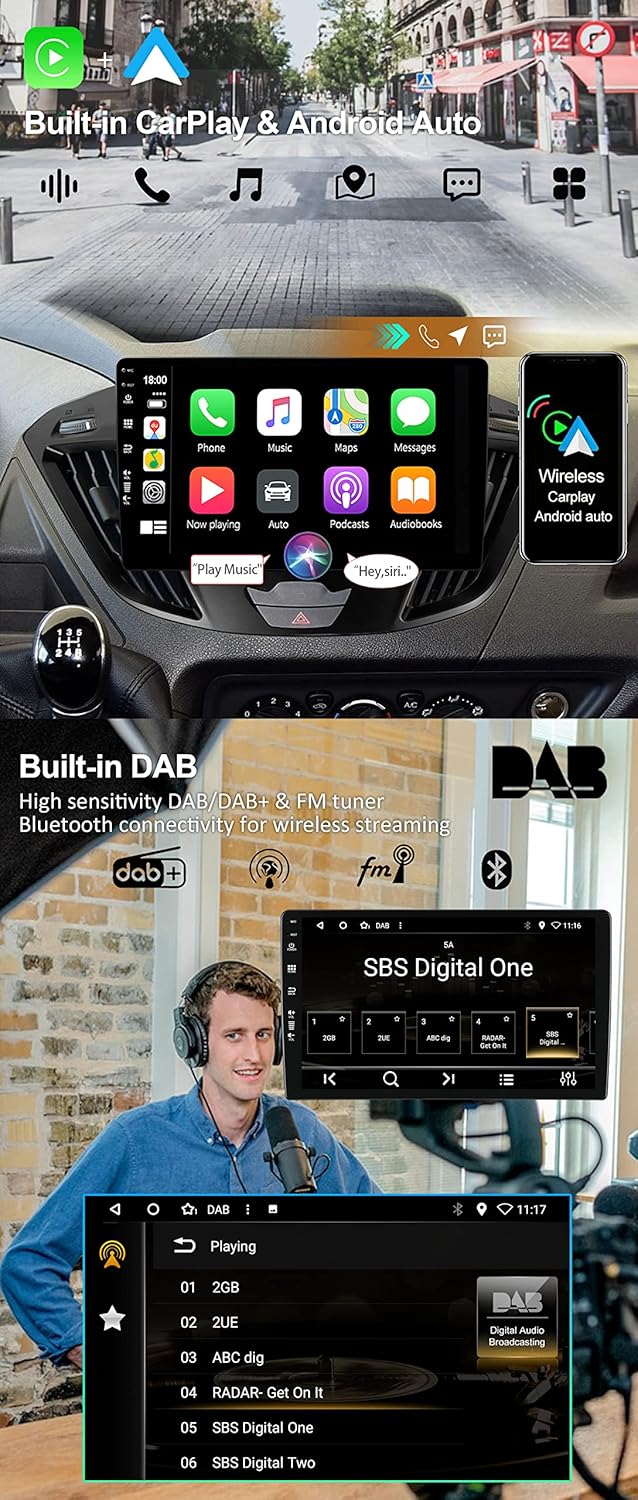
Image: CarPlay and Android Auto interfaces, and DAB+ radio in operation.
6.3 DAB+ Radio
Access digital radio stations by selecting the DAB+ application. Enjoy a wider selection of stations and superior sound quality compared to traditional FM radio. The system automatically scans and lists available DAB stations.
6.4 DSP Audio Settings
Utilize the built-in Digital Sound Processor (DSP) with its 64-band equalizer to customize your audio experience. Adjust frequency bands, balance, fader, and other sound effects to match your preferences.
6.5 GPS Navigation
The unit supports both online and offline GPS navigation. Use pre-installed map applications or download your preferred navigation apps from the Google Play Store. The system provides 3D maps and voice guidance. You can listen to radio or Bluetooth audio while navigating.
6.6 Bluetooth 5.0
Pair your smartphone via Bluetooth for hands-free calling and audio streaming. The system supports quick contact search and phonebook synchronization. To pair, go to Bluetooth settings on the car radio and your phone, search for the device, and connect.
6.7 Mirror Link
Use the Mirror Link function to display and control your smartphone's screen directly on the car radio. Connect your phone via USB cable or Wi-Fi as per the on-screen instructions.
6.8 Split Screen
The split-screen feature allows you to run two applications simultaneously, such as navigation on one side and music on the other. To activate, long-press the recent apps button or follow the specific app instructions.
6.9 Steering Wheel Control
Configure the car radio to work with your vehicle's original steering wheel controls. Access the 'Steering Wheel Control' settings in the unit's menu to map functions like volume, track change, and mode selection to your steering wheel buttons.
6.10 Quick Reversing Mode
When the vehicle is put into reverse gear, the car radio automatically switches to the rear camera display, providing a clear view of the area behind your vehicle for safer parking and maneuvering.
7. Specifications
| Feature | Specification |
|---|---|
| Brand | YUNTX |
| Model Number | DAB-4G+64G |
| Operating System | Android 14 |
| Processor | Octa-Core 2.5 GHz |
| RAM | 4GB |
| ROM | 64GB |
| Screen Type | IPS 2.5D Capacitive Touchscreen |
| Screen Size | 9 inches |
| Resolution | 1024*600 |
| Audio Output Power | 4*50W |
| DSP Equalizer | 64-band |
| Bluetooth Version | 5.0 |
| Connectivity | Bluetooth, USB, Wi-Fi, 4G (optional dongle) |
| USB Ports | 2 |
| Special Features | DAB+, CarPlay, Android Auto, DSP, GPS, Mirror Link, Split Screen, Steering Wheel Control, Rear Camera Input, OBD Support |
| Compatible Devices | Smartphone |
| Audio Output Mode | Stereo |
| Surround Sound Configuration | 4.0 |
| Video Encoding | H.264, MPEG-4 |
8. Troubleshooting
If you encounter issues with your YUNTX car radio, please refer to the following common troubleshooting steps:
- No Power: Check all power connections and fuses. Ensure the vehicle's ignition is on.
- No Sound: Verify speaker connections, check volume levels, and ensure the mute function is not active. Check DSP settings.
- GPS Signal Issues: Ensure the GPS antenna is correctly installed and has a clear view of the sky.
- Bluetooth Pairing Problems: Ensure Bluetooth is enabled on both the car radio and your smartphone. Delete previous pairings and try again.
- Touchscreen Unresponsive: Try restarting the unit. If the issue persists, a factory reset might be necessary (note: this will erase all user data).
- System Lag/Freezing: Close unnecessary background applications. If persistent, consider a factory reset.
For more complex issues, please contact our technical support team.
9. Maintenance
To ensure the longevity and optimal performance of your YUNTX car radio, follow these maintenance guidelines:
- Cleaning: Use a soft, dry cloth to clean the screen and exterior. For stubborn smudges, lightly dampen the cloth with water or a screen-safe cleaner. Avoid abrasive materials or harsh chemicals.
- Software Updates: Periodically check for available software updates through the unit's settings or the manufacturer's website to ensure you have the latest features and bug fixes.
- Environmental Conditions: Avoid exposing the unit to extreme temperatures, direct sunlight for prolonged periods, or excessive moisture.
10. Support and Warranty
For technical assistance, compatibility inquiries, or any other support needs, please contact our dedicated technical support team:
Email: yuntx_techsupport@163.com
Please include your product model number (DAB-4G+64G) and a detailed description of your issue when contacting support.
Information regarding product warranty is typically provided with your purchase documentation or can be found on the product's official sales page. Please retain your proof of purchase for warranty claims.


