
ALLIMITY QYSY-RC4390A-S-QYSY
ALLIMITY RC4390A Replacement Remote Control User Manual
Model: QYSY-RC4390A-S-QYSY
Product Overview
The ALLIMITY RC4390A is a replacement remote control designed for various SMARTECH television models. This remote is engineered to provide full functionality without the need for complex programming, offering a direct replacement experience.

Figure 1: Front view of the ALLIMITY RC4390A remote control. This image displays the complete layout of the remote, highlighting the ergonomic design and the arrangement of its various function buttons, including the power button, numerical keys, navigation pad, volume and channel controls, and quick access buttons for streaming services.
Setup and Installation
This replacement remote control requires no programming. Simply insert the correct batteries, and it will be ready for immediate use with compatible SMARTECH TV models.
Battery Installation
- Locate the battery compartment on the back of the remote control.
- Slide the battery compartment cover downwards or in the direction indicated by an arrow to open it.
- Insert two AAA alkaline batteries (not included), ensuring the positive (+) and negative (-) terminals align correctly with the markings inside the compartment.
- Close the battery compartment cover by sliding it back into place until it clicks securely.
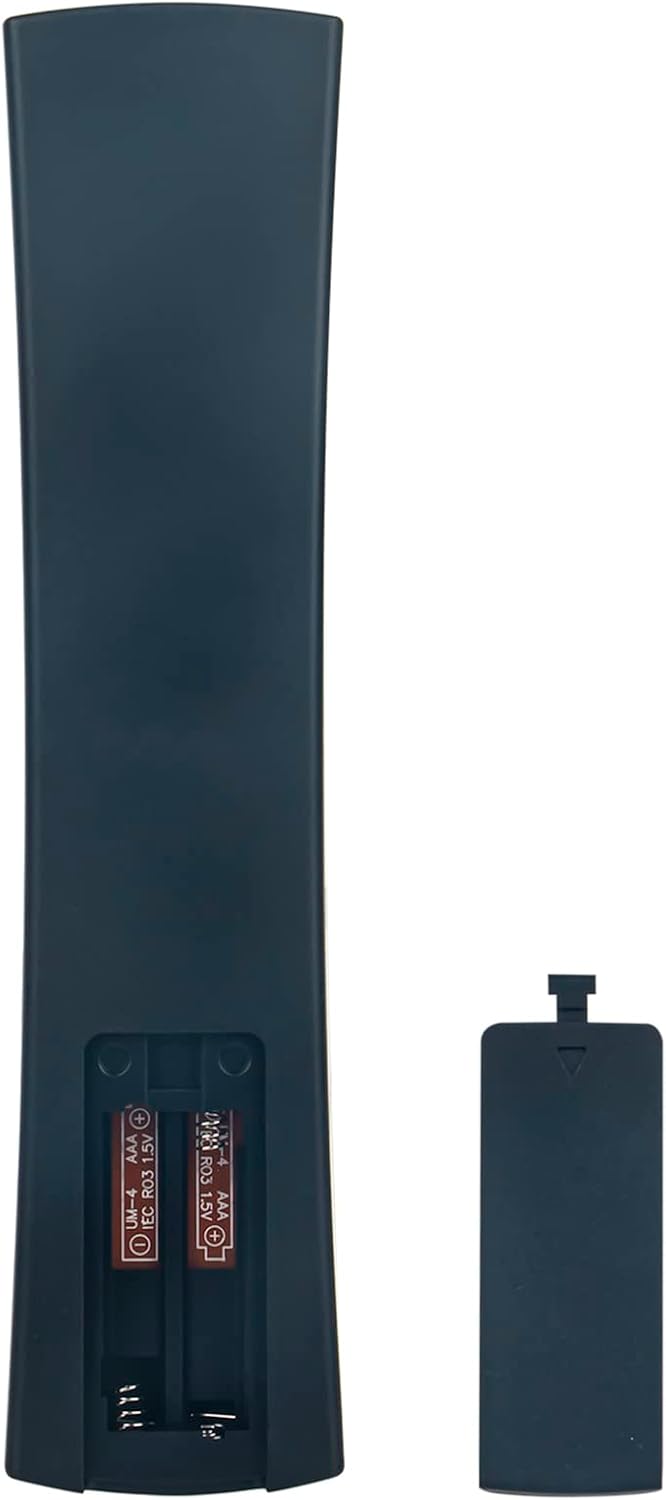
Figure 2: Battery compartment of the remote control. This image illustrates the open battery compartment on the back of the remote, clearly showing the two slots for AAA batteries and the polarity indicators.
Operating Instructions
The ALLIMITY RC4390A remote control is designed for intuitive operation, mirroring the functions of your original SMARTECH TV remote.
Key Functions
- Power Button (⏻): Turns the TV on or off.
- Number Pad (0-9): Direct channel selection.
- Volume Up/Down (+/-): Adjusts the audio volume.
- Channel Up/Down (▲/▼): Changes TV channels.
- Navigation Pad (◀ ▲ ▶ ▼): Used to navigate menus and select options.
- OK Button: Confirms selections within menus.
- Back Button: Returns to the previous screen or menu.
- Exit Button: Exits the current menu or application.
- Home Button (⌂): Accesses the TV's smart home screen or main menu.
- Dedicated App Buttons (Netflix, YouTube, Kids, USB): Provides quick access to these specific applications or inputs.
- Media Control Buttons (Play, Pause, Stop, Rewind, Fast Forward): Controls media playback.
Compatible Models
This remote control is compatible with a wide range of SMARTECH TV models, including but not limited to:
- LE-2219
- LE-24P28SA41
- LE2219-SMT
- LE-2419D
- LE-2419DTS
- LE-2822
- LE-4317
- LE-3219NSA
- LE-4018
- LE-4048SA
- LE-4317SA
- LE-4348SA
- LE-3222
- LE-5017SA
- LE-6519
- LE3918
- LE32011
- LE32D7
- LE-32D11
- LEDF32
- N30HC1LB1H
- 32P18SLN83
Maintenance
Proper maintenance ensures the longevity and optimal performance of your remote control.
- Cleaning: Use a soft, dry cloth to wipe the surface of the remote. For stubborn dirt, slightly dampen the cloth with water or a mild, non-abrasive cleaner. Avoid excessive moisture.
- Battery Replacement: Replace batteries when the remote's response becomes sluggish or stops working. Always replace both batteries at the same time with new alkaline batteries.
- Storage: If the remote will not be used for an extended period, remove the batteries to prevent leakage and potential damage to the remote. Store in a cool, dry place.
- Avoid Damage: Do not drop the remote, expose it to extreme temperatures, or immerse it in liquids.
Troubleshooting
If you encounter issues with your remote control, refer to the following common troubleshooting steps:
| Problem | Possible Cause | Solution |
|---|---|---|
| Remote not responding. | Dead or incorrectly inserted batteries. Obstruction between remote and TV. Remote out of range. |
|
| Some buttons not working. | Dirt or debris under buttons. Specific button malfunction. |
|
| Remote works intermittently. | Low battery power. Interference. |
|
Specifications
| Feature | Detail |
|---|---|
| Brand | ALLIMITY |
| Model Number | QYSY-RC4390A-S-QYSY |
| Product Dimensions | 4 x 12 x 0.3 cm |
| Item Weight | 60 g |
| Connectivity Technology | Infrared (IR) |
| Special Features | Ergonomic design |
| Max Supported Devices | 18 (referring to the number of compatible TV models listed) |
Warranty and Support
As a replacement remote control, this product typically adheres to the standard return and exchange policies of the retailer from which it was purchased. Please refer to your purchase documentation for specific warranty details or return periods.
For technical support or inquiries regarding compatibility, please contact the seller or manufacturer directly through the platform where the product was acquired. Provide your order details and the model number of your television for efficient assistance.
Ask a question about this manual
Ask about setup, troubleshooting, compatibility, parts, safety, or missing instructions. Manuals+ will review the question and use this page’s manual context to help answer it.