
Music Sound BTMSTWSSWAGR
Music Sound SWAG Wireless Earbuds User Manual
Model: BTMSTWSSWAGR | Brand: Music Sound
Product Overview
The Music Sound SWAG Wireless Earbuds are designed to provide a balanced sound and optimal comfort. These Bluetooth earbuds offer up to 20 hours of music playback, ensuring an uninterrupted listening experience. They feature intuitive touch controls for managing music and calls, and automatic pairing for seamless connection to your devices.

Image: The Music Sound SWAG Wireless Earbuds in red, shown with their compact charging case.
What's in the Box
Please check the package contents to ensure all items are present:
- Music Sound SWAG Wireless Earbuds (Left and Right)
- Charging Case
- USB-C Charging Cable
- User Manual

Image: A clear layout of the package contents: two earbuds, the charging case, a USB-C charging cable, and the user guide.
Setup
1. Charging the Earbuds and Case
Before first use, fully charge the earbuds and the charging case. Place the earbuds into the charging case. Connect the provided USB-C cable to the charging port on the case and the other end to a USB power source (e.g., computer, wall adapter). The LED indicator on the earbuds will show charging status.
Image: The USB-C charging cable connected to the charging case, illustrating the charging setup.
2. Initial Pairing
- Ensure earbuds are charged.
- Open the charging case. The earbuds will automatically enter pairing mode.
- On your device (smartphone, tablet, laptop), enable Bluetooth.
- Search for "SWAG" or "Music Sound SWAG" in the list of available Bluetooth devices.
- Select "SWAG" to connect. Once connected, a voice prompt will confirm the pairing.
The earbuds feature automatic pairing, meaning they will automatically connect to the last paired device when removed from the case, if Bluetooth is enabled on the device.
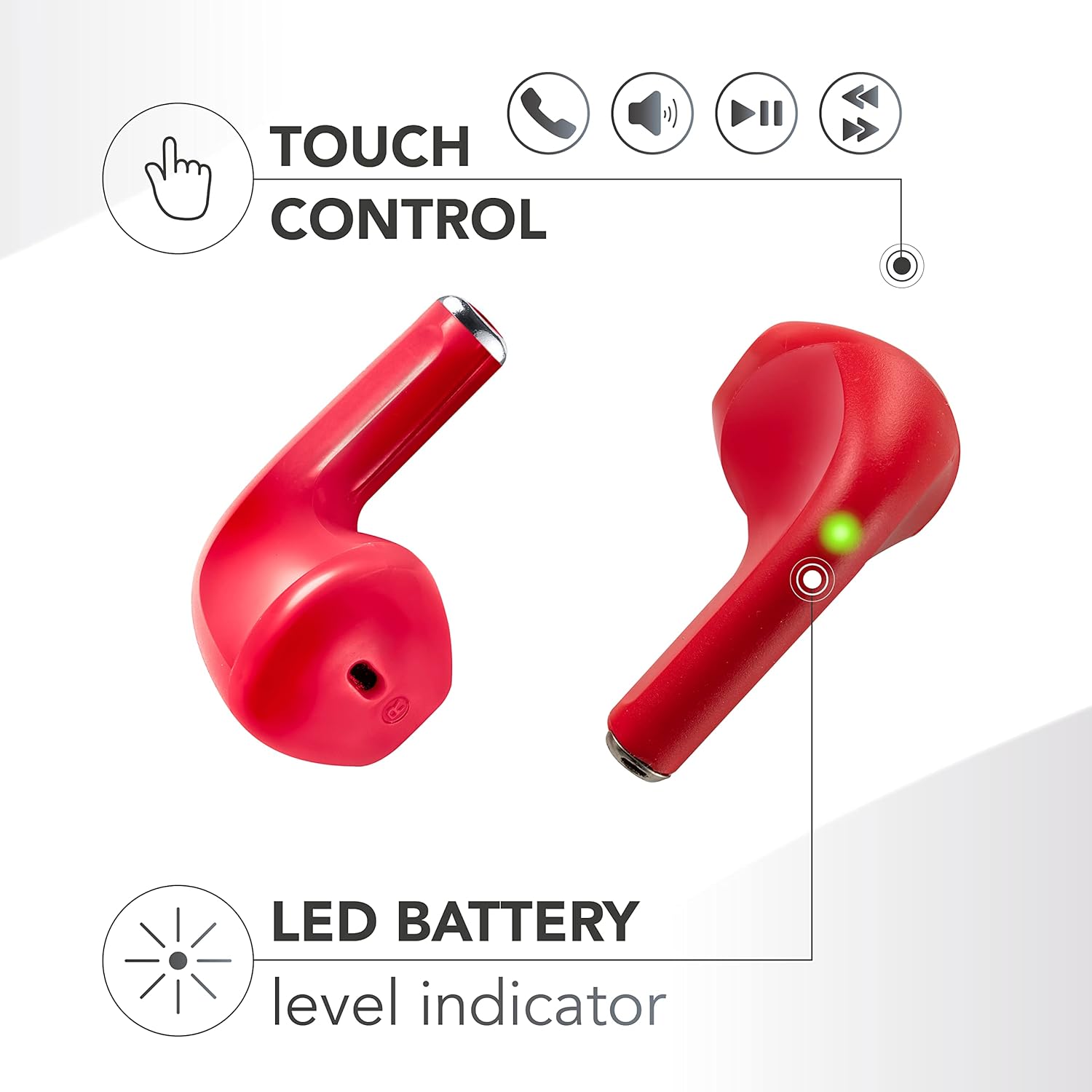
Image: A close-up of an earbud highlighting the LED battery level indicator, which helps confirm power status during pairing and use.
Operating Instructions
Wearing the Earbuds
Gently insert the earbuds into your ears. The capsule design is engineered for a comfortable and secure fit, ensuring optimal sound delivery and passive noise isolation.

Image: A woman wearing a Music Sound SWAG earbud, illustrating how the earbuds fit comfortably in the ear.
Touch Controls
The SWAG earbuds feature touch-sensitive areas on each earbud for easy control of music playback and calls. Specific functions may vary slightly, but common controls include:
- Play/Pause: Single tap on either earbud.
- Next Track: Double tap on the right earbud.
- Previous Track: Double tap on the left earbud.
- Answer/End Call: Single tap on either earbud during an incoming call.
- Reject Call: Press and hold on either earbud during an incoming call.
- Activate Voice Assistant: Triple tap on either earbud (if supported by your device).
Image: A visual representation of the touch control functions available on the earbuds, including icons for call management, volume, and music playback.
Battery Life
The Music Sound SWAG earbuds provide up to 20 hours of total playtime with the charging case. A single charge of the earbuds offers approximately 4 hours of continuous playback. The charging case extends the listening time by providing multiple recharges on the go.

Image: The earbuds inside their charging case, with an overlay indicating up to 15 hours of total playtime with the case and 4 hours on a single charge. (Note: Product description states 20 hours total playtime.)
Maintenance
- Cleaning: Use a soft, dry, lint-free cloth to clean the earbuds and charging case. Do not use harsh chemicals or abrasive materials.
- Storage: When not in use, store the earbuds in their charging case to protect them and keep them charged.
- Avoid Water: The earbuds are not waterproof. Avoid exposure to water, moisture, or extreme temperatures.
- Battery Care: To prolong battery life, avoid fully discharging the earbuds and case frequently. Charge them regularly.
Troubleshooting
| Problem | Possible Solution |
|---|---|
| Earbuds not pairing |
|
| No sound from one earbud |
|
| Charging case not charging |
|
| Touch controls not responding |
|
Specifications
| Feature | Detail |
|---|---|
| Model Name | BTSWAGR |
| Brand | Music Sound |
| Connectivity Technology | Wireless (Bluetooth) |
| Wireless Communication Technology | Bluetooth |
| Compatible Devices | Mobile Phones, Laptops, Tablets |
| Ear Placement | In-ear |
| Form Factor | True Wireless |
| Frequency Response | 20 Hz - 20,000 Hz |
| Battery Life (Total Playtime) | Up to 20 Hours (with charging case) |
| Battery Type | 2 Lithium Ion batteries (included) |
| Battery Cell Composition | Lithium Polymer |
| Product Dimensions | 2.7 x 14.1 x 7.5 cm |
| Item Weight | 60 grams |
| Additional Features | Volume Control |
| Color | Red |
Note on Noise Control: The specification mentions "Controllo del rumore: Cancellazione attiva del rumore". Given the product's features and typical price point for this type of earbud, this likely refers to passive noise isolation provided by the in-ear design rather than active noise cancellation (ANC) technology.
Warranty and Support
For warranty information and technical support, please refer to the official Music Sound website or contact their customer service directly. Keep your proof of purchase for any warranty claims.
You can visit the Music Sound Store on Amazon for more product information and support resources.
Ask a question about this manual
Ask about setup, troubleshooting, compatibility, parts, safety, or missing instructions. Manuals+ will review the question and use this page’s manual context to help answer it.