
1. Important Safety Instructions
Please read and understand all safety instructions before installing or operating this power supply unit. Failure to follow these instructions may result in electric shock, fire, or damage to the product and connected equipment.
- Professional Installation: Installation should only be performed by qualified personnel.
- Ventilation: Ensure adequate ventilation around the power supply unit. Do not block any ventilation openings.
- Moisture: Do not expose the unit to water or excessive moisture. Operate in a dry environment.
- Grounding: Ensure the power supply is properly grounded to prevent electric shock.
- Power Disconnection: Always disconnect the power cord from the wall outlet before performing any installation, maintenance, or troubleshooting.
- Voltage: Verify that the input voltage matches the specifications of the power supply unit.
- Internal Components: Do not open the power supply unit casing. There are no user-serviceable parts inside, and opening it voids the warranty and poses a risk of electric shock.
2. Package Contents
Verify that all items are present and in good condition upon unpacking.
- MIDTY 80plus Gold Flex Small 1U K39 600W Power Supply Unit (ENP-7660B)
- Mounting Screws (quantity may vary)
- Instruction Manual (this document)
3. Setup and Installation
Follow these steps to properly install the power supply unit into your system.
- Prepare the System: Ensure your computer system is completely powered off and disconnected from the main power outlet.
- Remove Old PSU (if applicable): If replacing an existing power supply, carefully disconnect all cables from the old unit and remove it from the chassis.
- Position the New PSU: Gently slide the MIDTY ENP-7660B power supply into the designated 1U Flex ATX power supply bay in your chassis. Ensure it is seated correctly.
- Secure the PSU: Use the provided mounting screws to secure the power supply unit to the chassis. Tighten screws firmly but do not overtighten.
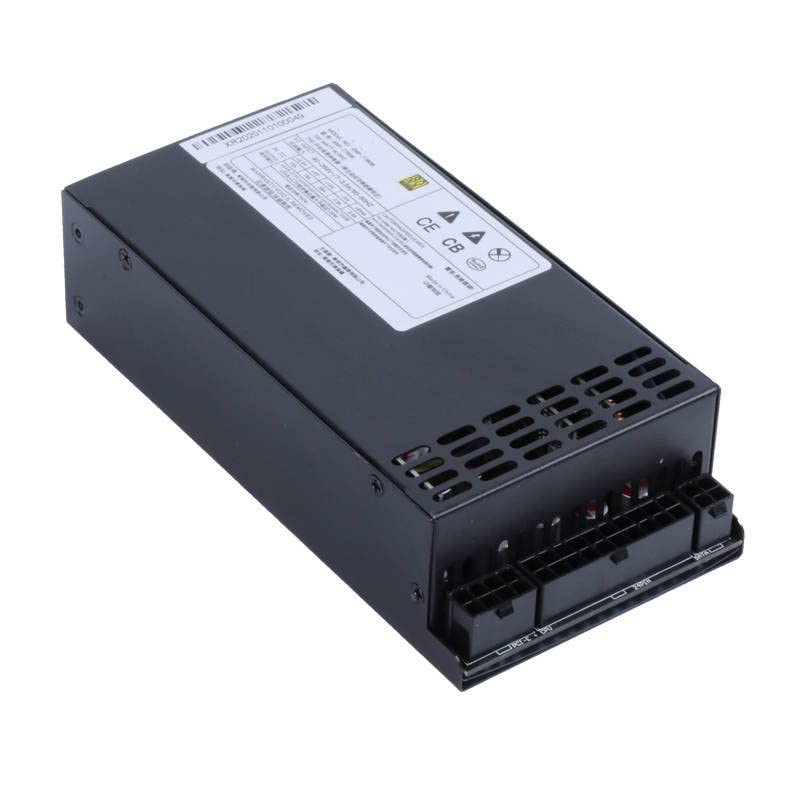
Figure 3.1: External view of the MIDTY ENP-7660B Power Supply Unit, showing its compact 1U Flex form factor and connector panel.
- Connect Cables: Connect the necessary power cables from the PSU to your motherboard, CPU, graphics card, storage drives, and other peripherals. Refer to your motherboard and component manuals for specific connection points. Ensure all connections are secure.

Figure 3.2: Internal view of the MIDTY ENP-7660B Power Supply Unit, showcasing its circuit board, capacitors, and transformers. This view is for informational purposes only; do not open the unit.
- Connect AC Power: Once all internal connections are made, connect the AC power cord to the power supply unit and then to a grounded wall outlet.
4. Operation
After successful installation, you can power on your system.
- Power On: Press the power button on your computer chassis. The power supply unit will begin to deliver power to your components.
- Status Indicators: Some systems or motherboards may have LED indicators to show power status. Refer to your system's manual for details.
- Normal Operation: The power supply fan will operate to cool the internal components. The fan speed may vary depending on the load and temperature.
5. Care and Maintenance
Proper care ensures the longevity and optimal performance of your power supply unit.
- Cleaning: Periodically clean the exterior of the power supply and its fan vents using a soft, dry cloth or compressed air to remove dust buildup. Ensure the system is powered off and unplugged before cleaning.
- Environment: Operate the unit in a clean, dry, and well-ventilated environment. Avoid extreme temperatures.
- Cable Management: Ensure cables are neatly managed to avoid obstructing airflow within the chassis.
6. Troubleshooting Common Issues
If you encounter problems, refer to the table below for potential solutions.
| Problem | Possible Cause | Solution |
|---|---|---|
| System does not power on. | Power cord not connected. PSU switch is off. Loose internal connections. Faulty component. | Ensure AC power cord is securely plugged into PSU and wall outlet. Check if the PSU's main power switch (if present) is in the 'ON' position. Verify all internal power cables are firmly connected. Test components individually if possible. |
| System powers on but shuts down immediately. | Overload or short circuit. Overheating. | Disconnect non-essential components to check for overload. Ensure proper ventilation and clean fan vents. Check for any short circuits in cabling. |
| Unusual noise from PSU. | Fan obstruction or defect. | Ensure no cables or debris are obstructing the fan. If noise persists, contact support. Do not open the unit. |
If troubleshooting steps do not resolve the issue, contact customer support or a qualified technician.
7. Technical Specifications
Detailed specifications for the MIDTY ENP-7660B Power Supply Unit.
- Model: ENP-7660B
- Form Factor: Flex ATX 1U
- Rated Power: 600W
- Efficiency: 80 PLUS Gold certified
- AC Input: 90-264V~ / 7-3.5A / 50-60Hz
- DC Output:
- +3.3V: 15A
- +5V: 15A
- +12V: 49A
- -12V: 0.3A
- +5Vsb: 2.5A
- Combined Power: +5V & +3.3V combined load not to exceed 100W. +5Vsb & +3.3V combined load not to exceed 100W.
- Manufacturer Reference: MiDTY_Ser_11251

Figure 7.1: Specification label for the MIDTY ENP-7660B Power Supply Unit, detailing electrical input and output ratings, and certifications.
8. Warranty and Customer Support
MIDTY products are manufactured to high-quality standards. While specific warranty details are not provided in this document, please retain your proof of purchase for any warranty claims.
For technical assistance, troubleshooting beyond this manual, or warranty inquiries, please contact your retailer or the manufacturer directly. Refer to the product packaging or the retailer's website for current contact information.
Note: Availability of spare parts information is currently unavailable.