
Introduction
The Purivortex AC300 HEPA Air Purifier is designed to improve indoor air quality by effectively filtering various airborne particles and odors. This manual provides essential information for the safe and efficient operation and maintenance of your new air purifier.

Image: Compact by Design certification.
Product Features
- Powerful Air Purification: Effectively filters harmful substances such as smoke, pollen, dander, hair, and odors, providing clean and fresh air in spaces up to 215ft².
- 360-Degree Air Intake: Ensures efficient airflow by filtering pollutants from all directions.
- Multi-Layer Filtration System: Consists of a pre-filter, HEPA filter, and activated carbon filter to effectively capture airborne particles and harmful pollutants.
- Whisper-Quiet Operation: Operates as low as 20dB, ideal for bedrooms, offices, and nurseries.
- Fragrance Sponge: Allows for aromatherapy to enhance air quality.
- Timer Function: Set operation for 4, 8, or 12 hours.
- Adjustable Fan Speeds: Multiple fan speed settings including a silent mode.
- Night Light Function: Provides a soft ambient light.

Image: Purivortex AC300 in a living room, showcasing key features.
Setup Guide
- Unpack the Air Purifier: Carefully remove the air purifier and all packaging materials from the box.
- Install the Filter:
The filter may come pre-installed but wrapped in plastic. Before first use, ensure the filter is unwrapped and correctly placed.
- Turn the air purifier upside down.
- Twist the base counter-clockwise to unlock and remove it.
- Remove the plastic packaging from the HEPA filter.
- Place the unwrapped filter back into the unit.
- Reattach the base by twisting it clockwise until it locks securely.
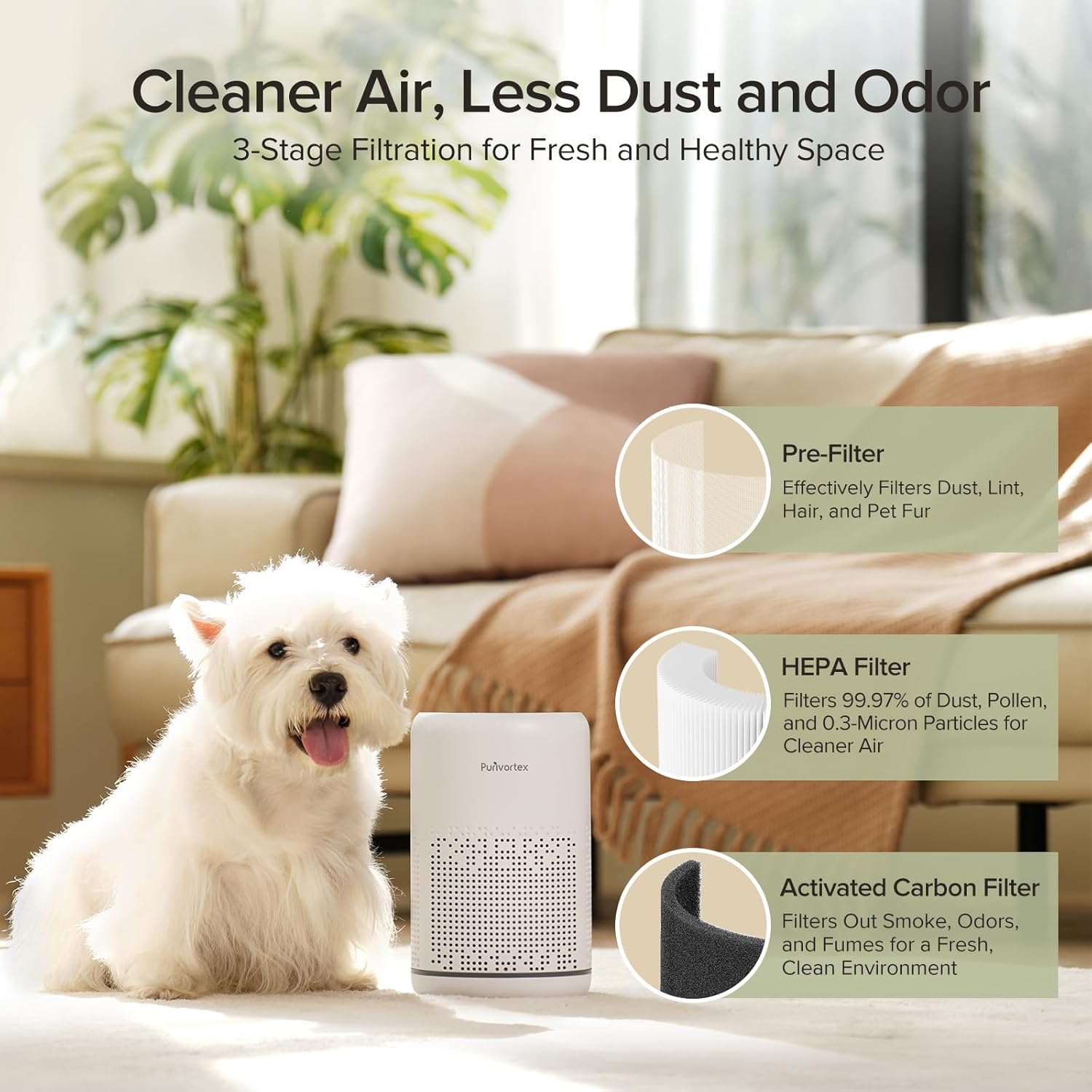
Image: Multi-Layer Filtration System components.
- Placement: Place the air purifier on a flat, stable surface. Ensure there is adequate space around the unit for optimal air intake and output. Avoid placing it directly against walls or furniture.
- Power Connection: Plug the power adapter into the air purifier and then into a standard electrical outlet.
Operating Instructions
The Purivortex AC300 features intuitive touch controls located on the top panel of the unit.

Image: Control panel overview.
Power On/Off
Press the Power button (circle with a vertical line) in the center of the control panel to turn the unit on or off.
Fan Speed Control
Press the Fan Speed button (fan icon) to cycle through different fan speeds: Low, Medium, High, and Silent (SL) mode. Silent mode operates at a whisper-quiet 20dB.

Image: Air purifier in sleep mode with display off.
Timer Function
Press the Timer button (clock icon) to set the operating duration for 4, 8, or 12 hours. The unit will automatically turn off after the selected time.
Night Light Control
Press the Light button (light bulb icon) to turn the ambient night light on or off. Some models may offer multiple color options for the light.
Child Lock Function
To activate the child lock, press and hold the Lock button (padlock icon) for a few seconds. This prevents accidental changes to settings. Repeat to deactivate.
Fragrance Sponge (Aromatherapy)
The unit includes a fragrance sponge for aromatherapy. To use:
- Press to remove the aroma box from the top of the unit.
- Open the aroma box and add a few drops of your preferred essential oil to the sponge.
- Close the aroma box and reinsert it into the unit.

Image: Instructions for using the fragrance sponge.
Maintenance
Filter Replacement
The multi-layer filter should be replaced regularly to maintain optimal air purification performance. The replacement frequency depends on usage and air quality. It is recommended to replace the filter every 3-4 months.
- Turn off and unplug the air purifier.
- Turn the unit upside down and twist the base counter-clockwise to remove it.
- Remove the old filter.
- Insert a new Purivortex AC300 replacement filter (search for B0BP78GGQC on Amazon).
- Reattach the base by twisting it clockwise until it locks securely.
Image: Multi-Layer Filtration System components.
Cleaning the Exterior
Wipe the exterior of the air purifier with a soft, dry cloth as needed to remove dust. Do not use abrasive cleaners or immerse the unit in water.
Troubleshooting
- Unit does not turn on: Ensure the power adapter is securely plugged into both the unit and a working electrical outlet.
- Reduced airflow or purification: Check if the filter needs replacement. Ensure the air intake and output vents are not blocked.
- Unusual noise: Verify that the unit is placed on a flat, stable surface. Check if the filter is correctly installed and not loose.
- Odor persists: Replace the activated carbon filter. Ensure the room is adequately ventilated.
If issues persist, please contact Purivortex customer support.
Specifications
| Product Dimensions | 6.1"D x 6.1"W x 9.7"H |
| Item Weight | 3 Pounds |
| Model Number | AC300 |
| Brand | Purivortex |
| Power Source | Corded Electric |
| Coverage Area | Up to 215ft² |

Image: Product dimensions.
Warranty and Support
For warranty information, technical support, or any inquiries regarding your Purivortex AC300 Air Purifier, please refer to the contact information provided in your product packaging or visit the official Purivortex website.
Replacement filters can be found on Amazon by searching for ASIN: B0BP78GGQC.