
B0C2425J84
User Manual: Replacement Remote Control
For Soleus Air Portable Room Casement Windows Air Conditioners
Product Overview
This document provides essential information for the replacement remote control compatible with various Soleus Air Portable Room Casement Windows Air Conditioner models. This remote is designed to provide basic control functionality for your air conditioner unit.
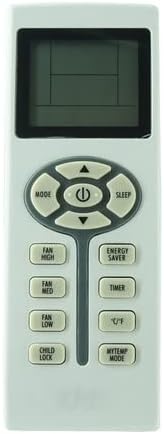
Figure 1: Front view of the replacement remote control, showing the display screen and various control buttons for mode, fan speed, timer, and temperature.
Compatibility
This replacement remote control is compatible with the following Soleus Air Portable Room Casement Windows Air Conditioner models:
- WS24E01
- PSC-14HP-201
- PSC-14HP-01
- TTWM1-14H-01
- PMC-14HP-201
- TTWM1-10H-01
Important: If your specific model number is not listed above, this remote control may not be compatible or may not provide full functionality. Please verify your air conditioner's model number before use.
Setup and Battery Installation
The remote control requires two AAA batteries (not included) for operation. Follow these steps to install the batteries:
- Locate the battery compartment on the back of the remote control.
- Gently slide the battery compartment cover downwards to open it.
- Insert two AAA batteries, ensuring the positive (+) and negative (-) terminals align correctly with the markings inside the compartment.
- Slide the battery compartment cover back into place until it clicks securely.

Figure 2: Back view of the remote control with the battery cover removed, illustrating the correct orientation for inserting two AAA batteries.
Once batteries are installed, the remote control is ready for use. No additional pairing or programming is typically required for this replacement unit.
Operating Instructions
This remote control provides standard functions for your Soleus Air conditioner. Point the remote control directly at the air conditioner's receiver when operating.
Key Functions:
- Power Button (⏻): Turns the air conditioner ON or OFF.
- MODE Button: Cycles through operating modes (e.g., Cool, Heat, Fan, Dry, Auto). This remote supports Cool and Heat functions.
- Fan Speed Buttons (FAN HIGH, FAN MED, FAN LOW): Adjusts the fan speed.
- Temperature Adjustment Buttons (▲ / ▼): Increases or decreases the set temperature.
- SLEEP Button: Activates or deactivates the sleep mode, which typically adjusts temperature gradually for comfort during sleep.
- ENERGY SAVER Button: Engages the energy-saving mode, which may adjust settings to reduce power consumption.
- TIMER Button: Sets the timer for automatic ON/OFF operation. Refer to your air conditioner's original manual for detailed timer programming.
- °C/°F Button: Switches the temperature display between Celsius and Fahrenheit.
- CHILD LOCK Button: Locks the remote control buttons to prevent accidental changes. Press again to unlock.
- MYTEMP MODE Button: Activates a specific temperature setting or mode, if supported by your AC unit.
Note: Not all functions displayed on the remote may be supported by every compatible air conditioner model. Functionality may vary based on your specific unit.
Maintenance
To ensure optimal performance and longevity of your remote control:
- Cleaning: Wipe the remote control with a soft, dry cloth. Do not use liquid cleaners or abrasive materials.
- Battery Replacement: Replace batteries when the remote's range decreases or if the display becomes dim. Always replace both batteries at the same time with new ones.
- Storage: If the remote control will not be used for an extended period, remove the batteries to prevent leakage and damage.
- Environment: Avoid exposing the remote control to direct sunlight, high temperatures, humidity, or strong impacts.
Troubleshooting
| Problem | Possible Cause | Solution |
|---|---|---|
| Remote not working. | Dead or incorrectly installed batteries. | Replace batteries with new AAA batteries, ensuring correct polarity. |
| Remote has short range. | Weak batteries; Obstruction between remote and AC unit. | Replace batteries. Ensure clear line of sight to the AC unit's receiver. |
| Some functions do not work. | Remote not fully compatible with your specific AC model. | Verify your AC model number against the compatibility list. Some advanced functions may not be supported by all units. |
| Display is dim or blank. | Low batteries. | Replace batteries. |
Specifications
- Product Type: Replacement Infrared (IR) Remote Control
- Power Source: 2 x AAA Batteries (not included)
- Connectivity: Infrared
- Special Features: With Cool and Heat function, °C/°F button for temperature unit switching.
- Manufacturer: SZHKHXD
- Country of Origin: China
Warranty and Support
As a generic replacement item, specific warranty details may vary. Please refer to the seller's return policy or contact the seller directly for information regarding returns, replacements, or support for this product.
For issues related to your Soleus Air conditioner unit itself, please consult the original manufacturer's manual or support channels.