
1. Introduction
This manual provides essential information for the safe and efficient use of your MEISHILE 60V 10A 600W Switching Power Supply. Please read these instructions carefully before installation and operation. Retain this manual for future reference.
The MEISHILE 60V 10A 600W Switching Power Supply is designed to convert AC input voltage (110V/120V) to a stable DC 60V output, providing up to 10A and 600W of power. It features a robust aluminum casing, efficient cooling, and multiple protection mechanisms for reliable performance.
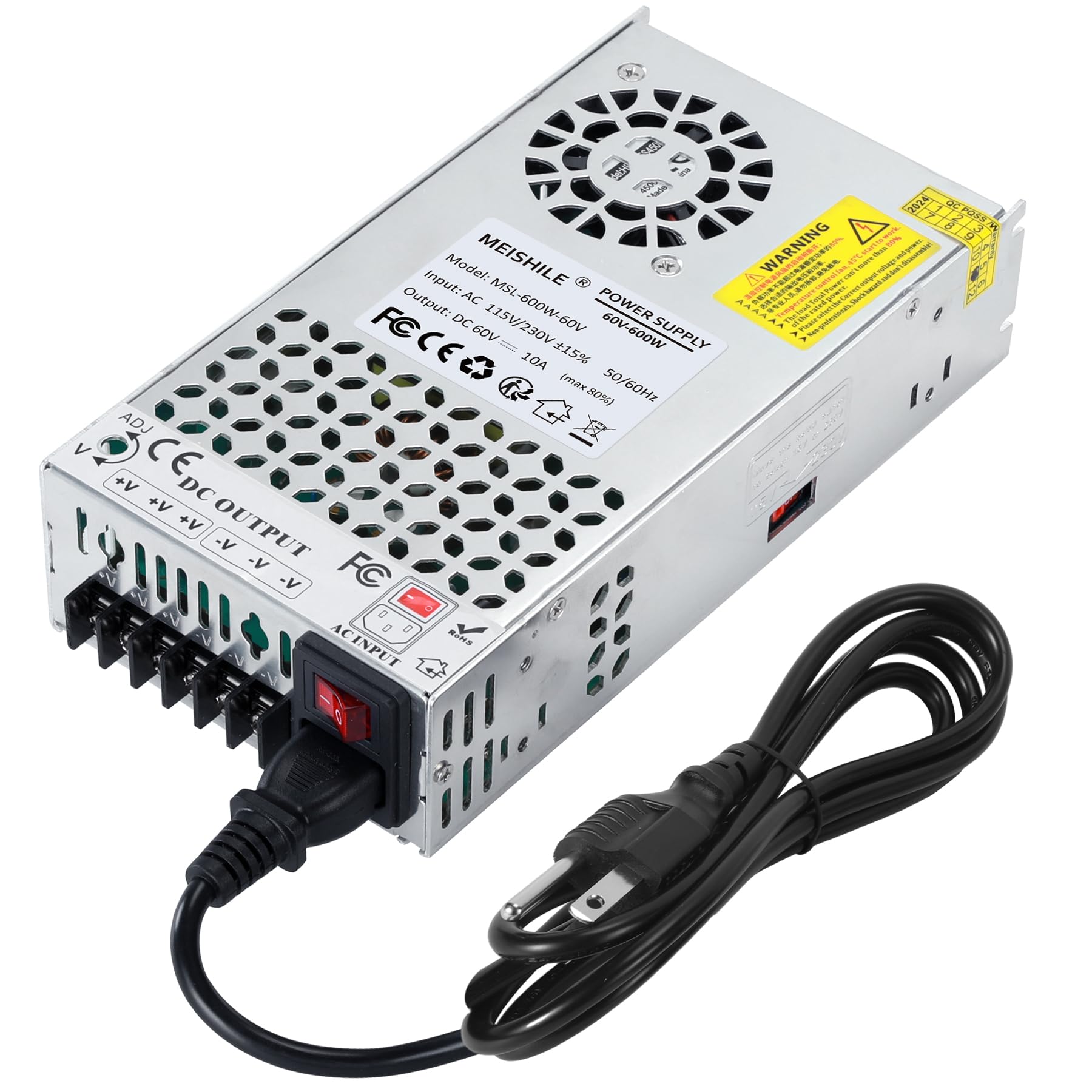
Image: MEISHILE 60V 10A 600W Switching Power Supply, front view.
2. Safety Information
WARNING: This device operates with high voltage. Improper installation or use can result in electric shock, fire, or personal injury. Always consult a qualified electrician for installation if you are unsure.
- Ensure the input voltage switch (115V/230V) is set correctly for your region before connecting to power. Incorrect setting can damage the unit.
- Do not open the casing or attempt to repair the unit. Refer all servicing to qualified personnel.
- Keep the power supply away from water, moisture, and flammable materials.
- Ensure adequate ventilation around the unit to prevent overheating. Do not block ventilation holes.
- Disconnect power before making any connections or adjustments.
- This power supply is designed for indoor use only.
Protection Features:
- Overload Protection: Automatically shuts down if the output current exceeds safe limits.
- Overvoltage Protection: Safeguards connected devices from excessive voltage.
- Leakage Protection: Enhances safety by preventing current leakage.
- Short-Circuit Protection: Prevents damage in case of a short circuit in the output.
- Overheating Protection: Built-in fan and aluminum casing help dissipate heat.

Image: Overview of the power supply highlighting its protection features.
3. Product Overview
Components:
- AC Input Terminal Block: For AC power connection (Live, Neutral, Ground).
- DC Output Terminal Block: For DC power connection (V+, V-).
- Voltage Selector Switch: To select between 115V and 230V AC input.
- Cooling Fan: Integrated intelligent fan for heat dissipation.
- LED Indicator: Indicates power status.
- ADJ Potentiometer: For fine-tuning output voltage (note: for this model, output voltage is fixed at 60V).
Dimensions:
The power supply measures approximately 8.58 x 4.53 x 1.97 inches (21.5 cm x 11.5 cm x 5 cm).

Image: Product dimensions and specifications.

Image: Close-up of the internal circuit board, showing the ADJ potentiometer for potential voltage fine-tuning.
4. Setup and Installation
Before installation, ensure the power supply is disconnected from any power source.
4.1 Input Voltage Selection:
Locate the red switch on the side of the power supply. This switch allows you to select between 115V (for USA/Canada) and 230V (for EU) AC input. Ensure this switch is set to the correct voltage for your region before connecting the power supply to the mains.

Image: Close-up of the voltage selector switch, showing the 115V/230V options. The switch is currently set to 115V.
4.2 Wiring Connections:
The power supply has clearly marked terminal blocks for AC input and DC output. Use appropriate gauge wires for your application.
- AC Input: Connect your AC power cord to the input terminals. Typically, 'L' for Live, 'N' for Neutral, and the ground symbol for Earth Ground.
- DC Output: Connect your load (e.g., LED strips, DC equipment) to the DC output terminals. Ensure correct polarity: '+V' for positive and '-V' for negative.

Image: Detailed view of the terminal blocks for AC input and DC power output (V+ and V-).

Image: Illustration showing how to connect LED strips to the DC output terminals of the power supply.
4.3 Mounting:
Mount the power supply in a stable location with sufficient airflow. Ensure that the ventilation holes and the cooling fan are not obstructed.
5. Operating Instructions
Once all connections are securely made and the input voltage switch is correctly set:
- Connect the AC input power cord to a suitable mains outlet.
- The power supply will turn on, and the LED indicator should illuminate.
- The cooling fan will operate to maintain optimal temperature.
- The output voltage is fixed at 60V. While an ADJ potentiometer may be present, user feedback indicates the output voltage is not adjustable on this specific model.
- For continuous use, it is recommended to operate the power supply at 80% of its maximum rated power (e.g., 480W for a 600W unit) to ensure longevity.

Image: The power supply unit, highlighting the quiet and efficient cooling system with air circulation arrows.
6. Maintenance
The MEISHILE Switching Power Supply is designed for minimal maintenance. Follow these guidelines to ensure optimal performance and longevity:
- Cleaning: Periodically clean the exterior of the unit with a dry, soft cloth. Ensure the ventilation holes are free from dust and debris. Do not use liquid cleaners.
- Ventilation: Regularly check that the cooling fan and ventilation openings are not obstructed. Proper airflow is crucial for heat dissipation.
- Connections: Periodically inspect all wiring connections to ensure they are secure and free from corrosion.
- Storage: If storing the unit, keep it in a cool, dry place away from direct sunlight and extreme temperatures.
Do not attempt to lubricate the fan or open the unit for internal cleaning. This may void the warranty and expose you to dangerous voltages.
7. Troubleshooting
| Problem | Possible Cause | Solution |
|---|---|---|
| No power output / LED indicator off |
|
|
| Unit overheats |
|
|
| Output voltage unstable |
|
|
If the problem persists after attempting these solutions, please contact MEISHILE customer support.
8. Specifications
| Feature | Detail |
|---|---|
| Model Number | 60V 10A 600W (MSL-600W-60V) |
| Input Voltage | AC 115V/230V ±15% (selectable) |
| Output Voltage | DC 60V |
| Output Current | 10A (Max) |
| Rated Power | 600W (Max) |
| Frequency | 50/60Hz |
| Product Dimensions | 8.58 x 4.53 x 1.97 inches (21.5 x 11.5 x 5 cm) |
| Item Weight | 1.8 pounds |
| Material | Aluminum |
| Cooling | Built-in intelligent fan |
| Protection | Overload, Overvoltage, Leakage, Short-Circuit, Overheating |
9. Warranty and Support
MEISHILE products are manufactured to high-quality standards. For warranty information or technical support, please refer to the contact details provided with your purchase or visit the official MEISHILE website.
For further assistance, you may contact MEISHILE customer service through their official channels. Please have your product model number (60V 10A 600W) and purchase date available when contacting support.
You can visit the MEISHILE store on Amazon for more information: MEISHILE Store

