1. Introduction
This manual provides essential information for the proper setup, operation, and maintenance of your Generic replacement remote control for Real Flame Electric Fireplaces. Please read these instructions carefully before use to ensure optimal performance and safety. This remote is designed as a direct replacement; ensure its appearance matches your original remote control for compatibility.
2. Product Overview
The replacement remote control allows you to manage various functions of your compatible Real Flame Electric Fireplace. It features an ergonomic design for comfortable handling.
2.1 Remote Control Layout
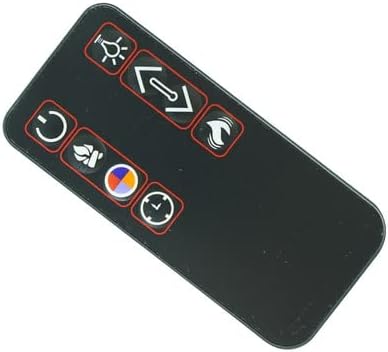
Image 1: Front view of the replacement remote control. This image displays the button layout, including controls for power, light, flame/heat intensity, flame color, and a timer function.
2.2 Battery Compartment

Image 2: Back view of the remote control with the battery compartment open. This image illustrates where the CR2025 battery is inserted and also shows the included mounting clip.
2.3 Package Contents
- 1 x Replacement Remote Control
- 1 x Mounting Clip
Note: Batteries are typically not included with this replacement remote control. Please refer to the 'Setup' section for battery requirements.
3. Setup
3.1 Battery Installation
- Locate the battery compartment on the back of the remote control.
- Gently slide the battery cover open.
- Insert one (1) CR2025 battery, ensuring the positive (+) side is facing upwards as indicated inside the compartment.
- Slide the battery cover back into place until it clicks securely.
This remote control does not require any programming or pairing. It is designed to work immediately with compatible Real Flame Electric Fireplaces once the battery is installed.
4. Operating Instructions
Point the remote control directly towards the infrared receiver on your electric fireplace. Ensure there are no obstructions between the remote and the fireplace.
- Power Button (⏻): Press to turn the fireplace ON or OFF.
- Light Button (💡): Controls the internal lighting of the fireplace, often adjusting brightness or turning it on/off.
- Flame/Heat Adjustment Button (↔): Adjusts the intensity of the flame effect or the heat output. Multiple presses may cycle through different levels.
- Flame Effect Button (🔥): Activates or changes the flame effect.
- Color Button (🎨): Cycles through different flame color options, if supported by your fireplace model.
- Timer Button (⏱): Sets a timer for the fireplace to automatically turn off after a specified duration.
5. Maintenance
5.1 Battery Replacement
Replace the CR2025 battery when the remote control's range decreases or it stops responding. Follow the battery installation steps in Section 3.1.
5.2 Cleaning
Wipe the remote control with a soft, dry cloth. Do not use abrasive cleaners or immerse the remote in water.
6. Troubleshooting
- Remote not responding:
- Ensure the battery is correctly installed with the positive (+) side up.
- Replace the battery with a new CR2025 battery.
- Ensure there are no obstructions between the remote and the fireplace's infrared receiver.
- Confirm that the remote control's appearance matches your original remote. This replacement is designed for specific models and may not be universally compatible if the original remote differs.
- Limited range:
- Replace the battery.
- Ensure you are within the recommended operating distance and line of sight of the fireplace.
7. Specifications
| Product Type | Replacement Remote Control |
| Brand | Generic |
| Compatible Devices | Real Flame Electric Fireplaces (Models: 8080E-W, 5950E-DW, 5910E-E, 2770E-W, 1750E-GRY, 5010E-W, 2770E-BK, 5950E-W, 3750E-O) |
| Battery Type | 1 x CR2025 (not included) |
| Color | Black |
| Special Feature | Ergonomic design |
8. Warranty and Support
As a generic replacement product, specific warranty details may vary. Please refer to the seller's return policy for information regarding returns or exchanges. For technical support or further inquiries, please contact the seller directly through your purchase platform.


