
Introduction
Thank you for choosing the CLUGOJ 52-inch White Ceiling Fan. This manual provides detailed instructions for the safe installation, operation, and maintenance of your new ceiling fan. Please read this manual thoroughly before installation and keep it for future reference. This fan is designed for both indoor and outdoor use, featuring a reversible DC motor and remote control for enhanced comfort and energy efficiency.
Important Safety Information
- Always disconnect power at the main circuit breaker before installation or maintenance.
- Ensure all electrical connections comply with local codes and ordinances, as well as the National Electrical Code. If you are unfamiliar with electrical wiring, consult a qualified electrician.
- The mounting structure must be capable of supporting the weight of the fan (approximately 7.19 kg).
- Ensure the fan blades are at least 7 feet (2.13 meters) from the floor and have at least 18 inches (45.7 cm) clearance from any walls or obstructions.
- Do not operate the fan if any part is damaged.
- This fan is suitable for damp locations, making it ideal for indoor and covered outdoor spaces like patios.
Parts List
Before beginning installation, verify that all parts are present and undamaged. Refer to the packaging for a complete list of components. Key components include:
- Motor Assembly
- Fan Blades (3 pieces, ABS plastic)
- Mounting Bracket
- Downrods (5-inch, 10-inch, 24-inch options)
- Canopy and Yoke Cover
- Remote Control with Receiver
- Hardware Pack (screws, wire nuts, etc.)
Setup and Installation
Follow these steps for proper installation of your CLUGOJ ceiling fan. For visual guidance, please refer to the installation video provided.
1. Mounting Bracket Installation
Secure the mounting bracket to the ceiling junction box. Ensure the bracket is firmly attached to a structural ceiling beam or a fan-rated outlet box. Use the provided explosion screws for concrete ceilings or appropriate hardware for wooden beams. The bracket is designed to support the fan securely.

Image: A person installing the mounting bracket for the CLUGOJ 52-inch white ceiling fan. This image highlights the initial steps of securing the fan to the ceiling, emphasizing the ease of the process.
2. Downrod Assembly
Select the appropriate downrod length (5", 10", or 24") for your ceiling height. Insert the downrod through the canopy and yoke cover, then secure it to the motor assembly using the cross pin and cotter pin. Ensure all connections are tight.

Image: This image displays the CLUGOJ 52-inch white ceiling fan installed with various downrod lengths (5-inch, 10-inch, and 24-inch) in different room settings, demonstrating how to choose the correct downrod for optimal fan height and room aesthetics.
3. Wiring
Carefully connect the fan's electrical wires to the household wiring according to the wiring diagram in the video. Typically, connect the live wire (red) to the live wire from the ceiling, and the neutral wire (black) to the neutral wire from the ceiling. Ensure the ground wire is securely connected. Use wire nuts to secure all connections.
4. Attaching Fan to Mounting Bracket
Lift the fan assembly and place the downrod ball into the mounting bracket's hanger lug. Rotate the fan until the tab on the mounting bracket engages with the slot on the downrod ball. This will secure the fan. Then, slide the canopy up to cover the mounting bracket and secure it with screws.
Video: This official CLUGOJ installation video provides a step-by-step guide for setting up your ceiling fan, including mounting the bracket, wiring, and securing the fan assembly. It offers visual instructions to ensure a smooth installation process.
5. Blade Installation
Attach the three ABS plastic fan blades to the motor housing using the provided screws. Ensure they are securely fastened.
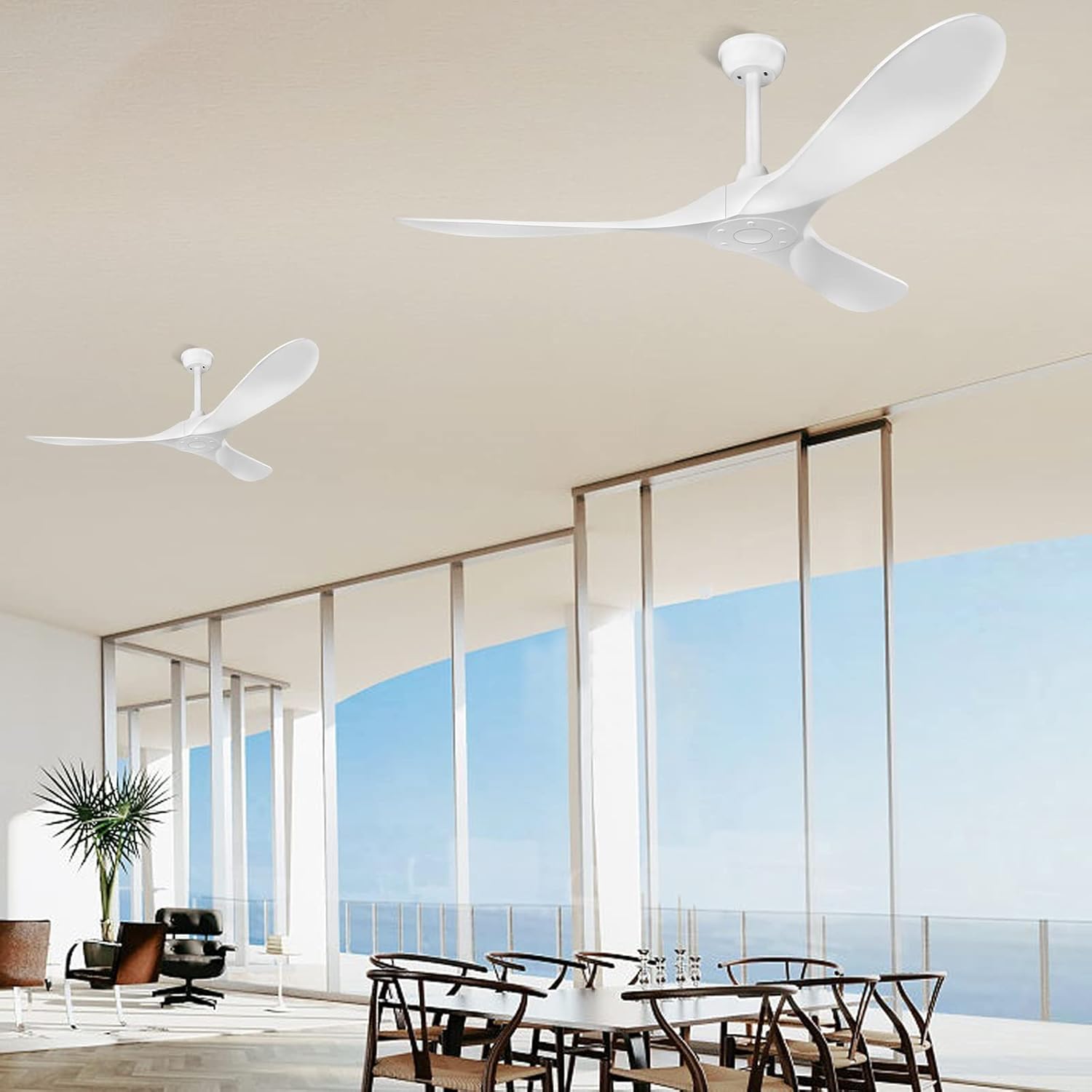
Image: Two CLUGOJ 52-inch white ceiling fans are shown installed in a modern room, demonstrating the final appearance after successful setup. The fans feature a sleek, minimalist design.
Operating Instructions
Your CLUGOJ ceiling fan comes with a remote control for convenient operation.
Remote Control Functions
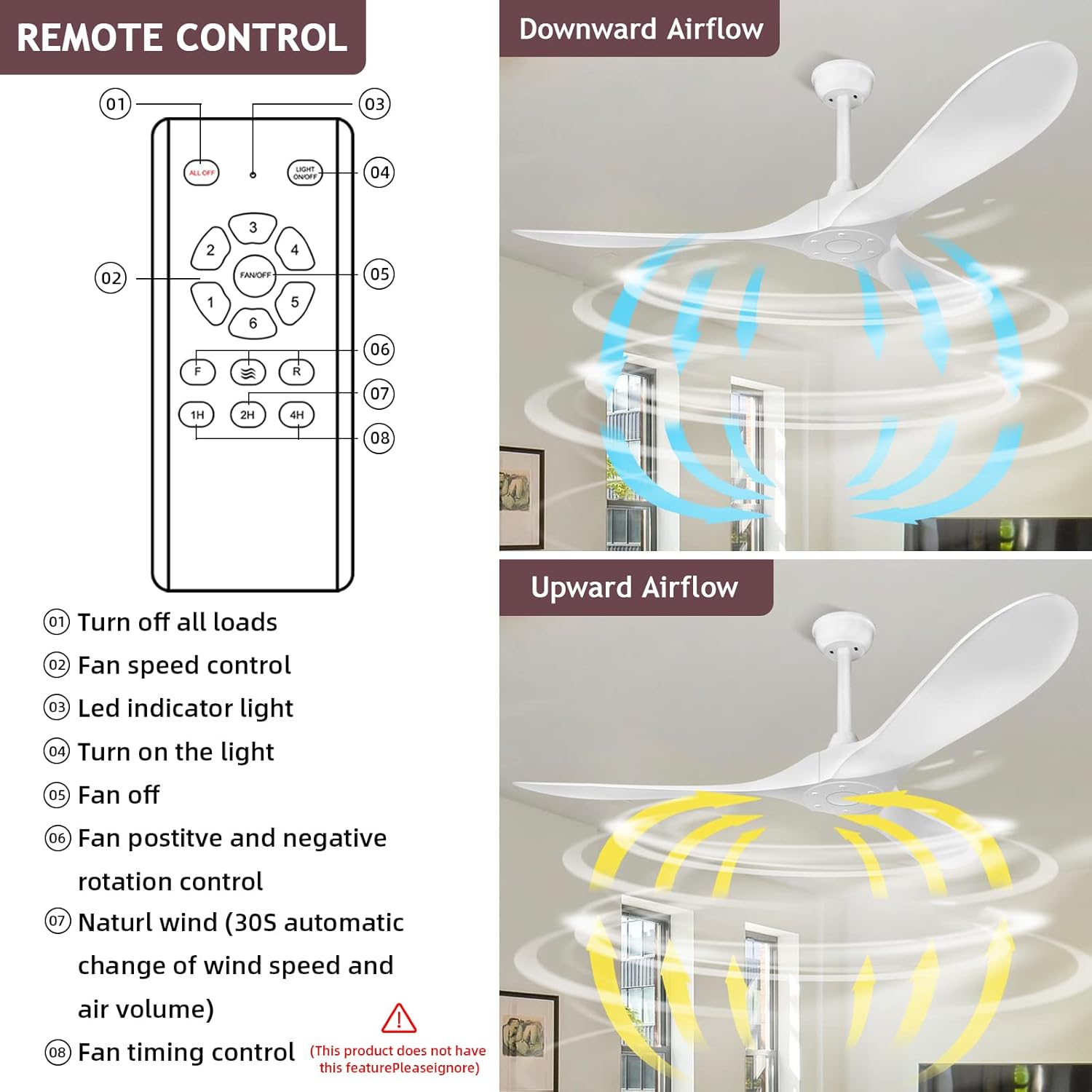
Image: This image displays the remote control for the CLUGOJ ceiling fan, with clearly labeled buttons for various functions. It includes controls for fan speed, timer settings, and the reversible airflow feature.
- Power On/Off: Press the power button to turn the fan on or off.
- Fan Speed Control: Adjust the fan speed with 6 available settings.
- Timer Function: Set the fan to turn off automatically after 1, 2, or 4 hours.
- Reversible DC Motor: Use the 'F' (Forward) and 'R' (Reverse) buttons to change the airflow direction. In summer, the fan operates in downshift mode (counter-clockwise) to create a cooling breeze. In winter, it operates in upshift mode (clockwise) to circulate warm air trapped near the ceiling.
- Natural Wind Mode: Activates an automatic change in wind speed and air volume to simulate a natural breeze.
- Light Control (if applicable): This model is a 'no light' fan. If you have a CLUGOJ fan model with a light feature, use the dedicated light button to turn the light on/off and adjust brightness or color temperature.
Quiet Operation
The CLUGOJ ceiling fan features an energy-saving DC motor that operates quietly, with noise levels less than 35 dB, ensuring a peaceful environment.

Image: A woman and her dog are shown in a relaxed setting, with the CLUGOJ 52-inch white ceiling fan operating above them. This image highlights the fan's ultra-quiet operation, contributing to a comfortable and serene atmosphere.
Maintenance
Regular maintenance ensures optimal performance and longevity of your ceiling fan.
- Cleaning: Periodically clean the fan blades and motor housing with a soft, damp cloth. Do not use abrasive cleaners or solvents, as they may damage the finish.
- Tightening Screws: Check all screws and fasteners annually to ensure they are secure. Loose connections can cause noise and wobble.
- Blade Balance: If the fan wobbles, ensure all blades are securely attached and balanced. A balancing kit (not included) can be used if necessary.
- No Lubrication Needed: The DC motor is permanently lubricated and does not require additional oiling.
Troubleshooting
If you experience issues with your fan, refer to the following common problems and solutions:
| Problem | Possible Cause | Solution |
|---|---|---|
| Fan does not start | No power to the fan; loose wire connections; remote control battery low. | Check circuit breaker; ensure all wiring is secure; replace remote control batteries. |
| Fan wobbles | Loose blade screws; unbalanced blades; loose mounting bracket. | Tighten all blade screws; use a balancing kit; ensure mounting bracket is secure. |
| Noisy operation | Loose screws; fan not properly seated in mounting bracket; internal motor issue. | Check and tighten all screws; ensure fan is correctly seated; contact customer support if noise persists. |
| Remote control not working | Low or dead batteries; incorrect pairing; obstruction between remote and receiver. | Replace batteries; re-pair remote with fan (refer to remote instructions); ensure clear line of sight. |
If these solutions do not resolve the issue, please contact CLUGOJ customer support.
Specifications
| Feature | Detail |
|---|---|
| Brand | CLUGOJ |
| Model Number | CL-52-QW-White-ABS |
| Color | White |
| Electric Fan Design | Ceiling Fan |
| Power Source | DC |
| Product Dimensions | 52"D x 52"W x 16"H |
| Room Type | Bedroom (suitable for various rooms) |
| Special Feature | Remote Control |
| Recommended Uses | Air Circulation |
| Mounting Type | Ceiling Mount |
| Controller Type | Remote Control |
| Number of Speeds | 6 |
| Noise Level | 35 Decibels |
| Wattage | 36 watts |
| Number of Blades | 3 |
| Voltage | 220 Volts |
| Indoor/Outdoor Usage | Indoor, Outdoor (covered) |
| Material | Acrylonitrile Butadiene Styrene (ABS Plastic) |
| Specification Met | FCC |
| Item Weight | 7.19 Kilograms |
| Included Components | Remote |
Warranty Information
CLUGOJ provides 12 months of after-sales service for this ceiling fan. This warranty covers manufacturing defects and ensures product quality. Please retain your proof of purchase for warranty claims.
Customer Support
For any questions, technical assistance, or warranty claims, please contact CLUGOJ customer support. Refer to your purchase documentation or the CLUGOJ official website for contact details.