
Introduction
This manual provides essential instructions for the proper setup, operation, and maintenance of your Merkury Innovations Video Call Light Stand. This device combines a desktop phone stand with an integrated ring light and a charger dock, designed to enhance your video calls and content creation.

Figure 1: Front view of the product packaging, illustrating the Video Call Light Stand in use.
What's in the Box
Please verify that all components are present before proceeding with setup:
- Merkury Innovations Video Call Light Stand (Base, Stand, Phone Holder with Ring Light)
- Micro USB Cable (for charging the ring light)
Note: Original MagSafe charger and smartphone are not included.
Setup
Follow these steps to assemble and prepare your Video Call Light Stand for use:
- Unpack Components: Carefully remove all parts from the packaging.
- Assemble the Stand: Insert the phone holder and light assembly onto the stand pole, then secure the pole into the base. Ensure all connections are firm.

Figure 2: The fully assembled Video Call Light Stand, ready for phone placement.
- Position the Stand: Place the stand on a stable, flat desktop surface. The sturdy base with a non-slip pad helps prevent accidental movement.
- Install MagSafe Charger (Optional): If using an original MagSafe charger (not included), guide its cable through the designated wire guide and securely place the charger into the MagSafe charger dock on the phone holder.
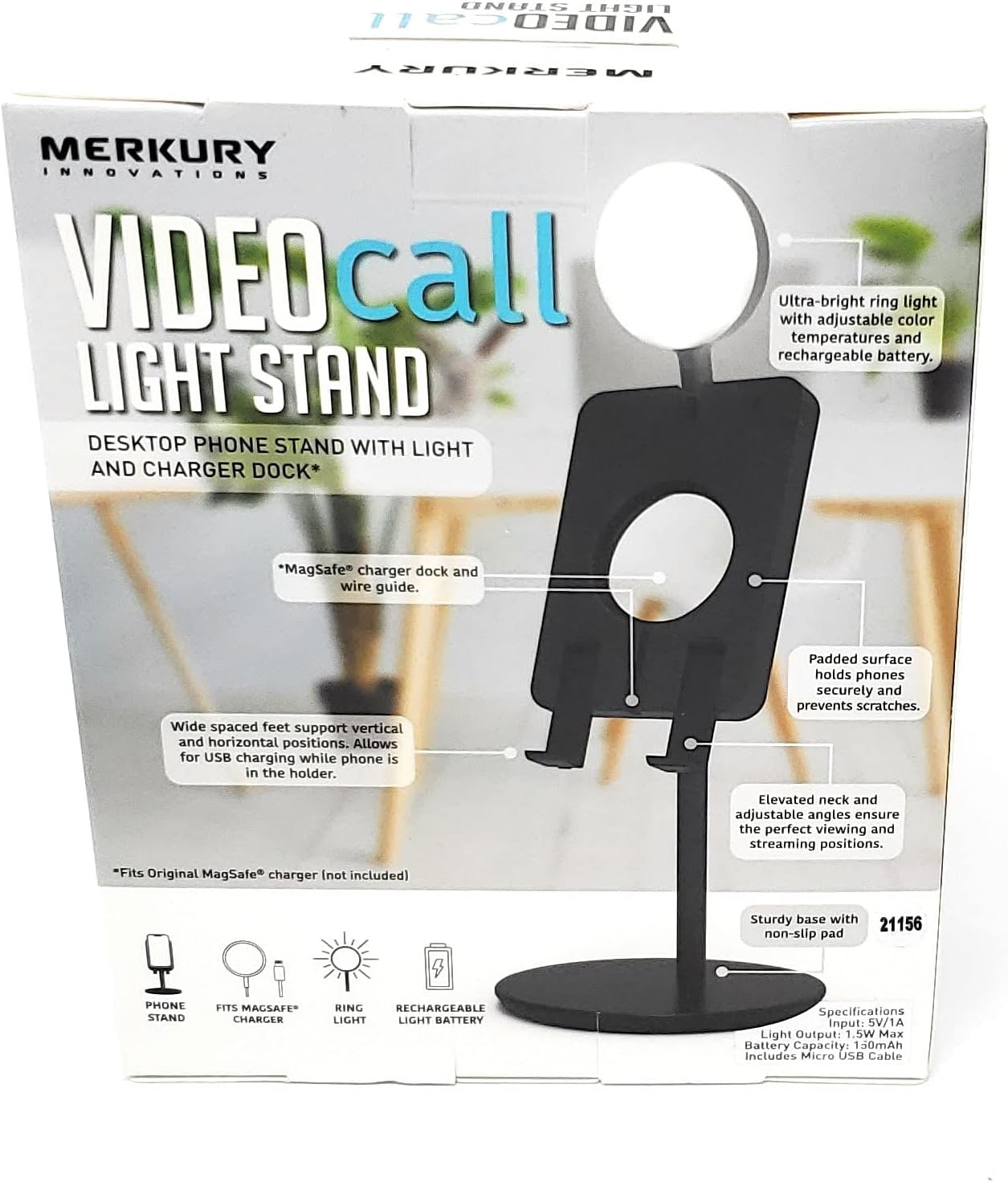
Figure 3: Detailed view of the MagSafe charger dock and wire guide on the phone holder.
Operating Instructions
Learn how to use the various features of your Video Call Light Stand:
1. Phone Placement and Adjustment
- Secure Your Phone: Place your smartphone onto the padded surface of the phone holder. The wide-spaced feet support both vertical and horizontal phone orientations.
- Adjust Viewing Angle: The elevated neck and adjustable angles allow you to find the optimal viewing and streaming positions for your device.
2. Ring Light Operation
- Power On/Off: Locate the power button on the ring light. Press and hold to turn the light on or off.
- Adjust Brightness: Short press the power button to cycle through brightness levels.
- Change Color Temperature: The ring light offers adjustable color temperatures (Warm White, Natural White, Cool White). Use the dedicated button (or a long press of the power button, depending on model variation) to switch between these modes.

Figure 4: Examples of the three available color temperature modes for the ring light.

Figure 5: The Video Call Light Stand with its ring light activated.
- Recharge the Light: Connect the provided Micro USB cable to the charging port on the ring light and to a 5V/1A USB power source. The light has a 150mAh rechargeable battery.
3. Charging Functionality
- USB Charging: The stand allows for USB charging of your phone while it is in the holder. Connect your phone's charging cable to a power source and then to your phone.
- MagSafe Charging: If an original MagSafe charger is installed, simply place your MagSafe-compatible phone onto the charger dock for wireless charging.
Maintenance
To ensure the longevity and optimal performance of your Video Call Light Stand, follow these maintenance guidelines:
- Cleaning: Use a soft, dry cloth to wipe down the stand and light. Avoid abrasive cleaners or solvents.
- Storage: When not in use, store the stand in a cool, dry place. The adjustable light folds flat into the stand for compact storage.

Figure 6: Illustration showing the light folding flat for storage and adjustable viewing angles.
- Battery Care: For the rechargeable ring light battery, avoid fully discharging it frequently. Recharge when the light dims or indicates low power.
Troubleshooting
If you encounter issues with your Video Call Light Stand, refer to the following common solutions:
- Light Not Turning On:
- Ensure the ring light battery is charged. Connect it to a 5V/1A USB power source using the Micro USB cable.
- Press and hold the power button for a few seconds to activate the light.
- Phone Stand Feels Wobbly:
- Verify that all parts of the stand are securely assembled.
- Ensure the stand is placed on a completely flat and stable surface.
- Phone Not Charging (via MagSafe):
- Confirm that an original MagSafe charger is correctly installed in the dock and connected to a power source.
- Ensure your phone is MagSafe compatible and properly aligned with the charger.
Specifications
| Model Number | MI-VLG15-101W |
| Input | 5V/1A |
| Light Output | 1.5W Max |
| Battery Capacity | 150mAh |
| Item Weight | 7.2 ounces |
| Package Dimensions | 6.1 x 4.8 x 2.2 inches |
| Compatible Devices | Smartphones (Universal fit, MagSafe compatible dock) |
Support and Warranty
For product support, frequently asked questions, or to explore other products, please visit the official Merkury Innovations website:
Merkury Innovations LLC
45 Broadway 3rd Fl. New York, NY 10006
Warranty information is typically provided with the product at the time of purchase or available on the manufacturer's website.

Figure 7: Product information including model number and manufacturer details.
Safety Information
- Do not expose the device to extreme temperatures, direct sunlight, or moisture.
- Do not attempt to disassemble or modify the product. This may void the warranty and pose safety risks.
- Keep out of reach of children.
- Use only the provided Micro USB cable for charging the ring light.
- Ensure proper ventilation when charging devices.
WARNING: Cancer and Reproductive Harm - www.P65Warnings.ca.gov