
MOUDOAUER Hard Drive External Box
Instruction Manual
MOUDOAUER Hard Drive External Box for PS4
Model: Hard Drive External Box
1. Introduction
This manual provides instructions for the MOUDOAUER Hard Drive External Box, designed to expand the internal memory capacity of your PS4 console. This accessory allows for the integration of 2.5-inch and 3.5-inch hard drives, upgrading your console's storage up to 2TB. It is engineered for ease of use, requiring no external power source, and includes necessary tools for installation.

Figure 1: The MOUDOAUER Hard Drive External Box, a black rectangular unit with a power cable extending from one end.
2. Package Contents
Please verify that all items are present in the package:
- 1x Hard Drive External Box
- 2x Screwdrivers (for installation)
- Note: Hard drive and game console are not included.
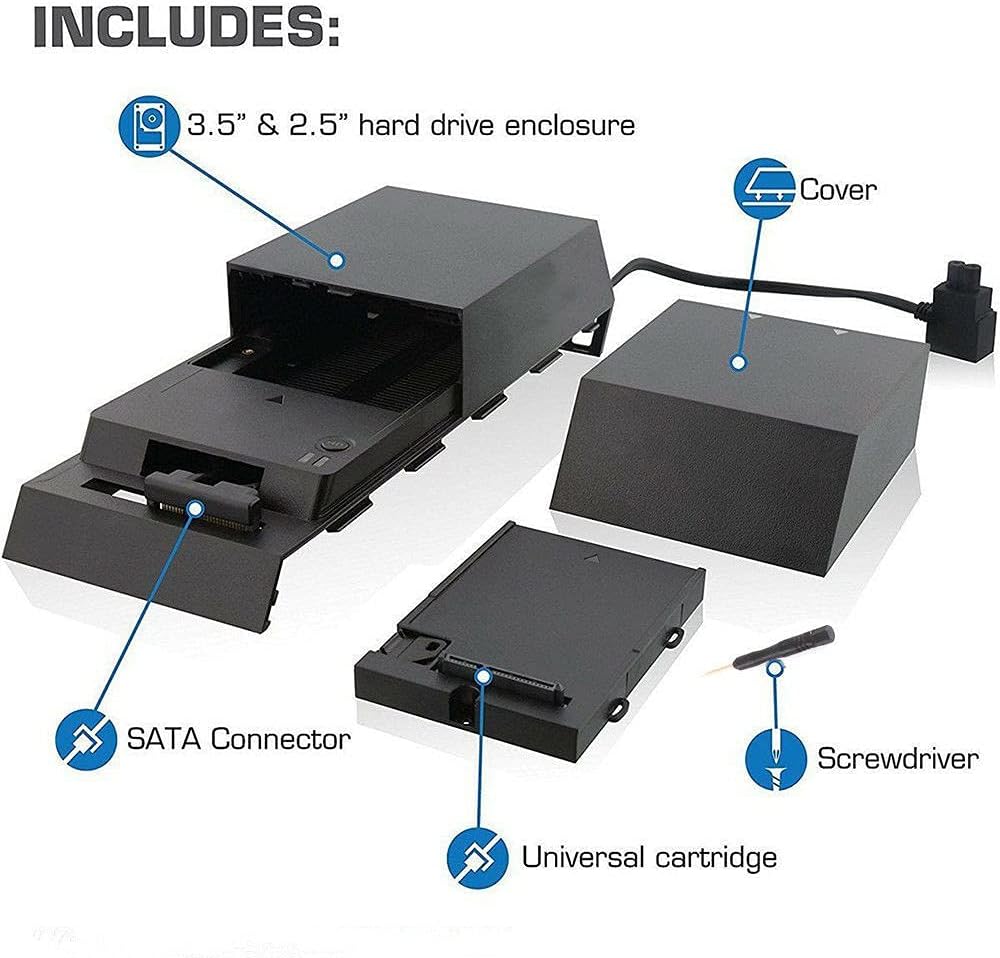
Figure 2: Diagram illustrating the components included: the 3.5" & 2.5" hard drive enclosure, its cover, a SATA connector, a universal cartridge, and screwdrivers.
3. Setup and Installation
Follow these steps to install the Hard Drive External Box with your PS4 console:
- Power Off Console: Ensure your PS4 console is completely powered off and unplugged from the power source.
- Remove PS4 Cover: Carefully slide off the glossy top cover of your PS4 console to expose the internal hard drive bay.
- Remove Original Hard Drive: Unscrew and remove the existing hard drive from the PS4.
- Prepare External Box: Open the Hard Drive External Box. You may need to use one of the provided screwdrivers to access the internal compartment.
- Install New Hard Drive: Insert your desired 2.5-inch or 3.5-inch hard drive into the universal cartridge within the external box. Ensure it is securely connected to the SATA connector.
- Connect External Box to PS4: Align the external box with the PS4's hard drive bay. The external box is designed to seamlessly integrate with the console's aesthetic.
- Secure Connection: Ensure the SATA connector from the external box properly connects to the PS4's internal port.
- Close External Box: Close the cover of the external box.
- Power On: Reconnect your PS4 to the power source and turn it on. The console should now recognize the expanded storage.

Figure 3: Image showing the Hard Drive External Box being attached to a PS4 console, with a hard drive being inserted into the open compartment of the box.
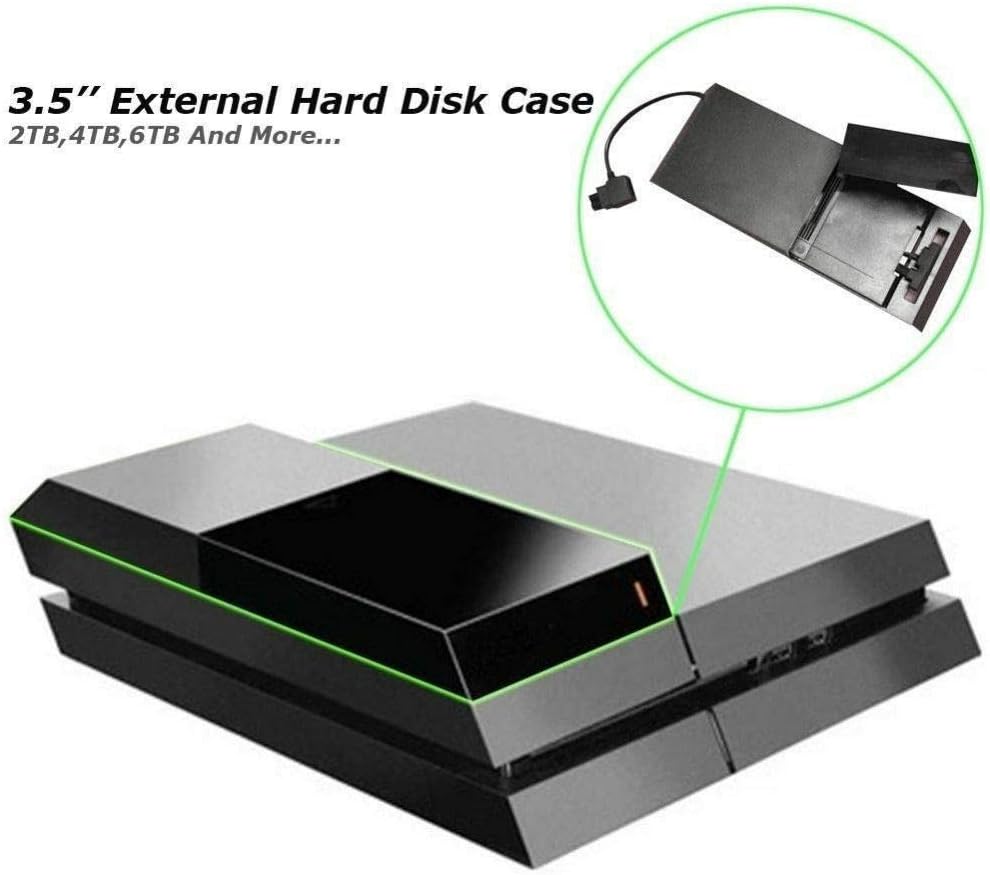
Figure 4: The Hard Drive External Box fully installed and closed on top of a PS4 console, appearing as a seamless extension.

Figure 5: An overhead view of the Hard Drive External Box with its top cover open, revealing the internal bay designed to house a hard drive.
4. Operating Instructions
Once installed, the Hard Drive External Box operates seamlessly with your PS4 console. The console will automatically detect and utilize the expanded storage capacity.
- LED Indicator: The external box features an LED indicator that illuminates to show when the PS4 is accessing or saving content on the hard drive.
- Drive Toggling: The unit allows for easy toggling between a 2.5-inch drive and a 3.5-inch drive via a built-in switch. This operation should only be performed when the console is completely off.
- No External Power: The device draws power directly from the PS4 console, eliminating the need for an additional power adapter.
5. Maintenance
To ensure the longevity and optimal performance of your Hard Drive External Box, follow these simple maintenance guidelines:
- Cleaning: Use a soft, dry cloth to gently wipe the exterior of the box. Avoid using liquid cleaners or abrasive materials.
- Ventilation: Ensure the ventilation grilles on the box are not obstructed to allow for proper airflow and prevent overheating.
- Storage: If storing the device for an extended period, disconnect it from the PS4 and store it in a cool, dry place away from direct sunlight and extreme temperatures.
6. Troubleshooting
If you encounter issues with your Hard Drive External Box, refer to the following common problems and solutions:
| Problem | Possible Cause / Solution |
|---|---|
| Device not recognized by PS4 |
|
| LED indicator not lighting up |
|
| Difficulty inserting/removing hard drive |
|
7. Specifications
| Feature | Detail |
|---|---|
| Brand | MOUDOAUER |
| Model | Hard Drive External Box |
| Compatible Devices | Game Console (PS4) |
| Supported Hard Drive Sizes | 2.5-inch and 3.5-inch |
| Maximum Capacity | Up to 2TB |
| Internal Interface | SATA (for hard drive connection) |
| Power Source | Powered by console (no external power needed) |
| Color | Black |
| Item Weight | 1.41 pounds |
8. Warranty and Support
For product support, technical assistance, or warranty inquiries, please contact MOUDOAUER customer service through the retailer where the product was purchased. Keep your purchase receipt as proof of purchase.
This product is designed for use with the specified game console models. Any unauthorized modification or improper use may void the warranty.
Ask a question about this manual
Ask about setup, troubleshooting, compatibility, parts, safety, or missing instructions. Manuals+ will review the question and use this page’s manual context to help answer it.