
Introduction
This manual provides detailed instructions for the assembly, operation, and maintenance of your HOOBRO Tall End Table with Charging Station. Please read this manual thoroughly before assembly and use to ensure proper function and safety.
Safety Information
- Keep the side table away from water, fire, and high-temperature environments.
- Children are not allowed to climb on or play with the product.
- Ensure all electrical connections are secure and meet local safety standards.
- Do not overload the electrical outlets.
Package Contents
Before assembly, verify that all components listed below are present and undamaged:
- 1 x Telephone Table (Main Unit)
- 1 x Socket (Integrated Charging Station)
- 1 x Accessory Kit (Hardware and Tools)
- 1 x Instructions Manual
Assembly Instructions
Assembly is required for this product. It is designed for easy assembly by one person, typically taking about 15 minutes. An Allen Key is included in the accessory kit.
- Unpack Components: Carefully remove all parts from the packaging. Lay them out on a clean, soft surface to prevent scratches.
- Identify Parts: Refer to the included instructions and diagrams to identify each component. All parts are clearly labeled.
- Assemble Frame: Attach the metal frame components using the provided screws and Allen key. Ensure all connections are tightened securely.
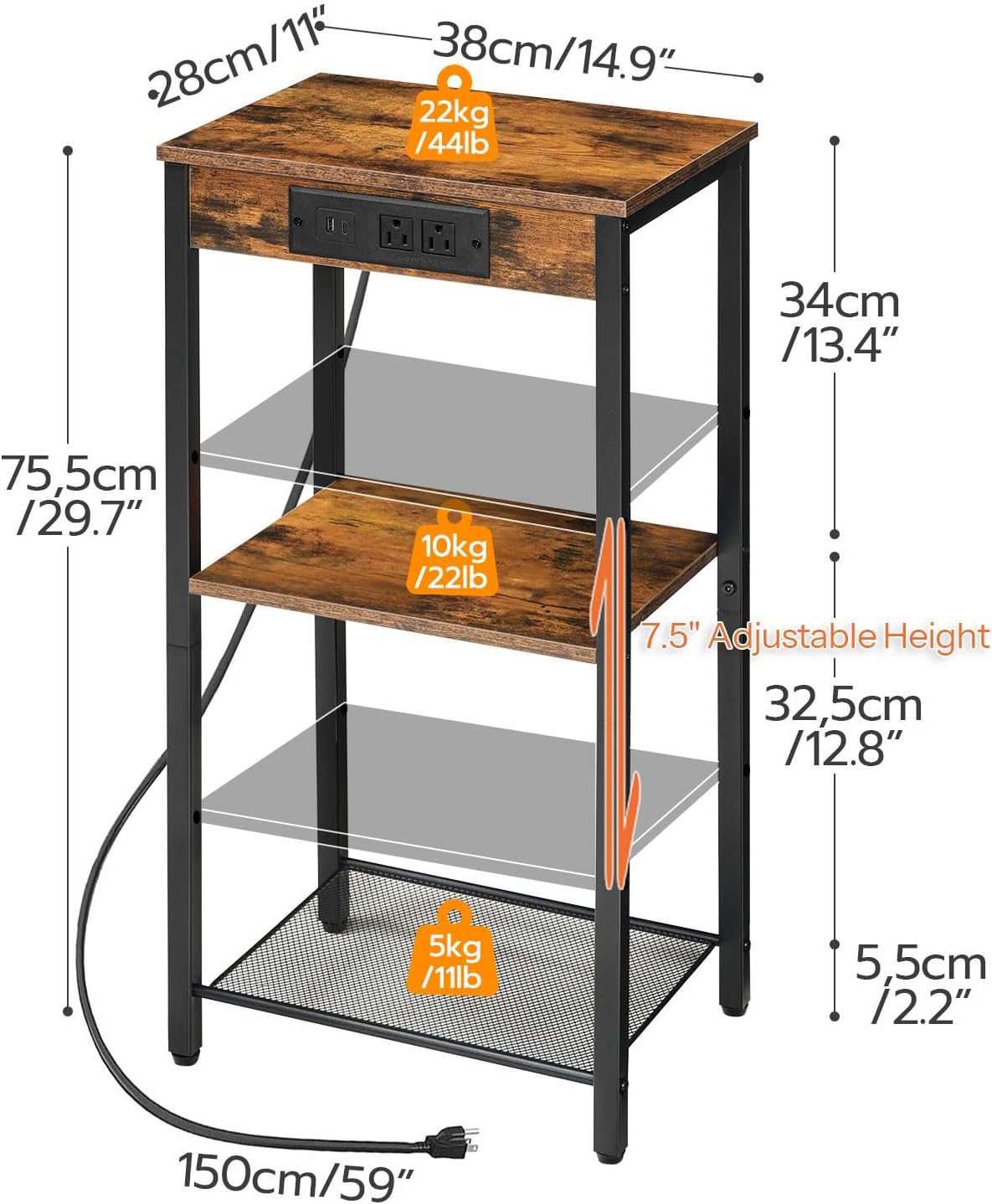
- Install Shelves: Place the wooden shelves and mesh shelf into their designated positions within the frame. The middle shelf is height-adjustable; select your desired height before securing.
- Secure Charging Station: Integrate the charging station into the designated slot on the tabletop. Ensure it is flush and secure.
- Attach Adjustable Feet: Screw the adjustable feet into the bottom of the table legs. These can be adjusted later to stabilize the table on uneven surfaces.

Operating Instructions (Charging Station)
The integrated charging station provides convenient power access for your devices.
- Power Connection: Plug the 4.9-foot power cord from the charging station into a standard wall outlet.
- AC Outlets: The station includes two 3-prong AC outlets (120V/12A) for powering larger devices like lamps or laptops.
- USB Ports: One standard USB port (5V/2A) is available for charging smartphones, tablets, and other USB-powered devices.
- Type-C Port: One Type-C port (5V/2A) is also included for compatible devices.
Ensure devices are properly connected to the correct ports for optimal charging. Avoid forcing plugs into outlets.

Features and Usage
- Space-Saving Design: The slim profile (15"L x 11"W x 30"H) is ideal for tight spaces in living rooms, bedrooms, hallways, or small entryways.
- 3-Tier Storage: Provides ample storage with a tabletop, an adjustable middle shelf, and a mesh bottom shelf.
- Adjustable Shelf: The middle shelf can be adjusted in height to accommodate various items.
- Durable Construction: Made from quality particleboard and a metal frame, ensuring stability and longevity.
- Adjustable Feet: Four adjustable feet enhance stability on uneven floors and protect surfaces from scratches.


Maintenance
To maintain the appearance and longevity of your end table:
- Wipe surfaces with a dry cloth to remove dust and spills.
- Avoid using harsh chemicals or abrasive cleaners, which may damage the finish.
- Periodically check and tighten all screws to ensure structural integrity.
Troubleshooting
- Table Wobbles: Adjust the leveling feet at the bottom of each leg until the table is stable.
- Charging Station Not Working: Ensure the power cord is securely plugged into both the table's socket and a functioning wall outlet. Check if the wall outlet is receiving power.
- Loose Parts: Re-tighten any loose screws or connections using the provided Allen key.
Specifications
| Feature | Detail |
|---|---|
| Brand | HOOBRO |
| Model Name | End Table (BF09UDH01) |
| Product Dimensions (L x W x H) | 15" x 11" x 30" |
| Material Type | Engineered Wood, Metal |
| Color | Rustic Brown + Black |
| Maximum Weight Recommendation (Tabletop) | 44 Pounds |
| Maximum Weight Recommendation (Middle Shelf) | 22 Pounds |
| Maximum Weight Recommendation (Mesh Shelf) | 11 Pounds |
| Number Of Shelves | 3 |
| AC Outlets | 2 (120V/12A) |
| USB Port | 1 (5V/2A) |
| Type-C Port | 1 (5V/2A) |
| Power Cord Length | 4.9 Feet |
| Required Assembly | Yes |
| Recommended Number of People for Assembly | 1 |
| Tools Recommended For Assembly | Allen Key (Included) |
Warranty and Support
Specific warranty details are not provided in the product information. For warranty claims, product support, or further inquiries, please contact HOOBRO customer service or visit the official HOOBRO store: