
PNY VCG407012TFXXPB1
PNY GeForce RTX 4070 12GB XLR8 Gaming Verto Epic-X RGB Triple Fan Graphics Card DLSS 3 User Manual
Introduction
This manual provides essential information for the installation, operation, and maintenance of your PNY GeForce RTX 4070 12GB XLR8 Gaming Verto Epic-X RGB Triple Fan Graphics Card DLSS 3. Please read this manual thoroughly before installation to ensure proper setup and optimal performance. This graphics card is designed to deliver a quantum leap in performance and AI-powered graphics, featuring the ultra-efficient NVIDIA Ada Lovelace architecture.
Product Overview
The PNY GeForce RTX 4070 12GB XLR8 Gaming Verto Epic-X RGB Triple Fan Graphics Card is engineered for stellar gaming and creative applications. It incorporates advanced technologies such as DLSS 3, ray tracing, and AI-accelerated performance.

Image: The PNY GeForce RTX 4070 graphics card displayed alongside its retail packaging.
Key Features:
- NVIDIA Ada Lovelace Architecture: Delivers a significant leap in performance, efficiency, and AI-powered graphics.
- DLSS 3: AI-accelerated performance for ultra-high FPS gaming and enhanced visual fidelity.
- Ray Tracing Cores: 3rd generation RT Cores for lifelike virtual worlds and realistic lighting.
- Tensor Cores: 4th generation Tensor Cores for up to 4x AI performance.
- 12GB GDDR6X Memory: Provides ample memory for demanding games and creative applications.
- EPIC-X RGB Lighting: Customizable RGB lighting for aesthetic personalization.
- Triple Fan Cooling: Efficient cooling solution to maintain optimal temperatures during intense usage.
- PCI Express 4.0 Interface: Ensures high-bandwidth connectivity with compatible motherboards.

Image: An exploded diagram illustrating the internal components of the graphics card, including the thermal module, EPIC-X RGB, compact size, NVIDIA Ada Lovelace chip, aluminum backplate, air vents, and GDDR6X memory.
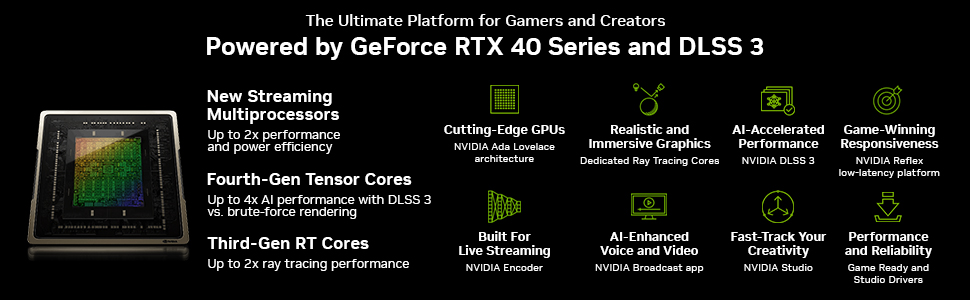
Image: A visual representation of the key features powered by GeForce RTX 40 Series and DLSS 3, including new streaming multiprocessors, cutting-edge GPUs, realistic and immersive graphics, AI-accelerated performance, game-winning responsiveness, fourth-gen Tensor Cores, third-gen RT Cores, built for live streaming, AI-enhanced voice and video, fast-track your creativity, and performance and reliability.
Setup and Installation
System Requirements:
- PCI Express-compliant motherboard with one x16 graphics slot.
- Minimum 600W power supply recommended (a 700W PSU is generally recommended for optimal stability, though 600W may suffice).
- Microsoft Windows 10/11 64-bit or Linux 64-bit operating system.
- Minimum 8GB system memory (16GB recommended).
Installation Steps:
- Preparation: Power off your computer and unplug all cables. Open your computer case.
- Remove Old Graphics Card (if applicable): If you have an existing graphics card, carefully disconnect any power cables, unlatch the PCIe retention clip, and remove the card.
- Locate PCIe Slot: Identify an available PCI Express x16 slot on your motherboard. This is typically the top-most long slot.
- Insert Graphics Card: Align the graphics card with the PCIe slot and press down firmly until it is fully seated and the retention clip locks into place.
- Secure Card: Secure the graphics card to the computer case with the appropriate screws.
- Connect Power: Connect the required 8-pin PCIe power connector(s) from your power supply to the graphics card. Ensure connections are secure.
- Close Case: Close your computer case and reconnect all cables.
- Initial Boot: Connect your display to one of the graphics card's output ports (DisplayPort or HDMI). Power on your computer.

Image: The rear I/O panel of the graphics card, featuring multiple DisplayPort outputs and one HDMI output for display connectivity.
Operating Instructions
Driver Installation:
After physical installation, the most crucial step is to install the latest graphics drivers. These drivers optimize performance and enable all features of your new card.
- Download Drivers: Visit the official NVIDIA website (www.nvidia.com/drivers) or the PNY support page. Select your product series (GeForce RTX 40 Series) and model (RTX 4070) to download the latest Game Ready Driver.
- Install Drivers: Run the downloaded installer and follow the on-screen prompts. It is recommended to perform a clean installation to avoid conflicts with previous driver versions.
- Restart: Restart your computer after the installation is complete.
NVIDIA GeForce Experience:
NVIDIA GeForce Experience is a companion application that enhances your PC gaming experience. It allows you to:
- Optimize game settings for the best performance and visual quality.
- Keep your drivers up to date automatically.
- Capture and share gameplay videos, screenshots, and livestreams.
- Access NVIDIA Ansel for in-game photography and NVIDIA Highlights for automatic clip capture.
Download and install GeForce Experience from the NVIDIA website if it's not included with your driver package.
EPIC-X RGB Control:
Your PNY XLR8 Gaming Verto Epic-X RGB card features customizable RGB lighting. Refer to the PNY software or compatible third-party RGB control software (if available) to personalize the lighting effects and synchronize them with other components in your system.
Maintenance
Proper maintenance ensures the longevity and optimal performance of your graphics card.
- Dust Cleaning: Regularly clean dust from the fans and heatsink using compressed air. Ensure the computer is powered off and unplugged before cleaning. Hold the fan blades gently to prevent them from spinning too fast during cleaning.
- Airflow: Ensure your PC case has adequate airflow to prevent heat buildup. Proper cable management and fan placement are crucial.
- Environmental Conditions: Operate the card in a well-ventilated area with stable room temperature. Avoid extreme humidity or temperature fluctuations.
- Software Updates: Keep your graphics drivers and NVIDIA GeForce Experience software updated to benefit from performance improvements and bug fixes.
Troubleshooting
Common Issues and Solutions:
- No Display Output:
- Ensure the display cable is securely connected to both the graphics card and the monitor.
- Verify the monitor is set to the correct input source.
- Reseat the graphics card in its PCIe slot.
- Check that all power connectors are firmly attached to the graphics card.
- Test with a different display cable or monitor if possible.
- Driver Installation Issues:
- Download the latest drivers directly from NVIDIA's official website.
- Use Display Driver Uninstaller (DDU) in Windows Safe Mode to completely remove old drivers before attempting a fresh installation.
- Temporarily disable antivirus software during driver installation.
- Poor Performance in Games/Applications:
- Ensure you have the latest graphics drivers installed.
- Check in-game settings; reduce graphics quality if necessary.
- Monitor GPU temperatures using software like MSI Afterburner or HWMonitor. Overheating can cause throttling.
- Verify your power supply unit (PSU) meets the recommended wattage.
- Close unnecessary background applications.
- Excessive Fan Noise:
- Some fan noise is normal under heavy load.
- Clean dust from the fans and heatsink.
- Ensure no cables or obstructions are hitting the fan blades.
- Adjust fan curves using software like MSI Afterburner if you prefer quieter operation at the expense of slightly higher temperatures.
- RGB Lighting Not Working:
- Ensure the RGB connection (if external) is properly seated.
- Check the PNY RGB control software or any motherboard RGB software for settings.
- Reinstall the RGB control software.
Specifications
Detailed technical specifications for the PNY GeForce RTX 4070 12GB XLR8 Gaming Verto Epic-X RGB Triple Fan Graphics Card DLSS 3:
| Feature | Specification |
|---|---|
| Graphics Coprocessor | NVIDIA GeForce RTX 4070 |
| Memory Size | 12 GB GDDR6X |
| Memory Interface | 192-bit |
| Memory Speed | 1920 MHz |
| CUDA Cores | 5888 |
| Boost Clock Speed | 2475 MHz |
| Max Screen Resolution | 7680x4320 |
| Video Output Interface | DisplayPort, HDMI |
| PCI Express | 4.0 |
| Item Model Number | VCG407012TFXXPB1 |
| Item Weight | 2.42 pounds (approx. 1.1 kg) |
| Product Dimensions (LxWxH) | 12.01 x 4.7 x 1.57 inches (approx. 30.5 x 11.9 x 4 cm) |
| Manufacturer | PNY |
| Country of Origin | China |
| Date First Available | April 12, 2023 |
Warranty and Support
PNY provides a limited warranty for its graphics cards. Please refer to the official PNY website or the warranty information included with your product for specific terms, conditions, and duration. Keep your proof of purchase for warranty claims.
For technical support, driver downloads, and frequently asked questions, please visit the official PNY support website:
You may also contact PNY customer service directly for assistance with product issues or inquiries.