
Introduction
Thank you for choosing the IMYB A36 Gaming Headset. This headset is designed to provide an immersive audio experience for gamers across multiple platforms. Featuring powerful 50mm neodymium magnet drivers, a noise-isolating microphone, and a comfortable, lightweight design, the A36 ensures clear communication and rich stereo sound during extended gaming sessions. This manual will guide you through the setup, operation, and maintenance of your new gaming headset.
What's in the Box
- IMYB A36 Gaming Headset
- User Manual
- 1-to-2 3.5mm Audio Jack Splitter Cable

Product Features
- Surrounding Stereo Subwoofer: High-power 50mm neodymium magnet drivers enhance sound expressiveness and depth for an immersive gaming experience.
- Noise Isolating Microphone: Integrated omni-directional microphone with premium noise isolation ensures clear communication.
- Humanized Design: Soft, skin-friendly ear cushions and a flexible headband with thickening pads provide long-lasting comfort. The headset weighs only 0.77lb.
- Durable Cable: Features a 6.5ft high tensile strength, anti-tangle braided cable.
- Convenient Controls: Rotary volume control and a button for microphone mute are integrated on the cable.


Setup
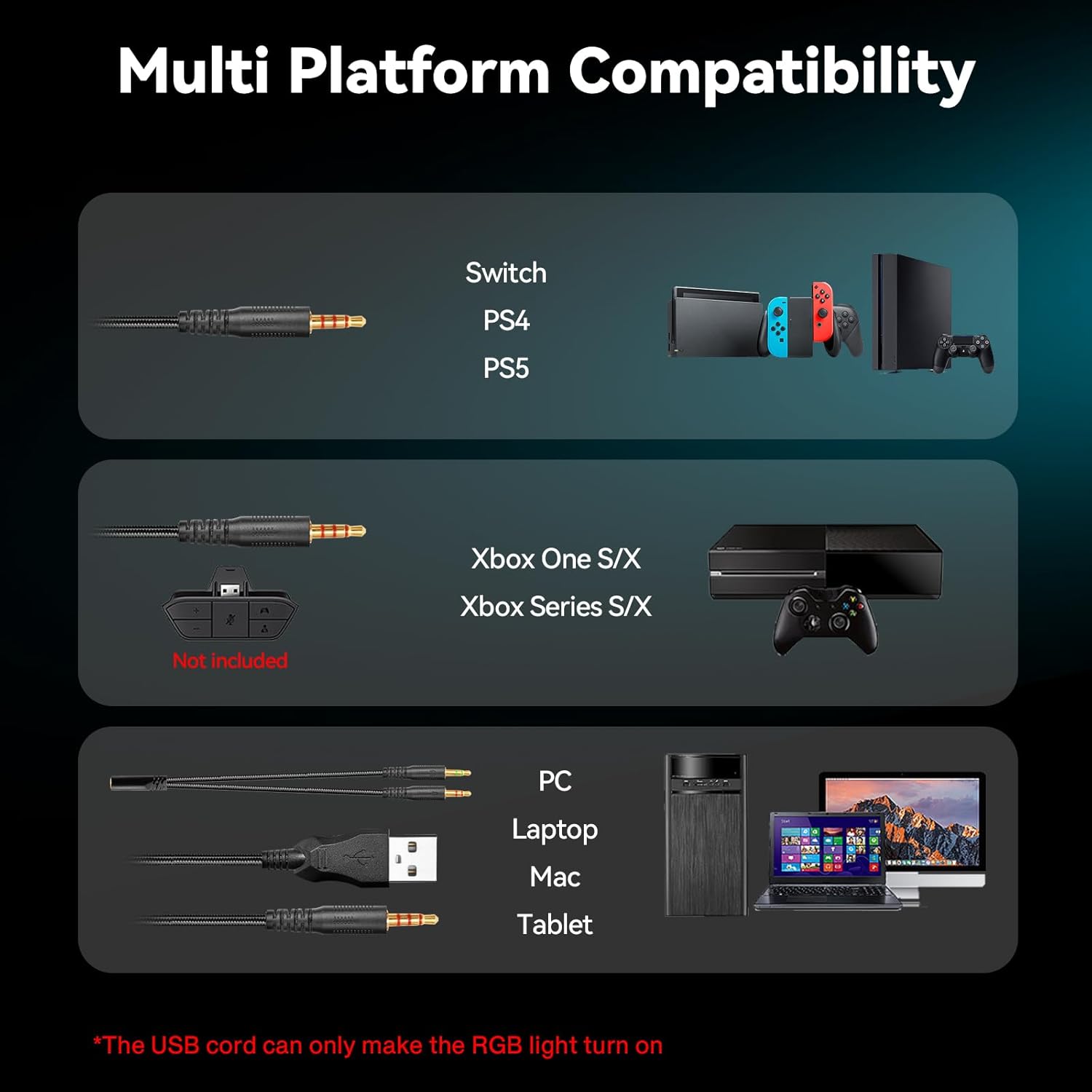
- Connect to Device: Plug the 3.5mm audio jack into your gaming console controller, PC, laptop, or mobile device.
- For Xbox One (Older Versions): An adapter (not included) may be required to connect the 3.5mm jack to older Xbox One controllers.
- Activate RGB Lighting: If your headset features RGB lighting, plug the USB connector into a compatible USB port on your device. Note that the USB connection is solely for powering the RGB lights and does not transmit audio.
- Adjust Microphone: Position the flexible microphone boom for optimal voice pickup.
Operating Instructions
- Volume Control: Use the rotary volume wheel located on the inline control unit to adjust the audio level.
- Microphone Mute: Toggle the microphone mute switch on the inline control unit to turn the microphone on or off.
- RGB Lighting: The RGB lighting will activate automatically when the USB connector is plugged into a powered USB port.

Multi-Platform Compatibility
The IMYB A36 Gaming Headset is designed for broad compatibility, ensuring you can use it with your favorite gaming systems and devices:
- PC (Personal Computer)
- PS4 (PlayStation 4)
- PS5 (PlayStation 5)
- Xbox One Series X/S (older Xbox One versions may require an adapter)
- Nintendo 3DS
- Nintendo Switch
- Laptop
- PSP (PlayStation Portable)
- Tablet
- iPad
- Mobile Phone
- Any 3.5mm jack device
Maintenance
- Cleaning: Use a soft, dry cloth to clean the headset. Avoid using harsh chemicals or abrasive materials.
- Storage: Store the headset in a cool, dry place away from direct sunlight and extreme temperatures.
- Cable Care: Avoid sharp bends or excessive pulling on the cable to prevent damage. Use the included cable tie for neat storage.
- Ear Cushions: Periodically check ear cushions for wear and tear.
Troubleshooting
| Issue | Possible Solution |
|---|---|
| No sound from headset |
|
| Microphone not working |
|
| RGB lights not working |
|
| Sound quality is poor |
|
Specifications
| Feature | Detail |
|---|---|
| Brand | IMYB |
| Model Number | A36 |
| Color | Blue |
| Ear Placement | Over Ear |
| Impedance | 32 Ohms |
| Headphone Jack | 3.5 mm Jack |
| Connectivity Technology | Wired |
| Item Weight | 0.77 Pounds |
| Noise Control | Sound Isolation |
| Frequency Response | 20 Hz - 20 kHz |
| Sensitivity | 42 dB |
| Audio Driver Size | 50 Millimeters |
| Compatible Devices | PC, PS4, PS5, Xbox One, Nintendo 3DS, Switch, Laptop, PSP, Tablet, iPad, Mobile Phone, 3.5mm jack device |
| Additional Features | Adjustable Headband, Microphone Included, Surround Sound, Tangle Free Cord, Volume Control |
Warranty & Support
The IMYB A36 Gaming Headset comes with a 3 Year Limited Hardware Warranty. For any product inquiries, technical support, or warranty claims, please visit the official IMYB Store on Amazon or contact customer service through the product detail page.
For more information, visit the IMYB Store.