Introduction
Thank you for choosing the Timex Waterbury Traditional GMT Automatic Watch. This timepiece combines classic design with modern functionality, featuring an automatic movement and a GMT complication for tracking a second time zone. This manual provides essential information for the proper setup, operation, and care of your watch.

Front view of the Timex Waterbury Traditional GMT Automatic Watch, showcasing the black dial, red and black GMT bezel, and brown leather strap.
Setup
1. Unboxing
Carefully remove your watch from its packaging. Inspect the watch for any visible damage. The package should include the watch with its attached leather strap.

The black Timex product box, indicating the watch's packaging.
2. Wearing the Watch
Adjust the brown leather strap to fit comfortably on your wrist. The buckle closure ensures a secure fit. Ensure the watch is not too tight to allow for proper blood circulation, nor too loose to prevent excessive movement.
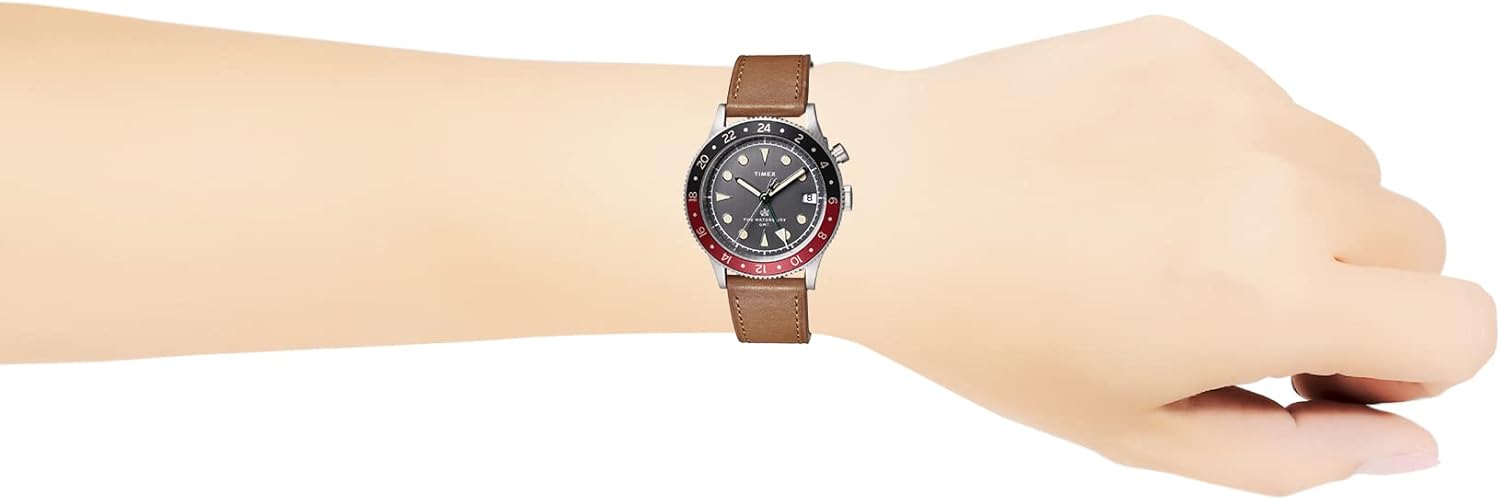
The Timex Waterbury Traditional GMT Automatic Watch worn on a wrist, demonstrating its size and fit.

Close-up of the brown leather strap and the silver buckle with the Timex logo.
3. Setting Time and Date
Your watch features a crown on the right side of the case. To set the time and date:
- Pull the crown out to position 3 (farthest out). Turn the crown clockwise or counter-clockwise to set the hour and minute hands.
- Pull the crown out to position 2 (middle position). Turn the crown to set the date. The date will advance by one day for each full rotation.
- Once the time and date are set, push the crown back to position 1 (fully in) to engage the movement.

Side view of the watch case, highlighting the crown for time and date adjustments.
4. Setting GMT Function
The GMT hand (often a distinct color or shape) tracks a second time zone using the 24-hour bezel. To set the GMT hand:
- The GMT hand is typically linked to the main hour hand. To adjust the GMT hand independently, you may need to rotate the bezel.
- Rotate the bidirectional bezel to align the desired second time zone's hour with the GMT hand. For example, if the GMT hand points to '10' on the 24-hour scale and you want it to represent 2 PM (14:00), rotate the bezel until '14' aligns with the GMT hand.
Operating
Automatic Movement
This watch is powered by an automatic mechanical movement. It winds itself through the natural motion of your wrist. When fully wound, it has a power reserve that allows it to run for a certain period (typically 36-40 hours) without being worn. If the watch stops, gently shake it side-to-side for about 30 seconds to initiate the movement, then set the time and wear it.
Water Resistance
Your Timex Waterbury Traditional GMT Automatic Watch is water-resistant to 200 meters (660 feet). This makes it suitable for swimming, snorkeling, and recreational diving. However, it is not suitable for saturation diving. Always ensure the crown is fully pushed in before exposing the watch to water. Do not operate the crown or pushers while the watch is wet or submerged.
Maintenance
Cleaning
To clean your watch, wipe the case and crystal with a soft, damp cloth. For the leather strap, avoid excessive moisture. If the watch has been exposed to saltwater, rinse it with fresh water and dry thoroughly with a soft cloth.
Strap Care
The brown leather strap is a natural material and will develop a unique patina over time. To prolong its life, avoid prolonged exposure to direct sunlight, extreme temperatures, and excessive moisture. If the strap becomes wet, allow it to air dry naturally, away from direct heat.
Water Resistance Care
The water resistance of your watch is not a permanent condition and may eventually be affected by the aging of gaskets or accidental shocks to the crown or case. It is recommended to have the water resistance checked periodically by an authorized service center, especially before prolonged water exposure.
Service
For optimal performance, mechanical watches benefit from periodic servicing, typically every 3-5 years. This involves cleaning, lubricating, and adjusting the movement. Contact an authorized Timex service center for professional maintenance.
Troubleshooting
- Watch not running: If the watch has stopped, it may need to be wound. Gently shake the watch for 30 seconds or manually wind it by turning the crown in position 1 (fully in) clockwise for 20-30 rotations.
- Time inaccuracy: Automatic watches can have slight variations in accuracy. If the watch is consistently gaining or losing significant time, it may require adjustment by a professional watchmaker.
- Date not changing: Ensure the time is set correctly, passing midnight to trigger the date change. Avoid setting the date between 9 PM and 3 AM, as this can interfere with the date change mechanism.
Specifications
| Feature | Detail |
|---|---|
| Model Number | TW2V74000 |
| Movement Type | Automatic (Mechanical) |
| Display Type | Analog |
| Case Material | Stainless Steel |
| Case Diameter | 39 Millimeters |
| Case Thickness | 11 Millimeters |
| Band Material | Leather (Brown) |
| Water Resistance Depth | 200 Meters (660 Feet) |
| Closure Type | Buckle |
| Features | GMT Function, Date Display |

Rear view of the watch case back, displaying engravings such as 'TIMEX', 'WATERBURY', 'WR 100M', and 'STAINLESS STEEL'.
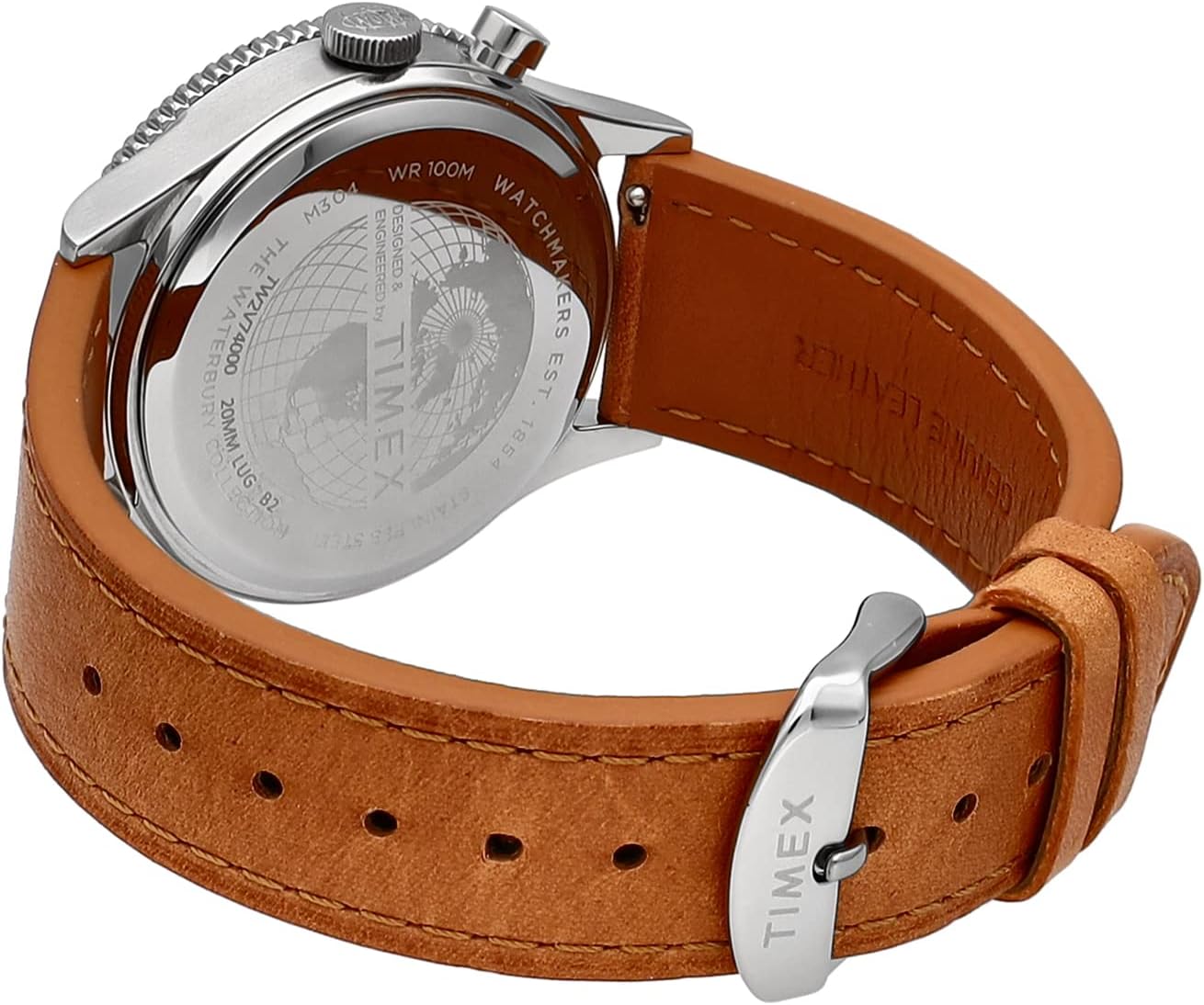
Angled rear view of the watch, showing the case back and the attachment of the brown leather strap.
Warranty and Support
Your Timex watch is covered by a limited warranty against manufacturing defects. For specific warranty terms, registration, and support inquiries, please refer to the warranty card included with your purchase or visit the official Timex website. Keep your proof of purchase for warranty claims.
For further assistance or to locate an authorized service center, please visit www.timex.com.


