
1. Introduction
This manual provides essential instructions for the proper setup, operation, and maintenance of your WBOYWK EVO-ALL441 Vehicle Remote Starter System Kit. Please read this guide thoroughly before installation and use to ensure optimal performance and safety. This system allows for remote starting of your vehicle and includes two 4-button remote controls for convenient access.
2. Product Components
The WBOYWK EVO-ALL441 kit includes the following main components:
- EVO-ALL441 Control Module: The central unit for the remote starter system.
- (2) 4-Button Remote Controls: For remote operation of the system.
- Antenna/Programming Tool: (The long black item shown in the image, used for signal reception or system configuration)
- Wiring Harnesses: For connecting the module to your vehicle's electrical system.
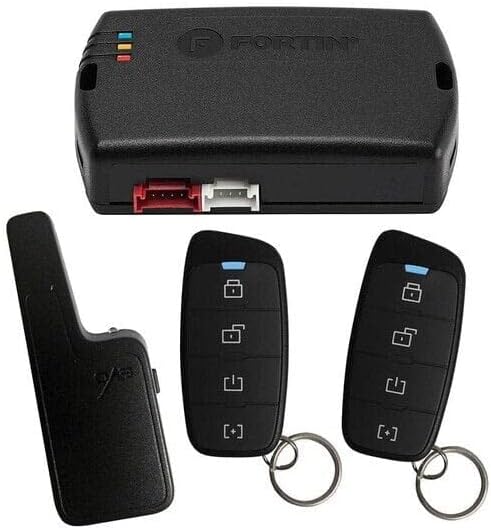
Figure 1: Overview of the WBOYWK EVO-ALL441 Vehicle Remote Starter System Kit components. Shown are the main control module, two 4-button remote controls, and an auxiliary device, likely an antenna or programming tool, along with associated wiring connectors.
3. Setup and Installation
Installation of the EVO-ALL441 Vehicle Remote Starter System requires technical knowledge of automotive electrical systems. Improper installation can lead to vehicle damage or system malfunction. It is highly recommended that this system be installed by a certified professional.
General Installation Guidelines (Professional Installation Recommended):
- Vehicle Compatibility: Ensure the EVO-ALL441 is compatible with your specific vehicle make, model, and year.
- Power Disconnection: Disconnect the vehicle's battery before beginning any electrical work.
- Module Placement: Mount the EVO-ALL441 control module securely in a hidden, dry location within the vehicle's cabin, away from excessive heat or moisture.
- Wiring Connections: Carefully connect all wiring harnesses according to the detailed wiring diagram provided with the product (not included in this manual). Pay close attention to power, ground, ignition, accessory, and starter wires.
- Antenna Placement: Position the antenna (if applicable) for optimal signal reception, typically on the windshield or dashboard, away from metal obstructions.
- Programming: After physical installation, the module and remotes will need to be programmed to your specific vehicle. This often involves a series of steps unique to the vehicle and the remote start system.
- Testing: Thoroughly test all functions of the remote starter system before reassembling the vehicle's interior.
Refer to the specific installation guide provided by the manufacturer for detailed wiring diagrams and programming procedures for your vehicle.
4. Operating Instructions
Your EVO-ALL441 system comes with two 4-button remote controls. The functions of these buttons are typically as follows:
- Lock Button (Padlock Closed Icon): Press once to lock all vehicle doors. The vehicle lights may flash once, and the horn may chirp once to confirm.
- Unlock Button (Padlock Open Icon): Press once to unlock all vehicle doors. The vehicle lights may flash twice, and the horn may chirp twice to confirm.
- Remote Start Button (Up Arrow/Engine Icon): Press and hold for approximately 3 seconds to remotely start your vehicle. The vehicle lights will flash, and the engine will start. The vehicle will run for a pre-set duration (e.g., 15 minutes) or until a specific command is given to shut it off.
- Trunk/Auxiliary Button (Trunk Icon or [:]): Press and hold to open the vehicle's trunk or activate an auxiliary function (if configured).
Entering the Vehicle After Remote Start:
- With the engine running via remote start, press the Unlock button on your remote.
- Enter the vehicle.
- Insert your key into the ignition and turn it to the "ON" or "RUN" position (do not turn to "START").
- Press the brake pedal. The remote starter will disengage, and the vehicle will now be running under key control.
Note: Specific button functions and sequences may vary slightly depending on your vehicle's configuration and the installer's programming. Consult your installer for personalized instructions.
5. Maintenance
The WBOYWK EVO-ALL441 system is designed for minimal maintenance. Follow these guidelines to ensure longevity:
- Remote Control Batteries: Replace the batteries in your 4-button remotes when the range decreases significantly or the indicator light (if present) dims. Refer to the remote's specific instructions for battery type and replacement procedure.
- Keep Dry: Protect the remote controls and the main module from water and excessive moisture.
- Avoid Extreme Temperatures: Do not expose the components to extreme heat or cold for prolonged periods.
- Cleaning: Clean the remote controls with a soft, dry cloth. Do not use harsh chemicals or abrasive cleaners.
6. Troubleshooting
If you experience issues with your EVO-ALL441 system, consider the following common troubleshooting steps:
- System Not Responding:
- Check the remote control battery.
- Ensure you are within range of the vehicle.
- Verify that the vehicle's hood is closed securely.
- Confirm all doors are closed.
- Vehicle Does Not Remote Start:
- Ensure the vehicle is in Park (P) and the parking brake is engaged (if required by installation).
- Check for any active warning lights on the dashboard (e.g., "Check Engine").
- Verify the vehicle's battery is charged.
- The system may have entered a "safety shutdown" mode. Consult your installer.
- Reduced Remote Range:
- Replace the remote control battery.
- Ensure the antenna is not obstructed or damaged.
- Environmental factors (e.g., large buildings, radio interference) can affect range.
For persistent issues or complex problems, it is recommended to contact the professional installer or the manufacturer's technical support.
7. Specifications
| Brand | WBOYWK |
| Model Number | EVO-ALL441 |
| Compatible Devices | Cars, Trucks, SUVs, Vans |
| Remote Control Included | Yes (Two 4-Button Remotes) |
| Manufacturer | WBOYWK |
| ASIN | B0C1CQR4L8 |
| UPC | 095000361305 |
8. Warranty and Support
For specific warranty information regarding your WBOYWK EVO-ALL441 Vehicle Remote Starter System Kit, please refer to the documentation included with your purchase or contact the seller/manufacturer directly. Warranty terms typically cover manufacturing defects for a specified period.
For technical support, installation assistance, or to report issues, please contact your authorized installer or the WBOYWK customer support channels as provided on their official website or product packaging.