
1. Introduction
The boogostore PS-618 Solar Charger Power Bank is a versatile portable charging solution designed for outdoor activities, emergencies, and daily use. Featuring a high-capacity 63200mAh battery, solar panel, hand-crank charging, and multiple output ports, it ensures your devices remain powered in various situations. It also includes a built-in LED flashlight with multiple modes for added utility.
2. Package Contents
- 1 x Portable Solar Charger Power Bank
- 1 x Micro Charging Cable
- 1 x User Manual
3. Setup
3.1 Initial Charging
Before first use, fully charge the power bank via a wall outlet to activate the internal battery. This ensures optimal performance and battery longevity.
3.2 Connecting Devices
The power bank features integrated charging cables and additional USB output ports for broad compatibility.
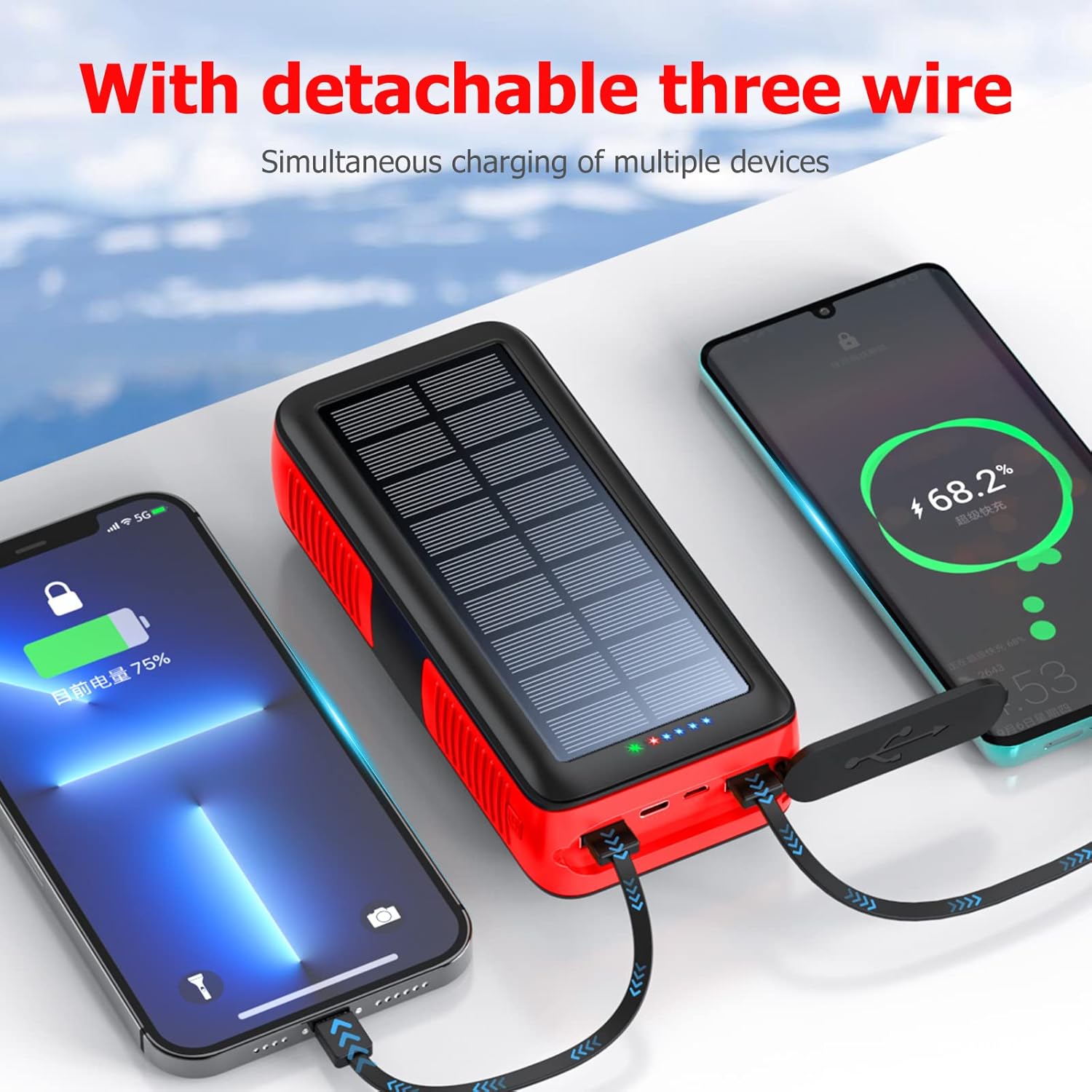
Image: The power bank features built-in cables for convenient charging of multiple devices.
To charge a device:
- Identify the appropriate built-in cable (Lightning, USB-C, Micro USB) or use your own USB cable with the available USB-A output ports.
- Connect the cable to your device and the corresponding port on the power bank.
- The power bank will automatically begin charging your device.
4. Operating the Power Bank
4.1 Charging the Power Bank
The power bank offers multiple charging methods:
- Wall Outlet Charging: For the fastest and most efficient charging, connect the power bank to a wall outlet using a compatible USB adapter and the provided Micro Charging Cable or a USB-C cable (not included). This is the recommended primary charging method.
- Solar Charging: The integrated solar panel allows for supplemental charging using sunlight. While effective for maintaining charge or emergency power, solar charging is slower and dependent on sunlight intensity. For best results, place the power bank with the solar panel facing direct sunlight. This method is ideal for outdoor use when a wall outlet is unavailable.
- Hand Crank Charging: In situations without sunlight or electrical outlets, the hand crank provides an emergency power source. Extend the hand crank and rotate it consistently to generate power. This method is intended for emergency use to provide a minimal charge.

Image: The power bank supports USB, solar, and hand crank charging methods.

Image: The hand crank feature provides emergency power when other charging options are unavailable.
Video: Demonstration of the hand crank feature for emergency charging of the power bank.
4.2 LED Flashlight Operation
The power bank includes a built-in flashlight with 4 LEDs and multiple modes:
- To turn on the flashlight, double-press the power button located on the side of the device.
- Press the power button once to cycle through the different modes (e.g., steady light, flashing, SOS).
- Double-press the power button again to turn off the flashlight.

Image: The power bank features a powerful LED flashlight for illumination in dark environments.
5. Maintenance and Safety
5.1 General Care
- Keep the power bank clean and dry.
- Avoid dropping or subjecting the device to strong impacts, despite its durable design.
- Store in a cool, dry place away from direct sunlight when not in use.
5.2 Safety Precautions
- Do not charge the power bank continuously for extended periods (e.g., all day) or with over-voltage chargers.
- For safety, do not leave the power bank charging in a car or other enclosed spaces where high temperatures can occur.
- Avoid charging other devices simultaneously while the power bank itself is being charged.
- The power bank is IPX66 waterproof, dropproof, and dustproof, making it suitable for extreme environments.

Image: The power bank is designed with IPX66 waterproofing, impact resistance, and dustproof capabilities for rugged use.
6. Troubleshooting
If you encounter issues with your power bank, consider the following:
- Device not charging: Ensure the power bank is sufficiently charged. Check all cable connections for proper seating. Try a different cable or output port.
- Power bank not charging: Verify the charging cable and power source are functional. Ensure the power bank is not exposed to extreme temperatures.
- Solar charging is slow: Solar charging is supplementary. Ensure the solar panel is clean and exposed to direct, strong sunlight.
- Flashlight not working: Double-press the power button to activate. If still unresponsive, ensure the power bank has sufficient charge.
For persistent issues, please contact customer support.
7. Specifications
| Feature | Description |
|---|---|
| Capacity | 63200mAh |
| Input | DC 5V 2.0A (Micro USB, USB Type C) |
| Output | DC 5.0V 2.1A (total) |
| Indicator | 4-LED indicators |
| Compatibility | Smartphones, tablets, earphones, cameras, and other devices |
| Dimensions | 7.7 x 3.2 x 1.2 inches (L x W x T) |
| Weight | 1.5 lbs (1.79 pounds) |
| Special Features | Built-in cables, Flashlight, Solar Charging, Hand Crank, IPX66 Waterproof, Dropproof, Dustproof |
| Battery Type | 3 Lithium Polymer batteries (included) |
| Charge Cycles | More than 1600 |
8. Warranty and Support
This product includes a lifetime friendly customer service. If you have any questions or require assistance after purchasing, please feel free to contact us. We are committed to providing a satisfactory solution.