
Logilink EM0006
LogiLink EM0006 Energy Cost Meter User Manual
Model: EM0006
1. Product Overview
The LogiLink EM0006 is an advanced energy cost meter designed to monitor the power consumption of connected electrical appliances. It features a remote display unit connected via an extension cable, allowing for convenient reading even when the main plug is in a hard-to-reach outlet. This device helps users understand their energy usage, calculate electricity costs, and estimate CO2 emissions, promoting energy efficiency.

Figure 1: The LogiLink EM0006 Energy Cost Meter, showing the main plug unit and the remote display connected by a cable.

Figure 2: A closer front view of the LogiLink EM0006, highlighting the display and control buttons.
2. Safety Information
Please read and understand all safety instructions before using the device. Failure to follow these instructions may result in electric shock, fire, or serious injury.
- Do not disassemble or modify the device.
- Do not expose the device to water, moisture, or extreme temperatures.
- Ensure the total power consumption of connected appliances does not exceed the maximum load capacity specified in the technical specifications.
- Keep out of reach of children.
- Only use the device indoors.
3. Package Contents
Verify that all items are present in the package:
- LogiLink EM0006 Energy Cost Meter unit with integrated extension cable and remote display.
- User Manual (this document).

Figure 3: The LogiLink EM0006 device shown alongside its retail packaging.
4. Setup
Follow these steps to set up your LogiLink EM0006 Energy Cost Meter:
- Initial Placement: Plug the main unit of the energy cost meter into a standard wall outlet. The remote display unit can be placed on a desk or mounted on a wall using the integrated mounting holes on its back.
- Connect Appliance: Plug the appliance you wish to monitor into the socket on the front of the energy cost meter.
- Initial Display Settings: When first powered on, the display may show default values or require initial setup.
- Set Time/Date: Press the 'SET' button to enter the setting mode. Use 'UP/Δ' and 'TOTAL/V' buttons to adjust values (e.g., time, date, day of week). Press 'SET' again to confirm each setting and move to the next.
- Set Electricity Price: In setting mode, navigate to the price setting. Input your local electricity cost per kilowatt-hour (kWh) using the 'UP/Δ' and 'TOTAL/V' buttons. This is crucial for accurate cost calculations.
- Reset Data: To clear all accumulated data (total consumption, cost, CO2), locate the 'RESET' button (often a small pinhole) and press it with a thin, non-metallic object.
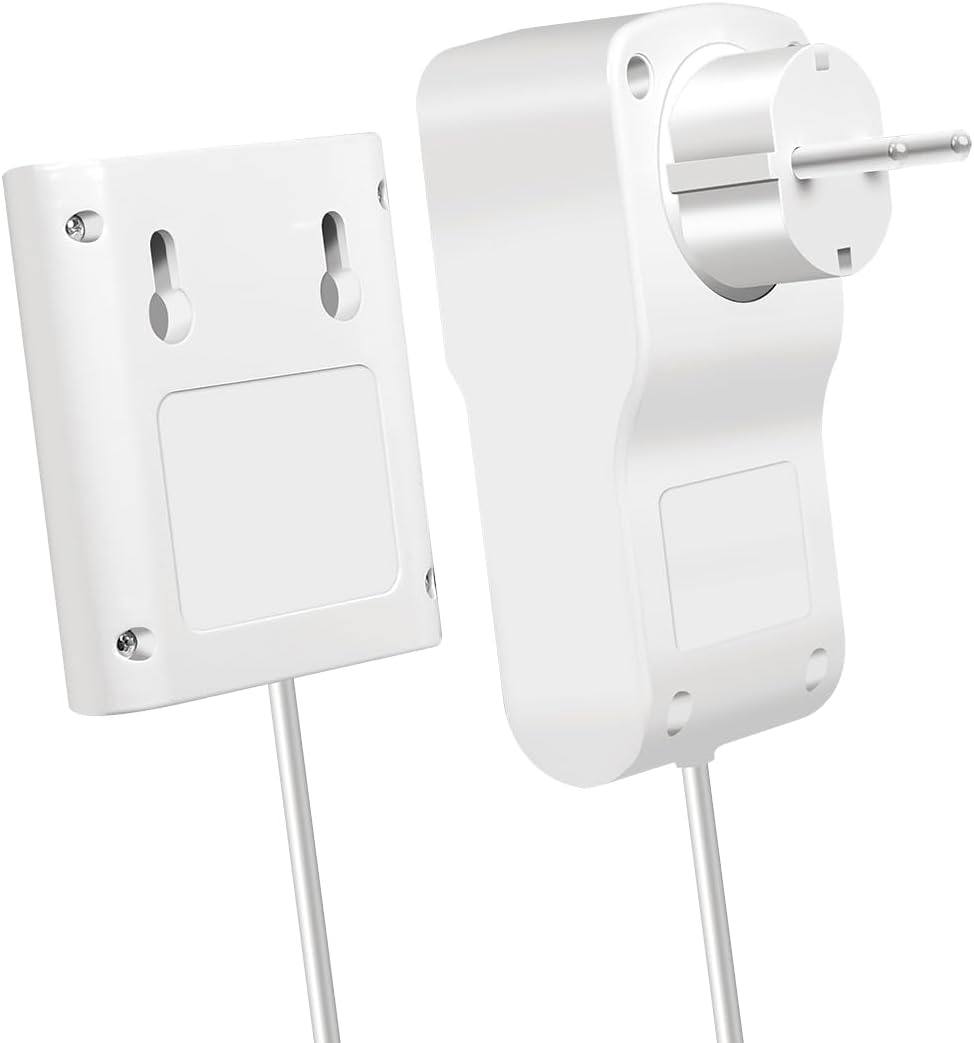
Figure 4: Rear view of the LogiLink EM0006 display unit, showing the mounting points for wall installation.
5. Operating Instructions
The LogiLink EM0006 provides various measurement modes accessible via the control buttons:

Figure 5: The LogiLink EM0006 in use, demonstrating its remote display capability for convenient monitoring of an appliance like a refrigerator.
- MODE Button: Press the 'MODE' button repeatedly to cycle through different display screens, which typically include:
- Current Power (W): Shows the real-time power consumption of the connected appliance.
- Voltage (V) / Amperage (A) / Frequency (Hz): Displays electrical parameters.
- Total Energy Consumption (kWh): Accumulates the total energy consumed since the last reset.
- Total Cost (€/$/£): Calculates the total cost based on accumulated kWh and the set electricity price.
- CO2 Emissions (kg): Estimates CO2 emissions based on energy consumption.
- Minimum/Maximum Power (W): Shows the lowest and highest power readings recorded.
- TOTAL/V Button: In certain modes, this button may switch between total accumulated values and instantaneous voltage readings.
- UP/Δ Button: Used for navigating menus or increasing values during setup.
6. Maintenance and Care
To ensure the longevity and accurate operation of your energy cost meter:
- Cleaning: Wipe the device with a soft, dry cloth. Do not use abrasive cleaners or solvents.
- Storage: When not in use for extended periods, unplug the device and store it in a cool, dry place away from direct sunlight.
- Avoid Impact: Protect the device from drops and strong impacts.
7. Troubleshooting
If you encounter issues with your LogiLink EM0006, refer to the following common problems and solutions:
| Problem | Possible Cause | Solution |
|---|---|---|
| Display is blank or not turning on. | No power, loose connection, or internal fault. | Ensure the meter is securely plugged into a live outlet. Check the connected appliance is working. If the issue persists, the device may be faulty. |
| Readings seem inaccurate. | Incorrect electricity price set, or appliance is drawing very low power. | Verify the electricity price setting. For very low power devices, the meter's accuracy might be limited. |
| Buttons are unresponsive. | Temporary software glitch. | Unplug the meter from the wall outlet for a few seconds, then plug it back in. If available, perform a hard reset using the 'RESET' pinhole button. |
| No CO2 calculation. | CO2 emission factor not set or feature not active. | Ensure the device is in the correct mode to display CO2. Some models may require an initial setup for the CO2 factor. |
8. Technical Specifications
Below are the technical specifications for the LogiLink EM0006 Energy Cost Meter:
- Model Number: EM0006
- Product Dimensions: 12.1 x 6 x 7.7 cm
- Weight: 265 g
- Manufacturer: LogiLink
- Release Date: January 1, 2023
- Language (Manual): English
- Input Voltage: Typically 230V AC, 50Hz (check device label for exact range)
- Max Load: (Not specified in input, typically 3600W/16A for EU plugs)
- Display: LCD
- Functions: Power (W), Voltage (V), Amperage (A), Frequency (Hz), Power Factor, Total Energy (kWh), Total Cost, CO2 Emissions, Min/Max Power.
9. Warranty and Support
LogiLink products are designed for reliability and performance. For warranty information, technical support, or service inquiries, please refer to the warranty card included with your product or visit the official LogiLink website. Keep your purchase receipt as proof of purchase for warranty claims.
LogiLink Official Website: www.logilink.eu
Ask a question about this manual
Ask about setup, troubleshooting, compatibility, parts, safety, or missing instructions. Manuals+ will review the question and use this page’s manual context to help answer it.