
PMSUN PMSUN 4500W
PMSUN 4500W Solar Hybrid Inverter User Manual
Model: PMSUN 4500W
1. Introduction
This manual provides essential information for the installation, operation, and maintenance of your PMSUN 4500W Solar Hybrid Inverter. This multifunctional inverter/charger combines the functions of an inverter, a 150A MPPT solar charger, and a battery charger to ensure an uninterruptible power supply. It features a new tempered glass screen design with user-friendly touch buttons and enhanced cooling with three integrated fans for improved efficiency and extended lifespan.
2. Important Safety Instructions
Please read all instructions and cautionary markings on the unit, batteries, and all appropriate sections of this manual before installation and operation. Failure to follow these instructions may result in electric shock, fire, or severe injury.
- Qualified Personnel: All wiring must be performed by qualified personnel.
- Battery Type: Only use sealed lead-acid batteries, sealed GEL/AGM lead-acid batteries, or lithium batteries.
- Ventilation: Ensure adequate ventilation around the inverter. Do not install in a confined space.
- Moisture: Do not expose the inverter to rain, snow, spray, or any liquids.
- Overload Protection: Do not overload the inverter beyond its rated capacity.
- Grounding: Ensure the inverter is properly grounded to prevent electric shock.
- Temperature: Avoid installing the inverter near heat sources or in direct sunlight.
- Fan Noise: The inverter's fans will generate noise during operation. Consider installation location to avoid disturbance.
- Galvanic Isolation: Be aware that the PV input may not have galvanic isolation. Exercise extreme caution when handling PV modules, especially in humid conditions.
3. Product Overview
The PMSUN 4500W Solar Hybrid Inverter is designed for efficient power conversion and management in various applications, including RVs, camping, boats, and home emergency systems. Its robust design ensures reliable performance.

Figure 3.1: Front view of the PMSUN 4500W Solar Hybrid Inverter, showcasing the LCD screen and touch buttons.
3.1. Components and Indicators
Familiarize yourself with the various components and indicators of your inverter for proper operation and troubleshooting.
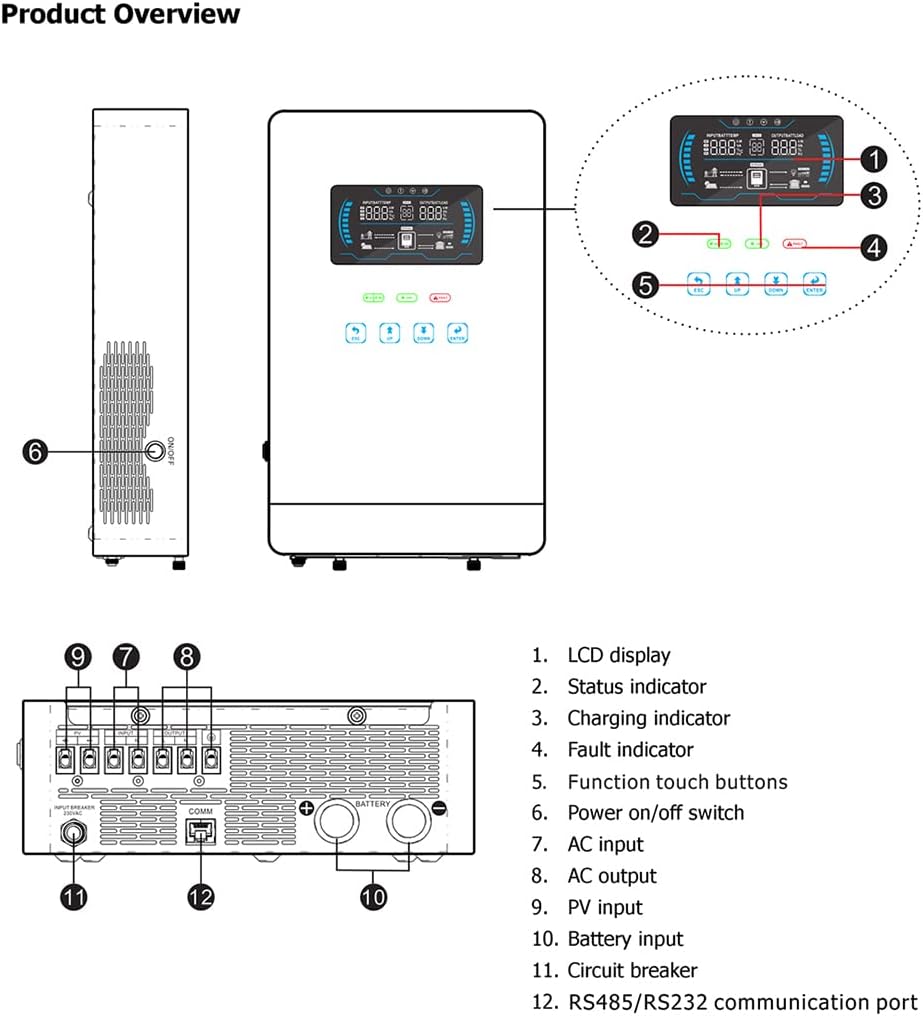
Figure 3.2: Detailed diagram of the inverter's front panel and rear connections with numbered components.
- LCD Display: Shows system status, settings, and error codes.
- Status Indicator: LED indicating operational status.
- Charging Indicator: LED indicating battery charging status.
- Fault Indicator: LED indicating system faults or warnings.
- Function Touch Buttons: Used for navigation and setting adjustments on the LCD.
- Power On/Off Switch: Main power control for the unit.
- AC Input: Terminal for connecting grid or generator AC power.
- AC Output: Terminal for connecting AC loads.
- PV Input: Terminals for connecting solar panel arrays.
- Battery Input: Terminals for connecting battery bank.
- Circuit Breaker: Provides overcurrent protection.
- RS232/RS485 Communication Port: For data communication and monitoring.
4. Setup and Installation
Proper installation is crucial for the safe and efficient operation of your inverter. Please follow these steps carefully.
4.1. System Connection Diagram
The following diagram illustrates a typical solar system connection with the PMSUN 4500W Hybrid Inverter.

Figure 4.1: Diagram showing the connection of solar modules, photovoltaic box, utility grid, battery packs, and home appliances to the hybrid inverter.
4.2. Installation Steps
- Mounting: Choose a suitable location for mounting the inverter. Ensure it is a dry, well-ventilated area, away from direct sunlight and heat sources.
- Battery Connection: Connect the battery bank to the inverter's Battery Input terminals (10). Ensure correct polarity (+ to + and - to -). Use appropriate cable gauges for the current.
- PV Array Connection: Connect your solar panel array to the PV Input terminals (9). Ensure the PV input voltage (120V - 450Vdc) and power (max 5500W) are within the inverter's specifications. The best working voltage is 200-300V.
- AC Input Connection: Connect the utility grid or generator AC power to the AC Input terminal (7).
- AC Output Connection: Connect your AC loads (e.g., oven, rice cooker, lamps, TVs, fans) to the AC Output terminal (8).
- Communication (Optional): If using, connect RS232/RS485 communication cables (12) or the optional WiFi monitoring module.
- Initial Power-Up: Once all connections are secure, switch on the circuit breaker (11), then the Power On/Off switch (6) on the inverter.
5. Operating Instructions
The PMSUN 4500W Hybrid Inverter offers multiple charging and output modes to suit various application requirements. Use the touch buttons (5) and LCD display (1) to configure settings.
5.1. Charging Modes
The inverter supports four optional charging modes:
- Only Solar: Charges batteries exclusively from solar power.
- Mains First: Prioritizes charging from the utility grid, supplementing with solar if needed.
- Solar First: Prioritizes charging from solar power, supplementing with grid if needed.
- Mains & Solar Hybrid: Utilizes both mains and solar power for charging simultaneously.
5.2. Output Modes
Three output modes are available for power supply:
- Solar First: Prioritizes power from solar, then battery, then grid.
- Mains First: Prioritizes power from the utility grid, then solar, then battery.
- SBU Priority: Solar (S), Battery (B), Utility (U) - prioritizes solar, then battery, then utility grid.
The default mode is Off-Grid. You can manually activate On-Grid mode if desired. The AC output voltage can be adjusted to 110Vac or 220Vac in battery mode.
5.3. Lithium Battery Activation
The inverter includes a built-in BMS function with a reactivation feature to wake up sleeping lithium batteries.
5.4. Automatic Restart
The inverter supports automatic restart upon AC recovery, ensuring continuous power supply.
6. Maintenance
Regular maintenance ensures the longevity and optimal performance of your PMSUN 4500W Solar Hybrid Inverter.
- Cleaning: Keep the inverter clean and free from dust. Use a dry cloth for cleaning. Do not use liquid cleaners.
- Ventilation: Periodically check that the cooling fans and vents are clear of obstructions to ensure proper airflow.
- Connections: Regularly inspect all electrical connections for tightness. Loose connections can cause overheating and damage.
- Battery Health: Monitor your battery bank's health and charge levels. Follow battery manufacturer guidelines for maintenance.
- Firmware Updates: Check the manufacturer's website for any available firmware updates for improved performance or new features.
7. Troubleshooting
This section addresses common issues you might encounter with your inverter. For problems not listed here, please contact customer support.
| Problem | Possible Cause | Solution |
|---|---|---|
| Inverter not turning on | No power from battery/PV; Main switch off; Blown fuse/breaker. | Check battery connections and voltage; Ensure PV input is sufficient; Turn on main switch; Check and reset circuit breaker. |
| Low output power / Inverter overheating | Overload; Insufficient ventilation; Dirty fans. | Reduce connected load; Ensure proper airflow around the unit; Clean fan vents. |
| MPPT charge controller not performing optimally (e.g., reduced PV power) | Suboptimal PV voltage; Internal software issue. | Ensure PV array voltage is within the optimal range (200-300V); Consider restarting the inverter; If persistent, an external charge controller might be considered. |
| Intermittent operation (especially at night with low load) | Low standby load causing inverter to cycle. | Ensure a minimum load is connected to keep the inverter stable, or adjust standby settings if available. |
| Error codes on LCD | Specific system fault. | Refer to the detailed error code list in the full product manual (if available) or contact support with the specific code. |
| No galvanic isolation on PV input (risk of electrification) | Product design characteristic. | Always ensure PV modules are disconnected and de-energized before handling, especially in humid conditions. Use insulated tools. |
8. Technical Specifications
| Feature | Specification |
|---|---|
| Model Name | PMSUN 4500W |
| Brand | PMSUN |
| Wattage | 4.5 KW (4500W) |
| Surge Capacity | 9000W |
| Power Source | Solar Powered |
| Max. PV Input Power | 5500W |
| PV Input Voltage Range | 150-400Vdc |
| Max. PV Input VOC | 450V DC |
| Start Voltage | >150V |
| Nominal Input Frequency | 50/60Hz |
| Battery Voltage | 24V (compatible with Lead-Acid, AGM, Gel, Flooded, Lithium) |
| MPPT Charger Current | 150A |
| Display | 6.25 inch LCD Screen with Touch Buttons |
| Communication | RS232/RS485 (WiFi monitoring optional) |
| Total Number of Sockets | 2 |
9. Warranty and Support
Specific warranty details for the PMSUN 4500W Solar Hybrid Inverter are not provided in this document. Please refer to your purchase documentation or contact PMSUN customer service for warranty information and technical support.
For further assistance, please visit the official PMSUN store or contact their support channels.