
Important Safety Information
- Age Recommendation: This building kit is recommended for ages 6 and up. Adult supervision is advised during assembly and play.
- Small Parts Warning: The kit contains small parts which may pose a choking hazard for children under 3 years old. Keep all components out of reach of infants.
- Battery Safety: Use only the specified battery type and charger. Do not mix old and new batteries. Do not dispose of batteries in fire.
- Material Safety: All building blocks are made from high-quality, non-toxic ABS material.
Package Contents
Verify that all components are present before beginning assembly. The kit includes 503 pieces to construct two different models.
- Building blocks (503 pieces)
- Remote control unit
- Rechargeable Lithium Ion battery
- USB charging cable
- Detailed step-by-step instruction manual

Image: The complete building kit with 503 pieces, showcasing the two possible vehicle forms and the remote control.
Assembly Instructions (Setup)
This kit offers a 2-in-1 building experience, allowing you to construct either an Off-Road Vehicle or a Monster Truck. Follow the included detailed step-by-step instruction manual for precise assembly.
Building Mode 1: Off-Road Vehicle
Refer to the specific section in your physical instruction manual for assembling the Off-Road Vehicle model. Ensure all connections are secure for optimal performance.
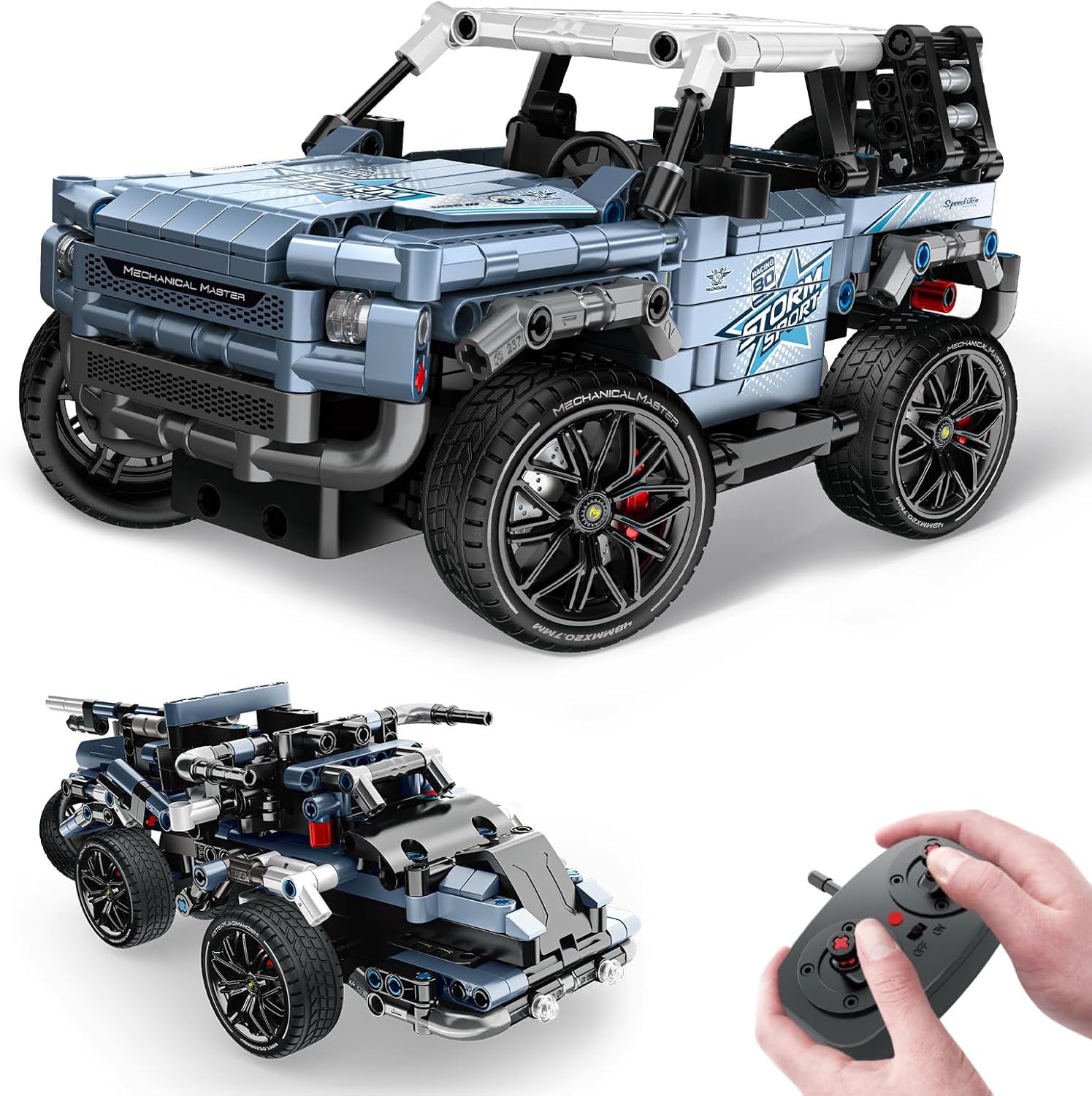
Image: The fully assembled Off-Road Vehicle model.
Building Mode 2: Monster Truck
Refer to the specific section in your physical instruction manual for assembling the Monster Truck model. This alternative build provides a different play experience.
Image: The alternative Monster Truck model (smaller image in the composite).

Image: Illustrates the building process, emphasizing engagement and skill development.
Battery Installation and Charging
The vehicle requires a rechargeable Lithium Ion battery (included). Follow these steps for installation and charging:
- Open Battery Cover: Use a screwdriver to open the battery compartment cover on the vehicle.
- Insert Battery: Carefully insert the Lithium Ion battery into the compartment, ensuring correct polarity.
- Close Cover: Securely close the battery compartment cover.
- Charging: Connect the included USB charging cable to the battery interface. Plug the other end into a USB power source (e.g., power bank, computer USB port, or wall charger). The battery indicator will show charging status.

Image: Details of the rechargeable battery and USB charging cable.
Operating Instructions
The vehicle can be controlled using either the physical remote control or a dedicated mobile application.
Remote Control Operation
The included 2.4 GHz remote control allows for direct manipulation of the vehicle's movement. Ensure the vehicle and remote control are powered on and paired according to the main instruction manual.

Image: The physical remote control unit.
App Control Operation
For advanced control and interactive features, download the official OWNONE 1 control app. Scan the QR code below or visit the provided link to download.

Image: QR code for app download.
The app offers several control modes:
- Gyro Mode: Control the vehicle by tilting your mobile device.
- Driving Simulation: Virtual joystick controls for precise movement.
- Navigation Path: Draw a path on the screen for the vehicle to follow.
- Programming: Use block-based coding to program custom movement sequences.
Image: Various app control interfaces for the vehicle.
Maintenance
- Cleaning: Wipe the vehicle and remote control with a dry, soft cloth. Avoid using water or chemical cleaners.
- Storage: Store the kit in a cool, dry place away from direct sunlight when not in use. Disassemble if storing for extended periods.
- Battery Care: Fully charge the battery before first use. Do not overcharge. Remove the battery if the toy will not be used for a long time.
- Component Integrity: Regularly check for any loose or damaged parts. Replace as necessary to ensure safe operation.
Troubleshooting
- Vehicle Not Moving: Ensure the battery is fully charged and correctly installed. Check that the remote control or app is properly paired with the vehicle.
- Remote Control Not Responding: Replace batteries in the remote control if applicable. Re-pair the remote with the vehicle.
- App Connectivity Issues: Ensure Bluetooth is enabled on your device and the vehicle is powered on. Restart the app and vehicle if necessary.
- Missing Pieces: While the probability of missing pieces is low (0.05%), if you encounter any missing blocks, please contact our customer service for assistance. We will resend missing pieces to you.

Image: Information regarding missing parts and customer service.
Specifications
| Product Dimensions | 9.05 x 4.52 x 3.9 inches |
| Item Weight | 1.62 pounds |
| Model Number | 8041 |
| Recommended Age | 6 years and up |
| Batteries | 1 Lithium Ion battery (included) |
| Connectivity | 2.4 GHz Remote Control, Bluetooth App Control |

Image: Product dimensions for both vehicle configurations.
Warranty and Support
OWNONE 1 is committed to customer satisfaction. This product comes with a 30-day money-back guarantee or free exchange options, and a 1-year warranty.
If you have any questions, require assistance, or need to report missing parts, please contact our customer service team. Our team is ready to provide support.
For customer service inquiries, please refer to the contact information provided on the product packaging or the official OWNONE 1 website.


