
YBOS AM-AKS2
User Manual: YBOS AM-AKS2 4-Channel Mixing Console
Model: AM-AKS2 | Brand: YBOS
Introduction
The YBOS AM-AKS2 is a versatile 4-channel mixing console designed for various audio applications, from live performances to home recording. It features integrated Bluetooth connectivity, USB recording and playback capabilities, 16 DSP effects, and comes equipped with two UHF wireless microphones for enhanced flexibility. This manual provides detailed instructions for setup, operation, and maintenance to ensure optimal performance of your device.

Figure 1: The YBOS AM-AKS2 mixing console with included UHF wireless microphones.
Setup
Power Supply
The AM-AKS2 mixer operates on a DC 5V 2A power supply. Use the provided power adapter to connect the mixer to a standard electrical outlet.
- Ensure the power adapter is securely connected to the mixer's power input and a compatible power source.
- Only use the original power adapter or a certified equivalent with the specified voltage and current ratings.
Microphone Connection and +48V Phantom Power
The mixer supports various microphone types. Channels 1 and 2 are equipped with +48V phantom power, essential for certain condenser microphones.
- Dynamic Microphones: Connect dynamic microphones using an XLR cable. Do not activate the +48V phantom power when using dynamic microphones.
- +48V Condenser Microphones: Connect these microphones via an XLR cable. Press the "+48V" button to activate phantom power. The LED indicator will illuminate when active.
- Important Note: The +48V phantom power is exclusively for the XLR sockets on channels 1 and 2, not for the 6.3mm (1/4 inch) sockets. This model does not support non-48V condenser microphones (e.g., 3.5mm plug computer microphones).

Figure 2: Detail of microphone inputs and +48V phantom power button.
Operating Instructions
Bluetooth Function
The AM-AKS2 mixer features built-in Bluetooth for wireless audio streaming from compatible devices.
- Ensure Bluetooth is enabled on your external device (e.g., smartphone, tablet).
- On the mixer, the display will show "BLUE" when in Bluetooth mode.
- Search for "MIX-MP3 BT" or a similar device name on your external device's Bluetooth settings and pair with it.
- Adjust the volume of the Bluetooth audio using the "TAPE/MP3" knob on the mixer. Further adjust the overall output using the main output faders.

Figure 3: Connecting a device via Bluetooth.
USB Function (Playback and Recording)
The USB port allows for direct audio playback from a USB drive and recording of the mixer's output.
- USB Drive Compatibility: The USB port supports FAT32 formatted USB drives. NTFS formatted drives are not recognized. Ensure there is at least one song file on the USB drive for proper recognition.
- Supported Playback Formats: FLAC, MP3, WAV, WMA.
- Recording Format: MP3.
- Note: The USB port is not designed for connecting USB microphones.
USB Playback:
- Insert a FAT32 formatted USB drive containing supported audio files into the USB port.
- The mixer will automatically begin playback.
- Adjust playback volume using the "TAPE/MP3" knob, similar to Bluetooth volume control.
USB Recording:
- Insert a FAT32 formatted USB drive into the USB port.
- Press the record button (usually indicated by a record icon or "REC") on the mixer's USB control section to start recording.
- Press the button again to stop recording. The recorded file will be saved as an MP3 on the USB drive.

Figure 4: USB drive connection for playback and recording.
PC Recording and Playback
The mixer can be connected to a computer for direct recording and playback, functioning as an audio interface.
- Connect the mixer to your computer using a USB cable.
- Your computer should recognize the mixer as an audio input/output device.
- Open your preferred Digital Audio Workstation (DAW) or recording software.
- Select the mixer as your audio input device in the software settings to record audio from the mixer.
- Select the mixer as your audio output device to play back audio from your computer through the mixer.
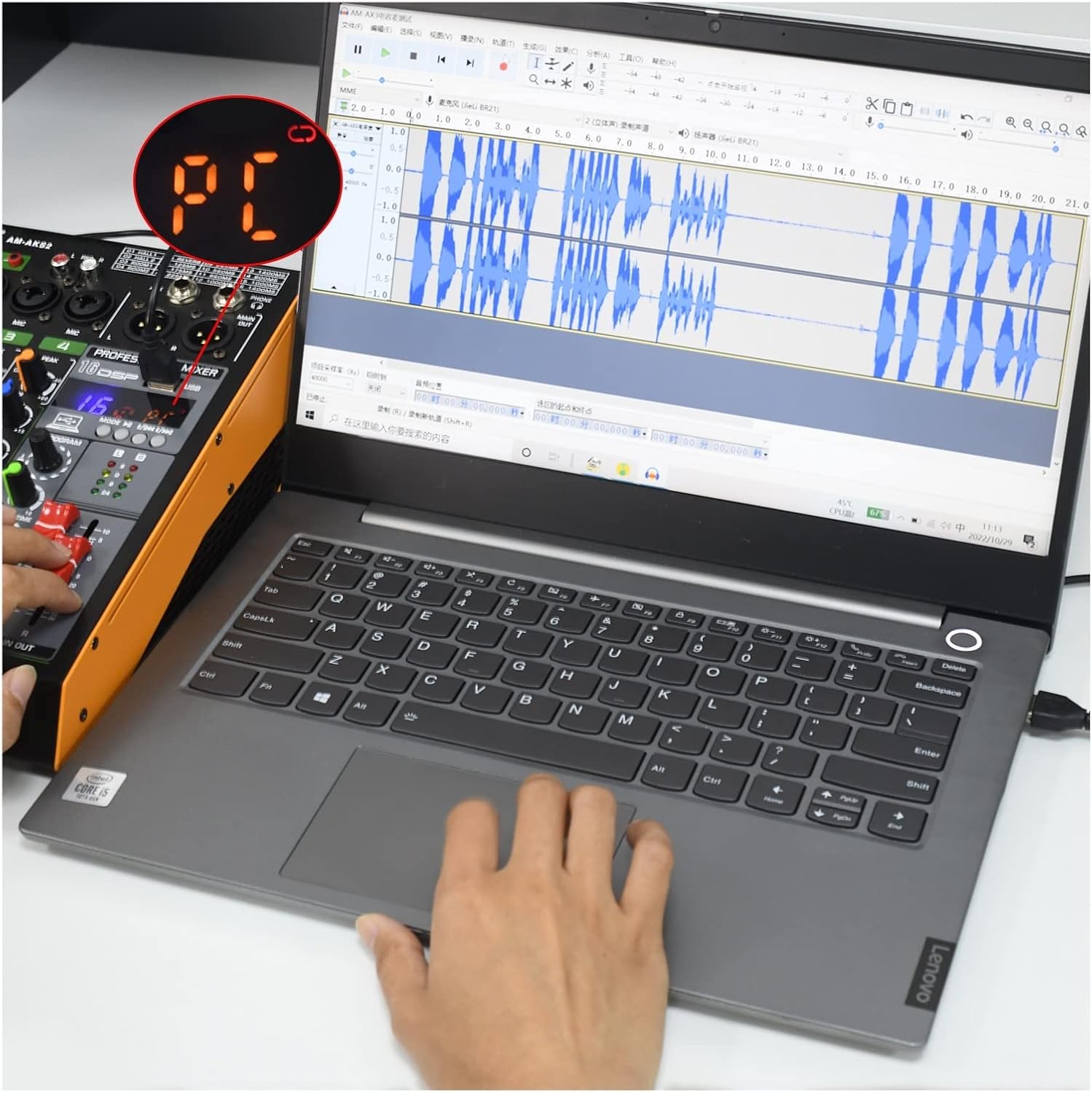
Figure 5: Mixer connected to a computer for recording.
16 DSP Effects
The AM-AKS2 features 16 built-in Digital Signal Processing (DSP) effects to enhance your audio.
- Rotate the "PROGRAM" knob to select from the 16 available effects. The selected effect number will be displayed.
- Adjust the "DELAY TIME" and "EFF" (Effect Send) knobs to control the intensity and characteristics of the chosen effect.
- The effects include various reverbs (Hall, Room), delays, and ping-pong delays.

Figure 6: List of 16 DSP effects.
Maintenance
- Cleaning: Use a soft, dry cloth to clean the surface of the mixer. Avoid using liquid cleaners or abrasive materials, which can damage the finish or internal components.
- Storage: Store the mixer in a cool, dry place away from direct sunlight, extreme temperatures, and high humidity.
- Handling: Handle the mixer and microphones with care to prevent physical damage. Avoid dropping or subjecting them to strong impacts.
- Protective Film: A protective film is present on the display to prevent scratches. You may remove it for clearer visibility.
Troubleshooting
| Problem | Possible Cause | Solution |
|---|---|---|
| No power | Power adapter not connected or faulty. | Ensure power adapter is securely connected and plugged into a working outlet. Test with another outlet if possible. |
| No sound from microphone | Incorrect phantom power setting; cable issue; gain too low. |
|
| USB drive not recognized | Incorrect format (NTFS); no audio files; faulty USB drive. |
|
| Bluetooth connection issues | Device not in pairing mode; interference; already connected to another device. |
|
Specifications
| Feature | Detail |
|---|---|
| Model | AM-AKS2 |
| Brand | YBOS |
| Number of Channels | 4 |
| Power Supply | DC 5V 2A (Corded Electric) |
| Phantom Power | +48V (Channels 1 & 2, XLR only) |
| Wireless Microphones | 2 UHF adjustable frequency microphones included |
| DSP Effects | 16 built-in effects |
| Bluetooth | Yes, for audio streaming |
| USB Playback Formats | FLAC, MP3, WAV, WMA |
| USB Record Format | MP3 |
| USB Drive Format | FAT32 (NTFS not supported) |
| PC Connectivity | USB for recording and playback |
| Item Weight | Approximately 1 Grams (0.035 ounces) |
Warranty and Support
For warranty information and technical support, please refer to the documentation included with your purchase or contact YBOS customer service through their official channels. Keep your proof of purchase for warranty claims.
Ask a question about this manual
Ask about setup, troubleshooting, compatibility, parts, safety, or missing instructions. Manuals+ will review the question and use this page’s manual context to help answer it.