
HUIYEETEX HYC-AM25MEL-P
HUIYEETEX AC 100-240V Hardwired Roller Blind Motor Kit + Controller + Mounting Bracket User Manual
Brand: HUIYEETEX | Model: HYC-AM25MEL-P
Product Overview
The HUIYEETEX AC 100-240V Hardwired Roller Blind Motor Kit offers a convenient and affordable solution for motorizing your existing roller blinds. This kit is designed to simplify the operation of hard-to-reach window coverings, enhancing both comfort and safety in your home. It includes a hard-wired tubular motor, an RF controller, and mounting brackets for easy integration.
With this system, you can control your roller shades effortlessly using the included remote, set preferred positions, and even schedule automated routines. The hardwired design ensures consistent power without the need for battery replacements, making it a reliable choice for modern smart homes.

Image: The HUIYEETEX roller blind motor kit, showing the tubular motor, remote control, and power cable.
Package Contents
The HUIYEETEX Roller Blind Motor Kit includes the following components:
- Wired Motorized Tubular Motor (AC 100-240V)
- RF Remote Control
- Mounting Bracket Kit (includes two side brackets)
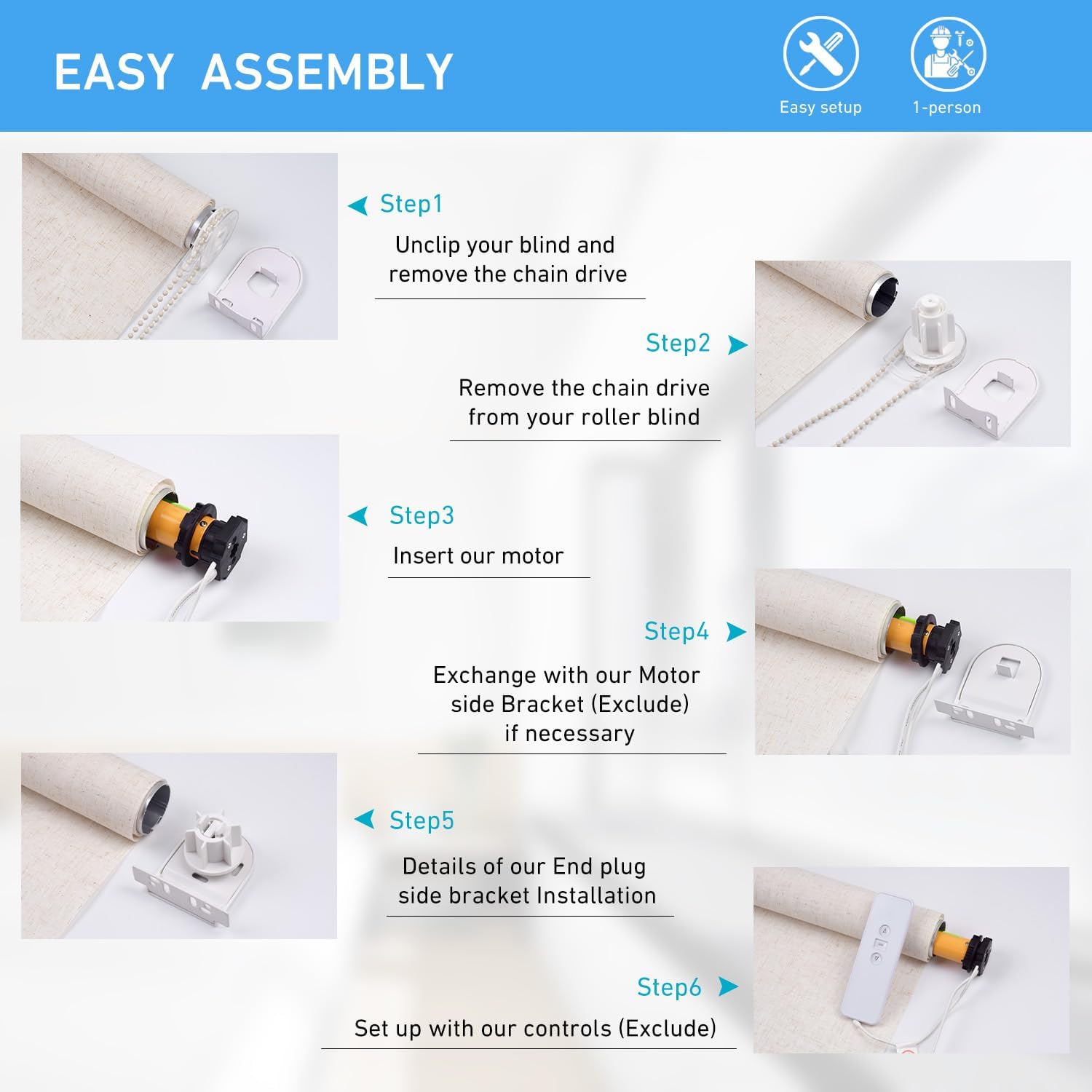
Image: Visual representation of the package contents, including the wired tubular motor, remote control, and mounting bracket kit.
Specifications
| Feature | Detail |
|---|---|
| Model Number | HYC-AM25MEL-P |
| Brand | HUIYEETEX |
| Voltage | AC 100-240V |
| Compatible Tube OD | Φ1.5" / 38mm |
| Torque | 1.2Nm |
| Speed | 30rpm |
| Rated Current | 1.2A |
| Power | 28.8W |
| Material | Plastic, Metal |
| Item Weight | 1.7 pounds |
| Package Dimensions | 18.66 x 3.5 x 2.44 inches |

Image: Detailed specifications and dimensions of the roller shade motor.
Setup and Installation
This section provides step-by-step instructions for installing your HUIYEETEX roller blind motor. The process is designed for easy DIY installation, allowing you to upgrade your existing blinds efficiently.
Safety First
The motorized shades motor eliminates the need for manual cords or chains, providing a high level of safety, which is ideal for households with children and pets.

Image: The motor integrated into a roller blind, emphasizing its safe, cord-free operation.
Installation Steps
Unclip your blind: If your existing roller blind has a chain drive, unclip it. DIY Blinds roller blinds typically have a clear plastic cog. Rotate this cog anti-clockwise to retract the pin away from the bracket, which will help you unclip your blind.

Image: Step 'a' from the installation guide, showing how to unclip the blind.
Remove the chain drive: Gently tug to remove the chain drive mechanism from your roller blind.
Image: Step 'b' from the installation guide, illustrating the removal of the chain drive.
Insert our motor: Carefully insert the HUIYEETEX motor into the roller blind tube. Ensure to line up your adapter and the tube profile so it slides in easily. Your motor will be flush with the tube when inserted correctly.
Image: Step 'c' from the installation guide, demonstrating how to insert the motor into the blind tube.
Exchange with our motor side bracket (if necessary): Replace the existing bracket with the provided motor side bracket if required for proper fitment.
Image: Step 'd' from the installation guide, showing the exchange of the motor side bracket.
End plug side bracket installation: Install the end plug side bracket to secure the other end of the roller blind.
Image: Step 'e' from the installation guide, detailing the installation of the end plug side bracket.
Set up with our controls: Once the motor is installed and the blind is re-mounted, proceed to set up the remote control and program the motor. Ensure the aerial isn't touching your roller blind, so it doesn't get damaged when you open and close your blinds.
Image: Step 'f' from the installation guide, showing the final setup with controls.
Installation Videos
Video: "The easy way to retrofit your roller blind with motorisation" - This video provides a visual guide on how to retrofit your existing roller blinds with the HUIYEETEX motor, covering the uninstallation of the old mechanism and installation of the new motor.
Video: "DIY AC110V Plug-in Blind Motor" - A short demonstration of the HUIYEETEX plug-in motor in action, showing its smooth operation after installation.
Operating Instructions
The HUIYEETEX roller blind motor offers multiple convenient ways to control your shades.
Remote Control Operation
Use the included RF remote control to effortlessly raise, lower, or stop your blinds at any desired position. The remote allows for precise control and can be programmed to manage multiple motors.

Image: Demonstrates the use of the wireless remote control for operating the blinds.
Smart Home Integration (Voice & App Control)
The motor features a built-in 2.4GHz WiFi and 433MHz RF receiver, enabling seamless integration with smart home systems. You can control your blinds using voice commands via Amazon Alexa or Google Assistant, or through a compatible mobile application. This hub-free smart control allows for advanced automation.

Image: Shows smart control capabilities, including voice commands via Alexa or Google Assistant.
Automated Routines
Set up automated routines to open or close your blinds at specific times of the day, such as sunrise or sunset. This feature provides convenience and energy efficiency without requiring additional hubs.

Image: Depicts the scheduling of automated routines for blinds, enhancing daily convenience.
Compatible Blind Types
This motor kit is compatible with various roller blind types, including Zebra blinds, standard Roller blinds, and Shangrila blinds, provided they fit the Φ1.5" / 38mm OD shade tube requirement.

Image: Illustrates the types of blinds compatible with the HUIYEETEX motor, including Zebra, Roller, and Shangrila blinds.
Maintenance
The HUIYEETEX roller blind motor is designed for minimal maintenance. To ensure optimal performance and longevity:
- Keep the motor and remote control clean and free from dust. Use a soft, dry cloth for cleaning.
- Ensure the power cable is not pinched or damaged.
- Avoid exposing the motor to excessive moisture or extreme temperatures.
- Periodically check the mounting brackets to ensure they remain securely fastened.
Troubleshooting
If you encounter any issues with your HUIYEETEX roller blind motor, please refer to the following common troubleshooting tips:
| Problem | Possible Cause | Solution |
|---|---|---|
| Motor not responding to remote | No power; Remote battery low; Remote not paired; Obstruction. | Check power connection. Replace remote battery. Re-pair remote with motor (refer to remote pairing instructions). Remove any obstructions. |
| Blinds stop unexpectedly | Power interruption; Overload protection activated. | Check power supply. Allow motor to cool down if it has been running continuously. |
| Motor makes unusual noise | Misalignment; Internal issue. | Ensure motor is properly seated in the tube and brackets. If noise persists, contact customer support. |
| Limits not set correctly | Incorrect programming. | Refer to the remote control programming section to reset and adjust the upper and lower limits. |
If the issue persists after trying these solutions, please contact HUIYEETEX customer support for further assistance.
Warranty and Support
HUIYEETEX products are designed for reliability and performance. For detailed warranty information, please refer to the documentation included with your purchase or visit the official HUIYEETEX website.
Additional support and resources, including a comprehensive installation manual, can be found via the following link:
Download Installation Manual (PDF)
For technical assistance or product inquiries, please contact HUIYEETEX customer service.
Related documentsHYC-AM25MEL-P


Ask a question about this manual
Ask about setup, troubleshooting, compatibility, parts, safety, or missing instructions. Manuals+ will review the question and use this page’s manual context to help answer it.