
BOUWOIMA 62a7eba6-9c4c-40ec-bf6a-9eded25ce1bc
BOUWOIMA 10-Inch Double Din Car Stereo User Manual
Model: 62a7eba6-9c4c-40ec-bf6a-9eded25ce1bc
Product Overview
This manual provides detailed instructions for the installation, operation, and maintenance of your BOUWOIMA 10-Inch Double Din Car Stereo. This advanced car stereo features wireless Apple CarPlay and Android Auto, an 8-core processor, 2GB RAM, 32GB ROM, a 1280x720 QLED touchscreen, dual Bluetooth, Wi-Fi, AM/FM radio, GPS navigation, and supports a live rearview camera.

Figure 1: BOUWOIMA 10-Inch Double Din Car Stereo with included rearview camera and smartphone integration.
Safety Information
- Ensure the vehicle's ignition is off before beginning installation.
- Disconnect the negative terminal of the vehicle's battery to prevent electrical shorts.
- Consult a professional for installation if you are unsure about any steps.
- Do not operate the device in a manner that distracts you from driving.
- Keep the device away from extreme temperatures and moisture.
Package Contents
Verify that all items are present in the package:
- 1 x Double Din Car Stereo Unit
- 1 x Power Cable
- 1 x Audio Video Adapter Cable
- 1 x Backup Camera Video Input Cable
- 1 x GPS Antenna
- 1 x Backup AHD Live View Camera
- 1 x External Microphone
- 2 x USB Adapter Cables
- 1 x CarPlay & Android Auto USB Adapter Cable
- 1 Set x Installation Brackets
- 1 x User Manual

Figure 2: Dimensions and included accessories of the car stereo.
Installation Guide
1. Pre-Installation Checks
- Confirm the stereo's dimensions (6.81x3.85 x 4 inches / 173mm x 97mm x 110mm) are compatible with your vehicle's double din slot.
- Gather necessary tools: wire strippers, crimpers, electrical tape, multimeter, mounting tools.
2. Wiring Connections
Connect the power cable, audio/video cables, and other accessories according to standard car stereo wiring color codes. Ensure all connections are secure to prevent malfunctions.
- Power (Yellow): Constant 12V power.
- Accessory (Red): Switched 12V power (ignition).
- Ground (Black): Vehicle chassis ground.
- Speaker Wires: Connect to corresponding vehicle speaker wires (e.g., White/White-Black for Front Left).
- Backup Camera Input: Connect the backup camera video input cable and power the camera from the vehicle's reverse light circuit.
- GPS Antenna: Mount the GPS antenna in a location with a clear view of the sky.
- External Microphone: Connect the external microphone for improved call quality.
3. Mounting the Unit
Use the provided installation brackets to secure the main unit into your vehicle's dashboard. Ensure the unit is firmly in place.
4. Detachable Screen Installation
The 10-inch QLED screen is detachable from the main unit. To attach, align the screen with the main unit's connectors and gently push until it clicks into place. To detach, pull out the two clips, move the screen up, and take it off. Hold the terminal harness and pull it back for complete disassembly.

Figure 3: Steps for detaching the screen from the main unit.
Operating Instructions
1. Basic Controls
The unit features a rotating knob for easy volume adjustment and voice assistant activation. Short press to mute/unmute, long press to power on/off.

Figure 4: Rotating knob functions for volume and power.
The floating and detachable screen can be adjusted in three directions (up/down, left/right tilt, and forward/backward tilt) to optimize viewing angles and reduce glare.

Figure 5: Adjustable screen angles for optimal viewing.
2. Wireless CarPlay & Android Auto
Connect your iPhone or Android smartphone wirelessly for seamless integration. This allows access to navigation, music, calls, messages, and voice assistants (Siri/Google Assistant).
- Ensure Bluetooth and Wi-Fi are enabled on your smartphone.
- On the car stereo, navigate to the CarPlay or Android Auto application.
- Follow the on-screen prompts to pair your device via Bluetooth. Once paired, the wireless connection for CarPlay/Android Auto will establish automatically.
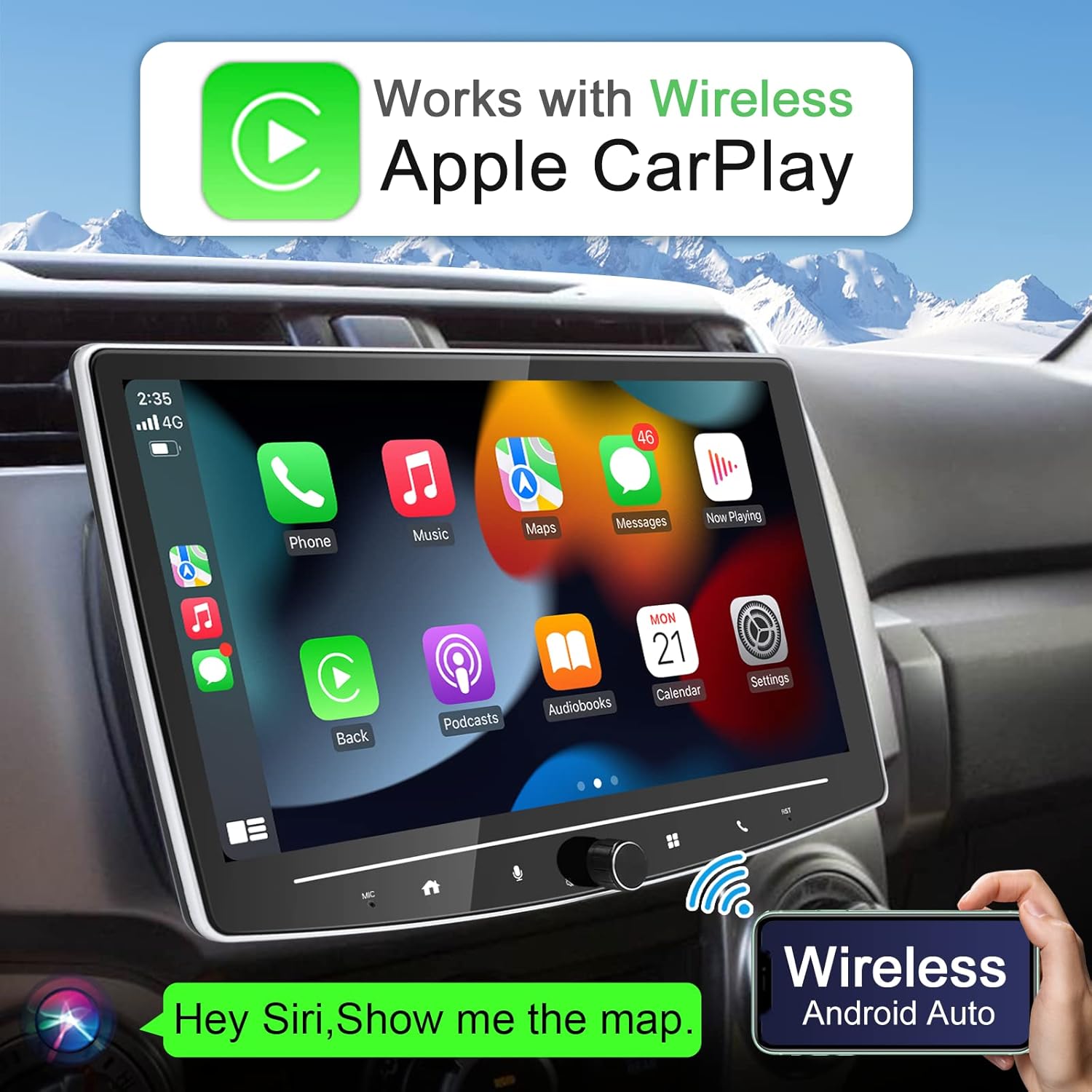
Figure 6: Wireless Apple CarPlay interface.

Figure 7: Wireless Android Auto interface.
3. QLED Display
The 1280x720 QLED display offers superior clarity and a 178° full-viewing angle, ensuring clear visibility even in bright conditions or from different seating positions. It supports 1920x1080P video playback.

Figure 8: QLED display quality comparison.
4. GPS Navigation
The unit supports online and offline GPS navigation. You can use pre-installed maps or download your preferred navigation apps from the Play Store. Integration with CarPlay/Android Auto allows for seamless navigation through your phone's apps.

Figure 9: GPS Navigation interface.
5. AM/FM Radio
Access your favorite radio stations with the built-in AM/FM tuner. The unit supports RDS (Radio Data System) to display station names and song information where available.

Figure 10: AM/FM Radio interface with RDS support.
6. Audio Settings (DSP & EQ)
Customize your audio experience with the integrated DSP (Digital Signal Processor) and 32-band EQ. Adjust frequency bands, sound field, surround sound, and bass enhancement to suit your preferences. The unit also features 5RCA output (3.68V) and subwoofer output for connecting external amplifiers.

Figure 11: 5.1 Channel Audio Output configuration.
7. Split Screen Display
Utilize the split screen feature to run two applications simultaneously, such as navigation and music, or a web browser and radio. This enhances multitasking capabilities while driving.

Figure 12: Split screen display for multitasking.
8. Live Rearview Camera
The included AHD rearview camera provides a 170° ultra-wide viewing angle, HD 1080P video quality, and night vision. The "Live Rear View" function allows you to see the rear camera feed even when the car is moving forward, aiding in safe driving and parking.

Figure 13: AHD Live Rearview Camera features and display.
9. Connectivity
The unit offers multiple ways to connect to the internet and other devices:
- Wi-Fi Hotspot: Connect to your phone's hotspot or a dedicated Wi-Fi network (supports 2.4GHz and 5GHz).
- Bluetooth: Dual Bluetooth chips (Bluetooth 4.1 and 5.0) for various functions including wireless CarPlay/Android Auto, Bluetooth music streaming, phone calls, Bluetooth OBD devices, and Bluetooth mouse.
- USB Tethering: Connect your phone via USB for internet access.

Figure 14: Internet connectivity options.
10. Operational Video Demonstration
Watch this video for a comprehensive demonstration of the car stereo's features and operations, including screen adjustment, knob functions, wireless CarPlay/Android Auto, GPS navigation, music playback, phone calls, voice control, radio, EQ adjustment, split screen, and backup camera functionality.
Video 1: Demonstration of the 10-inch Double Din Car Stereo's features.
Maintenance
- Screen Cleaning: Use a soft, lint-free cloth to gently wipe the screen. For stubborn smudges, slightly dampen the cloth with water or a screen-safe cleaner. Avoid abrasive materials or harsh chemicals.
- General Cleaning: Keep the unit free from dust and debris. Use a soft brush or compressed air to clean vents and ports.
- Software Updates: Periodically check for software updates from the manufacturer to ensure optimal performance and access to new features.
Troubleshooting
| Problem | Possible Cause | Solution |
|---|---|---|
| Unit does not power on. | Incorrect wiring, blown fuse, loose connection. | Check power and ground connections. Verify vehicle fuses. Ensure all wiring harnesses are securely plugged in. |
| Wireless CarPlay/Android Auto not connecting or disconnecting frequently. | Bluetooth/Wi-Fi interference, incorrect pairing, software glitch. | Ensure Bluetooth and Wi-Fi are on your phone. Forget the device on both phone and stereo and re-pair. Restart both devices. Check for software updates. |
| No sound or distorted sound. | Speaker wiring issues, incorrect audio settings, volume too low. | Check speaker connections. Adjust volume. Verify EQ and sound settings. Ensure Mute is not active. |
| Rearview camera not displaying. | Camera wiring issue, camera malfunction, incorrect input selected. | Check camera power and video input connections. Ensure the correct camera input is selected or automatically triggered by reverse gear. |
| GPS signal weak or inaccurate. | GPS antenna placement, environmental interference. | Ensure GPS antenna is mounted in a clear, unobstructed location. Avoid placing near metal objects. |
Specifications
| Feature | Detail |
|---|---|
| Product Dimensions | 4 x 6.81 x 4.33 inches (173mm x 97mm x 110mm) |
| Item Weight | 5.79 pounds |
| Model Number | 62a7eba6-9c4c-40ec-bf6a-9eded25ce1bc |
| Brand | BOUWOIMA |
| Connectivity Technology | Bluetooth, Wi-Fi |
| Controller Type | Android |
| Special Features | Wireless Android Auto, Wireless Apple CarPlay, Detachable QLED Screen, Live Rearview Camera, GPS Navigation, Split Screen, Dual Bluetooth, AM/FM Radio, DSP+32EQ |
| Compatible Devices | Smartphone |
| Connector Type | RCA |
| Audio Output Mode | Stereo |
| Surround Sound Channel Configuration | 5.1 Channel |
| Display Resolution | 1280 x 720 QLED |
| Processor | 8 Cores CPU |
| Memory | 2GB RAM + 32GB ROM |
Warranty and Support
Your BOUWOIMA car stereo comes with a standard manufacturer's warranty. Please refer to the warranty card included in your package for specific terms and conditions.
For technical support, installation assistance, or any inquiries, please contact our customer service team. You can reach us via email:
sales01@gpsdvd.com.cn

Figure 15: Customer Service Email on product packaging.
We are committed to providing 24-hour online customer service to assist you with any questions regarding installation or usage.