
1. Introduction
This manual provides essential instructions for the safe and efficient operation, maintenance, and troubleshooting of your ANOITD FP1804F Replacement Battery Charger. This charger is designed for use with Makita 7.2V-18V Nickel-Cadmium (Ni-CD) and Nickel-Metal Hydride (Ni-MH) battery packs.
Please read this manual thoroughly before using the charger to ensure proper function and to prevent damage to the unit or batteries.
2. Important Safety Instructions
WARNING: To reduce the risk of injury, fire, or electric shock, read all instructions before using this product.
- Do not charge any battery types other than Ni-CD or Ni-MH. This charger is not compatible with Makita Li-ion batteries.
- Do not expose the charger to rain or wet conditions.
- Use only with the specified input voltage (100-240V).
- Do not operate the charger if it has received a sharp blow, been dropped, or otherwise damaged.
- Do not disassemble the charger. Incorrect reassembly may result in a risk of electric shock or fire.
- Unplug the charger from the outlet before attempting any maintenance or cleaning.
- Do not allow metal objects to come into contact with the battery terminals on the charger.
- The charger is equipped with multiple protections:
- No charging to a defective battery.
- Automatic cut-off when short-circuit is detected.
- Automatic stop charging when charger faulty detected.
- Automatic stop charging when overcharging.
- Stop charging when overheat.
3. Product Overview
The ANOITD FP1804F charger is designed for efficient and safe charging of your Makita 7.2V-18V Ni-CD and Ni-MH batteries. It features an intelligent cooling design and clear LED indicators for charging status.

Figure 1: ANOITD FP1804F Battery Charger. This image displays the charger unit with its attached power cord, highlighting its compact design and the battery slot.
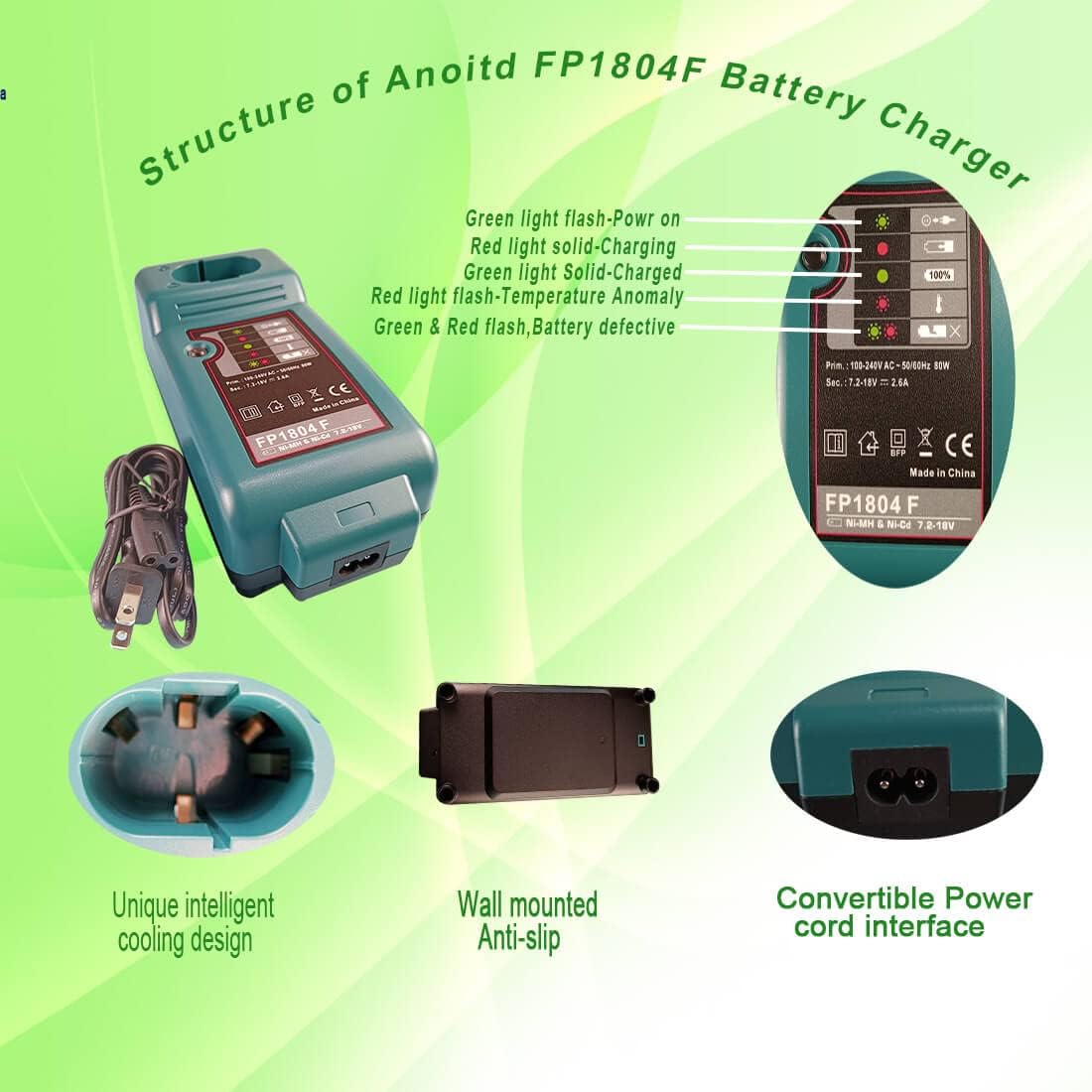
Figure 2: Charger Structure and LED Indicators. This image details the various parts of the charger, including the battery interface, LED status lights, and wall-mounted anti-slip features.
4. Setup
- Unpack the charger and inspect it for any damage.
- Connect the charger's power cord to a standard 100-240V AC power outlet. The green power indicator light should illuminate.
- Ensure the charger is placed on a stable, flat surface, away from direct sunlight, heat sources, or moisture.
5. Operating Instructions
5.1 Charging a Battery
- Ensure the charger is plugged into a power source.
- Align the battery pack with the charger's slot and slide it in until it clicks securely into place.
- The charger will automatically begin the charging process. Refer to the "Charging Indicators" section for details on LED status.
- Once charging is complete, the indicator will show a full charge. Remove the battery by pressing the release button (if applicable) and sliding it out.
- Unplug the charger from the power outlet when not in use.
5.2 Demonstration of Charging Process
Video 1: This video demonstrates the process of connecting the ANOITD FP1804F charger to a power source and inserting a compatible Makita Ni-CD/Ni-MH battery for charging. It shows the initial power-on and the charging indicator activating.
Video 2: This video illustrates the compatibility of the ANOITD FP1804F charger with various Makita 7.2V-18V Ni-CD/Ni-MH battery types, showing different battery models being inserted and initiating the charging sequence.
Video 3: This video provides a close-up view of the ANOITD FP1804F charger's LED indicators during the charging process, demonstrating how the lights change to reflect the battery's charge status.
6. Charging Indicators
The charger features LED indicators to communicate the battery status:
- Green light flash: Power on / Ready to charge.
- Red light solid: Charging in progress.
- Green light solid: Fully charged.
- Red light flash: Temperature anomaly (battery too hot or too cold).
- Green & Red flash: Battery defective.

Figure 3: Visual representation of the charger's LED indicators and integrated safety features, including over-voltage, over-current, over-charging, and over-heat protection.
7. Maintenance
- Keep the charger clean and free from dust and debris. Use a dry cloth to wipe surfaces.
- Store the charger in a dry, cool place when not in use.
- Regularly inspect the power cord for any signs of damage. If damaged, discontinue use and replace.
8. Troubleshooting
| Problem | Possible Cause | Solution |
|---|---|---|
| Charger not powering on. | No power from outlet; loose connection. | Check power outlet with another device; ensure power cord is securely plugged into charger and outlet. |
| Battery not charging (Red light solid). | Battery not properly seated; charger or battery fault. | Re-seat the battery firmly; try charging a different, known-good battery. |
| Battery not charging (Red light flashing). | Battery too hot/cold; defective battery. | Allow battery to reach room temperature; try charging a different battery to confirm charger function. If the issue persists with multiple batteries, the charger may be faulty. |
| Green & Red lights flashing. | Defective battery. | The battery is likely defective and cannot be charged. Replace the battery. |
9. Specifications
- Brand: ANOITD
- Model: FP1804F
- Battery Type: Ni-CD, Ni-MH
- Input: 100-240V AC, 50-60Hz
- Output Voltage: 7.2V-18V DC
- Output Current: 2.5A
- Product Dimensions: 8.68 x 3.18 x 5.06 inches
- Item Weight: 1.07 pounds
- Certifications: CE, FCC, ROHS
- Compatible Makita Battery Models: DC18SC, DC1803, DC1804, DC1201, DC1290, DC1410, DC1412, DC1413, DC1414, DC1470, DC1439, DC14SA LXT, DC7100, DC711, DC9700, DC9710, 1131032.
10. Warranty and Support
This product comes with a 30-day money-back guarantee and a 1-year warranty from the date of purchase.
For any questions or support needs, please contact ANOITD customer service through your purchase platform by clicking "Ask a question" on our storefront or "contact seller" in your order options.