
Introduction
Thank you for choosing the LANLIPU 24-inch FHD 165Hz IPS Monitor. This manual provides essential information for setting up, operating, and maintaining your monitor. Please read this manual thoroughly before using the product to ensure proper operation and to prevent damage.
This monitor is designed for a variety of uses, including gaming, office work, graphic design, and multimedia consumption, offering a versatile display solution.

The LANLIPU 24-inch monitor is suitable for various usage scenarios, including gaming, office tasks, design work, and watching movies.
Safety Information
To ensure safe and optimal performance of your monitor, please observe the following safety precautions:
- Do not expose the monitor to rain, moisture, or extreme temperatures.
- Avoid placing the monitor in direct sunlight or near heat sources.
- Ensure proper ventilation around the monitor. Do not block ventilation openings.
- Use only the power adapter supplied with the monitor.
- Disconnect the power cable from the outlet during lightning storms or when unused for extended periods.
- Do not attempt to service the monitor yourself. Refer all servicing to qualified personnel.
- Keep the monitor away from strong magnetic fields.
Package Contents
Please check the package contents upon unpacking. If any items are missing or damaged, contact your retailer.
- LANLIPU 24-inch Monitor
- Monitor Stand (Base and Neck)
- Power Adapter and Cable
- DisplayPort (DP) Cable
- User Manual
- Screws for Stand Assembly
Product Overview
The LANLIPU 24-inch monitor features a 1920 x 1080p Full HD resolution IPS panel with a 165Hz refresh rate, providing clear visuals and smooth motion. It supports a 178° wide viewing angle and includes a blue light filter and flicker-free technology for comfortable viewing.

Front view of the LANLIPU 24-inch monitor, highlighting its key display features.
Key Features:
- Display: 24-inch IPS Panel, 1920 x 1080p FHD Resolution
- Refresh Rate: 165Hz for smooth visuals
- Color Gamut: 98% sRGB for accurate color reproduction
- Viewing Angle: 178° Wide View
- Design: Frameless, VESA Mount Support (75x75mm)
- Eye Care: Flicker-free technology and Blue Light Filter
- Connectivity: Multiple interfaces including DP, HDMI, USB, and Headphone Port

The monitor's 98% sRGB color gamut ensures accurate and vibrant color reproduction.
The IPS panel provides clear resolution, sensitive response, and richer, finer colors.
Setup
1. Assembling the Stand
- Carefully remove the monitor from its packaging, keeping it protected on a soft surface.
- Attach the stand neck to the monitor panel using the provided screws.
- Connect the stand base to the stand neck and secure it with the remaining screws.
- Ensure all connections are tight and secure before placing the monitor upright.
Alternatively, the monitor supports VESA mount (75x75mm) for wall or arm mounting. Refer to your VESA mount instructions for installation.
2. Connecting to a Computer
The monitor offers multiple input options. Choose the appropriate cable for your device.

Rear view of the monitor displaying its multi-interface design, including Power, USB, HDMI, and DP ports.
- DisplayPort (DP): For optimal performance, especially at 165Hz refresh rate, connect your computer's graphics card to the monitor using the supplied DP cable. Note: A 165Hz refresh rate requires a DP connection and a graphics card of at least 4GB.
- HDMI: Connect to your computer or other devices using an HDMI cable. The monitor has two HDMI ports.
- USB: Connect USB devices to the monitor's USB port.
- Headphone Port: Connect headphones or external speakers.

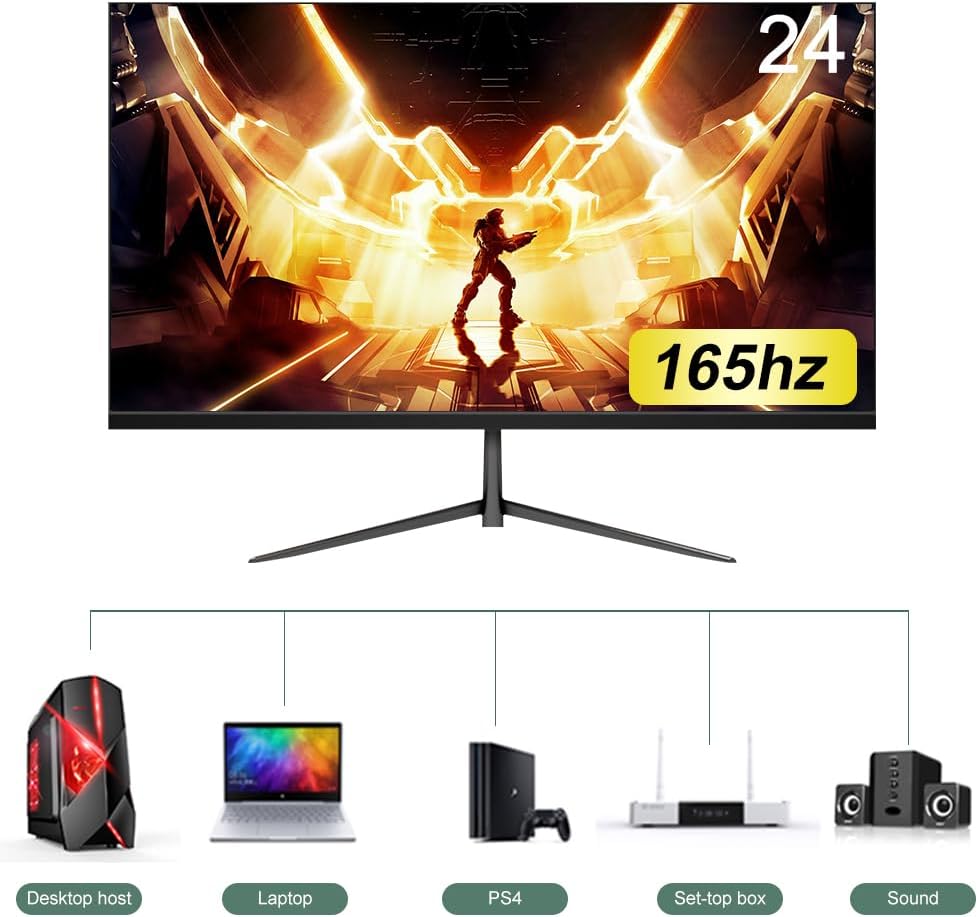
The monitor can be connected to various devices such as desktop computers, laptops, gaming consoles (PS4), and set-top boxes.
3. Power Connection
- Connect the power adapter to the monitor's power input port.
- Plug the power cable into a wall outlet.
Operating Instructions
1. Power On/Off
- To power on the monitor, press the power button located on the monitor.
- To power off, press and hold the power button until the monitor turns off.
2. On-Screen Display (OSD) Menu
The OSD menu allows you to adjust various display settings. The specific buttons and navigation may vary slightly, but generally involve:
- Pressing a dedicated OSD button or the joystick (if present) to open the menu.
- Using navigation buttons (up/down/left/right) or the joystick to move through options.
- Pressing an 'Enter' or 'OK' button to select an option.
- Pressing an 'Exit' or 'Back' button to return to the previous menu or close the OSD.
3. Display Settings
Within the OSD menu, you can adjust settings such as:
- Brightness/Contrast: Adjust the overall luminance and contrast of the display.
- Color Settings: Modify color temperature, gamma, and individual RGB values.
- Input Source: Manually select between DP, HDMI 1, or HDMI 2 inputs.
- Picture Mode: Select preset modes (e.g., Standard, Game, Movie, Text).
- Refresh Rate: Ensure your computer's display settings are configured to 165Hz for optimal performance.

The 165Hz refresh rate significantly reduces screen blur, tearing, and drag, providing clear transitions in fast-paced content.
4. Adjusting Viewing Angle
The monitor screen can be tilted forward by 5 degrees or backward by 15 degrees. Gently adjust the top or bottom edge of the monitor panel to find your preferred viewing angle.
Maintenance
Cleaning the Monitor
- Always unplug the monitor from the power outlet before cleaning.
- Use a soft, lint-free cloth slightly dampened with water or a mild, non-abrasive screen cleaner.
- Do not spray cleaner directly onto the screen. Apply it to the cloth first.
- Avoid using benzene, thinner, ammonia-based cleaners, or abrasive pads, as these can damage the screen or casing.
Storage
If storing the monitor for an extended period, disconnect all cables and pack it in its original packaging or a suitable protective container. Store in a cool, dry place away from direct sunlight and extreme temperatures.
Troubleshooting
If you encounter issues with your monitor, refer to the following common problems and solutions:
| Problem | Possible Solution |
|---|---|
| No image on screen |
|
| Image is blurry or distorted |
|
| Flickering screen |
|
| No sound from headphones/speakers |
|
Specifications
| Model Number | 24-1080P-165HZ-Black |
| Screen Size | 24 Inches |
| Panel Type | IPS |
| Resolution | 1920 x 1080p (FHD) |
| Refresh Rate | 165 Hz |
| Viewing Angle | 178 Degrees |
| Color Gamut | 98% sRGB |
| Brightness | 250 cd/m² |
| Contrast Ratio | 1000:1 (Typical) |
| Connectivity | 1x DisplayPort, 2x HDMI, 1x USB, 1x Headphone Port |
| VESA Mount | 75 x 75 mm |
| Additional Features | Blue Light Filter, Frameless Design, Flicker-Free |
| Product Dimensions (L x W x H) | 53.34 x 40.64 x 10.92 cm |
| Weight | 3.74 kg |
Warranty Information
LANLIPU products are covered by a limited warranty from the date of purchase. Please retain your proof of purchase for warranty claims. The warranty covers manufacturing defects and does not cover damage caused by misuse, accidents, unauthorized modifications, or normal wear and tear. For specific warranty terms and conditions, please refer to the warranty card included with your product or contact customer support.
Customer Support
If you have any questions, require technical assistance, or need to report an issue with your LANLIPU monitor, please contact our customer support team. Please have your model number (24-1080P-165HZ-Black) and purchase information ready when contacting support.
Contact information (e.g., email, website, phone number) can typically be found on the product packaging or the retailer's website where you purchased the monitor.