
ELERA Automatic Upper Arm Blood Pressure Monitor
ELERA Blood Pressure Monitor
Instruction Manual
Introduction
Thank you for choosing the ELERA Blood Pressure Monitor. This device is designed for accurate and convenient blood pressure measurement at home. It features a large backlit LCD display, dual-user mode with extensive memory, and comes with two cuffs to accommodate various arm sizes. Please read this manual thoroughly before using the device to ensure proper operation and accurate readings.
This manual provides essential information on the product's features, setup, operation, maintenance, and troubleshooting.
Safety Information
- Consult your physician before using this device if you have any medical conditions.
- Do not use this device for diagnosis or treatment of any health problem or disease. Always consult a medical professional for diagnosis and treatment.
- Keep the device out of reach of children and pets.
- Do not use the device in a moving vehicle.
- Avoid strong electromagnetic fields (e.g., microwave ovens, mobile phones) near the device during measurement.
- Statements regarding dietary supplements have not been evaluated by the FDA and are not intended to diagnose, treat, cure, or prevent any disease or health condition.
Product Overview
The ELERA Blood Pressure Monitor is an automatic upper arm device designed for ease of use and accuracy. It includes the main monitor unit and two different sized cuffs.

Figure 1: ELERA Blood Pressure Monitor main unit, standard cuff, extra large cuff, AAA batteries, and USB Type-C cable.

Figure 2: What's in the box: Packaging Box, BP Monitor, Quick Guide, English User Manual, AAA Battery x4, 2 Upper Arm Cuffs, USB Type-C Cable.
Main Unit Features:
- Large Backlit LCD Display: Shows systolic and diastolic blood pressure, pulse rate, date, and time. The display is easy to read in various lighting conditions.
- One-Button Operation: Simplifies the measurement process.
- Memory Button (MEM): Accesses stored measurement data.
- Set Button (SET): Used for setting date, time, and switching user profiles.
- Power Options: Can be powered by 4 AAA batteries or a USB Type-C cable.
- Irregular Heartbeat Detection: Alerts the user to irregular heartbeats during measurement.
- Hypertension Indicator: Provides a classification of blood pressure levels.

Figure 3: The large backlit LCD display ensures clear readability both at night and during the day.

Figure 4: Two power options: 4 AAA batteries (included) or USB Type-C cable (included) for convenient use anywhere.
Cuffs:
The monitor comes with two cuffs to ensure accurate readings for different arm circumferences:
- Standard Cuff: Suitable for arm circumference 9"-14" (22-36cm).
- Extra Large Cuff: Suitable for arm circumference 13"-21" (32-52cm).
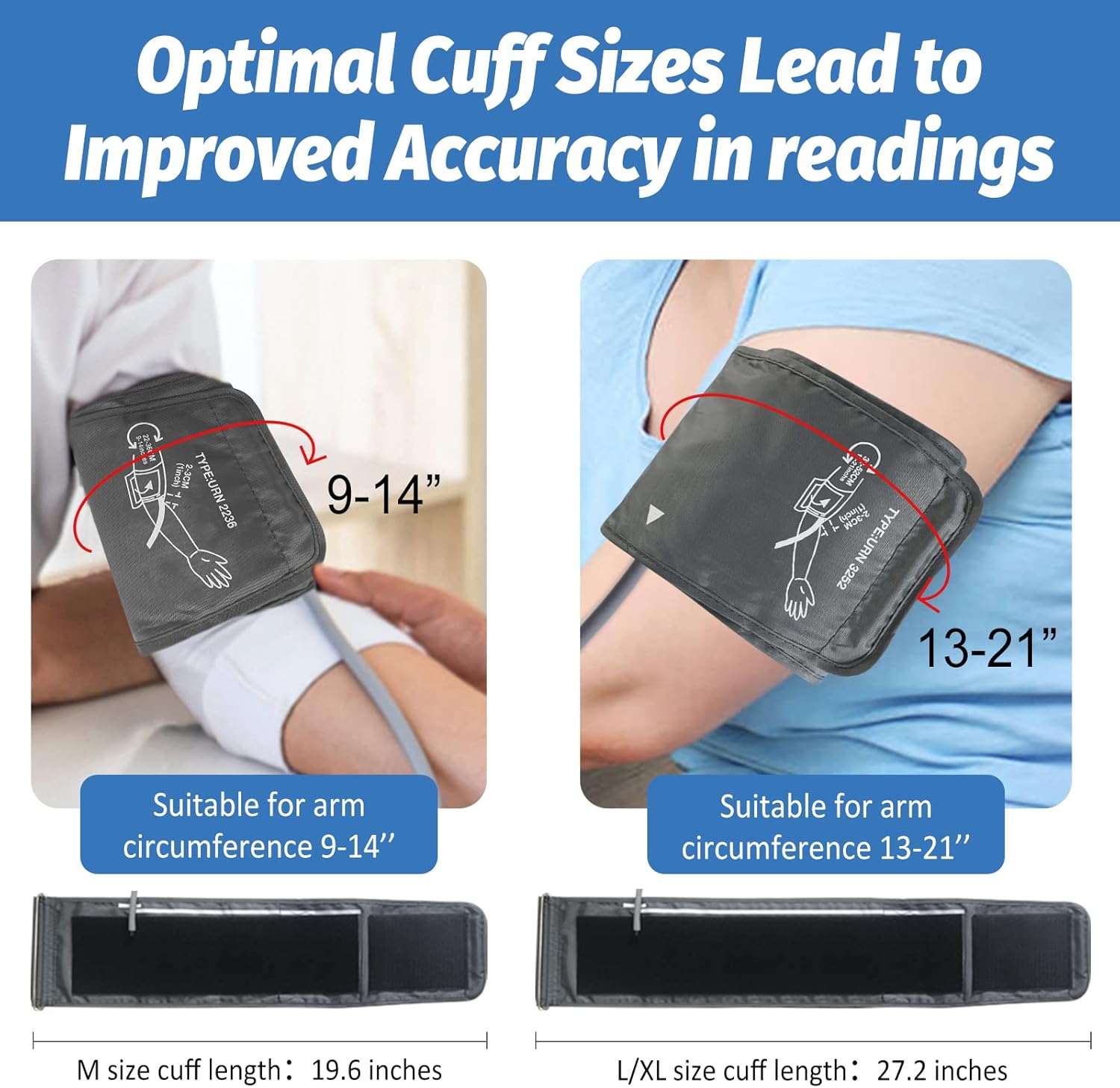
Figure 5: Optimal cuff sizes lead to improved accuracy in readings. Choose the cuff that best fits your arm.
Setup
1. Powering the Device:
The ELERA Blood Pressure Monitor can be powered by either AAA batteries or a USB Type-C cable.
- Battery Installation: Open the battery compartment on the back of the monitor. Insert 4 AAA batteries, ensuring correct polarity (+/-). Close the battery cover securely.
- USB Type-C Power: Connect the provided USB Type-C cable to the port on the side of the monitor and plug the other end into a compatible USB power adapter (not included) or a computer USB port.
2. Connecting the Cuff:
Select the appropriate cuff size for your arm circumference. Insert the air tube connector of the cuff firmly into the air jack on the side of the main monitor unit.
3. Setting Date and Time:
Before first use, or after replacing batteries, you may need to set the date and time. Refer to the detailed instructions in the included Quick Guide or PDF User Manual for precise steps on setting these parameters using the SET button.
Operating Instructions
Preparing for Measurement:
- Relax for 5-10 minutes before taking a measurement.
- Avoid eating, smoking, exercising, or bathing 30 minutes prior to testing.
- Sit in a comfortable position with your back supported and feet flat on the floor.
- Place your arm on a flat surface so the cuff is at heart level.
Applying the Cuff:
- Ensure your left upper arm is not covered by clothing.
- Wrap the cuff around your bare upper arm, approximately 2-3 cm (1 inch) above the elbow joint.
- Ensure there is enough space to insert one finger between the cuff and your arm.
- Adjust the cuff position so it is flush with your heart.

Figure 6: Simple Steps for Use: 1. Relax for 5-10min, avoid eating, smoking, exercising, bathing 30 minutes before testing. 2. Left upper arm not covered, the cuff is 2-3cm above the elbow fossa, and keep 1 finger space between the cuff and arm. 3. Adjust the position so that the cuff is flush with the heart. 4. Press the Start/Stop button, wait for 50 seconds, keep quiet and don't move during the measurement.
Taking a Measurement:
- Once the cuff is correctly applied and you are in a relaxed position, press the START/STOP button.
- The cuff will automatically inflate, and the measurement will begin. Remain still and quiet during the measurement.
- The monitor will display your systolic pressure, diastolic pressure, and pulse rate upon completion.
- The result will be automatically saved to the current user's memory.

Figure 7: The monitor is designed for easy use with one-button operation.
Dual User Mode and Memory Function:
The monitor supports two users and stores up to 90 measurements for each user (total 180 records) with date and time stamps.
- Switching Users: When the monitor is off, press the SET button to select User 1 or User 2. Then press the MEM button to confirm the user.
- Viewing Memory: Press the MEM button when the device is off to view previous readings for the selected user. Press again to scroll through records.

Figure 8: The monitor supports dual users with 90 memories each, making it easy to track data for two individuals.

Figure 9: The display indicates irregular heartbeat detection, providing additional health insights.
Official Product Video:
Video 1: An official product video demonstrating the features and ease of use of the ELERA Blood Pressure Monitor, including its highly accurate upper arm measurement, two cuff sizes, one-button operation, and dual-user mode with 180 measurement storage, irregular heartbeat detection, and hypertension indicator.
Maintenance
Cleaning:
- Clean the monitor and cuff with a soft, dry cloth.
- Do not use abrasive cleaners or immerse the device in water.
- If necessary, wipe the surface with a cloth lightly dampened with water or a mild detergent, then dry thoroughly.
Storage:
- Store the device in a cool, dry place, away from direct sunlight and extreme temperatures.
- If the device will not be used for an extended period, remove the batteries to prevent leakage.
- Keep the device and cuffs in their original packaging or a protective case to prevent damage.
Troubleshooting
If you encounter issues with your ELERA Blood Pressure Monitor, please refer to the following common problems and solutions. For more detailed troubleshooting, consult the full User Manual (PDF) available online or included with your product.
| Problem | Possible Cause | Solution |
|---|---|---|
| No display/Device won't turn on | Batteries are dead or incorrectly inserted; USB cable not connected properly. | Replace batteries, ensuring correct polarity. Check USB cable connection. |
| Inaccurate readings | Incorrect cuff size or placement; movement during measurement; not relaxed before measurement. | Ensure correct cuff size and proper placement (2-3cm above elbow, at heart level). Remain still and quiet. Relax for 5-10 minutes before measuring. |
| Cuff does not inflate or inflates too little | Air tube disconnected; air leakage from cuff. | Check that the air tube is securely connected to the monitor and the cuff. Inspect cuff for damage. |
| Error message on display | Various operational errors. | Refer to the specific error code in the full User Manual (PDF) for detailed solutions. Often, re-applying the cuff and restarting the measurement resolves the issue. |
If problems persist, please contact ELERA customer support.
Specifications
| Feature | Detail |
|---|---|
| Product Dimensions | 5.9"L x 3.9"W x 2"Th (5.9 x 3.9 x 2 inches) |
| Weight | 1.3 Pounds |
| Batteries | 4 AAA batteries required (included) |
| Power Source | Battery Powered / USB Type-C |
| Display Type | LCD (Backlit) |
| Cuff Sizes Included | Standard (9"-14" / 22-36cm), Extra Large (13"-21" / 32-52cm) |
| Memory | 180 records (90 per user for 2 users) with date and time stamp |
| Included Components | Monitor, 2 Cuffs, 4 AAA Batteries, USB Type-C Cable, Instruction Manual |
| Manufacturer | Shenzhen Urion Technology Co.,Ltd |
Warranty and Support
For warranty information and customer support, please refer to the official ELERA website or the contact details provided in the included User Manual (PDF). You can access the digital version of the user manual here.
ELERA is committed to providing high-quality and easy-to-use professional home medical devices. For any questions or assistance, please reach out to their customer service team.